A general store sells the same biscuit by the packet and by the carton, and buys rice in 50 kg bags that it sells by the kilo. MartPOS keeps one stock figure for each item, counted in its base unit, and lets each pack have its own price and its own barcode. This guide shows how to set up units and packs, how prices for packs work, and what the till does with them.
The base unit and packs
Every item has a base unit with factor 1. It is how stock is counted:
- a new item starts with PCS, named Piece;
- an item marked Sold loose, by weight or measure starts with KG, named Kilogram. You can rename it to a litre or a metre.
A pack is any other unit of the same item: a dozen, a tray, a carton, a bag, a box. Its factor says how many base units it holds, for this item only. A carton of one biscuit may hold 24 packets while a carton of soap holds 72 bars; a bag of rice holds 50 kg.
Stock is always kept in base units. If you receive 10 cartons of 24 biscuit packets, the stock is 240 packets. Sell 2 cartons and 3 loose packets, and 189 are left. Take one packet back, and there are 190. For a loose item it works the same way in kilograms: receive 2 bags of 50 kg of rice, sell 1.25 kg, and 98.75 kg are left. Nothing is counted twice, whichever unit you sell in.
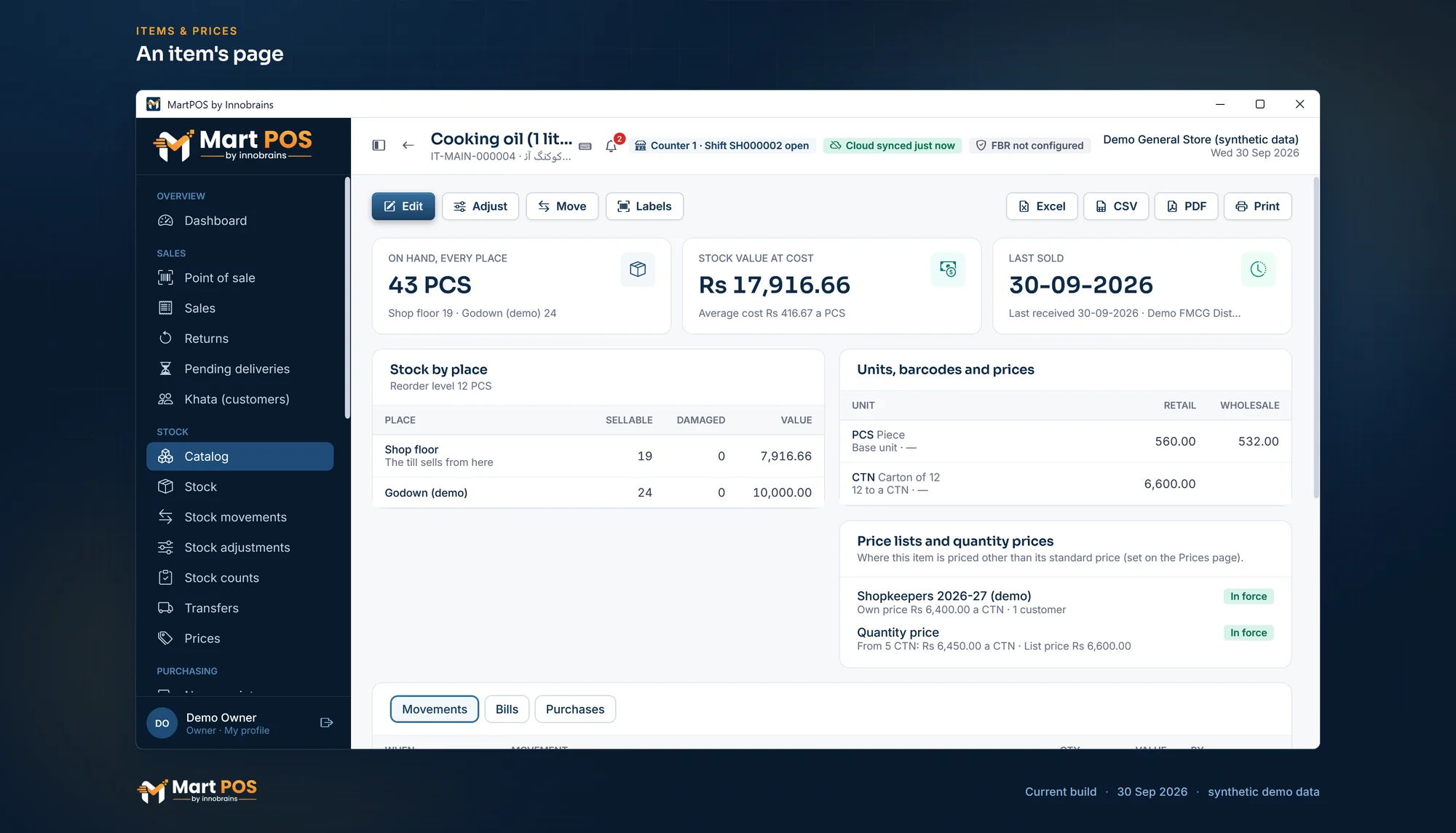
An item's page. An item's stock on the shop floor and in the godown, its units and prices, and the price lists and quantity prices that apply. Screenshot of the current build (30 Sep 2026), synthetic demo data.
How to add a pack to an item
- In Catalog, open the item with Edit (or create it with New item).
- Under Units, prices and barcodes, choose Add unit. The first extra unit starts as CTN, Carton of 24, factor 24 (on a loose item, BAG, Bag of 50 kg, factor 50): change them to suit.
- Fill in the row:
| Column | What it means |
|---|---|
| Code | A short code, for example DZN, CTN, BAG, TRAY. |
| Name | What the cashier and the receipt show, for example Dozen or Tray of 30. |
| Factor | How many base units it holds, for example 12, 24, 30 or 50. |
| Retail | The price of the whole pack for walk-in customers. |
| Wholesale | The price of the whole pack for wholesale customers (optional). |
| Barcodes | The pack's own barcodes, separated by commas (optional). |
| Sell / Buy | Tick Sold in this unit and Bought in this unit as they apply. |
- Choose Save item.
A unit that is bought but not sold (a carton you always break open, for example) needs only Bought in this unit. The till then will not offer it.
Prices for packs
- A pack's price is its own figure. A carton may cost less than 24 single packets; MartPOS does not force it to add up.
- If a pack has no price of its own, the till uses the base unit's price times the factor, and the line says From unit price.
- A loose item's retail price is the price of one kg (or one litre). The till multiplies it by the weight you type: 0.75 kg of daal at Rs 360 a kg is Rs 270.
- Prices are dated. A change applies from the day it is saved; bills already made keep their price.
- Price lists, quantity breaks and promotions can change the price further. See Price lists, quantity breaks and promotions.
Barcodes
- One item can carry several barcodes: the maker's barcode, an old label from your previous system, a distributor's code.
- EAN-13, UPC-A and EAN-8 barcodes are checked for their check digit when you save; a wrong one is refused as a typing mistake. Other codes are kept as they are.
- The item's own SKU (for example IT-MAIN-000123) is added as a barcode automatically, so its label scans even when the pack has no barcode.
- A pack's own barcode rings up the pack, not one piece: scanning the barcode printed on a carton puts a carton on the bill.
- If one barcode is found on two items, the till asks which one the customer is holding. It never guesses. Where the owner chose to refuse duplicate barcodes (Settings › Products › Barcode rules), a barcode already on another item, or on another pack of the same item, is refused when the item is saved or imported.
- Where the owner chose in-store EAN-13 barcodes (Barcode rules), a new item made without a barcode also gets one on its base unit, starting with the shop's number from 20 to 29, with its check digit worked out. Labels print it as an EAN-13.
- A barcode the till does not know is "not found", unless the owner lets the till add the item there (Settings › Products › Adding items at the till): see Adding items. A barcode that belongs on an item you already have is added to that item on its page (Edit); then scan again.
- A label for a pack can only carry the pack's own barcode, because the SKU would ring up a single piece. See Printing barcode labels.
At the till
The Unit column on each bill line lists the units the item is sold in. Scanning or searching adds the item in its base unit (or in the pack whose barcode was scanned); change the unit on the line if the customer takes a carton. The quantity and the price follow the unit. For a loose item, type the weight in the line's quantity, such as 2.5 for two and a half kilos. A return can be made in a different unit from the sale, for example one packet back from a carton.
A loose item can also be sold by amount: for "Rs 100 of sugar", press F6 on the line and type 100, and the store PC works out the weight to the gram at the line's price. The till's quick-weight buttons (100 g, 250 g, 500 g and 1 kg) put a typed weight on the selected loose line in one tap. See Billing at the till.
Rules worth knowing
- A pack's size cannot change once it has been used. If a carton of 24 has been bought or sold, changing it to 12 would rewrite history, so it is refused: "Carton of 24 has already been used in stock documents; add a new unit instead of changing its size." Add a new unit, such as CTN12, and stop selling the old one.
- Units cannot be removed. Untick Sold in this unit and Bought in this unit instead. Only a new unit that has not been saved yet can be removed.
- Items counted in pieces stay in whole pieces. A quantity that works out to part of a piece, such as 1.5 packets, is refused. Only items sold loose take decimals, up to three places (0.625 kg).
- Opening stock and imports are in base units. A shelf with 5 cartons of 24 is entered as 120; a sack with 37.5 kg of loose rice is entered as 37.5.
Common questions
A customer wants half a dozen eggs. What do I do?
Sell 6 in the base unit. If you often sell half dozens, add a unit with factor 6 and its own price.
Why does the carton price on the bill differ from 24 times the packet price?
Because the carton has its own price. That is usually intended: a carton is cheaper per packet. If you would rather it followed the packet price, leave the carton's retail price empty.
The distributor sends cases of 6 cartons. Do I need a case unit?
Only if you receive in cases. Add a case unit with the right factor in base units (for example 6 cartons of 24 = 144) and tick only Bought in this unit.
Can a loose item have a pack too?
Yes. Rice kept in kg can have a Bag of 50 kg unit for buying, and a 5 kg unit for selling with its own price and barcode if you pack it yourself. Stock is still one figure in kg.
Related guides
- Adding items
- Billing at the till
- Printing barcode labels
- Price lists, quantity breaks and promotions
- Grocery store POS: packed and loose goods in one stock
Last updated 05 October 2026. Still stuck? Contact us.