MartPOS never lets anyone type a new stock total. Every change of stock is a movement with a reason, a person and a time: a sale, a purchase, a return, a transfer, or an adjustment. This keeps the shelf, the stock report and the books in agreement, and it means every difference can be explained later: the packet of biscuits a child opened, the eggs broken on delivery, the bag of rice the rats got into. This guide covers the Stock page and the four kinds of adjustment.
The Stock page
Open Stock (under Stock in the menu). "Quantities and values come from the movement ledger, across every place of this branch."
- Type an item's name or SKU in the search box to find it.
- Narrow the list with the filters: Sold loose or Packed, a brand, a category, In stock, Out of stock or Low stock (at or below the item's reorder level), one place (shop floor, godown…), and active or discontinued items. Clear filters shows everything again.
- Each row shows the Item, Where it is when some of it is off the shop floor, its State (sellable or damaged), On hand in the base unit (pieces, or kg with decimals for loose goods), the Reorder at level, Avg cost and Value.
- At cost at the top is the value of the stock shown.
- Choose a row to open the item's own page: Stock by place (sellable and damaged stock and its value at each place) and, under Movements, every movement of the item with when, what, the document and place, the quantity, its value and who made it.
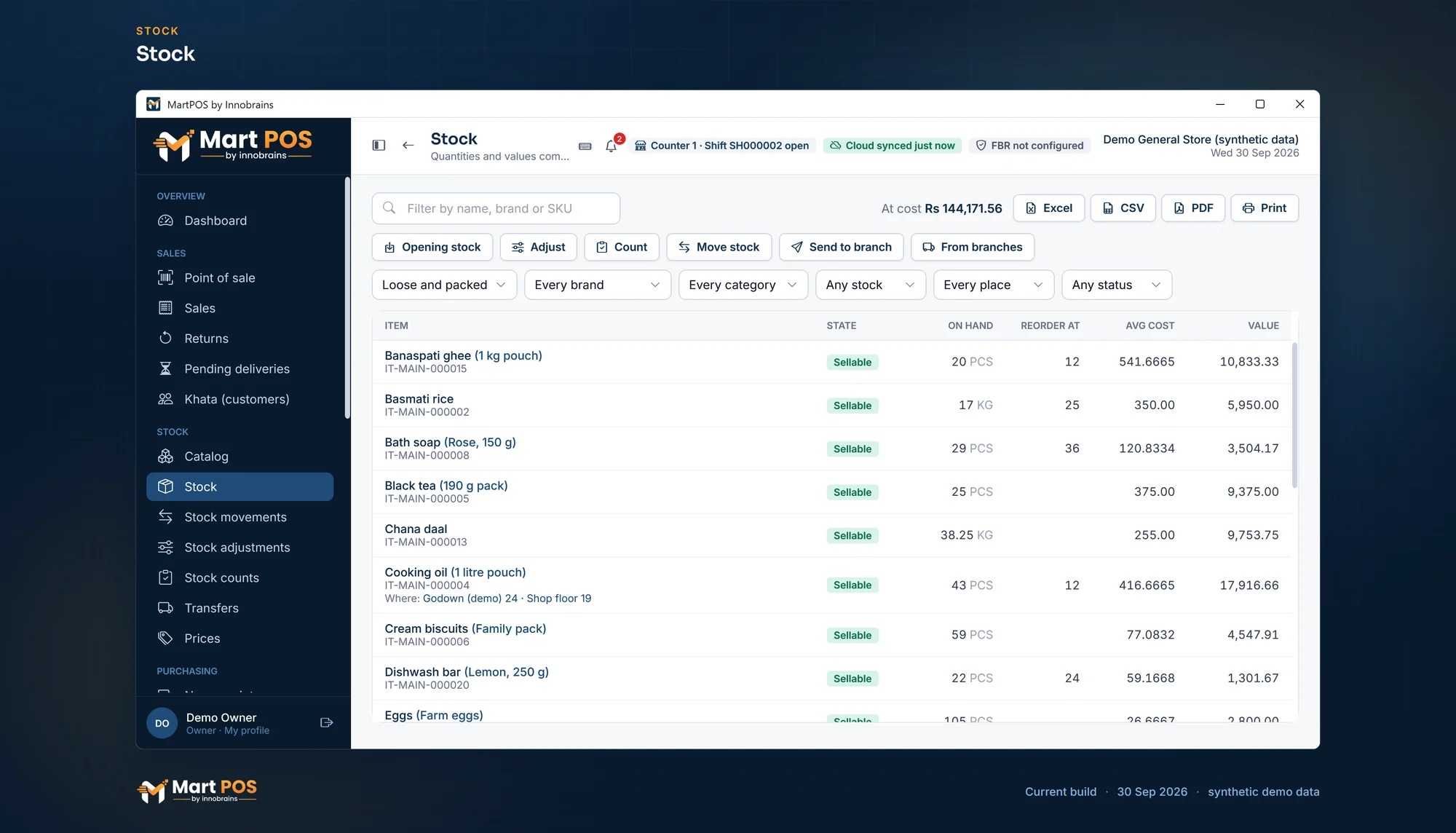
Stock. On hand, reorder level, average cost and value for every item: loose goods in kg, packed goods in pieces. Screenshot of the current build (30 Sep 2026), synthetic demo data.
Every movement: Stock movements
Stock movements (under Stock) lists every movement of every item, newest first: when it happened, the item, the kind of movement (sale, customer return, purchase, returned to supplier, adjustment, opening stock, stock count, marked damaged, moved out or in), the document it came from, the place, the quantity in or out, its value at cost, and who posted the document. It starts on this month; choose other dates with From and To, or Today, Last month, Year or All.
Narrow it by kind, by place (shop floor, godown…), by item (type its name, SKU or barcode and choose it; the cross clears it), and, for owners, by the person who made it. It shows 100 movements at a time. Excel, CSV, PDF and Print give up to 2,000 movements matching the filters. Movements made before this page existed show who posted their document, where the document names someone.
The four kinds of adjustment
Choose Adjust (or Opening stock) on the Stock page. In What happened, pick one:
| Kind | When to use it | Value |
|---|---|---|
| Opening stock | Stock already on the shelf when MartPOS started. | At the cost you enter. Credits opening-balance equity, not a purchase. |
| Found stock (increase) | A count found more than the books show. | At the average cost, unless you enter a cost. An item with no stock to average from needs a cost. |
| Lost or written off (decrease) | A count found less, or goods were stolen, eaten by pests or thrown away. | Taken out at the average cost. |
| Mark as damaged | Sellable goods are damaged: a torn packet, a dented tin, a leaking oil pouch. | Moved to damaged stock at the same cost. They can no longer be sold. |
For an item that tracks expiry dates, Opening stock and Found stock show an EXPIRY · BATCH column: the date (and batch) on the packs makes the stock's lot. Left blank, opening stock goes into a lot with no date, and found stock into the item's earliest lot. Stock taken out (lost, written off or marked damaged) leaves the earliest lots first. See Expiry dates and the near-expiry report.
How to post an adjustment
- On Stock, choose Adjust (or New adjustment on Stock adjustments) and pick What happened.
- Find each item by its name, SKU or barcode and add it. The line shows what is in stock.
- Set the Unit and Qty. A loose item takes decimals, such as 2.5 kg of rice; other items must come to whole pieces. For opening stock or found stock, you may type a Cost / unit; otherwise the average is used.
- For damaged goods being thrown away, choose Lost or written off and tick From damaged on the line, so they come out of damaged stock rather than sellable stock.
- Type the Reason, for example counted 2 short on 26 Sep, 6 eggs broken in the tray or rice bag torn by rats in the store room. It is required for every kind except opening stock.
- Choose Post adjustment. "MAIN-ADJ000005 posted · value Rs 1,350.00."
Not ready to post? Save draft keeps the adjustment on the store server with its kind, lines and reason, and moves no stock. It is listed on Stock adjustments › Drafts with who saved it and when; Open it to finish and post it, or Delete it. See Drafts and same-day voids.
Finding an adjustment later
Stock adjustments (under Stock) lists every adjustment with its date, number, reason, kind, number of lines, who posted it and its value, and the total value at the top. Filter by kind (Opening stock, Found (increase), Lost (decrease), Marked damaged), by Posted and voided or Voided, and by dates; it starts on the financial year. Choose one to see each item with its unit, quantity, base quantity, cost and value. Excel, CSV, PDF and Print export the list or the adjustment shown.
Voiding an adjustment the same day
On the day it was posted, an owner or manager can open an adjustment and choose Void this adjustment, with a reason. Everything it moved goes back as it was, at the same value: goods it took out come back, goods it marked damaged are sellable again, and goods it added (opening stock or found stock) go back out, which is only allowed while all of them are still there and none of that item has gone out since. Its entry in the books is reversed. The adjustment stays on the list marked Voided, with who voided it, when and why, and counts for nothing in the total.
What the books see
- Losses and write-offs go to the Stock adjustments expense account (5100), so they show in Profit and loss.
- Found stock is credited to the same account, reducing the loss.
- Marking goods damaged moves value between sellable and damaged stock; it is not a loss until they are written off.
- Opening stock goes to opening-balance equity, so the first day's profit is not inflated.
Rules worth knowing
- Adjustments work on the shop floor. To correct goods kept in the godown, move them to the shop floor first with Move stock. See The godown and the shop floor.
- Stock can never go below zero. A decrease larger than what is on hand is refused: "Not enough stock of … available, … needed."
- Many differences at once: use a count instead of typing adjustments one by one. See Stock counts while the shop stays open.
- Posted adjustments are never edited. The same day, an owner or manager can void one; after that, a wrong adjustment is corrected by another one, with its own reason.
- Expired goods are written off (or sent back to the supplier) like any other damaged goods, with the reason, such as expired. For items that track expiry dates, Reports › Near expiry shows which deliveries are close to their date or past it. See Expiry dates and the near-expiry report.
- Services and charges have no stock and cannot be adjusted.
- Who can adjust: owners, managers and warehouse staff. Everyone can see stock quantities, but the Stock adjustments screen shows values, so cashiers do not have it.
Common questions
I entered opening stock twice by mistake. How do I fix it?
If it was today and none of those items has been sold or moved since, an owner or manager can void the second one. Otherwise post a Lost or written off adjustment for the extra quantity, with a reason such as opening stock entered twice. The movements keep both entries and the correction.
Why is the value of found stock not what I paid?
Found stock is valued at the item's current average cost, because nobody knows what the found goods cost. Type a Cost / unit if you do know.
Where do damaged goods go?
To damaged stock of the same item and place. The till does not sell them. Send them back to the supplier (Supplier returns and credit notes) or write them off.
A loose item weighs less than the books say. Is that a loss?
Yes, if the difference is real: sugar, rice and daal lose a little in weighing out and spills. Post a Lost or written off adjustment for the difference in kg, with a reason such as weighing loss, sugar, September, or count the item on a count sheet.
Can a cashier adjust stock?
No. Cashiers can see stock but not change it.
Related guides
Last updated 04 October 2026. Still stuck? Contact us.