A paired store PC holds a licence grant signed by MartPOS Cloud. The PC checks the signature itself, so it knows what it may do without asking the internet, and it renews the grant whenever it reaches the cloud. This guide explains the licence states, what each one means at the counter, and where to see them.
Where to see the licence
- On the store PC, for the owner: Account › Plan & licence. It shows the state, the plan and edition, the kind of licence (the trial, a paid period, or a lifetime desktop licence that "never expires"), the trial days left or the paid-until date, the cloud add-on on its own line when the PC has one, the limits and what this PC uses of them, "Valid to …; keeps working offline until …", and when it was last renewed. Check now asks the cloud for a new grant at once. See Plan & licence and downloads in the app.
- On Sync & FBR, for everyone who opens it: the licence in one line; managers can choose Check now there.
- In the bar at the top, only when it needs attention: Licence: reconnect soon, Licence ran out or Licence suspended.
- In the owner portal: Licence shows the account's status, the kind of licence, the desktop licence's validity, the cloud add-on apart from it, the grant's length, its features and each store PC's grant with its Expires and Works offline until dates ("Never" for a lifetime licence).
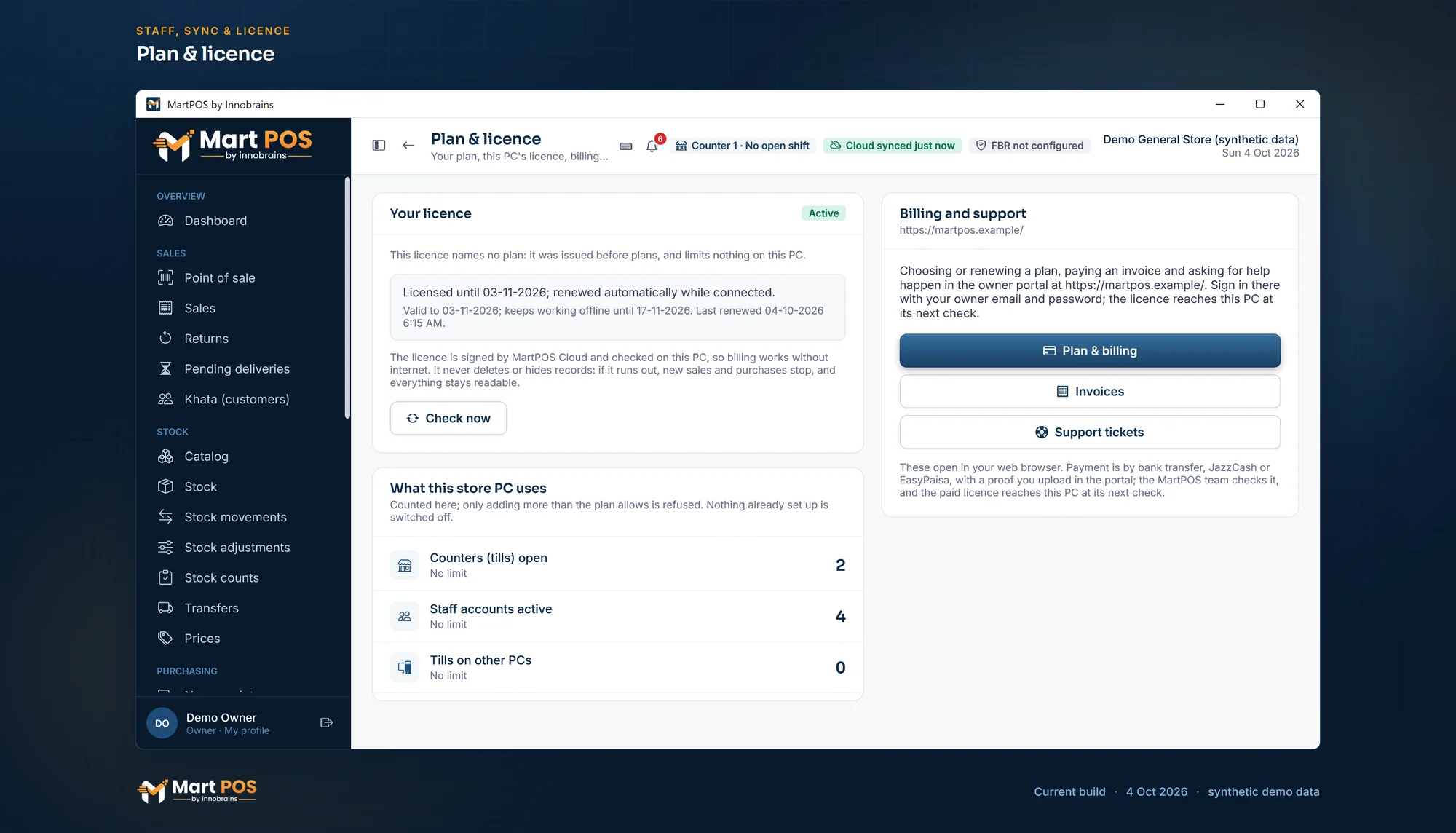
Plan & licence. The licence this store PC holds, checked on the PC itself, and what the store uses; plans are chosen and paid for in the owner portal. Screenshot of the current build (4 Oct 2026), synthetic demo data.
The states
| State | What it means | At the counter |
|---|---|---|
| Not activated | The store is not paired with MartPOS Cloud, or has not received a grant yet. | Everything works. "Nothing is restricted." |
| Active | A valid grant: "Licensed until …; renewed automatically while connected." A lifetime desktop licence stays Active for good unless it is suspended. | Everything works. |
| Grace period | The grant expired, but the grace days have not: "Connect to MartPOS Cloud before … to keep selling." | Everything works. The bar shows Licence: reconnect soon. |
| Ran out | The grant and its grace days are over. | New sales and purchases stop until the store reconnects. |
| Suspended | MartPOS suspended the account's licence. | New sales and purchases stop. |
By default a grant lasts 30 days and is followed by 14 days' grace, so a store PC can work for weeks without internet. The store PC renews the grant as it syncs, at most once an hour.
Kinds of licence, plans and the paid period
The grant also carries your plan, your edition (Cloud or Offline), the kind of licence, the date you have paid until, the plan's limits (branches, counters and staff accounts) and, for a desktop licence, its cloud add-on. A payment approved in the portal reaches the store PC at its next check-in. Three kinds of licence are told apart, each with its own rules: the trial, a subscription (a paid Cloud period, or an Offline licence for a fixed term) and a lifetime desktop licence. Which of them are on sale, and at what price, is shown on the pricing page once plans are announced.
- Cloud edition: the grant lasts 30 days or until the paid-until date, whichever comes first. After the paid period there are the account's grace days (7 by default), then the licence runs out.
- Offline edition: the grant lasts until the paid-until date, so one check-in keeps the PC working offline for the whole period you paid for (1 or 5 years). An Offline store checks its licence when it is online but sends no business data to MartPOS Cloud, unless it has the cloud add-on.
- Lifetime desktop licence (Offline edition): bought once, it never expires. The store PC keeps selling for good, even if it is never online again; only a suspension by the MartPOS team, which reaches the PC at its next check-in, stops it.
- Cloud add-on (for an Offline licence, lifetime or fixed term): sync and the owner portal for its own month or year, with its own end date. While it runs the store PC syncs like the Cloud edition. When it ends, after the same grace days, the PC stops syncing but keeps selling under its desktop licence, and shows "The cloud add-on ended on …: syncing stopped; this PC keeps selling under its desktop licence". What it records meanwhile stays on the PC and is sent once the add-on is renewed.
- Trial: a new account runs on the trial plan until the trial ends (after approval, when the MartPOS team has approval switched on), then needs a paid plan under Plan & billing in the owner portal.
- Limits: the store PC refuses one counter or staff account more than the plan allows, and tills on other PCs when the plan does not include them. Other plan features are listed in the grant but not switched off on the store PC.
What stops, and what keeps working
When the licence has run out or is suspended:
- New sales and new purchases are refused, with the reason: "New sales are stopped: …".
- Everything stays readable: bills, stock, khata, reports.
- Money owed can still be received: khata payments work.
- Nothing is deleted or hidden, on the PC or in the cloud.
The owner of MartPOS confirmed this on 27 September 2026: only new sales and new purchases stop. Returns, same-day voids, supplier payments and printing go on as well.
How to get back to Active
- Connect the store PC to the internet.
- On Account › Plan & licence (or, for a manager, on Sync & FBR), choose Check now.
If the licence was suspended, the reason shows in the portal's dashboard and Licence page; contact the MartPOS team through Support.
Rules worth knowing
- Turning the PC's clock back does not extend a grant. MartPOS remembers the latest time it has seen.
- A changed grant reaches a PC only when it connects. A PC that stays offline keeps its current grant until it expires and its grace ends.
- A revoked PC (portal › Devices › Revoke) cannot fetch a new grant and keeps billing only until its current grant and grace run out.
- A grant that no longer verifies (for example a tampered or copied database) is treated as run out until the store reconnects for a new one.
Common questions
Our internet is down for a week. Will billing stop?
No. The grant lasts 30 days and then gives 14 days' grace by default. Reconnect before the grace ends.
Does an unpaired store need a licence?
No. A store never paired with the cloud is Not activated, and nothing is restricted.
Where do I see my plan?
On the store PC, Account › Plan & licence shows the plan, edition, trial days left and the paid-until date, and opens Plan & billing, your invoices and support tickets in the browser. In the owner portal, Plan & billing shows the plan, the current period, usage against the limits and your invoices; Licence shows each store PC's grant.
How do I pay?
In the owner portal choose Plan & billing, pick a plan, edition and period, and pay the invoice by bank transfer, JazzCash or EasyPaisa to the accounts shown there; then upload the payment proof. When the MartPOS team approves it, the paid period starts (or extends the current one) and reaches the store PC at its next check-in. An extra branch, counter or staff account is bought the same way as an add-on (see Add-ons); a move between the Cloud and Offline editions is made with the MartPOS team (see Changing your plan or edition).
What happens when our cloud add-on ends?
Only syncing stops. The store PC keeps selling under its desktop licence, and a lifetime licence stays valid for good: ending the cloud never takes the desktop licence away. Sales and changes made meanwhile wait on the PC, and are sent to MartPOS Cloud as soon as the renewed add-on reaches it (it checks every few minutes while syncing is stopped).
Will MartPOS delete our records if we stop paying?
No. A licence never deletes data. Records stay readable, and money owed can still be received.
Related guides
Last updated 04 October 2026. Still stuck? Contact us.