When the bill is ready, F9 opens Take payment. One bill can be paid in one way or split across several: part cash, part JazzCash, the rest on the customer's khata. This guide explains each way to pay, how change works, and what MartPOS checks before it saves the sale.
The Take payment window
At the top is the Amount due. Below it are the tenders, each with an amount box:
| Tender | Notes |
|---|---|
| Cash | Goes through this counter's drawer. The only tender that gives change. |
| Card | Recorded as paid by card. |
| Bank transfer | Recorded as a bank transfer or deposit. |
| EasyPaisa | Recorded as paid by EasyPaisa. |
| JazzCash | Recorded as paid by JazzCash. |
| On account (khata) | Added to the customer's khata balance. Only for a chosen customer with a credit limit. |
| From advance | Taken from money the customer paid earlier. Only for a chosen customer who has an advance. |
Paid and Still due update as you type. Complete sale saves the bill once Still due is zero. Back to bill returns to the bill without saving anything.
Card, bank transfer and wallet payments are recorded, not verified: MartPOS does not connect to a bank, EasyPaisa or JazzCash. Check the customer's payment on your own phone or terminal before you complete the sale.
Paying in cash
The Cash box starts filled with the whole total, so a plain cash bill is just F9 and Enter.
- Type what the customer hands you in Cash handed over, or use the quick buttons Exact, 500, 1,000 or 5,000.
- Change shows what to give back. On a Rs 1,250 bill paid with Rs 1,500, change is Rs 250.
- Choose Complete sale.
Only the bill's cash part is booked to the drawer; the rest of the note is change. If the cash handed over is less than the cash part, the sale waits: "The cash handed over is less than the cash part."
Splitting a bill
- Clear or lower the Cash amount.
- Type the other amounts on their tenders, or click a tender's name to put whatever is still due on it.
- When Still due reaches zero, choose Complete sale.
For example, a Rs 3,000 bill for the month's atta, ghee and tea: Rs 1,000 in cash and Rs 2,000 by JazzCash. Type 1,000 in Cash, then click JazzCash. The receipt lists both.
On account (khata)
A regular customer can take goods now and pay later: a family that settles at the start of the month, a nearby hotel or canteen that pays every Friday.
- Press F4 and choose the customer before F9. The payment window says what they owe and their limit: "Hamid owes Rs 2,400.00 of a Rs 10,000.00 limit."
- Put the unpaid part on On account (khata), and any part paid now on its tender.
- Choose Complete sale.
MartPOS checks the limit when saving. A bill that would take the customer over it is refused unless the owner has chosen a warning the cashier confirms or a manager's approval instead: "Hamid owes Rs 8,000.00. Their limit is Rs 10,000.00. This bill puts Rs 3,000.00 on khata: Rs 1,000.00 over the limit." A customer with no credit limit is cash only, and On account is greyed out for them. A walk-in bill cannot go on account at all. Set limits in Khata: customers, credit limits and recoveries.
From advance
If the customer paid in advance (a restaurant paying ahead for a month of cooking oil and rice, or a family paying before the Ramazan rush, for example), choose them with F4 and use From advance. Clicking it fills in the advance or what is still due, whichever is smaller; MartPOS never takes more than the customer holds ("Only Rs … of advance is available."). The rest can be paid in any other way. See Customer advances.
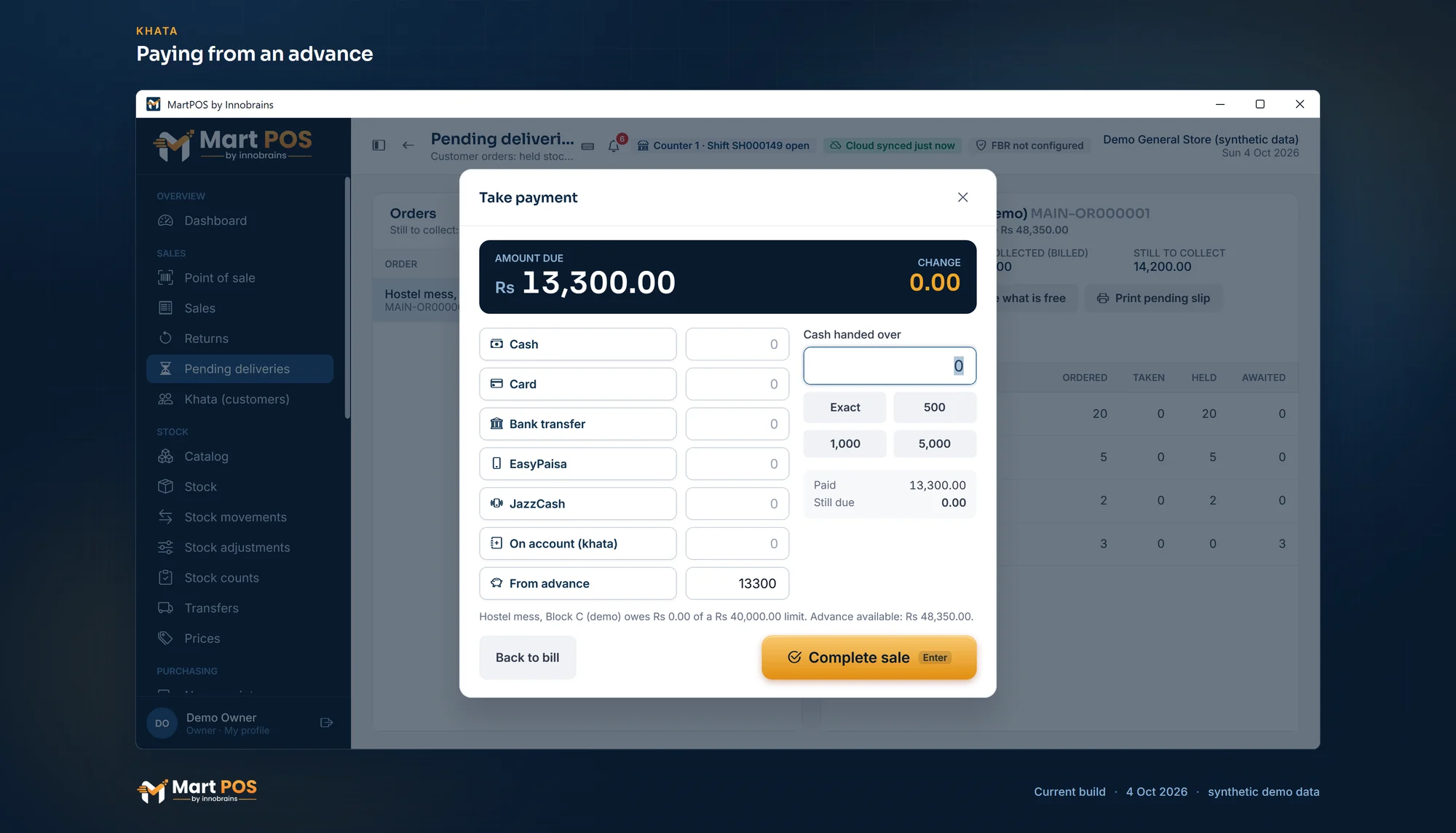
Paying from an advance. From advance pays a bill from what the customer paid ahead, here the hand-over of an order; no cash moves, because the drawer counted the advance on the day it was paid. Screenshot of the current build (4 Oct 2026), synthetic demo data.
The buyer's name and mobile on a walk-in bill
When the shop asks for them (Settings › Sales › Walk-in customers), a bill without a chosen customer shows Buyer boxes above the tenders: the buyer's name and their mobile number. Type the mobile any usual way (0300 1234567, 03001234567 or +92 300 1234567); MartPOS keeps it as 0300-1234567 and refuses anything that is not a Pakistani mobile number.
- Optional: leave them empty if the customer does not want to give them.
- Required from an amount: on a bill of that amount or more, Complete sale waits until you type the name or the mobile (either is enough): "Enter the buyer's name or mobile: walk-in bills of Rs 50,000 or more need one." The store PC checks it too, so a till that does not ask cannot save such a bill without them.
The name prints on the receipt as the customer, and the mobile with its middle digits hidden (0300-***4567). With FBR POS integration on, both go to FBR as the buyer. No khata account is made. The full number is shown only on the bill's page to owners, managers and accountants; lists and receipts always hide it.
What reaches the drawer
Only cash enters the drawer. Card, bank transfer, EasyPaisa, JazzCash, on-account and from-advance amounts never do, so the shift close counts only notes and coins. The daily report shows the day's bills by how they were paid.
Rules worth knowing
- Nothing is charged twice. If the store PC does not answer while saving, the till locks the bill and Retry sends exactly the same bill again. See Held bills, unsaved bills and reprints.
- The price is fixed on the bill, not in this window. Discounts are given on the bill's lines before F9.
- A bill cannot be left part-paid without a customer: every rupee must be on a tender.
- Refunds follow the same tenders. A return can refund in cash, to a wallet or bank, or, for a named customer, back to their khata or advance.
Common questions
Can I record the JazzCash transaction ID?
Yes. When an amount is on card, bank transfer, EasyPaisa or JazzCash, the payment window shows a reference box for that way of paying (and, when the shop has more than one account of that kind, which account the money went to). The owner can make the reference required under Settings › Payments; then the bill cannot be completed without it. When you receive a customer's khata payment later under Receive payment, there is a Reference (cheque, transaction ID) box too.
Why is On account (khata) greyed out?
Either no customer is chosen (press F4) or the customer has no credit limit, which means cash only. Give them a limit under Khata (customers) › Edit customer.
A customer overpaid by card. Can I give the difference in cash?
No. Only cash gives change, and card and wallet amounts cannot be more than what is due. Put the exact amount on the card.
Does MartPOS take payments from EasyPaisa or JazzCash itself?
No. It records that the customer paid that way. The money moves in your own EasyPaisa, JazzCash or bank account, outside MartPOS.
Related guides
- Billing at the till
- Khata: customers, credit limits and recoveries
- Customer advances
- Shifts and closing the day
- General store POS: the counter, from the barcode to the receipt
Last updated 05 October 2026. Still stuck? Contact us.