Barcode billing for packed goods
Scan the maker's barcode and the item goes on the bill; scan the carton's own barcode and a carton does. EAN-13, UPC-A and EAN-8 check digits are verified when an item is saved.
A grocery sells atta from the sack, milk that goes off in days and biscuits by the carton. Here is what MartPOS does at a grocery counter.
A grocery store bills two kinds of goods at one counter: packed goods with the maker's barcode, and loose goods weighed out from the sack. MartPOS is grocery store POS software that keeps both in one stock: scan a packet or a carton and the right unit goes on the bill; sell atta, rice, daal or sugar by the kilo, or by the rupee ("Rs 100 of sugar"), from stock kept in kilograms with parts. Packed milk, bread and yoghurt can carry the date and batch printed on each delivery, kept as stock lots that sell earliest date first, and a near-expiry report shows what to move first.
Regular customers buy on udhaar khata within a limit, a home delivery charge goes on the bill like any item, and the shop's own PC keeps billing when the internet is down.
 Open the full-size screenshot
 Scan the maker's barcode and the item goes on the bill; scan the carton's own barcode and a carton does. EAN-13, UPC-A and EAN-8 check digits are verified when an item is saved.
Loose goods keep their stock in kg with parts (0.625 kg). The cashier types the weight, or presses F6 and types the rupees: the store PC works out the weight to the gram.
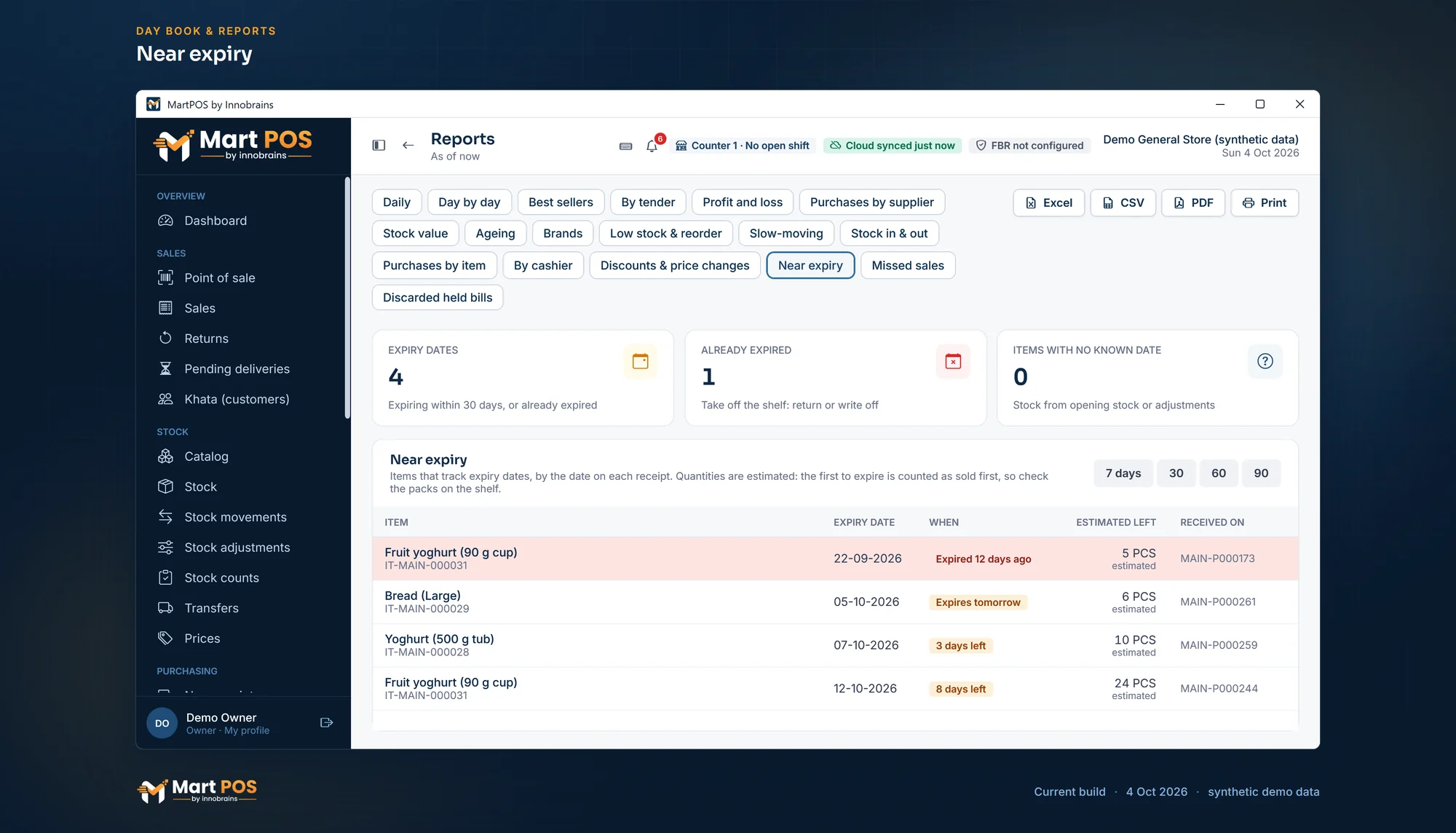
Tick "Track expiry dates" on packed milk, bread or yoghurt, and every purchase of it asks for the date on the goods, with the batch number if you want it. The stock is kept in lots by date and batch, sold earliest date first; Reports › Near expiry lists the lots close to their date or past it, and you choose what the till does with stock past its date: sell it, warn, ask for a manager's PIN, or refuse.
Where the owner allows it, a barcode that matches nothing can be added at the till (name, Urdu name, price, by the piece or loose by the kg) and goes straight on the bill. The item is marked for the back office to review.
A reorder level per item. Reports › Low stock & reorder lists what is low, with the last 30 days' sales, a suggested order and whom you last bought it from.
Eggs at Rs 30 each but Rs 28 each from 12; a dated offer on a brand or a category. The till charges the lowest price that applies, and nothing stacks.
Credit limits, statements and recoveries for regular customers. Money paid ahead is held as an advance, not counted as a sale.
Billed as a service or charge: on the bill like any item, refunded on a return, with no stock and no cost.
"Asked for" (Ctrl+M) notes an item a customer wanted and did not get. Reports › Missed sales shows what is asked for most.
A 50 kg bag bought and 2.5 kg sold loose come out of one figure in kg. You never "open" a bag in the software.
Count a shelf or a category while the till sells. Each line keeps what the records said when it was counted, so only real differences are posted.
Stock moves only through recorded documents, and a sale that would take it below zero is refused.
Tell us what you sell, how many counters and branches you have, and how you keep records today.
We install MartPOS on your main PC with you. There is no public installer yet.
Items, opening stock, customers and suppliers from CSV, every row checked before saving.
Give your staff their own sign-ins and roles, and open the till.
One that bills packed goods by barcode and loose goods by weight from one stock figure, keeps udhaar khata, warns about dates, and keeps billing when the internet is down. MartPOS does each of these.
MartPOS does, for the items you choose. Tick "Track expiry dates" on an item and every purchase of it needs the date printed on the goods. Its stock is kept in lots by date and batch, and sales take the earliest date first. Reports › Near expiry lists the lots due within 7, 30, 60 or 90 days, or already past, with what is in stock of each, and the dashboard warns about stock past its date or due soon. In Settings › Products you choose what the till does when an item with stock past its date is sold: allow it, warn the cashier, ask for a manager's PIN, or refuse it.
Yes. Mark the item as sold loose and keep its stock in kg; add a Bag of 50 kg unit with its own price and barcode. Selling a bag and selling 2.5 kg loose both come out of the same stock figure.
The till takes a barcode typed or scanned into its search box, so a scanner that types like a keyboard is the kind it is built for. Each item can have several barcodes, and each finds the right unit.
Yes, for the items that track expiry dates. A delivery line can carry the maker's batch number with its date, or be split into several lots with their own dates. Each date and batch is kept as a stock lot at its place, sales take the earliest date first, and the near-expiry report lists each lot with its batch.
Contact us: we set MartPOS up on your shop PC with you, bring in your item list and show your staff the till. There is no public installer yet.
Tell us about your shop and we will show you the till and the owner portal, and set MartPOS up on your shop PC with you.