A restaurant orders its monthly groceries: 50 kg of rice, 20 kg of sugar and two tins of cooking oil, to be picked up over the week. A family wants a wedding order of rice, ghee and spices, but the distributor has not delivered the basmati yet. An office wants biscuits and tea for a function next Friday. In each case the goods are promised but not yet handed over. In MartPOS that is an order: items on the shelf are held for the customer, the rest is awaited, and nothing is billed until the customer collects. Pending deliveries lists every open order.
How to take an order at the till
- Put the items on the bill as usual, with the quantities and any line discount agreed. Loose items take decimals, for example 12.5 kg of sugar.
- Press F4 and choose the customer. An order always needs a named customer; if none is chosen, F7 asks for one first.
- Press F7 (Order: hold the items for the chosen customer and bill them when collected).
MartPOS shows, for example, "MAIN-OR000012 for Al-Noor Restaurant (demo): 70 held until 13-10-2026, 2 awaited. Hand over from Pending deliveries." Here the rice and sugar are on the shelf (70 kg held) and the two tins of oil are awaited; the figures add up the base units of every line (kg, litres or pieces). The bill clears; no money was taken and no stock left the shelf.
- Held items are in stock now, set aside for this customer until the hold date, 14 days from today.
- Awaited items are not in stock. They are held when stock arrives (below).
- Prices are fixed when the order is made: the price the till would charge this customer today (their retail or wholesale price, or their price list), less any line discount. The till's Retail | Wholesale switch is for bills: an order takes the customer's usual prices (wholesale for a customer marked for them, or in a wholesale shop), and its delivery keeps them at any counter. When the customer collects, they pay the agreed price even if the shelf price has changed since. A price typed over by hand at the till is not carried into the order; give a line discount instead.
To take money now, record it as an advance first: see Customer advances.
What holding means
A held item cannot be sold to anyone else. If a cashier tries, the bill is refused: "Only 2 of … are free; 3 are held for customer orders."
Only sellable stock on the shop floor is held. Goods in the godown are not: move them to the shop floor first, then hold again. See The godown and the shop floor.
When the hold date passes, the items simply stop being held; no job has to run. The order stays open and says so: "The hold date has passed: nothing is held now. Reserve again to hold what is free."
Pending deliveries
Open Pending deliveries (under Sales). The list shows each open order with the customer, its number and what is still To collect, and the total still to collect at the top. Show closed adds finished and cancelled orders.
Choose an order to see it: the customer, Held until, any Advance they hold, the value Ordered, Collected (billed) and Still to collect, and each line with what was Ordered, Taken, Held and Awaited.
When the store PC is paired with MartPOS Cloud, the owner portal's Orders page lists each branch's customer orders with what is still to deliver and its value, read-only, as the store PC last sent them. Orders are taken, handed over and cancelled only on the store PC.
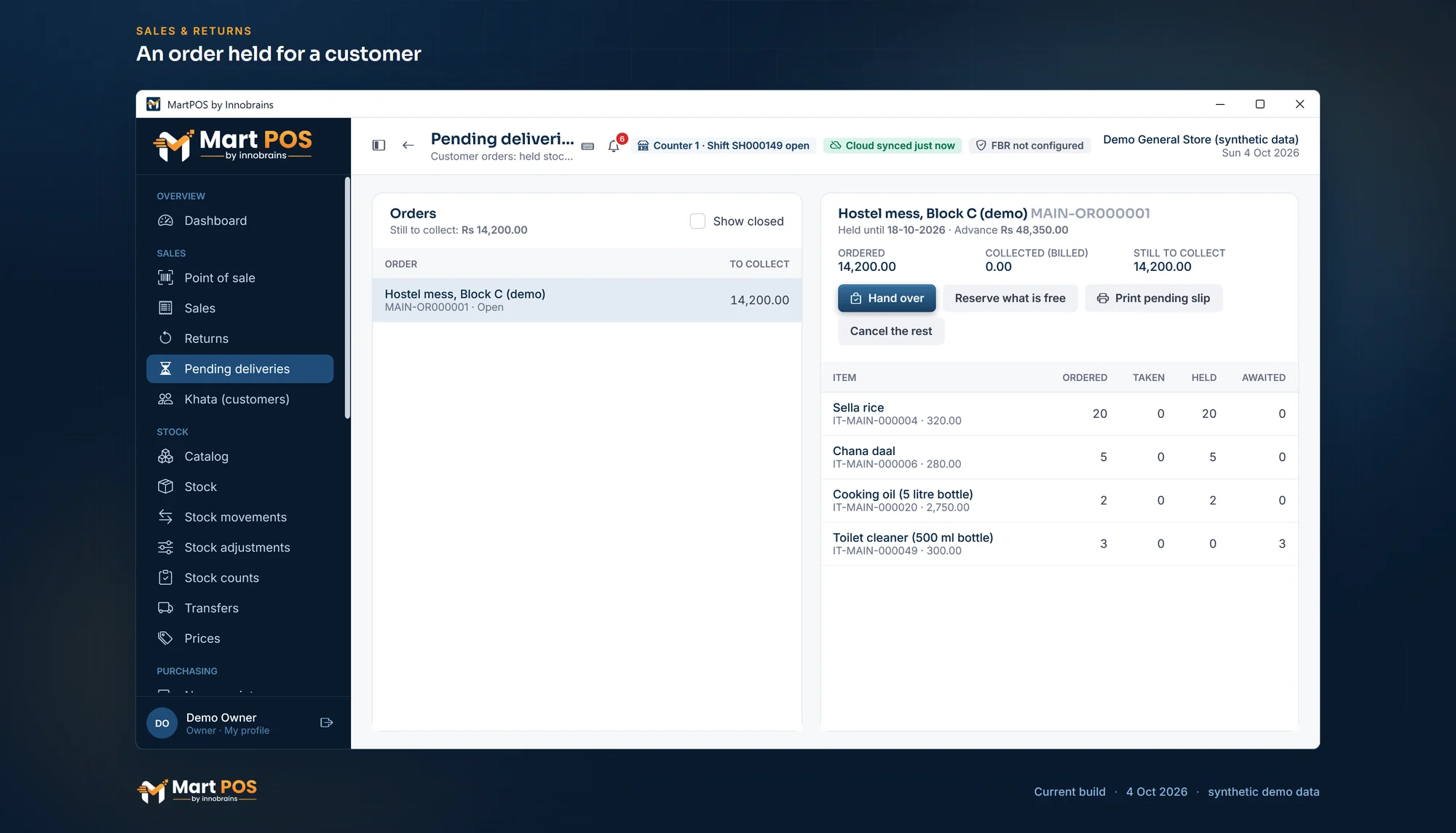
An order held for a customer. Pending deliveries: each open order with what is held from the shop floor, what is still awaited, the customer's advance and what is left to collect. Screenshot of the current build (4 Oct 2026), synthetic demo data.
How to hand over an order
- In Pending deliveries, choose the order and Hand over.
- Held quantities are filled in. Change a quantity to what the customer takes now; the rest stays on the order at the agreed price.
- To pay now shows the amount, with each item's tax. Choose Continue to payment.
- Take the money as at the till. From advance is there if the customer paid ahead.
- Complete the sale.
The hand-over is an ordinary bill with its own number: "MAIN-C1-S000051: Al-Noor Restaurant (demo) collected Rs 18,450.00 of order MAIN-OR000012." It needs an open shift on the counter. Collect in as many parts as needed; the order closes when everything is collected.
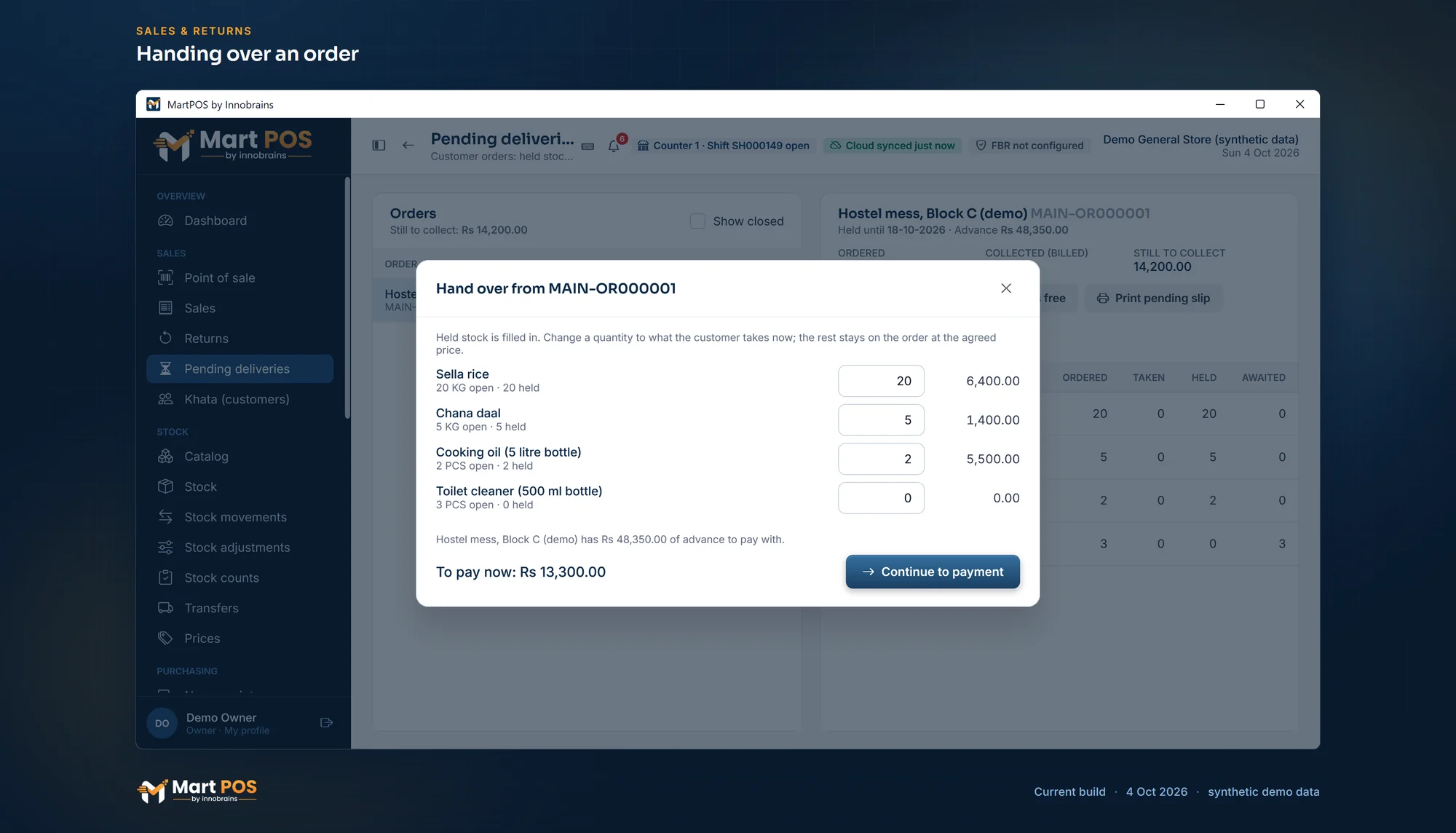
Handing over an order. The held quantities are filled in; the customer takes what they need now, and the rest stays on the order at the agreed price. Screenshot of the current build (4 Oct 2026), synthetic demo data.
When stock arrives: Reserve what is free
After a delivery from the distributor, open the order and choose Reserve what is free. MartPOS holds whatever is now free on the shop floor for this customer: "MAIN-OR000012: 72 held until 13-10-2026; 0 still awaited." Do this for each order that was waiting for that item.
While the hold is still running, the hold date stays as it was. Once it has passed, Reserve what is free starts a new 14 days from that day.
The pending slip
Print pending slip prints a short list of what the customer is still to collect, to hand to them. It says plainly that it is not a bill: "This is not a bill. Bring it when you collect; prices are as agreed on the order."
Cancelling what is left
If the customer bought elsewhere or no longer needs the rest, choose Cancel the rest, type a Reason (for example Function called off) and confirm. MartPOS confirms that what was left is cancelled and its held items are free for other customers. What was already collected stays billed, and any advance is not touched. Choose Keep the order to change your mind.
Cancelling needs the order-cancel permission, which owners and managers have.
Common questions
Does an order reduce stock?
No. Stock leaves the shelf only when the order is handed over, as a normal bill. Until then held items are still in stock, just not for sale to others.
Can I change the hold date?
Orders taken at the till are held for 14 days. When that has passed, Reserve what is free holds again for another 14 days from that day.
Where do I see which items I still need to buy for orders?
On Pending deliveries, the Awaited column of each order. Order those items from the supplier with a purchase order: see Purchase orders and deliveries in parts.
Can the customer pay for the whole order now?
Take the money as an advance first, then make the order. Each hand-over is paid from the advance.
Related guides
Last updated 05 October 2026. Still stuck? Contact us.