Many kiryana and general stores keep sacks of sugar and atta, cartons of cooking oil and extra crates of soft drinks in a godown or a back store, and bring them to the counter as the shelves empty. Before Ramazan or Eid the godown fills up well ahead of the rush. MartPOS keeps each place's stock apart: the Stock page says where every item is, and the till sells only what is on the shop floor. This guide covers adding places and moving stock between them.
Cannot find Move stock? A shop set up as a Kiryana or a General store keeps the godown and other places out of the menus. Choose Mini mart, or tick Show every feature, under Settings › Business type. See Choosing your business type.
Places in a branch
Every branch starts with one place: the Shop floor. Deliveries arrive there, the till sells from there, and adjustments work there. Count sheets can be made for any place.
You can add others: a Godown, a Back store, an upstairs room. Stock in them belongs to the same branch and is in the same totals, but it is not for sale at the counter until it is moved to the shop floor.
How to add a godown
- Open Stock and choose Move stock ("Move stock between the shop floor and the godown").
- If the branch has only the shop floor, the window says so: "Add the other place where you keep stock, such as a godown or back store."
- Type the name, for example Godown, and choose Add place.
More places can be added the same way (Another place, e.g. Back store). Two places cannot share a name.
How to move stock
- On Stock (or on Transfers), choose Move stock. On an item's own page, Move opens the same window with that item already added.
- Choose From and To. Swap the two places turns the direction round.
- Find each item by its name, SKU or barcode and add it. The search results show how much of each item is on the shop floor.
- Set the Unit and Qty: move 5 cartons, or 2 bags of 50 kg, or the exact weight of a loose item, such as 37.5 kg of rice. Packed goods move in whole pieces.
- Add a Note if useful, for example Ramazan stock to the counter.
- Choose Move stock. "MAIN-TR000003: 4 item(s) moved from Godown to Shop floor."
Recent moves lists the last moves, with the number, from and to, how many items and their value.
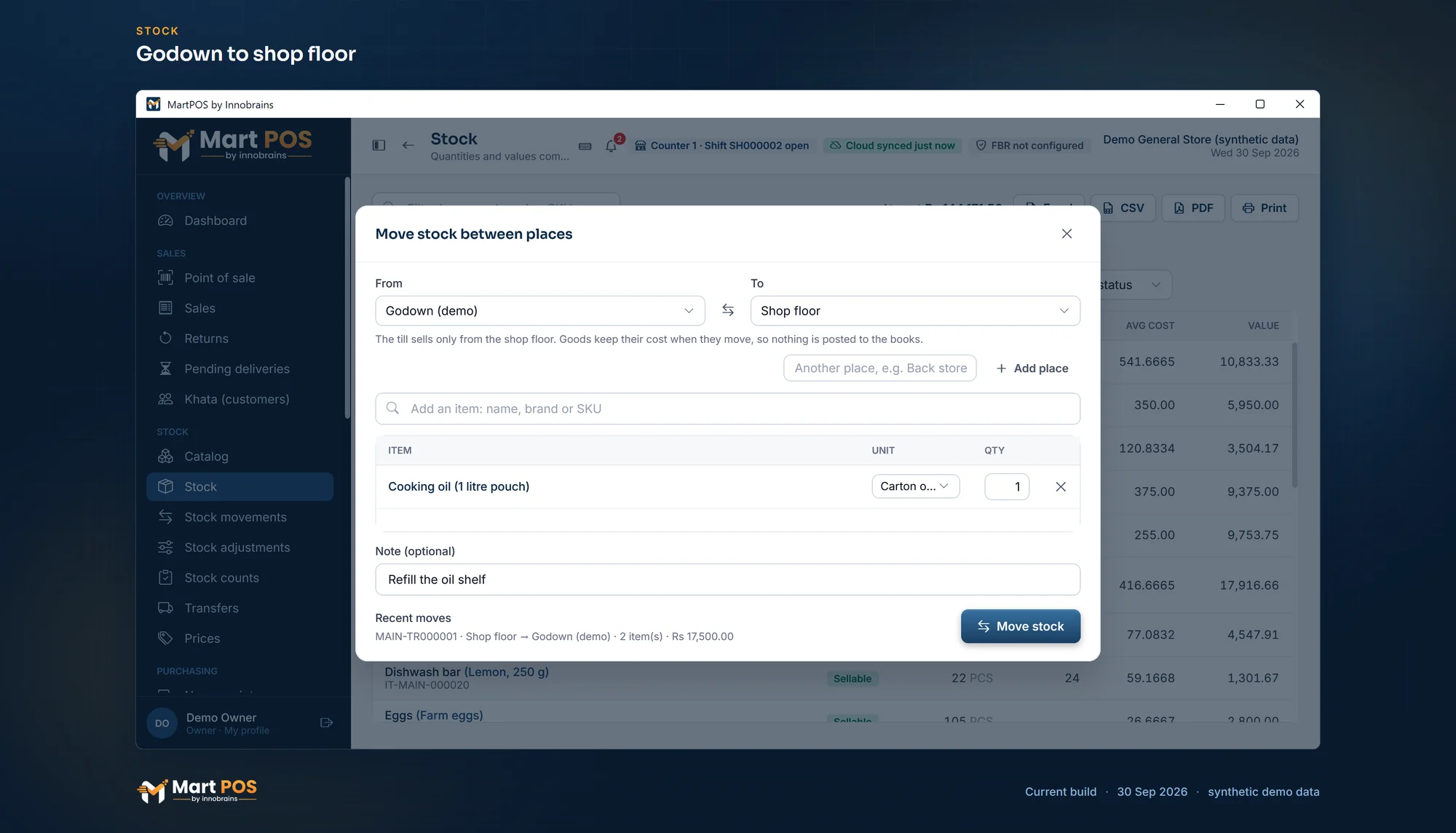
Godown to shop floor. Stock moved from the godown to the shop floor keeps its cost; the till sells only what is on the floor. Screenshot of the current build (30 Sep 2026), synthetic demo data.
What a move does
- Goods keep their cost. A move changes where stock is, not what it is worth, so nothing is posted to the books and the stock value does not change.
- Dated goods keep their dates. For an item that tracks expiry dates, a move takes the earliest lots first and they arrive with their dates and batches.
- Stock can never go negative in any place: you cannot move more than is there.
- Each move is its own document with a number and a note, in both places' movements.
- A move sent twice by accident (for example after a network hiccup) is recorded once.
Where you see places
- Stock shows a row per item, with Where it is when some of it is off the shop floor. Choose a place in the Every place list to see only that place's stock.
- An item's own page (choose its row on Catalog or Stock) has Stock by place: sellable and damaged stock and its value at each place.
- Transfers (in the menu under Stock) lists every move between places, with who made it; a move opens on its own page with its lines and values.
- Reports › Stock value covers every place, and the total equals the inventory account.
- The till offers only shop-floor stock. A bill for more than the shop floor holds is refused, even if the godown has plenty: move it first.
- MartPOS Cloud (when the store PC is paired): the owner portal's Stock page has a Place list and a Stock by place table, read-only. The store PC tells the cloud which place each movement used since its update of 30 September 2026; stock moved before that shows there under Place not reported, so the store PC's own screens are the ones to trust for what is at each place.
Rules worth knowing
- Deliveries and adjustments work on the shop floor. To correct godown stock, move it to the shop floor first. A count sheet can be made for the godown itself: see Stock counts.
- Only sellable stock moves. Damaged goods stay on the shop floor until they are written off or sent back to the supplier.
- Transfers from another branch arrive on the shop floor. Move them to the godown afterwards.
- Who can move stock: owners, managers and warehouse staff.
Common questions
Why does the till say "Only 2 in stock" when the godown has 50?
The till sells only from the shop floor. Move stock from the godown with Move stock, then bill.
Can I sell straight from the godown?
No. Bring the goods to the shop floor with a move first. It takes a few seconds and keeps both places' figures right.
A customer wants a whole sack from the godown. What is quickest?
Move one bag (or its weight in kg) to the shop floor with Move stock, then bill it at the till as usual. The bill takes the stock from the shop floor, and the godown shows one bag less.
Does moving stock change profit?
No. Moves carry the goods' cost with them; nothing is bought, sold or lost.
Can I rename or remove a place?
Not from the screen. Choose names carefully when you add a place.
Related guides
Last updated 05 October 2026. Still stuck? Contact us.