Khata, or udhaar, is credit for customers you know: a family that settles at the start of the month, a hotel or canteen that pays every Friday, a smaller shop that buys wholesale. In MartPOS every customer has an account with a credit limit, a running balance and a statement of every bill and payment. This guide covers adding customers, selling on khata, receiving payments, and reading the statement.
How to add a customer
- Open Khata (customers) (under Sales in the menu).
- Choose New.
- Fill in:
| Field | What it is for |
|---|---|
| Name | As you know them, for example Aslam Karyana Store or Hamid (House 12). |
| Phone | The easiest way to find them at the till (F4 searches by name or phone). |
| Type | retail, institution (a business, office, hotel, restaurant or canteen) or wholesale. |
| Account code | Optional: your own number for them, such as the page of your old khata register. No two customers can share one. |
| CNIC | Optional: 13 digits, kept as 35202-1234567-1. |
| Address | Optional. |
| Credit limit (Rs) | The most they may owe. Empty = cash only: no khata at all. |
| Credit (days to pay) | Optional: how long they are given to pay a bill, for example 30. |
| Notes | Optional: anything worth knowing, such as "pays at month end". |
| Charge wholesale prices | Bills for them use the items' wholesale prices. |
| Price list | A named price list for this customer, if you use them. See Price lists, quantity breaks and promotions. |
- Choose Save customer.
Adding and editing customers needs the party-editing permission, which owners, managers and accountants have. Cashiers can find customers and take their payments, but cannot create them.
Selling on khata
At the till, press F4, choose the customer, and on F9 put the unpaid part on On account (khata). The rest can be paid now in any way. See Taking payment.
The limit is checked by the store PC when the bill is saved. If Hamid owes Rs 8,000 of a Rs 10,000 limit and a bill would put Rs 3,000 more on khata, the payment window already says "This takes Hamid Rs 1,000.00 over their limit", and what happens next is the shop's own rule (see Khata rules the owner sets below):
- Do not allow (how MartPOS starts): the bill is not saved. "Hamid owes Rs 8,000.00. Their limit is Rs 10,000.00. This bill puts Rs 3,000.00 on khata: Rs 1,000.00 over the limit. This shop does not put a bill over the limit on khata." Take part of it in cash, or raise the limit first.
- Warn, the cashier confirms: the till shows the same words with the figures in a small table (Owes now, This bill puts on khata, Credit limit, Over the limit by). Put it on khata saves the bill and records on it who confirmed; Go back returns to the payment with nothing saved.
- Needs a manager's approval: a cashier is asked for a manager, who reads the same words and types their PIN. The approval is for that one bill, and the bill keeps the manager's name. An owner or manager at the till is shown the warning and confirms it themselves.
The same three choices can apply when the customer has an old unpaid bill, for example one older than 30 days: "Hamid's oldest unpaid bill, MAIN-C1-S000012 of 16-08-2026, is 45 days old; 30 days are given." This check is off until the owner turns it on.
A bill let through this way says so on its page under Payment, for example "Put on khata after the warning, confirmed by Bilal: Rs 1,000.00 over the limit of Rs 10,000.00."
How to receive a payment
- In Khata (customers), search by Name or phone and choose the customer. The panel shows what they Owe and any Advance held.
- Choose Receive payment. The amount starts as what they owe; change it if they pay part.
- Choose Paid by: Cash (through this counter's drawer), Bank transfer / cheque, Card, EasyPaisa or JazzCash.
- Where the shop lets you choose the bills (see below), tick the bills this payment is for under Which bills does this payment settle?
- Add a Reference (cheque, transaction ID) and a Note if useful.
- Choose Post payment. MartPOS shows, for example, "MAIN-RC000014: received Rs 5,000.00 from Hamid, oldest bills first. Balance Rs 3,000.00."
Which bills a payment settles
A payment normally settles the oldest bills first. If the owner has chosen Choose the bills in Settings, the payment window lists the customer's unpaid bills, each with its date and what is due:
- Tick a bill to put the payment against it. The box beside it starts at what is due on that bill; lower it to pay part of the bill.
- The amount of the payment follows the ticked bills until you type one yourself.
- Whatever the payment has left over after the ticked bills settles the oldest bills first: "Rs 1,120.00 on the ticked bill; the other Rs 500.00 settles the oldest bills first."
- With no bill ticked the payment settles the oldest bills first, as before.
The ticked bills are kept with the payment and never change afterwards, whatever is paid or billed later.
Cash received here goes into this counter's drawer and is counted at the shift close ("Cash is counted in this counter's shift"), so a shift must be open. Bank, card and wallet payments do not touch the drawer.
A customer cannot pay more than they owe as a khata payment: "Hamid owes Rs 3,000.00. To keep the rest for later purchases, record it as an advance." See Customer advances.
Who owes the shop
The cards at the top of Khata show Udhaar to collect (what every customer owes) and Advances held (money customers paid ahead, owed back to them in goods or cash). They add up every customer, whatever the list shows.
Search by name, account code, phone or CNIC. Choose Owes the shop to list only customers with khata to collect, largest first, or Has an advance for those with an advance. The list shows 50 customers at a time; the arrows under it move between pages.
Reading the statement
With a customer chosen, the statement lists every Date / document with what was Billed, what was Paid and the running Balance: bills on khata, payments, returns to their account, and their opening balance. It starts from 1 July (the financial year); type other dates in From and To as dd-mm-yyyy and choose Show, or choose This month, Last month, Year or All. The first line then says the Balance before the start date.
Choose a line to open what is behind it: a bill or a return opens as its receipt, a payment as a summary.
- A payment's line says which bills it settled, for example "settles MAIN-OB000001 Rs 500.00; MAIN-C1-S000008 Rs 2,793.00".
- Unpaid bills lists the bills still owed today, whatever the dates: each bill's amount, what has settled it, what is due and how many days old it is, and under a part-paid bill which payment paid that part. Payments settle the oldest bills first, unless bills were ticked for a payment.
- Advance lists the advance taken, used on bills and refunded, with what is held. Advances do not change what they owe.
- Contract prices lists the customer's own prices for particular items, such as a restaurant's agreed price for cooking oil by the tin, with the usual price beside each. An owner or manager adds one with Add item, changes it with the pencil or removes it with the bin; the till then charges it for this customer before any price list, wholesale price or promotion. See Price lists, quantity breaks and promotions.
- Excel, CSV, PDF and Print give the statement for the dates shown, with the unpaid bills and the advance, to send to the customer or keep, in the shop's usual layout.
- Print statement lets you choose the layout for one printout: Every line or One row per bill (each bill with what settled it), Everything in the period or Only unpaid bills, List each bill's items under it, and A4 or The receipt printer. Then Print or Save as PDF.
A bill's own page (open it from the statement or from Sales) shows what is still due on it and, under Khata settled by, each payment that settled it.
The Ageing report shows who owes what, and for how long (0–30, 31–60, 61–90 and over 90 days). See Reports for the owner.
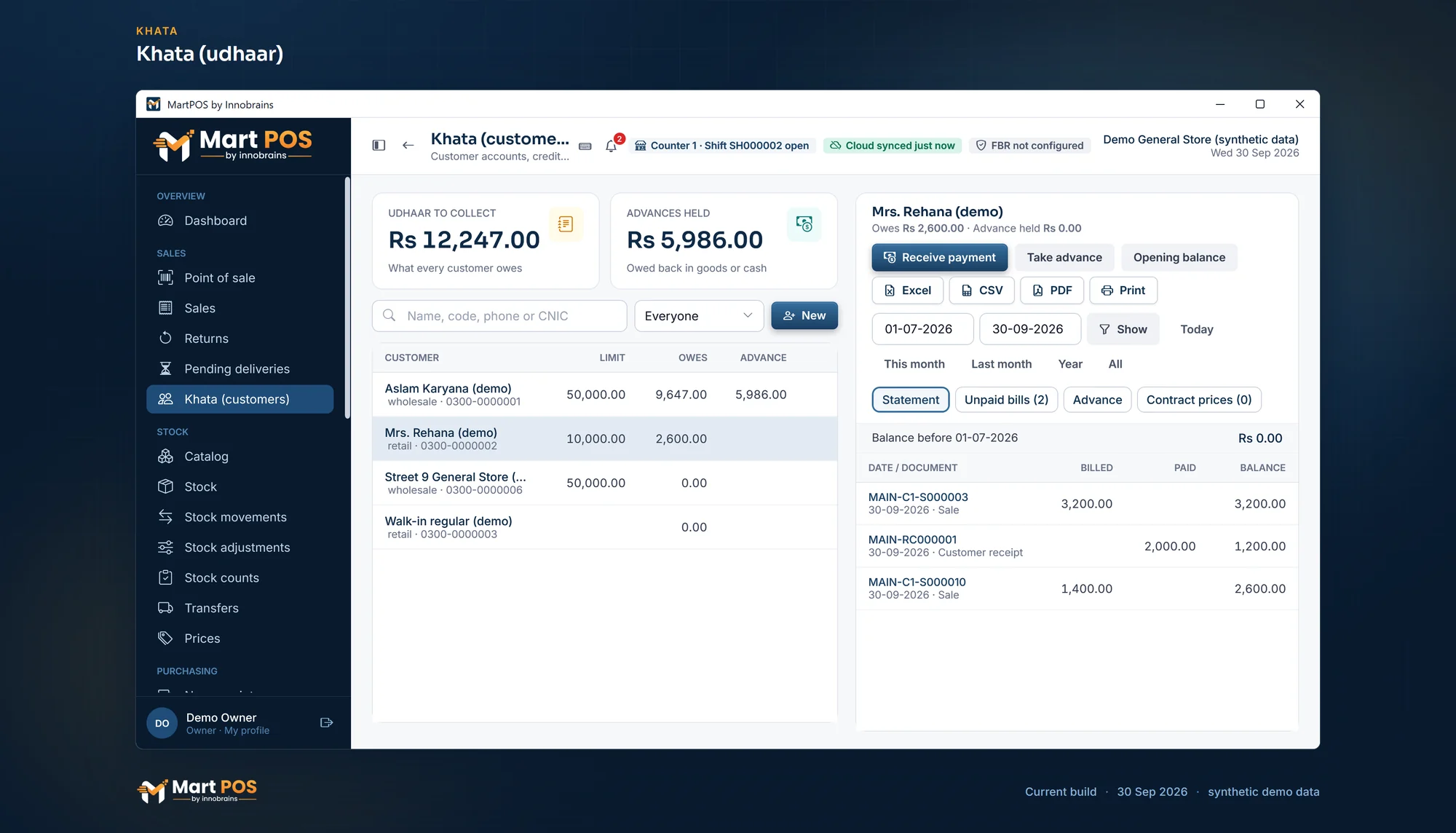
Khata (udhaar). What each customer owes on khata, their credit limit and advance, and a statement of bills and payments for any dates. Screenshot of the current build (30 Sep 2026), synthetic demo data.
Khata rules the owner sets
An owner or manager sets these once under Settings › Payments, in the Khata (bills on account) and Statements cards. The store PC applies them to every till.
| Setting | Choices | How MartPOS starts |
|---|---|---|
| A bill that takes a customer over their credit limit | Do not allow, Warn, the cashier confirms, Needs a manager's approval | Do not allow |
| A bill on khata while the customer has an old unpaid bill | Not looked at, Do not allow, Warn, the cashier confirms, Needs a manager's approval, with Overdue after so many days (1 to 365) | Not looked at |
| Which bills a payment settles | The oldest bills first, Choose the bills | The oldest bills first |
| Statements: what a statement lists | Every line or One row per bill; Everything in the period or Only unpaid bills; List each bill's items under it | Every line, everything in the period, no items |
| Statements: Printed on | A4 or The receipt printer | A4 |
| Statements: Note at the foot | A few lines such as the shop's bank account for payments, in English letters and digits | None |
A customer who has Credit (days to pay) of their own is held to those days instead of the shop's. A customer with no credit limit takes no bill on khata, whatever is chosen. The rules can be changed at any time; bills and payments already saved keep what was recorded on them.
Money owed from before MartPOS
Use Opening balance on the customer, once, for what they owed on the day you started. It is not a sale and does not change today's takings. See Opening balances and opening stock.
Rules worth knowing
- A bill on khata is a sale on the day it is made. It counts in that day's sales and profit; the payment later only settles the account.
- The total owed to the shop is shown at the top of Khata as Udhaar to collect.
- Each branch keeps its own khata. A customer of one branch is not automatically a customer of another. MartPOS Cloud shows each branch's khata read-only (Khata in the owner portal), as the store PC last sent it; payments are taken only on the store PC. Its Across branches tab shows one customer's balance at each branch and the total when both branches have the same mobile number for them; the store PC sends a match code, never the number, and names alone are never merged.
- Nothing is deleted. A wrong payment is corrected by a new entry; the statement keeps both.
Common questions
Why is On account greyed out for a regular customer?
They have no credit limit, which means cash only. Open them in Khata (customers), choose the pencil (Edit customer) and set a Credit limit (Rs).
Can I send the customer their statement?
Yes. Choose the customer, set the dates, and choose PDF to save an A4 statement you can send on WhatsApp or email, or Print. CSV opens in Excel. Print statement gives the same statement in another layout, or as a slip on the receipt printer to hand over at the counter.
Can a customer pay one particular bill rather than the oldest?
Yes, once the owner has chosen Choose the bills under Settings › Payments. Receive payment then lists their unpaid bills to tick. Until then every payment settles the oldest bills first.
Why did the till ask the cashier to confirm a khata bill?
The shop warns when a bill takes a customer over their credit limit, or when their oldest unpaid bill is older than the days the shop gives. The window says which, with the figures. Choosing Put it on khata is recorded on the bill with the cashier's name.
Can a cashier receive khata payments?
Yes. Receiving payments is part of the cashier role, and cash goes into their drawer. Creating customers and changing limits is not.
Related guides
Last updated 05 October 2026. Still stuck? Contact us.