Daily sales per branch
Sales and returns per day as each branch reported them, in rupees, with the time of its last report.
"Works offline" can mean many things. Here is exactly what it means in MartPOS.
The shop's main PC runs the MartPOS store server, which owns that branch's database: stock, bills, khata and the day book. Only the store server writes to it. The till on the same PC, and tills on other PCs in the shop, all ask the store server. Never put the store's database on a shared folder, OneDrive or Google Drive: MartPOS is built on the rule that one program owns it.
A sale is saved on the store PC together with a numbered message for the cloud, in one step. Every 15 seconds (less often while the cloud is not answering), or when you press Sync now, the store sends what is waiting. A message sent twice counts once, and the store forgets a message only after the cloud confirms it has saved it. In a test, sales made while the cloud was switched off reached it later, and the cloud's daily totals matched the store's own report.
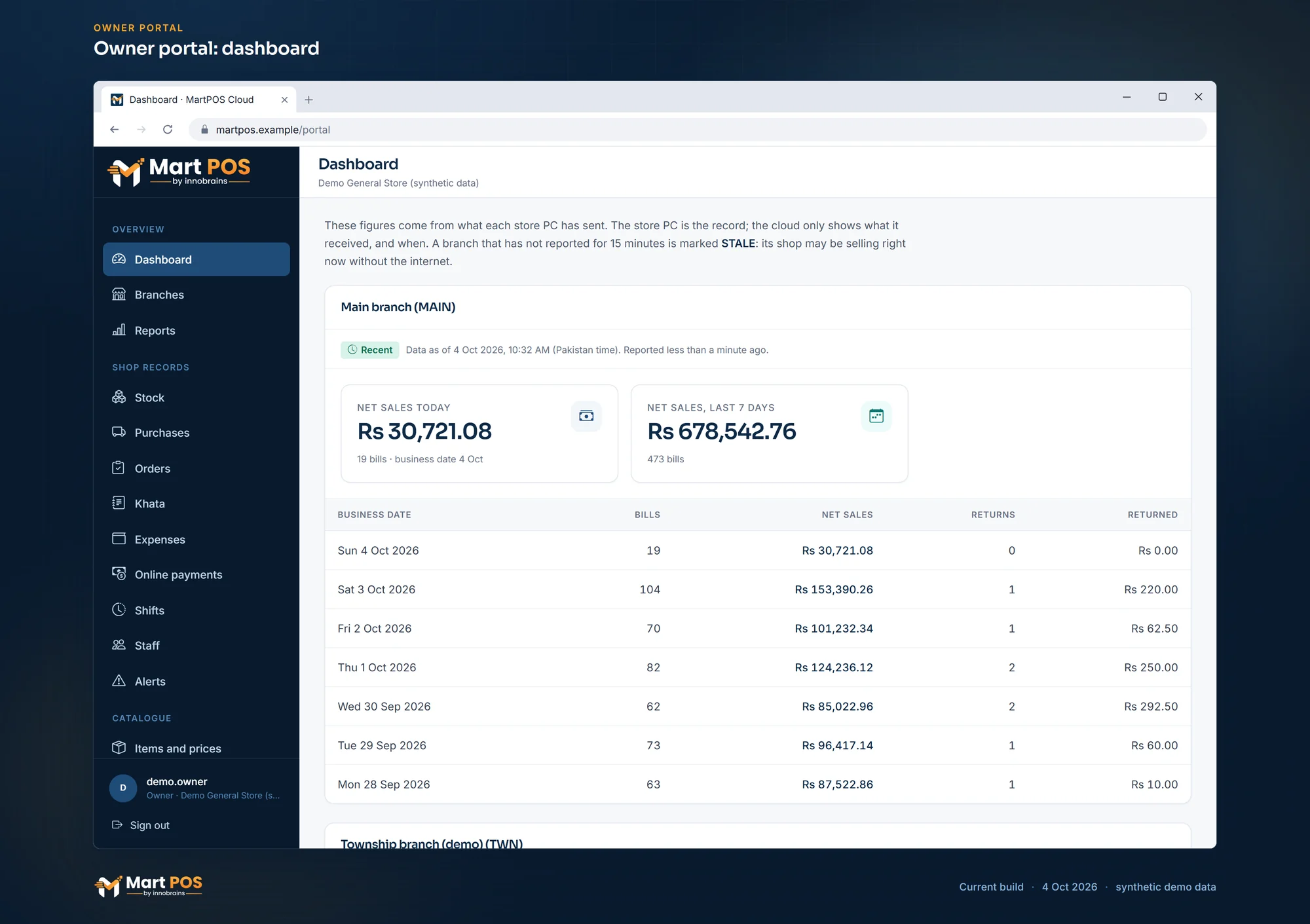 Open the full-size screenshot
 Selling, returns, purchases, khata payments, closing a shift and printing all continue. Changes wait on the store PC, in order.
The same as no internet. The store retries on its own and never loses what is waiting.
A till on another PC cannot bill without the store PC. Its bill in progress is kept, and a retry cannot post it twice. The till on the store PC keeps working.
Every till needs it. No second PC quietly takes over, because two PCs selling the same stock separately could both sell the last packet.
Sales and returns per day as each branch reported them, in rupees, with the time of its last report.
Each branch's stock (also per place), purchases, customer and purchase orders, khata and advances, expenses, shifts, staff, alerts and a sales report, as its store PC last sent them.
A branch that has not reported for 15 minutes is marked STALE, because it may be selling right now without the internet.
Store PCs with their last-seen time and licence grant. Revoke one and its cloud access stops at once.
Add items, or change an item's name, packs, barcodes, prices or tax, and some shop settings; each branch applies them at its next sync unless the shop changed that item meanwhile.
Share a section of settings, such as the receipt, the ways of paying or the khata rules, from one branch with every branch that follows. Each store PC applies it with its own checks, and the portal shows what each branch did with it.
Goods sent between branches as the cloud relayed them: on their way, received in full or short.
An owner invites managers by email to see the records and alerts, for every branch or only chosen ones. A manager changes nothing on a store PC, the plan or the members.
Owners and managers can require a code from an authenticator app, with one-time recovery codes.
The cloud gives each paired store PC a signed grant (30 days by default, then 14 days' grace). The PC checks the signature itself, without the internet.
Turning the PC's clock back does not extend a grant. A suspension is only noticed at the next check-in.
The store PC takes an encrypted backup at the time you choose, after each shift closes and before each database upgrade, reads it back to check it, and can keep a second copy in another folder such as a USB drive. An owner can restore one on screen, on the same PC or a replacement.
Tell us what you sell, how many counters and branches you have, and how you keep records today.
We install MartPOS on your main PC with you. There is no public installer yet.
Items, opening stock, customers and suppliers from CSV, every row checked before saving.
Give your staff their own sign-ins and roles, and open the till.
Nothing changes at the counter. The shop keeps billing, and changes go to the cloud, in order and each once, when the internet returns.
Yes, each branch's daily sales in the owner portal, with the time the branch last reported. If a branch has not reported for 15 minutes it is marked STALE, never shown as live.
Tills on other PCs cannot bill until it is back; their open bills are kept. MartPOS deliberately does not let a second PC take over the stock.
No. Each store PC holds a signed grant it checks itself, valid for 30 days by default plus 14 days' grace, renewed whenever it syncs.
No. One program, the store server, must own the database on the store PC's own disk. A synced or shared folder can corrupt it. For a copy away from the PC, set a second backup folder, such as a USB drive, in Settings › Backups.
Yes. On the Sync & FBR page, Pause sync stops sending until someone resumes it; billing and the licence check carry on, and records wait on the store PC. Unpair, after typing UNPAIR, removes the PC's cloud credentials and keeps all its data; it is refused while records are still waiting to be sent.
The bill in progress is kept on the PC and comes back when MartPOS starts again. A sale retried after an unclear answer cannot be posted twice. Billing needs the store PC to be on, so a UPS on the store PC helps during load-shedding.
Tell us about your shop and we will show you the till and the owner portal, and set MartPOS up on your shop PC with you.