Goods go back to the distributor for many reasons: a carton of biscuits crushed in delivery, the wrong size of shampoo, soap that did not sell, a customer's return that cannot go back on the shelf. The supplier's credit note often comes weeks later, and sometimes for less than was sent. In MartPOS a return to a supplier is a claim: the goods leave stock at once, the claim waits until the credit note arrives, and anything the supplier refuses is written off with a reason. Nothing is lost in between.
How to send goods back
- Open Supplier returns (under Purchasing) and choose Send goods back.
- Choose the Supplier / brand the goods go back to.
- Optionally type the Dispatch reference: a courier receipt, gate pass or the supplier's return authorisation.
- Add each item by its name, barcode or SKU, with its Unit and Qty. A carton can go back as a carton, and a loose item in kg with decimals.
- Check the Claim price per unit. It is filled with the net price you last paid this supplier (the price on their bill, without any freight or other charges you added to the cost); change it if the supplier agreed another figure. For an item never received from this supplier in MartPOS (stock from before you started, for example), type the price they will credit.
- Tick Damaged for goods that are in damaged stock, for example a leaking oil pouch a customer brought back.
- Type the Reason, for example crushed in delivery, wrong size supplied or not selling, agreed with the salesman.
- Check the Claim total and choose Post return.
The return gets a number such as MAIN-PR000003 (the owner can change how these are numbered in Settings › Stock & buying › Purchase numbers; numbers already given never change). The goods leave stock at once, and the claim shows on the supplier's account on Suppliers as an open return claim, next to what you owe them.
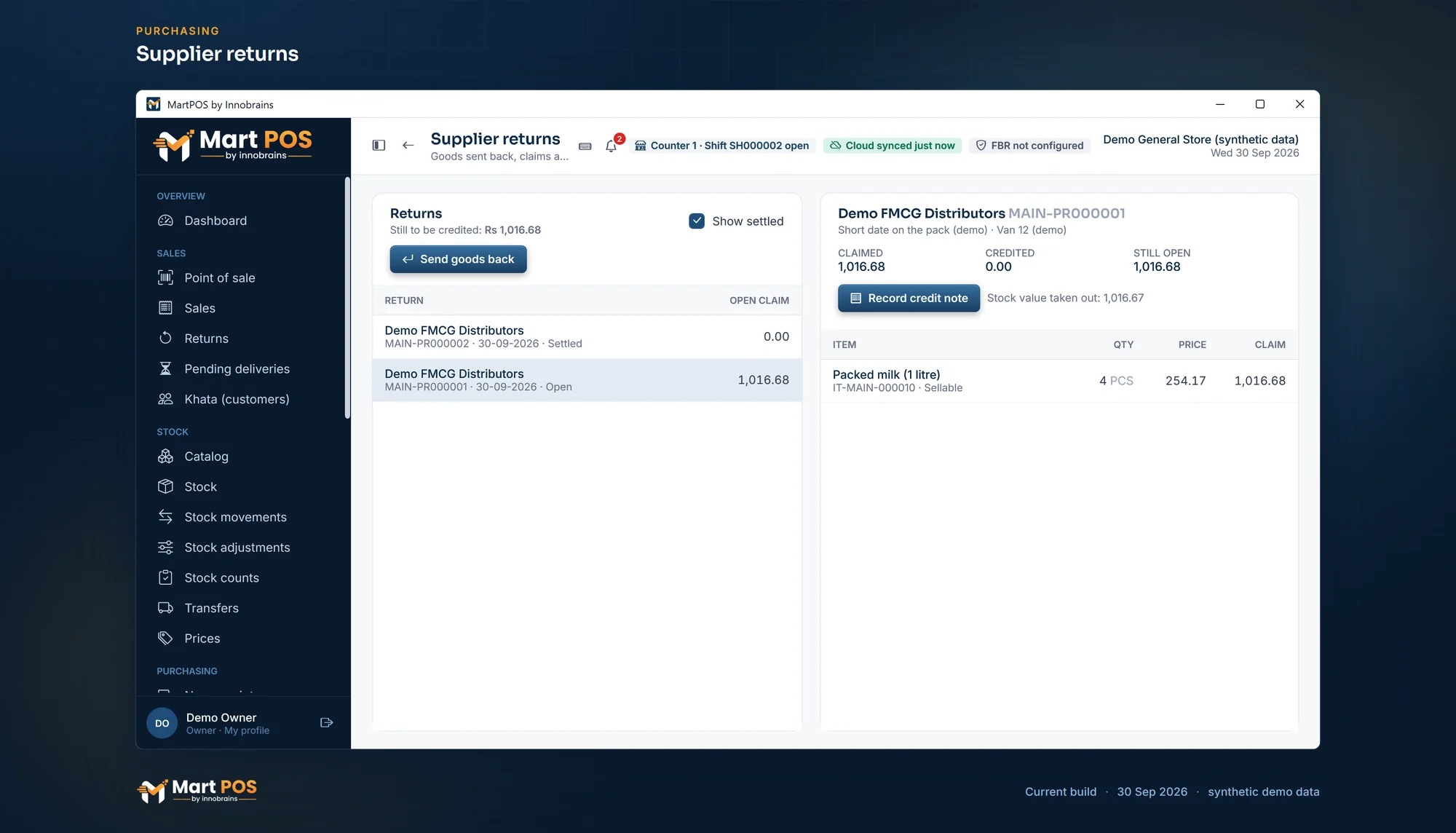
Supplier returns. Goods sent back to a supplier become a claim until the credit note arrives; settled returns stay on record. Screenshot of the current build (30 Sep 2026), synthetic demo data.
The return window
Many distributors take returns only for a set time after a delivery. Set it on the supplier as Return window (days), for example 30. When you send goods after that window, counted from the supplier's last delivery of that item, the item is marked past window, and the return needs a manager and a reason: Why send them after the window (manager), for example salesman agreed on the phone, 26-09. A cashier or warehouse user cannot send it alone. An item never received from that supplier in MartPOS counts as past the window, because there is no delivery to count from. Leave the window empty for a supplier who takes returns at any time.
The shop's own return rules
Two more rules can be set for every supplier at once, in Settings › Stock & buying › Suppliers and purchases (only the owner or a manager changes them):
- A manager approves every return. A warehouse user who sends goods back is then asked for a manager: the manager chooses their name and types their PIN on the same PC, for exactly that return, and their name is kept on it. Owners and managers send returns themselves.
- The shop's own limit in days, for example 60, counted from the last delivery of that item from that supplier. With Warn, the return shows which item is past the limit and by how much, and you confirm it before it goes; the return is marked as sent past the shop's limit. With Refuse, goods past the limit cannot be sent back. Goods never received from that supplier in MartPOS are not checked against this limit.
Both are off unless the owner turns them on, so returns work as before. The supplier's own return window above still applies on top of them.
How to record the credit note
- In Supplier returns, choose the return. It shows what was Claimed, Credited so far and is Still open.
- Choose Record credit note.
- Type the Amount credited (Rs) and Their credit note no. (optional).
- If this is the last credit note for this return, tick Close the claim. Whatever is still open is then written off, and Notes (needed to write off) asks why: supplier refused 2 packets opened by a customer.
- Choose Record credit note.
The credit reduces what you owe the supplier. A return can take several credit notes; it is settled when nothing is open. Show settled lists settled returns too, and the page shows the total Still to be credited. If a distributor replaces the goods instead of crediting money, ask your accountant how they want it recorded before you close the claim.
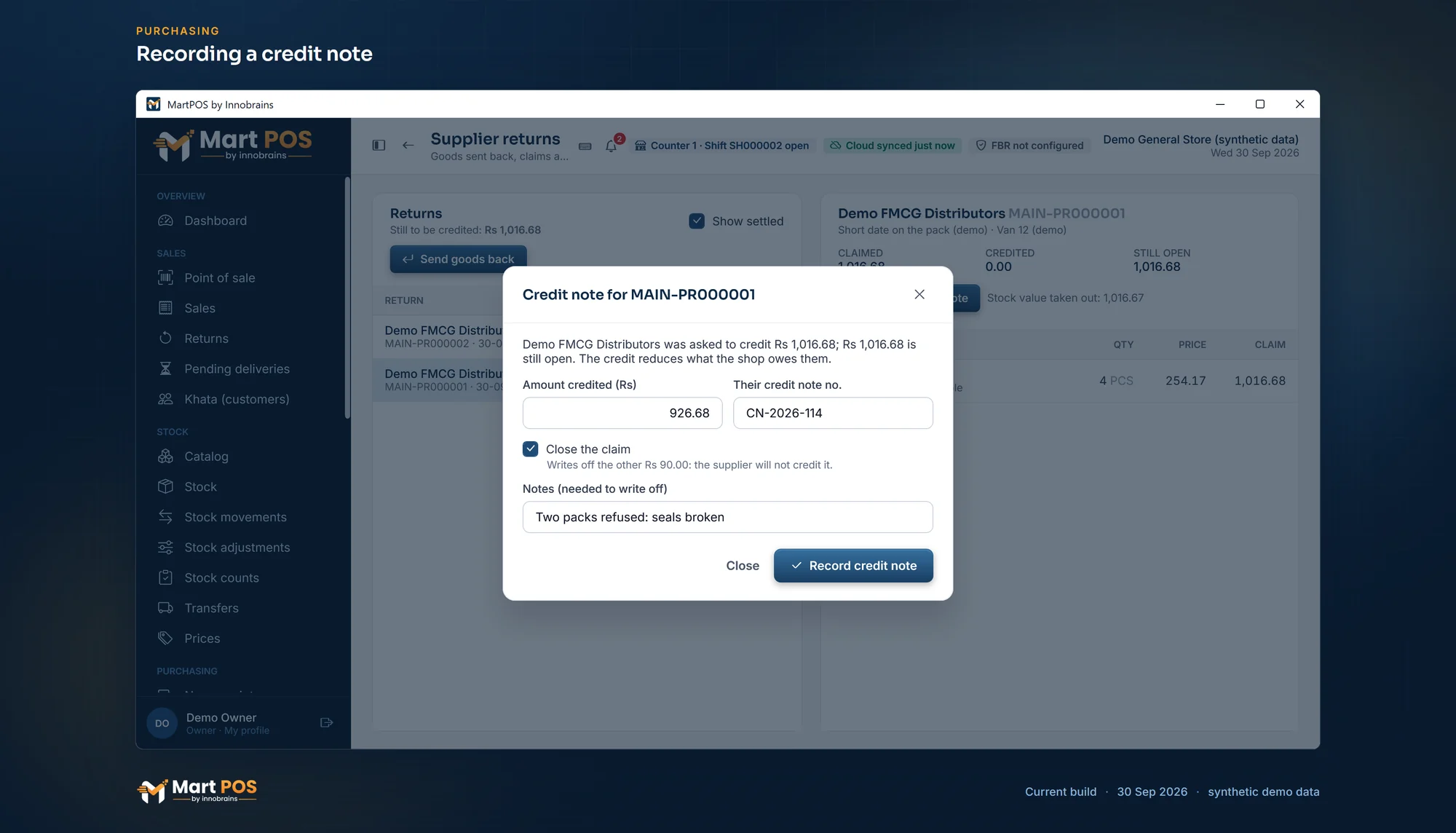
Recording a credit note. The credit note closes the claim; what the supplier will not credit is written off with a note. Screenshot of the current build (30 Sep 2026), synthetic demo data.
What happens in the accounts
- The goods leave stock at their average cost.
- The claim is at the claim price, as money the supplier owes you (Supplier return claims). The difference between cost and claim goes to Supplier return differences, so stock value stays right.
- A written-off shortfall is booked to Supplier return differences with its reason.
You do not need to do any of this by hand; the Day book shows each entry.
Who can do this
| Step | Who |
|---|---|
| Send goods back | Owners, managers, warehouse staff |
| Send after the return window | Owners, managers |
| Send where the shop asks for a manager on every return | Owners, managers, or anyone with a manager's PIN approval of that return |
| Record a credit note, write off | Owners, managers, accountants |
Rules worth knowing
- Stock is checked. You cannot send back more than is in stock (or in damaged stock, when Damaged is ticked).
- Posted returns are never edited. Like every stock document, a return keeps its number, its reason and who posted it.
- Slow sellers worth sending back are listed in Reports › Slow-moving, and Reports › Brands shows what went back per brand.
Common questions
What if the supplier credits more than the claim?
The credit note cannot be more than what is still open on the claim. Record the claim's amount, and ask your accountant how to record the extra.
What if the supplier has not replied for a month?
The claim simply stays open. Still to be credited at the top of Supplier returns shows the total waiting, and the supplier's account shows it too, so you can raise it when their salesman next visits.
Can I cancel a return I posted by mistake?
No. Posted returns are never edited or deleted, and there is no "cancel" button. If the goods never left the shop, ask your accountant and the MartPOS team before correcting it, so the stock and the claim are put right together.
A customer returned a damaged item. Can it go back to the supplier?
Yes. Take the customer's return with Damaged ticked, so it goes into damaged stock and never back on the shelf. Then send it back with Damaged ticked here.
Related guides
Last updated 30 September 2026. Still stuck? Contact us.