Loose goods in kg and litres
Atta, rice, daal and sugar keep their stock in kg with parts (0.625 kg), so what was sold loose and what is left always add up.
Sugar by the kilo or by the rupee, oil by the carton, biscuits by the packet, and regular customers on khata. This is what MartPOS handles for a kiryana shop.
A kiryana shop sells the same sugar four ways: a customer asks for two and a half kilos, another asks for "Rs 100 of sugar", a hotel takes a 50 kg bag, and the shopkeeper next door buys it at a lower rate. MartPOS is kiryana store software built around that, whether the board over your shop says kiryana, karyana or general store: an item sold loose keeps its stock in kilograms or litres with parts (0.625 kg), the till works out the weight for an amount to the gram, a bag or carton is a pack with its own price and barcode, and regulars buy on khata up to a limit you set. The name a customer uses, in English, in Urdu or the way they say it ("cheeni"), finds the item.
The day's hisaab keeps itself: every bill, udhaar payment and expense goes into a day book that balances, and the daily report shows sales, profit and what was put on khata. It runs on the shop's own Windows PC, so billing never waits for the internet. We set it up on your shop PC with you.
 Open the full-size screenshot
 Atta, rice, daal and sugar keep their stock in kg with parts (0.625 kg), so what was sold loose and what is left always add up.
Press F6 (Rs worth) on a loose item and type the amount. The store PC works out the weight to the gram at that line's price and shows it: Rs 50 at Rs 160 a kg is 0.313 kg, billed Rs 50.08.
A 50 kg bag or a carton of 12 bottles is a pack of the item, with its own price and barcode. Stock is never counted twice.
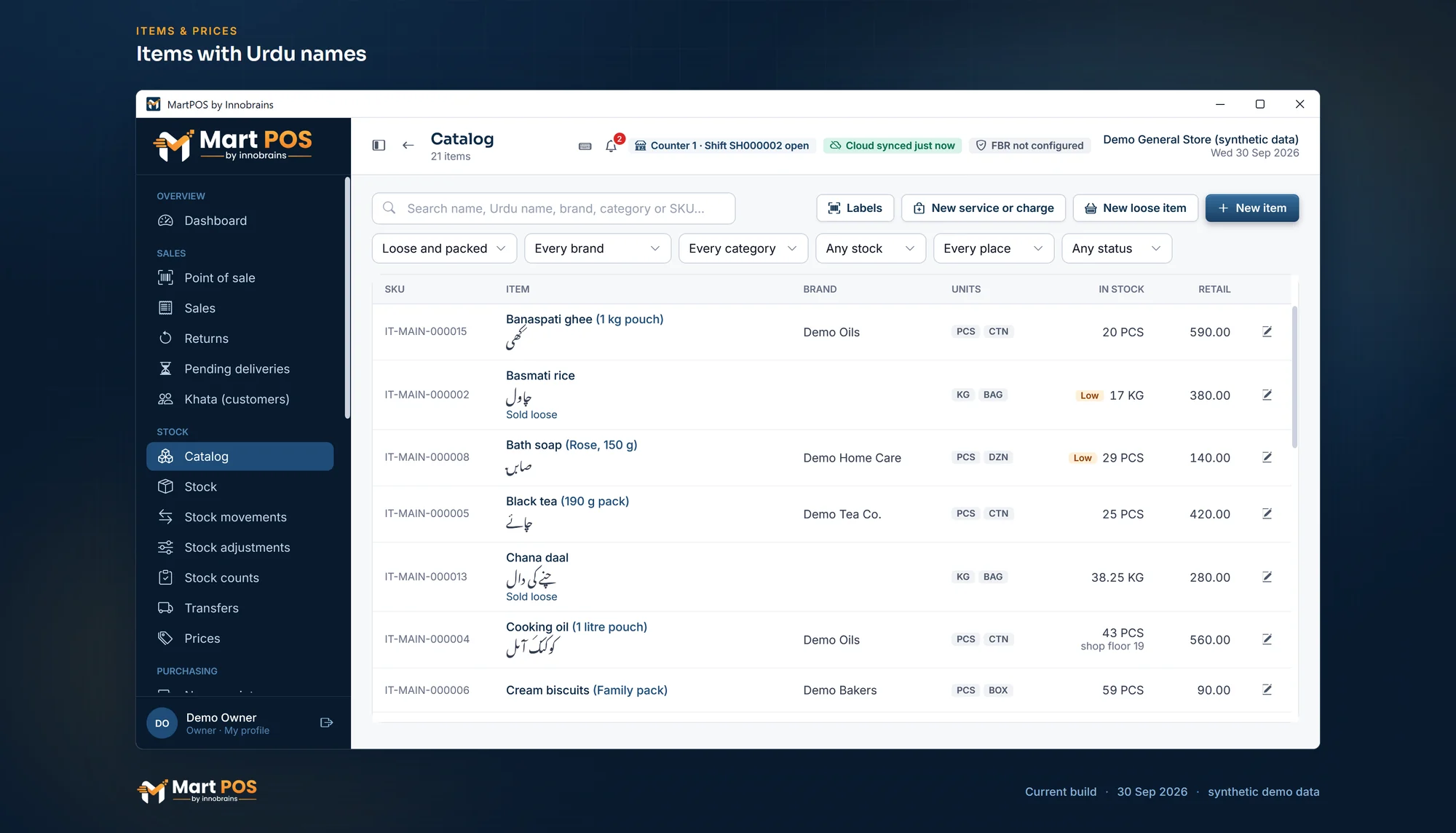
An item's Urdu name shows beside the English one in a Nastaliq font, and the names customers ask for (cheeni, shakar) can be added. Search finds all of them.
Sell on account up to each customer's credit limit, show their statement, and take payments in cash, bank or wallet.
Money a customer pays ahead is held for them, not counted as a sale, and used on a later bill or refunded.
Reports › Daily shows net sales, gross profit at average cost, returns, and bills by how they were paid, udhaar included. Expenses and cash to the bank are recorded too.
Each unit has a retail and a wholesale price. A customer set to wholesale is charged it, and the till can switch a bill between retail and wholesale if you turn that on.
Choose Kiryana as the business type: new items start as sold loose, categories such as "Atta, rice & daal" are suggested, and the menus keep to fewer screens. Change it any time; nothing is deleted.
Buttons for 100 g, 250 g, 500 g and 1 kg put a common weight on a loose line in one press; any other weight is typed with up to three decimals.
Stock, khata and the day book live on the store PC. Bills, returns and purchases carry on with the internet down.
Every sale, return, purchase and payment posts a balanced double entry. Till shifts close blind, and the difference is recorded.
Every feature on this site is marked with its real state: works today or partly built.
Tell us what you sell, how many counters and branches you have, and how you keep records today.
We install MartPOS on your main PC with you. There is no public installer yet.
Items, opening stock, customers and suppliers from CSV, every row checked before saving.
Give your staff their own sign-ins and roles, and open the till.
Yes. Mark the item as sold loose and its stock is kept in kilograms with parts, such as 0.625 kg. A 50 kg bag can be a pack of the same item, with its own price and barcode, so selling bags and loose kilos keeps one stock figure.
Yes. Choose the sugar line on the bill, press F6 (Rs worth) and type 100. The store PC works out the weight to the gram at that line's price, and the line shows it: at Rs 160 a kg, Rs 50 comes to 0.313 kg, billed Rs 50.08. Weigh out what the line says.
Yes. Each item can have an Urdu name, shown beside the English name in the Noto Nastaliq Urdu font and found by search. You can also add other names customers ask for, such as cheeni and shakar, so the cashier finds the item whichever word they type. The receipt can print item names in English, Urdu or both, and its own words in English, Urdu or both. The screens themselves are in English.
It can. When a delivery comes with freight or loading charges, add them to the purchase, on the supplier's bill or paid now from the drawer, the bank or a wallet. MartPOS shares them into the cost of the goods on that bill, by value or by quantity, so the profit on a kilo of sugar counts what the bag really cost you.
Each customer can have a credit limit. A bill goes on their account only up to that limit, unless you choose in Settings › Payments › Khata to warn the cashier or ask for a manager's PIN instead, and their statement shows every bill and payment with a running balance. Payments can come in cash through the drawer, by bank transfer, card or wallet. A customer with no limit pays at the counter.
You do not write it separately. Every bill, return, purchase, udhaar payment and expense posts a balanced entry in the day book as it happens. Reports › Daily gives the day's sales, gross profit and bills by how they were paid, and each counter's shift closes with a blind cash count. Profit and loss, stock value and who owes you are under Reports.
Yes. Each unit of an item has a retail and a wholesale price, and a customer can be set to wholesale prices. If you turn it on in Settings › Sales, the till also shows a Retail | Wholesale switch on every bill; switching needs an owner's or manager's permission.
Yes. The store PC keeps the records, so billing, returns, purchases and khata payments work with no internet. Changes go to MartPOS Cloud when the internet is back.
Contact us: we set MartPOS up on your shop PC with you, bring in your item list and show your staff the till. There is no public installer yet.
Tell us about your shop and we will show you the till and the owner portal, and set MartPOS up on your shop PC with you.