A busy counter is interrupted all the time: a customer goes back for one more packet of biscuits, the power goes, the network cable is pulled. MartPOS keeps the bill you are working on safe through all of it, and never saves the same sale twice. This guide covers held bills, what happens to an unfinished bill, and reprinting receipts.
How to hold a bill
- With items on the bill, press F8 (or choose Hold). "Bill held on the store PC. It reserves no stock."
- The bill clears, and the Held button shows how many bills are waiting.
- Serve the next customer as usual.
To add a name or a note, so the right customer gets the bill back, press Shift+F8 instead and type it, for example Aslam bhai, blue shirt. The note shows in the list of held bills. If your shop asks for a note on every held bill, F8 asks for it.
How to resume a held bill
- Choose Held. The Held bills window lists each one with its customer, its note, its lines, its total and who held it when.
- Choose the bill and Resume bill.
- If another bill was on the screen, it is put on hold in its place, so nothing is lost.
Prices and stock are checked again when you resume, because they may have changed while the bill waited. When a price changed, the till says so: "Prices changed since this bill was held: Cooking oil Rs 560 → Rs 580." The bill shows today's prices.
A bill switched between retail and wholesale prices keeps its prices when held: it comes back at them, and the Held bills window marks it Wholesale.
Held bills are kept on the store PC, and they hold no stock. They are not sales. If the last tin of ghee is on a held bill, another counter can still sell it. To keep goods aside for a customer, make an order with F7 instead. See Orders and pending deliveries.
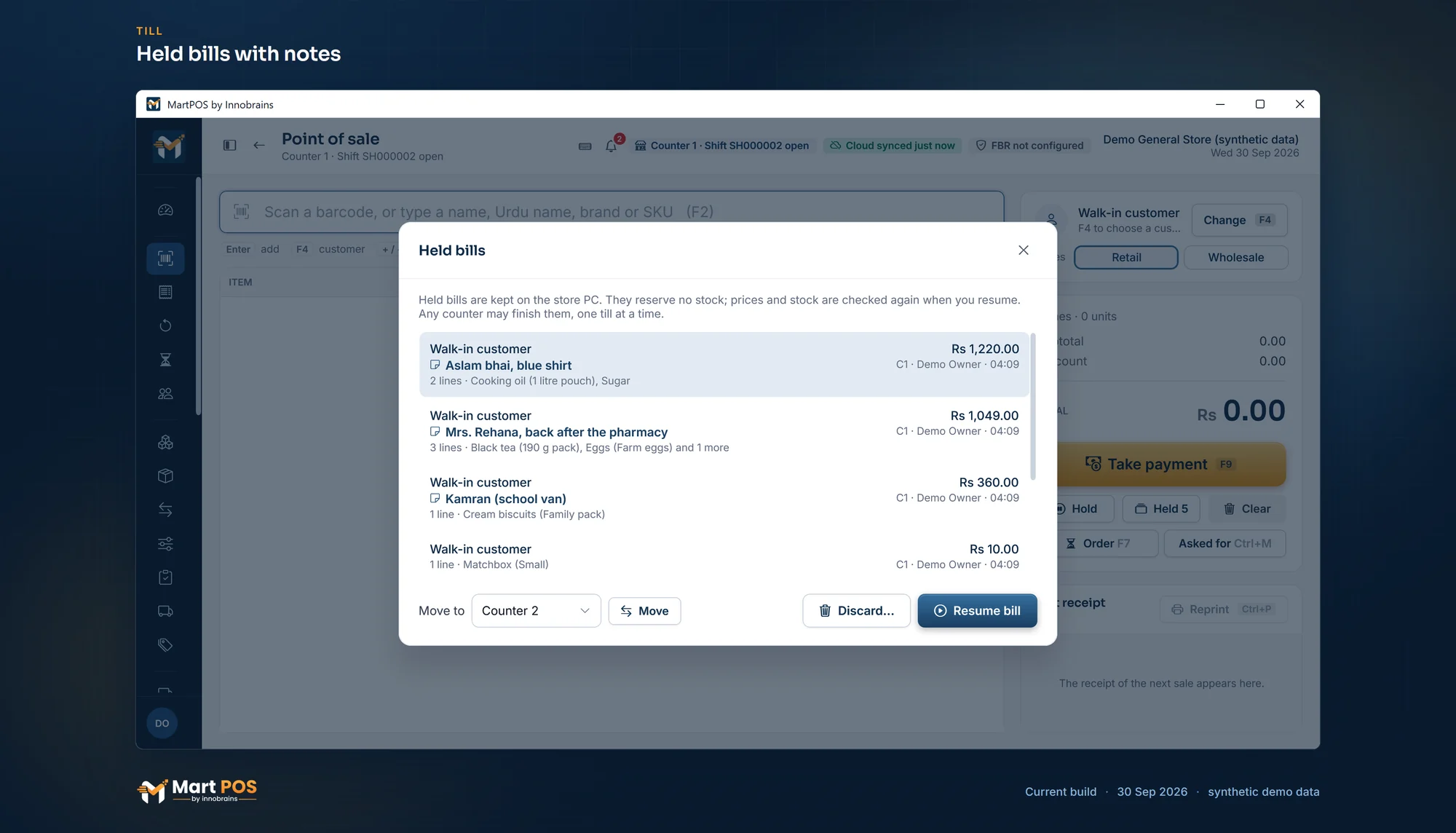
Held bills with notes. Bills put aside with a note so the next customer can be served, kept on the store PC; any counter can resume them. Screenshot of the current build (30 Sep 2026), synthetic demo data.
Your shop's rules for held bills
The owner or a manager sets them in Settings › Sales › Held bills. Until someone changes them, held bills work as they always did: each is finished at the counter it was held on, there is no limit, no note is needed and they are kept until they are finished.
- Which counters can finish a held bill. This counter only, or Any counter, so a customer can pay at another till. Only one till at a time can finish a bill: another till sees "Being finished at C2 by …" and waits. If that till is switched off, the bill is free again after a few minutes.
- How many a counter may hold. No limit, or at most a number (1 to 50) a counter. One more is refused: "Counter 1 already has 5 held bills, the most this shop allows."
- A name or note when holding. Optional, or required.
- Held bills at shift close and after a while. Keep them; Settle before closing the shift (closing the shift first lists the counter's held bills: resume and sell each one, move it to another counter's list, or discard it); or Discard after a number of hours (1 to 72).
Discarding a held bill
Choose the bill in Held and Discard…, or choose Clear on a bill you resumed. MartPOS asks why ("Customer left"). Every discarded held bill is kept as a record: who held it, who discarded it, when, why, the items and the value. The owner and managers see them in Reports › Discarded held bills, because ringing items up and throwing them away can hide a mistake or a theft.
You can discard a bill you held yourself. Someone else's held bill needs a manager: the manager discards it, or approves it on your till with their PIN.
Clearing a bill
Clear empties the bill and sets the customer back to walk-in. Nothing was saved, so nothing needs undoing. On a bill you resumed from Held, Clear discards that held bill, with a reason, as above.
When MartPOS closes in the middle of a bill
The bill on the screen is written to the PC's disk after every change. If the power goes, Windows restarts or the program is closed, the bill comes back the next time MartPOS starts: "The unfinished bill from before was restored." Check it with the customer and carry on.
When the store PC does not answer
Holding a bill still works. If the store PC does not answer when you press F8, the bill is held on this till instead: "The store PC is not answering: the bill is held on this till and handed to the store PC when it answers." When the store PC is back, the till hands it over by itself, once. Until then, the Held list shows it as On this till only.
Saving a sale. A till on another PC saves every bill through the store PC. If the network or the store PC fails at the moment you complete a sale, the till cannot know whether the bill was saved. MartPOS never guesses:
- The bill is locked: "Waiting for the store server to confirm this bill. The bill is locked so it cannot be posted twice."
- The message says: "The store server did not confirm this bill. Press Retry: it resends the same bill and cannot charge twice."
- When the store PC is back, press Retry. It sends exactly the same bill. If the first attempt had in fact been saved, you get that saved sale back, with its number; if not, it is saved now. Either way there is one sale.
While a bill is locked, you cannot start another one on that till ("Finish the waiting bill first (Retry)."). If MartPOS is closed while a bill is waiting, it comes back locked at the next start: "A bill was waiting for the store server's answer. Press Retry to finish it."
If the store PC refuses the bill outright (not enough stock, a credit limit), nothing was saved: the bill unlocks so you can fix it. For a till that cannot reach the store PC at all, see A till cannot reach the store PC.
How to reprint a receipt
The last receipt: the Last receipt panel on Point of sale shows the receipt of the last sale. Choose Reprint or press Ctrl+P.
An older bill: open Sales, find the bill by its day, number or customer, open it and choose Reprint. A4 PDF saves the bill as a full-page invoice. A cashier sees only the bills they made; the owner or a manager reprints anyone else's. See Returns, reprints and A4 invoices.
What a reprint does:
- It prints one copy, marked DUPLICATE COPY 1, 2 and so on, so a customer cannot present a copy as a second original.
- It never opens the cash drawer.
- It is recorded with the name of whoever reprinted it. Cashiers may reprint.
- If the first print had failed (the printer was off), the next print is still the original.
Printing never creates or changes a sale. A sale is saved first; printing comes after. If the printer jams, the sale stands and you simply print again.
Common questions
How many bills can I hold?
As many as your shop allows: no limit unless the owner set one in Settings › Sales › Held bills. Held bills are meant for minutes, not days, and they do not reserve stock.
The customer wants to pay at the other counter. Can the other till finish the bill?
Yes, if your shop lets any counter finish held bills (Settings › Sales › Held bills, Any counter). The other till chooses Held and resumes it. Otherwise, resume it at the counter where it was held.
Another till says the bill is "being finished at C2". What now?
That till has the bill on its screen. Ask there. If that till was switched off with the bill on it, the bill is free again after a few minutes.
The customer left and the bill is still locked. What do I do?
Press Retry once the store PC answers. If the sale was saved, it comes back with its number; if the customer did not take the goods, take a return against it. Never type the bill in again while it is locked: that would make a second sale.
Can I reprint a receipt from last week?
Yes, from Sales: choose that day (or type the bill's number), open the bill and choose Reprint. A cashier finds only their own bills there; for another person's bill, ask the owner or a manager.
Related guides
Last updated 30 September 2026. Still stuck? Contact us.