Retail | Wholesale switch
Turn it on and the till shows the switch under the customer on every bill; switching changes the prices of the whole bill.
Walk-in customers pay retail; the shopkeeper who buys by the carton pays your wholesale rate. MartPOS keeps both on one stock figure and shows on every line which price was charged.
Many kiryana and general stores sell both ways: parchoon to the neighbourhood and thok to smaller shops, hotels and canteens. MartPOS bills wholesale and retail from the same stock. Each unit of an item, a piece, a kg or a carton, has a retail and a wholesale price. In Settings › Sales › Retail and wholesale, the owner chooses how the shop sells: retail, with wholesale prices only for customers set to them; retail and wholesale, with a Retail | Wholesale switch on every bill; or a wholesale shop, where every bill starts at wholesale. One counter can also start every bill at wholesale.
Owners and managers may switch a bill's prices; a cashier may only if the owner allows it, or with a manager's PIN for that bill, and the store PC checks it on every bill. An item without a wholesale price is sold at retail and the line says so, and the receipt and A4 invoice of a wholesale bill say Prices: Wholesale.
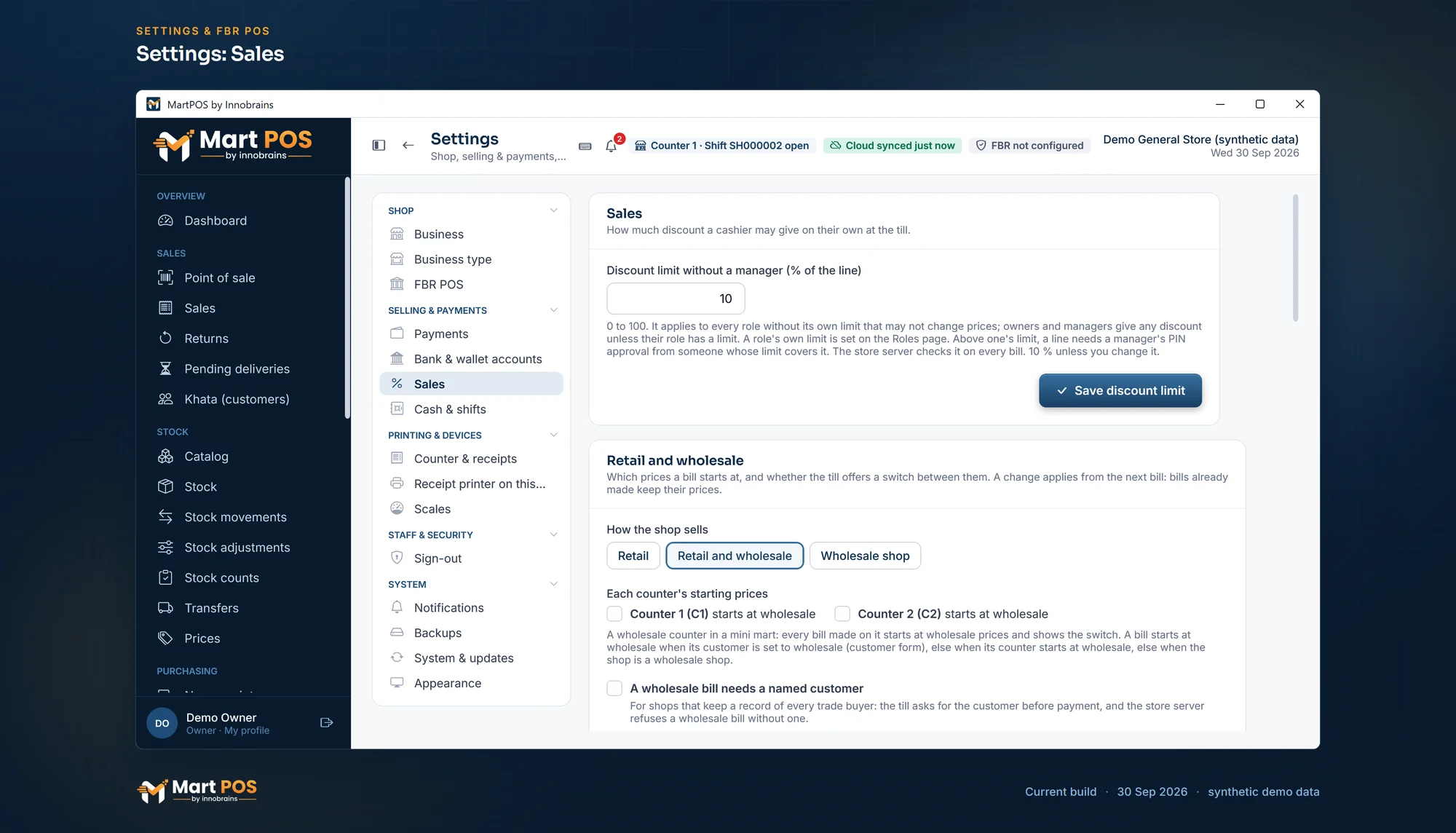 Open the full-size screenshot
 Turn it on and the till shows the switch under the customer on every bill; switching changes the prices of the whole bill.
Tick "Charge wholesale prices" on a customer, and every bill for them starts at wholesale prices.
A counter can start every bill at wholesale, for trade buyers, while the other counters bill at retail.
Every bill starts at wholesale, walk-in bills too; the switch gives retail prices when a customer asks.
Each pack has its own retail and wholesale price. A carton without a price of its own takes the piece's wholesale price times the pieces in it.
A named, dated price list for a group of buyers, or one customer's agreed price for an item. They come before the wholesale price.
Owners and managers always; cashiers only when the owner allows it on the Roles page. Otherwise a manager approves that one bill with a PIN.
The receipt, the A4 invoice and the bill's page say "Prices: Wholesale"; a line with no wholesale price says "No wholesale price: retail".
On the Sales page, "Wholesale prices" lists only the bills made at wholesale, and its totals are that period's wholesale sales.
Shopkeepers who buy on credit get a credit limit, a statement and ageing, like any customer. A wholesale bill can be set to need a named customer.
Each bill line shows where its price came from: List, Wholesale, Price list, Qty price, Contract or Promotion. A reprint or a return shows the same.
A carton sold to a shopkeeper and a packet sold to a walk-in customer come out of one stock figure, counted in the base unit.
Both kinds of sale post to the same day book at the same average cost, so the profit and loss shows what wholesale really earns.
Tell us what you sell, how many counters and branches you have, and how you keep records today.
We install MartPOS on your main PC with you. There is no public installer yet.
Items, opening stock, customers and suppliers from CSV, every row checked before saving.
Give your staff their own sign-ins and roles, and open the till.
Yes. Each unit of an item has a retail and a wholesale price. In Settings › Sales › Retail and wholesale, choose retail and wholesale and the till shows a Retail | Wholesale switch on every bill, or set the whole shop to wholesale. Stock is one figure either way.
A bill starts at wholesale when its customer is set to wholesale prices, else when its counter starts at wholesale, else in a wholesale shop; otherwise at retail. A customer's agreed price or price list comes before the wholesale price, and every line says which price it used.
Only if the owner allows it for cashiers on the Roles page. Otherwise the till asks for a manager's approval, and a manager approves that one bill with their PIN. The store PC checks the permission on every bill, whatever the screen shows.
It is sold at its retail price on a wholesale bill, and the line says "No wholesale price: retail", so nobody is surprised. A carton with no price of its own takes the piece's wholesale price times the pieces in it.
Yes. Put a group of buyers on a named, dated price list with its own prices or a discount off a brand or category, or give one customer an agreed price for an item. Changing them needs the pricing permission.
Yes. On the Sales page, choose "Wholesale prices" for a period: the list shows only the bills made at wholesale, and the cards add up that period's wholesale sales. The bills list marks each one as Wholesale.
Yes, up to the credit limit you set for them, like any customer. Their statement, unpaid bills and ageing show what they owe and for how long.
Tell us about your shop and we will show you the till and the owner portal, and set MartPOS up on your shop PC with you.