On the day a shop starts using MartPOS, it already has stock on the shelves and in the godown, customers who owe money on the old khata register, and distributors it owes for the last deliveries. These are opening figures. MartPOS records them against opening balance equity, so they set the right starting point without counting as today's sales, purchases or payments.
Choose one closing date
Take every opening figure as of the same day: usually the evening before MartPOS starts. Count the stock that night, and total each customer's and supplier's balance up to that night. Everything after that date is billed in MartPOS. A quiet day after the month-start rush is easier than the week before Eid.
Opening stock
Many items: import them with an Opening stock column and a Unit cost. The opening stock is in the item's base unit (pieces, or kg for a loose item), not in cartons, and the unit cost is for that unit. An item not sold loose needs a whole number. See Importing items, customers and suppliers from CSV.
A few items by hand:
- Open Stock and choose Opening stock.
- Add each item with the Qty on the shelf and its Cost / unit: what one unit cost you. Choose the unit that is easiest to count: 6 cartons of 24 at the carton's cost, or 23.5 kg of sugar at the cost of one kg.
- Choose Post adjustment. No reason is needed for opening stock.
"Stock already on the shelf when MartPOS started, at its cost. Credits opening-balance equity." The cost becomes the item's average cost, so profit on the first sales is right. A loose item's opening stock takes up to three decimals; other items must come to whole pieces.
Opening stock goes onto the shop floor. Stock kept in a godown can be entered the same way and then moved there with Move stock. See The godown and the shop floor.
A customer's opening balance
- Open Khata (customers) and choose the customer (or add them).
- Choose Opening balance ("What this customer owed before MartPOS").
- Type the Amount owed (Rs) and the date As of (day-month-year), for example 30-06-2026.
- Add a Note, for example From the 2026 khata register, page 14.
- Choose Record opening balance.
"Posted against opening balance equity, not as a sale or a payment, so today's takings do not change." The customer's statement starts with this line, and Receive payment settles it like any bill. Opening balances need the opening-balance permission: owners, managers and accountants.
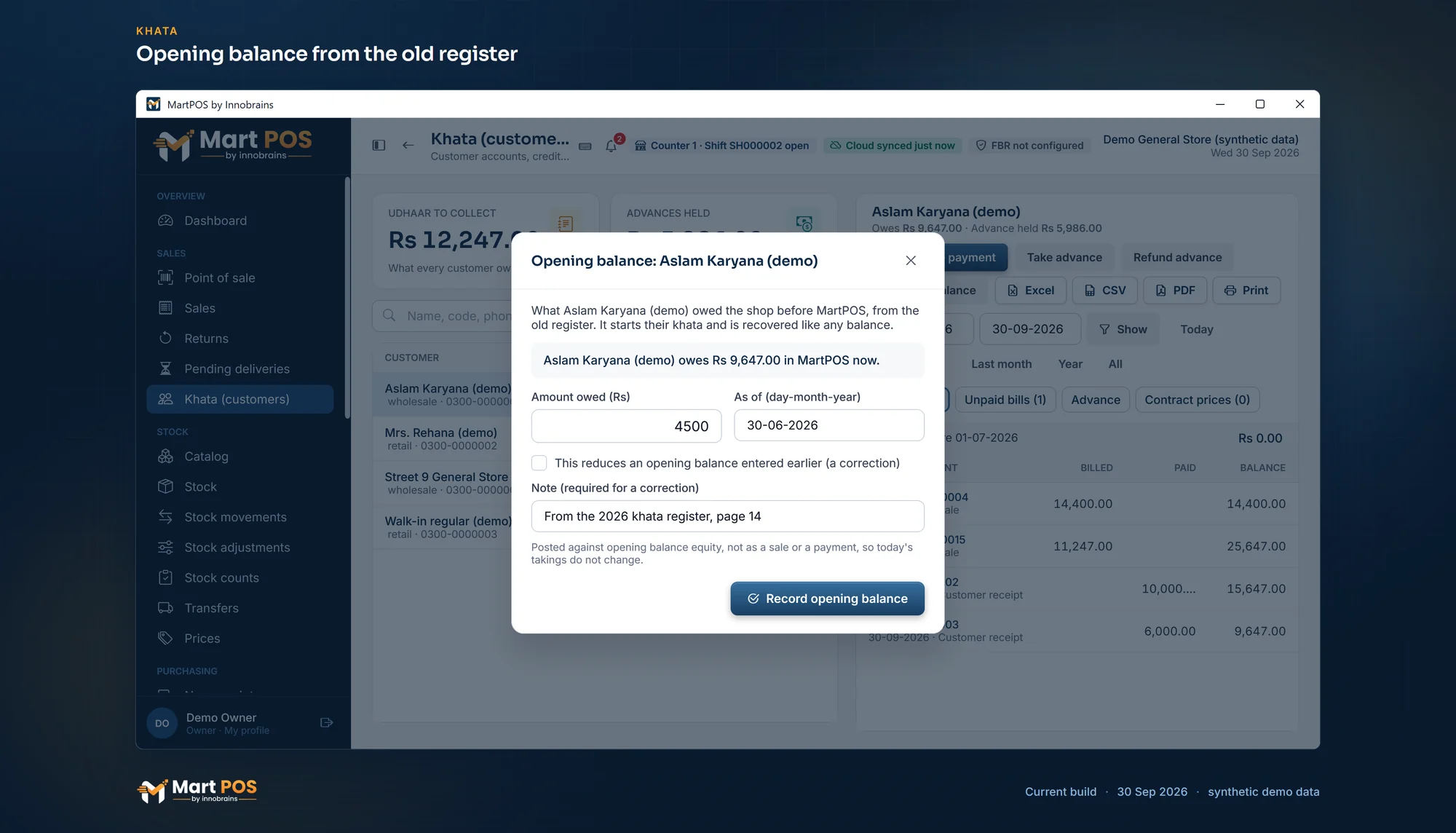
Opening balance from the old register. What a customer owed before MartPOS, entered once with its date and a note; today's takings do not change. Screenshot of the current build (30 Sep 2026), synthetic demo data.
A supplier's opening balance
The same for a supplier: open them on Suppliers (or choose them on New receipt) and choose Opening balance ("What the shop owed this supplier before MartPOS"). It is paid off like any supplier balance. A CSV of suppliers can carry it too, in an Opening balance (owed to them) column.
A bank or wallet account's opening balance
The money already in the shop's bank account or wallet on the closing date is an opening figure too. An owner or manager enters it under Settings › Bank & wallet accounts.
A new account. Choose Add account, fill in the kind, the name and the number, and type what is in it in Opening balance (Rs, optional) with the date As of (dd-mm-yyyy), for example 85,000 as of 01-09-2026 from the bank statement. Save account adds the account and posts its opening balance together.
An account already in the list that nothing has been paid into or out of yet shows Opening balance on its row: type the amount In the account (Rs), the date and a note, and choose Record opening balance.
The amount is posted on that date against opening balance equity, so it is not a sale, a payment or a deposit. It is the first line of the account's book under Accounts & books, and the account's row in Settings shows "Opening balance Rs 85,000.00".
Once an account has any posting, its opening balance cannot be entered or replaced: the row shows Adjust opening instead. An adjustment is a further entry on its own date, with a Reason, that raises the opening balance, or lowers it with Take the opening balance down by this amount. Nothing already posted changes, and the book shows both entries. An adjustment cannot take the opening balance or the account's book below zero.
Correcting a wrong opening balance
Nothing is overwritten. To reduce a figure entered too high, record another opening balance, tick This reduces an opening balance entered earlier (a correction), and type a Note saying why. Both entries stay on the statement.
A correction can never leave a customer in credit or a supplier owing you: "That would leave … in credit." To correct opening stock, post a stock adjustment with a reason. See Stock adjustments.
Rules worth knowing
- Advances from before MartPOS are not entered as opening figures. Take them as new advances on the first day. See Customer advances.
- Closed books. If the owner closes the books through a date, an opening balance dated on or before it is refused, for a customer, a supplier or a bank or wallet account. Enter opening figures before closing any period.
- Cash in the drawer is not an opening balance: it is the opening cash typed when the first shift is opened.
- Damaged goods on hand at the start are best left out of opening stock: write them off or send them back to the supplier the old way.
- Expiry dates of opening stock: on Stock adjustments › Opening stock, a line of an item that tracks expiry dates has an EXPIRY · BATCH column for the date (and batch) on its packs, which becomes the stock's lot. Left blank, or imported from CSV, the stock goes into a lot with no date, which Reports › Near expiry lists under the table; its later deliveries carry their dates. See Expiry dates and the near-expiry report.
Common questions
Why not enter old balances as sales?
Because they were sold before MartPOS, perhaps last year. As sales they would inflate today's sales and profit; as opening balances they only set the starting point.
Can I enter the stock value without counting?
Opening stock needs quantities and costs per item, because every later sale takes its cost from them. Count first, or import from your old system's stock list.
What cost do I use for loose goods bought in bags?
The cost of one kg: a 50 kg bag of sugar that cost Rs 7,000 is Rs 140 a kg. Enter the weight on hand in kg at that cost, or enter full bags in the bag unit at the bag's cost.
What if a customer disputes their opening balance?
Correct it with a reduction and a note. The statement keeps both lines, so the history is clear.
Related guides
Last updated 05 October 2026. Still stuck? Contact us.