Besides each item's retail and wholesale price, MartPOS has three pricing tools on the Prices page: price lists for groups of customers, quantity breaks for buying more, and dated promotions for walk-in customers. One rule keeps them simple: one source sets each line's price, and nothing stacks. Every bill line says where its price came from.
Cannot find price lists or promotions? A shop set up as a Kiryana keeps them off the Prices page; quantity breaks always show. Choose another business type, or tick Show every feature, under Settings › Business type. Price lists and promotions already made keep working at the till either way. See Choosing your business type.
Which price wins
For each line, MartPOS works out the price in this order:
- A manual price, if someone allowed to override prices typed one.
- The customer's contract price for that item and unit, while its dates include today. It is set on the customer's Contract prices tab in Khata (customers) (below).
- A base price, the first that exists:
- the customer's price list, while it is switched on and its dates include today: its own price for the item, otherwise its brand or category discount off the standard price;
- the wholesale price, on a bill at wholesale prices: for a customer marked Charge wholesale prices, at a counter that starts its bills at wholesale, in a wholesale shop, or after the till's Retail | Wholesale switch (see Billing at the till);
- the standard retail price (on a wholesale bill, for an item without a wholesale price: the line says No wholesale price: retail);
- for a pack without its own price, the piece price times the pack size (the piece's wholesale price on a wholesale bill).
- A quantity break, when the line's quantity reaches it and its price is lower.
- For walk-in customers at standard prices, the largest promotion that covers the item also competes.
The lowest of the base price, the quantity break and the promotion is charged. They are compared, never added together. A cashier's line discount can still come on top, within the usual limit.
At the till, the Price column shows the source: List for the standard price, or Price list, Wholesale, Qty price, Promotion, Contract, Order price, From unit price. The bill keeps it, so a reprint or a return shows what was charged and why.
Price lists
A price list is a named, dated set of prices for a group of customers, for example Hotel rates 2026-27 for the hotels, restaurants and canteens you supply, or Wholesale rates 2026-27 for smaller shops that buy from you.
- Open Prices (under Stock) › Price lists and choose New price list.
- Type the Name, the From date and, if it ends, the To (optional) date.
- Under Items with their own price, add items and type the List price per unit. The Standard price is shown beside it. For a loose item, the price is per kg (or per bag, if you add the bag unit).
- Under Discounts for a brand or category, add rules such as 5% off one brand of cooking oil, or 3% off the Rice & daal category. They apply to items without their own price above. A brand's rule comes before a category's; between equals, the larger discount.
- Keep In use ticked, add Notes if useful, and choose Save list.
Then put customers on it: in Khata (customers), Edit customer › Price list. "While the list is in force, its prices come before wholesale prices. Changing it needs the pricing permission."
A price list cannot be deleted, so old bills stay explainable. Untick In use to pause it, or give it an end date.
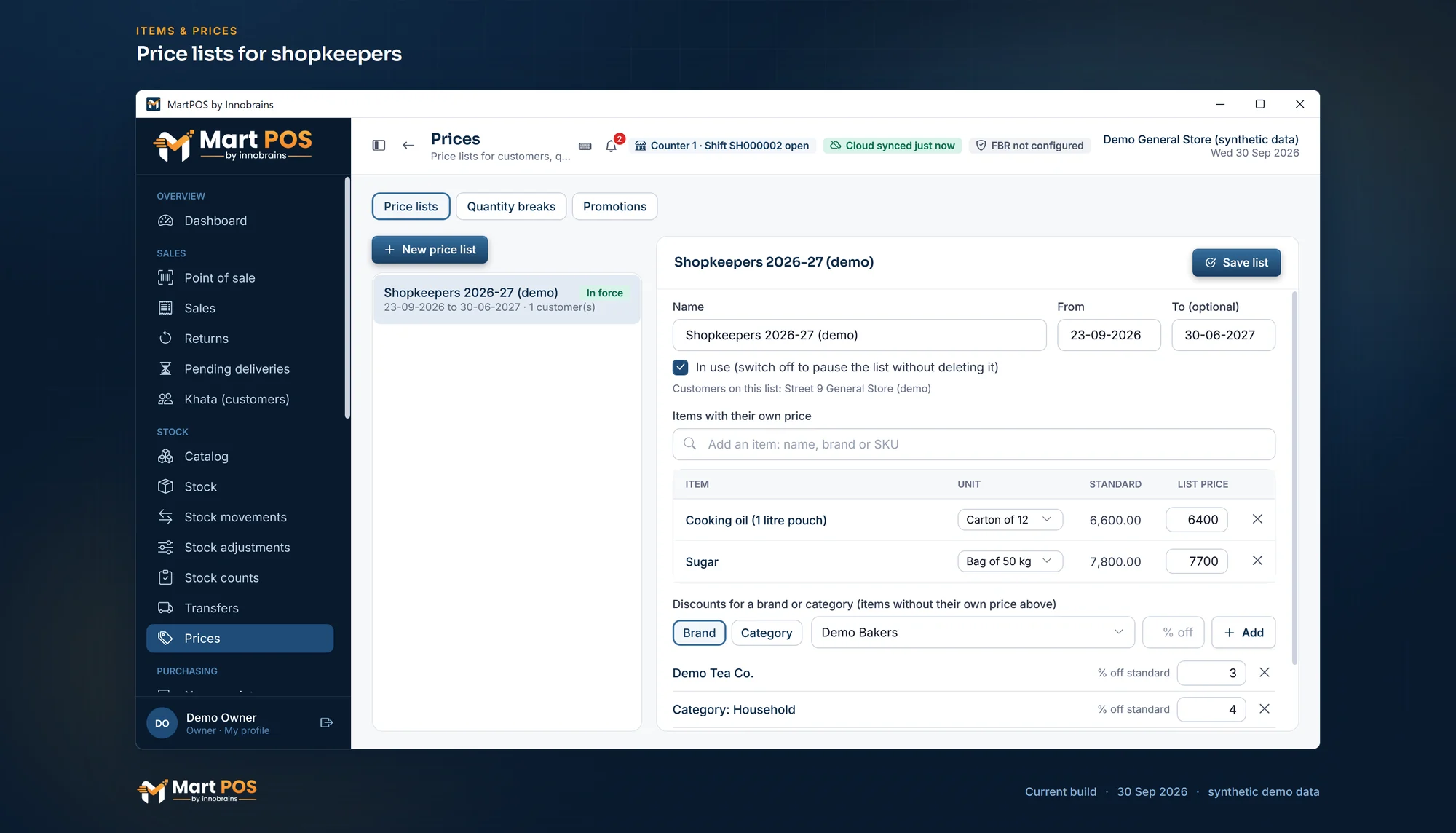
Price lists for shopkeepers. A customer's own prices for bags and cartons, and discounts by brand or category, for shops that buy in bulk. Screenshot of the current build (30 Sep 2026), synthetic demo data.
Contract prices
A contract price is one customer's own price for one item, for example the price agreed with a restaurant for a 16 litre tin of cooking oil, or with an office canteen for a carton of tea. It comes before the customer's price list, the wholesale price, a quantity break and any promotion; only a manual price typed at the till comes first.
- Open Khata (customers) and choose the customer.
- Open the Contract prices tab and choose Add item.
- Find the item by its name or SKU, choose its unit (a piece, a carton, a kg…) and type Their price (Rs). The usual price is shown under it.
- Leave From empty to start today, or type a date as dd-mm-yyyy. Leave Last day empty unless the agreement ends.
- Choose Save price.
Each row shows the usual price beside their price, and Not today when its dates do not include today. The pencil changes a price or its dates; the bin removes it (bills already made keep their price). One item and unit can have only one price on any day: a second price for the same unit needs dates that do not overlap, for example this quarter's price until 31 December and next quarter's from 1 January. If someone else changed the same customer's prices meanwhile, MartPOS says so and shows the latest ones before anything is saved.
At the till the line shows Contract as its price source, and the bill keeps it.
Quantity breaks
"From a quantity on one bill line, the unit price drops." For example, eggs at Rs 30 each but Rs 28 each from 12, or loose rice at Rs 340 a kg but Rs 325 a kg from 10 kg.
- Prices › Quantity breaks.
- Choose the Item, the Unit, From qty and Price each, then Add break.
A break applies only when it is lower than the customer's price, and the highest break reached wins. A break starts above 1, and two breaks cannot start at the same quantity of the same unit. A break counts one line only: 6 packets on one line and 6 on another do not reach a break at 12.
Promotions
"A promotion takes a percentage off the standard price for walk-in customers. Only the largest one applies to a line, never on top of a customer's own prices, or a quantity break."
- Prices › Promotions › New promotion.
- Type the Name, for example Ramazan offer.
- Choose what it Covers: Everything in the shop, One brand's items, One category, or Chosen items. For a brand or a category, choose which one.
- Type the Discount (%), the Starts date and the Ends (last day) date. Both days are included.
- Tick Clearance only for stock you are willing to sell below cost (below).
- Choose Save promotion.
Some examples:
- Ramazan offer: 5% off the Dates & sharbat category for the whole month of Ramazan.
- Eid special: 10% off one brand's vermicelli and custard for the last ten days before Eid.
- Month-start saving: 3% off one brand of cooking oil and ghee from the 1st to the 7th of the month.
- Soap week: 8% off chosen items, such as three sizes of one soap, for a week.
The list shows each promotion's discount, dates and status. Change edits one; End now stops it early with a reason, for example stock cleared. Show finished and ended shows past ones. Bills already made keep their prices.
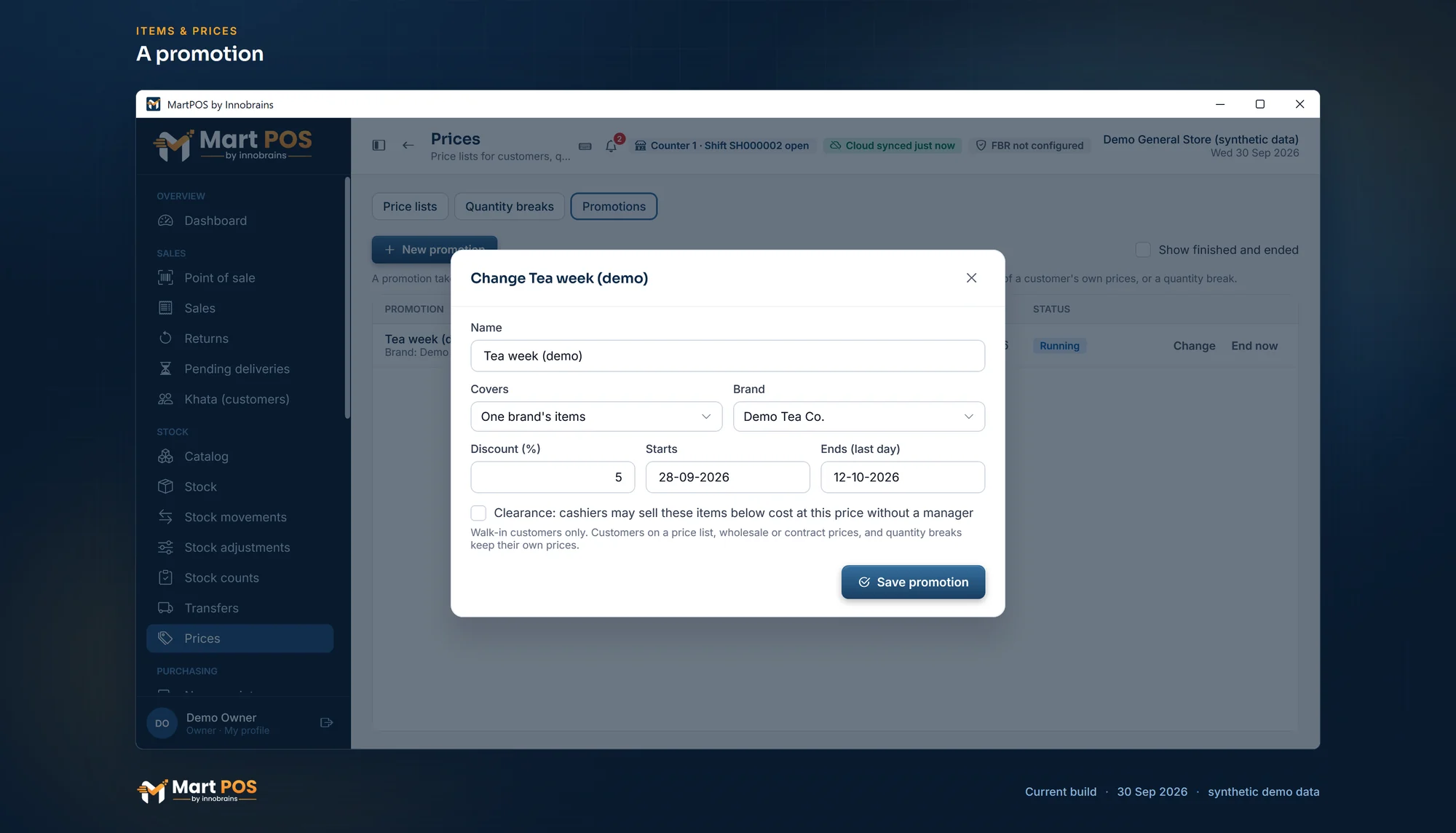
A promotion. A time-limited discount on one brand's items for walk-in customers; customers on their own prices keep them. Screenshot of the current build (30 Sep 2026), synthetic demo data.
Clearance and selling below cost
Normally a line that would sell below its average cost needs an owner or manager: when one of them completes the sale, the till asks for a reason (Sell below cost) and keeps it with the bill line, and a cashier's bill is refused. A promotion marked Clearance ("cashiers may sell these items below cost at this price without a manager") is the owner's approval in advance, for example for a flavour that did not sell or tins with dented packing. Marking a promotion as clearance needs the below-cost permission, which owners and managers have. The till still shows the Below cost warning on those lines.
Who can change prices
Price lists, contract prices, quantity breaks, promotions and moving a customer onto a price list need the pricing permission: owners and managers. Anyone who bills can see a customer's contract prices. Every change is recorded in the audit log with the name of who made it.
Common questions
A hotel is on a price list, and there is a Ramazan offer on. Which applies?
The price list. Promotions apply only to walk-in customers at standard prices.
Can I give one restaurant 5% off everything?
Yes: make a price list for them with a brand or category rule for each, or give their items their own list prices. There is no "whole list" percentage rule; rules are per brand or category.
Should I use a price list or contract prices?
A price list suits a group of customers who share the same terms, such as every hotel you supply. Contract prices suit one customer's own agreement on a few items. A customer can have both: their contract prices come first, and the price list covers everything else.
Do price lists and promotions reach my other branches?
No. They are kept by each store PC, so each branch has its own. From the owner portal you can change one item's list prices and promotions for one branch at a time: see Items and prices from the owner portal.
Can a promotion be for a set time of day?
No. Promotions run for whole days, from the start date to the last day. A two-hour iftar offer is not possible; run it for the whole day or give line discounts at the till.
Related guides
- Units, packs, prices and barcodes
- Billing at the till
- Khata: customers, credit limits and recoveries
- Adding items
- Retail and wholesale billing: two prices from one stock, and who may switch
Last updated 05 October 2026. Still stuck? Contact us.