Every shop turns customers away without noticing: the 5 kg atta that ran out on Friday, the shampoo sachet you never stocked, the oil that was Rs 20 dearer than next door. Each one is a sale the records never see. MartPOS lets the cashier note it in a few keys with Asked for (Ctrl+M), without leaving the bill, and shows the owner what is asked for most in Reports › Missed sales. This guide explains both.
Noting a missed sale at the till
- When a customer asks for something you cannot sell, press Ctrl+M, or choose Asked for, next to Order on the till. The bill on screen stays exactly as it is.
- The Not in stock / asked for window opens. What did the customer ask for? starts with what is already on screen:
- the item highlighted in the search results, if any;
- otherwise the words in the search box, for example shampoo sachet when nothing matched;
- otherwise the item on the selected bill line, when the customer wanted more of it.
- If you typed words and they match items, the window asks "Is it one of these? Click it to note the item:". Choose one, or keep the words. When an item is shown, Not this item lets you type what was asked for instead.
- Type How much (optional), for example 5 for five kilos.
- Choose Why was it not sold?: Out of stock, We don't keep it or Price too high.
- Choose Note it, or press Enter. The till says, for example, "Noted: Atta (5 kg bag) × 2." The owner sees it in Reports › Missed sales.
"Nothing is sold and the bill stays as it is." The search box is cleared if the words came from it, ready for the next scan. It takes a few seconds, so it fits between two customers.
What is kept
Each note keeps the item (or up to 120 characters of the words used), the quantity if given, the reason, the business date, the counter and who noted it. It is kept on the store PC for the report. A note is not a sale and moves nothing: no stock, no money and no bill number. It is not sent to MartPOS Cloud.
The Missed sales report
Open Reports (under Money) and choose Missed sales. It covers the period chosen at the top of Reports. Notes about the same item are grouped together, and notes in words are grouped by the same words, whatever the capitals. The most asked for comes first.
| Column | What it shows |
|---|---|
| ASKED FOR | The item, or the words the customer used. |
| SKU | The item's code, when it is an item in Catalog. |
| TIMES | How many times it was asked for and not sold. |
| QTY | The quantities noted, added up. |
| WHY | How many times for each reason, for example Out of stock 3 · Not kept 1. |
| LAST ASKED | The last date it was noted. |
The cards above it show the Times asked in the period and how many Different things were asked for. The report can be saved as Excel, CSV or PDF, or printed, like any report.
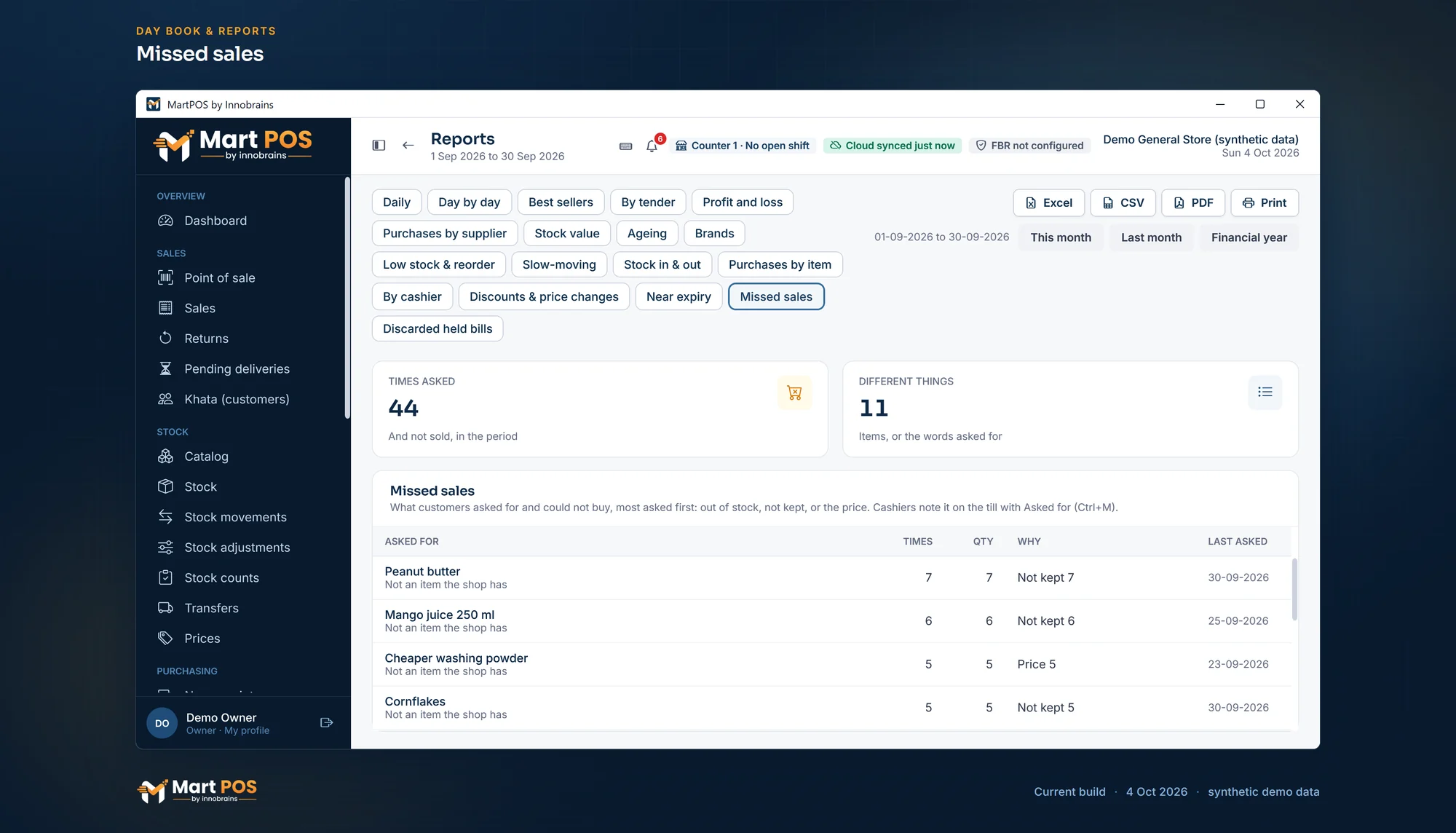
Missed sales. What customers asked for and did not get, most asked first: out of stock, not kept, or the price. Screenshot of the current build (4 Oct 2026), synthetic demo data.
Reading the report
- Out of stock again and again: the reorder level is too low, or the order comes too late. Raise the reorder level so Low stock & reorder suggests more. See Reports for the owner.
- We don't keep it, asked for often: a product worth trying. Add it in Catalog and buy a small quantity first.
- Price too high: compare with the market, or with what the supplier charges you now. A quantity price or a promotion may bring the customer back. See Price lists, quantity breaks and promotions.
- Words that match an item you do keep: add those words to the item's Other names, so the cashier finds it next time. See Adding items.
Who can note and who can see
Anyone who can bill can note a missed sale: owners, managers and cashiers. The report needs the reports permission or purchasing: owners, managers, accountants, auditors and warehouse staff. Cashiers note; they do not see the report.
Common questions
Does noting a missed sale change the bill or the stock?
No. Nothing is sold, posted or counted. The bill in progress, its customer and its lines stay as they were.
Can I note something that is not in the catalogue?
Yes. Type the words the customer used, such as olive oil 250 ml, and note them without choosing an item. They are grouped by those words in the report.
Can a cashier undo a note made by mistake?
No. Notes are not edited. One wrong note is only one line among many; the report is for spotting what comes up again and again.
Are missed sales shown in the owner portal?
No. They stay on the store PC, in Reports › Missed sales.
Related guides
Last updated 04 October 2026. Still stuck? Contact us.