The bell at the top of every screen, beside the counter and shift, collects what needs your attention now. A red number on it counts the items you have not read yet. Choose the bell to open the panel; choose an item to go straight to the screen that deals with it. This guide explains what can appear there, who sees which item, and how read and unread work.
What the bell lists
The store server works the list out from the shop's own records each time it is asked, so it is always what is true now, not a message that was sent once and may be out of date. It can show:
| Item | Where it takes you |
|---|---|
| Items at or below their reorder level | Reports › Low stock & reorder |
| Stock lots of items that track expiry dates, past their date or expiring within the near-expiry days | Reports › Near expiry |
| Shelf labels printed with a price that has changed since | The Labels window, to print them again |
| Bills not yet with FBR (only while FBR POS integration is on) | Sales, filtered to Not yet with FBR |
| Changes from MartPOS Cloud that need a decision, and records the cloud refused | Sync & FBR |
| Goods sent from another branch, waiting to be counted in | Transfers |
| Customer orders whose hold on the goods has run out | Pending deliveries |
| Returns to suppliers not credited yet, with the amount still claimed | Supplier returns |
| No backup yet, a backup older than two days, a failed backup, or backups without a password | Sync & FBR (backups) |
| The licence in its grace period, run out or suspended, and the days left of a trial | Plan & licence for the owner, Sync & FBR for others |
| A newer version of MartPOS on offer for the store PC, a required or security update, tonight's automatic update, or an update that did not install | Settings › System & updates |
| Tills running an older MartPOS than the store PC, and the tills' certificate (expiring, changing, or a till that must be paired again) | Staff & counters |
| Notices from the MartPOS team | Nothing to open: read them in the panel |
Items that call for no action, such as customer orders with goods held for pickup, stay on the Dashboard and are not repeated in the bell.
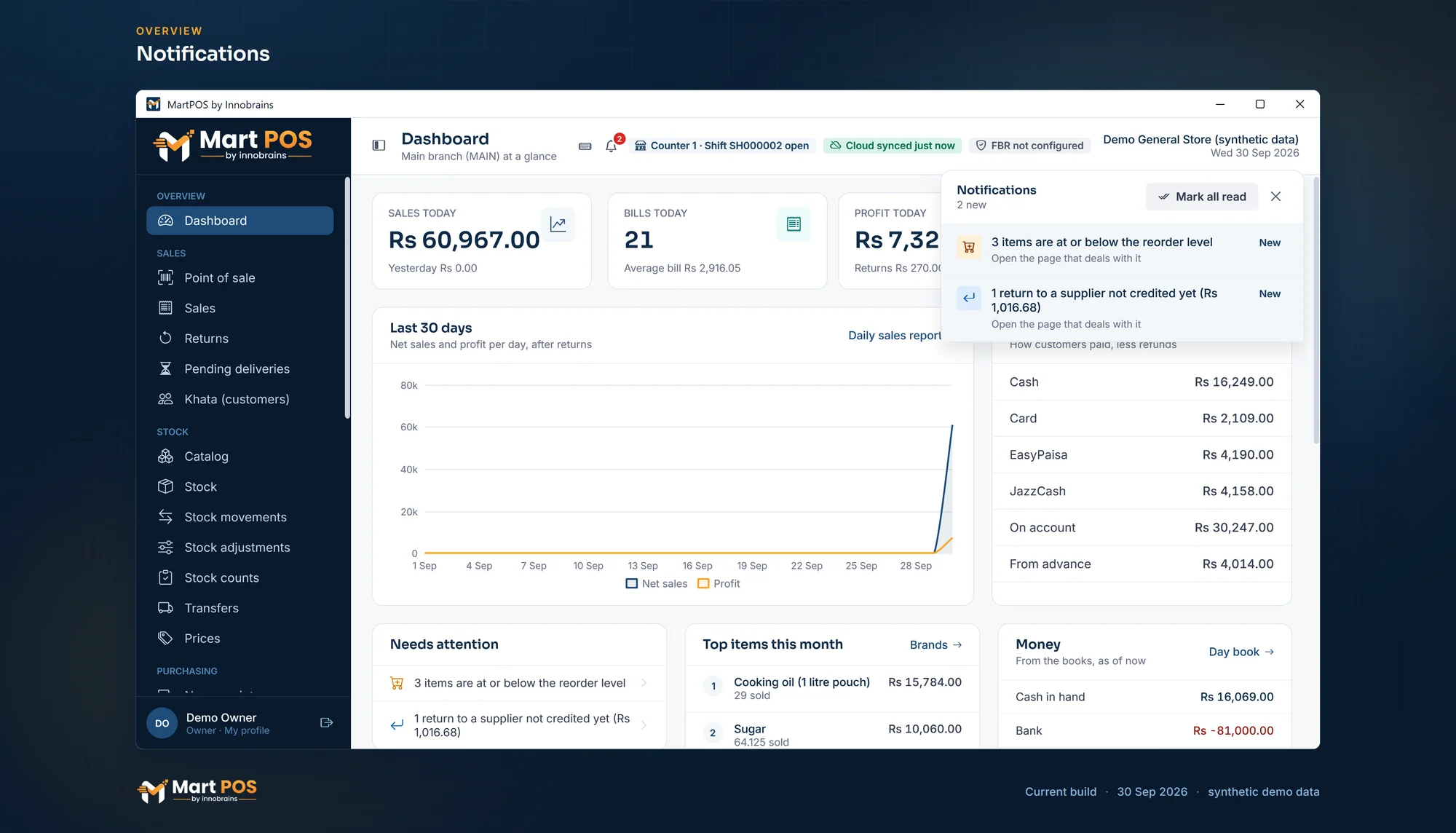
Notifications. The bell lists what needs a person, such as items at their reorder level or a supplier return not yet credited, each linking to the page that deals with it. Screenshot of the current build (30 Sep 2026), synthetic demo data.
Who sees what
Each item is shown only to someone who may use the screen it opens, using the same permissions as the rest of MartPOS:
- A cashier sees stock and order items (low stock, stock near or past its expiry date, labels with an old price, lapsed holds) but not backups, the licence or updates.
- Items about backups, the licence, updates and the notices from MartPOS are for whoever runs the store: owners and managers.
- Bills not with FBR go to those who see every bill.
- Supplier claims not yet credited go to those who send goods back to suppliers, record their credit notes, or see reports: owners, managers, accountants, auditors and warehouse staff.
- Warehouse staff see the low-stock, expiry, label, transfer and supplier-return items, and the changes from MartPOS Cloud, since they add and edit items.
The store server applies the rule, not only the screen, so the list a person gets never includes an item their role may not open.
A store PC paired with MartPOS Cloud also sends the low-stock, expiry and over-the-credit-limit alerts to MartPOS Cloud when they change, following Settings › Notifications. There the owner sees them under Alerts and can have them emailed or texted, at once or once a day, under Notifications; texts are sent through SendPK with approved message templates. See The owner portal.
Read and unread
- An item you have not read shows New and a light background, and counts on the bell.
- Opening an item marks it read and takes you to its screen. Choosing a notice from MartPOS marks it read and leaves the panel open.
- Mark all read clears the count for everything shown.
- Read state is per person: the owner reading the list does not clear it for the cashier.
- An item you read comes back as new when it changes. If two items were low when you read it and a third (say, the 1 kg sugar) drops below its level, the entry shows three items and is new again. A notice the MartPOS team edits is new again too.
The bell refreshes with the status bar every half minute, and again each time you open it. Opening any page closes the panel.
Notices from the MartPOS team
The MartPOS team posts notices in the owner portal: planned maintenance of MartPOS Cloud, changes to plans, new features. A store PC paired with MartPOS Cloud fetches the notices for its business about once an hour, together with its licence check, and keeps them. They are therefore still in the bell when the internet is down. Check now on Account › Plan & licence fetches them at once. A store PC that is not paired has no notices from the team; everything else in the bell works without the cloud.
Urgent notices come first and are marked in red. A notice leaves the bell by itself when the team ends it.
Common questions
The bell has a number but the list looks empty. Why?
The number counts unread items when the status bar last refreshed. Open the bell: it refreshes the list at once. If something was dealt with meanwhile (the transfer was counted in), it is no longer listed.
Can I switch an item off?
No. Each item stays until the thing behind it is dealt with: count the transfer in, take a backup, send the bills to FBR, reorder the low stock, record the supplier's credit note. Marking it read clears the red number until it changes.
Why does a cashier not see the backup warnings?
Backups, the licence and updates are for whoever runs the store. A cashier cannot deal with them, so the bell does not show them.
Does the bell need the internet?
No. Everything except the notices from the MartPOS team is worked out on the store PC. The notices already fetched stay available offline.
Related guides
Last updated 05 October 2026. Still stuck? Contact us.