Credit limits
A bill goes on account up to the customer's limit; a customer with no limit pays at the counter.
Regular customers buy on credit, shopkeepers buy at wholesale rates, and distributors give you goods on account. This is what MartPOS keeps straight today.
Most kiryana and general stores run on udhaar: the family that settles at the end of the month, the hotel that pays weekly, the smaller shop that buys at your wholesale rate. MartPOS keeps a khata for every customer, in place of the khata copy: a credit limit, every bill on account and every payment, and a statement with a running balance. What you owe distributors and suppliers is kept the same way.
Every khata entry is part of a double-entry day book, so the udhaar customers owe you always agrees with the books, and the top of the Khata screen shows the total udhaar to collect.
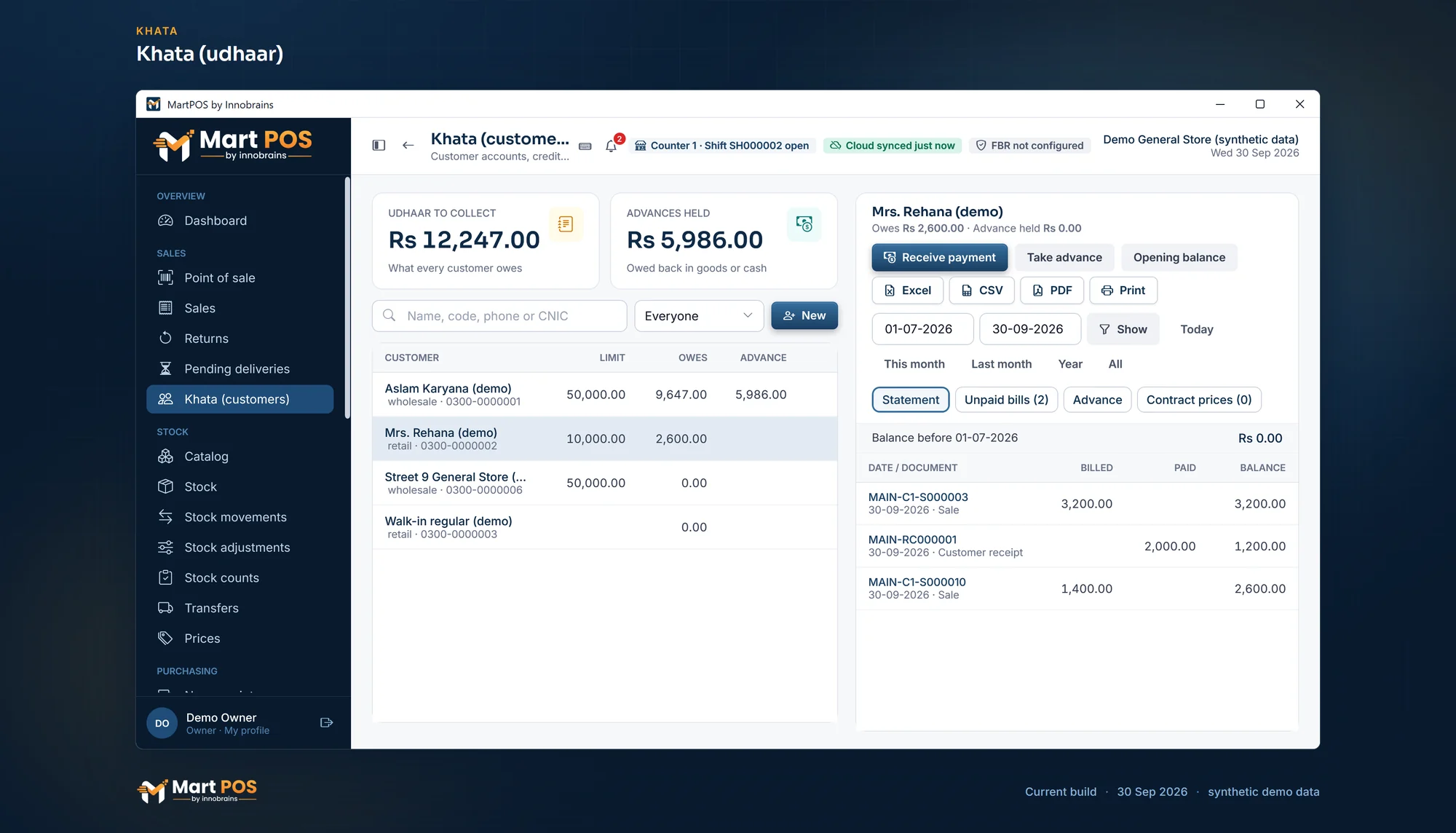 Open the full-size screenshot
 A bill goes on account up to the customer's limit; a customer with no limit pays at the counter.
Over the limit, or with a bill unpaid longer than the days you set: refuse the bill, warn the cashier, or ask for a manager's PIN. Each bill keeps who let it through.
Every bill and payment with a running balance, for any period: every line or one row per bill, everything or only what is unpaid, on A4 or the receipt printer.
A payment settles the oldest bills first, or the bills the customer says they are paying for, if you switch that on.
Money owed comes in as cash through the drawer, bank transfer, card or wallet, and shows on the statement.
Money paid ahead is held for the customer, not counted as a sale, used with the "From advance" tender and refundable.
A wholesale price per unit, and named, dated price lists for groups of customers, such as shopkeepers who buy from you.
Purchases on credit, payments and advances to suppliers, and a statement for each. The same supplier bill number cannot be entered twice.
Customer and supplier ageing in the owner reports: who owes you, and whom you owe, by how long.
Import customers and suppliers with their opening balances from CSV, dated with your closing day.
Every sale, return, purchase and payment posts a balanced double entry in the day book.
Tell us what you sell, how many counters and branches you have, and how you keep records today.
We install MartPOS on your main PC with you. There is no public installer yet.
Items, opening stock, customers and suppliers from CSV, every row checked before saving.
Give your staff their own sign-ins and roles, and open the till.
Yes. As it comes, a bill that would take a customer over their credit limit is refused, and a customer with no limit pays at the counter. In Settings › Payments › Khata you can instead have the cashier warned and confirm, or ask for a manager's PIN for that one bill, and set the same rule for a customer whose oldest unpaid bill is older than the days you choose. Each bill keeps how it was let through and by whom.
Yes. Each unit of an item has a retail and a wholesale price, and a customer can be set to wholesale prices. A named, dated price list can also give a group of customers their own prices, or a discount off a brand or a category.
Yes. Import customers and suppliers from a CSV file with their opening balances, dated with your closing day, so each statement starts from the right figure.
Open the customer's khata, choose the period and save the statement as a PDF, then send it yourself by WhatsApp or email, or print it on A4 or the receipt printer. The ageing report shows who has owed you longest, so you know whom to call first.
Yes. An advance is taken in cash, bank, card or wallet and held for that customer as money you owe them, not as a sale. Later bills can be paid "From advance", alone or with cash, and what is left can be refunded.
It removes the usual arguments. In MartPOS every bill on khata and every payment has a number and a date, the balance is worked out, not added by hand, and a bill over the customer's limit is stopped at the counter unless your rules let it through. A statement answers "I paid you last week" in seconds.
Tell us about your shop and we will show you the till and the owner portal, and set MartPOS up on your shop PC with you.