The Account section at the end of the menu is for the owner only. Plan & licence shows the plan and the licence this store PC holds, what the PC uses of the plan, and opens the owner portal's billing and support pages. Downloads & updates shows the versions on this PC and where to get the installer. Managers and other roles do not see the section; the store server refuses its pages to them too.
Plan & licence
Your licence shows the licence the store PC holds, as MartPOS Cloud signed it:
- the state: Active, Grace period, Ran out, Suspended or Not activated; during the trial, the trial itself;
- the plan and edition, for example Standard plan · Cloud edition;
- the trial days left with the date the trial ends, the date it is paid until, or, for a lifetime desktop licence, Lifetime desktop licence: never expires;
- the cloud add-on, for an Offline licence that has one, on its own line: Cloud add-on: syncing until …, or once it has ended, The cloud add-on ended on …: syncing stopped; this PC keeps selling under its desktop licence;
- the limits where the store counts them, for example Up to 2 counters (tills), 5 staff accounts, 1 branch in the business;
- the licence's own words about what it means now, and the dates it is valid to and keeps working offline until.
Check now asks MartPOS Cloud for a new licence at once (it is also checked about once an hour while the PC is online), and fetches the notices from the MartPOS team for the bell at the same time. A store PC that is not paired says so: "This store has no licence from MartPOS Cloud yet, so nothing is limited."
The licence is signed and checked on the store PC itself, so billing works without internet. It never deletes or hides records. See Your MartPOS licence for what each state means at the counter.
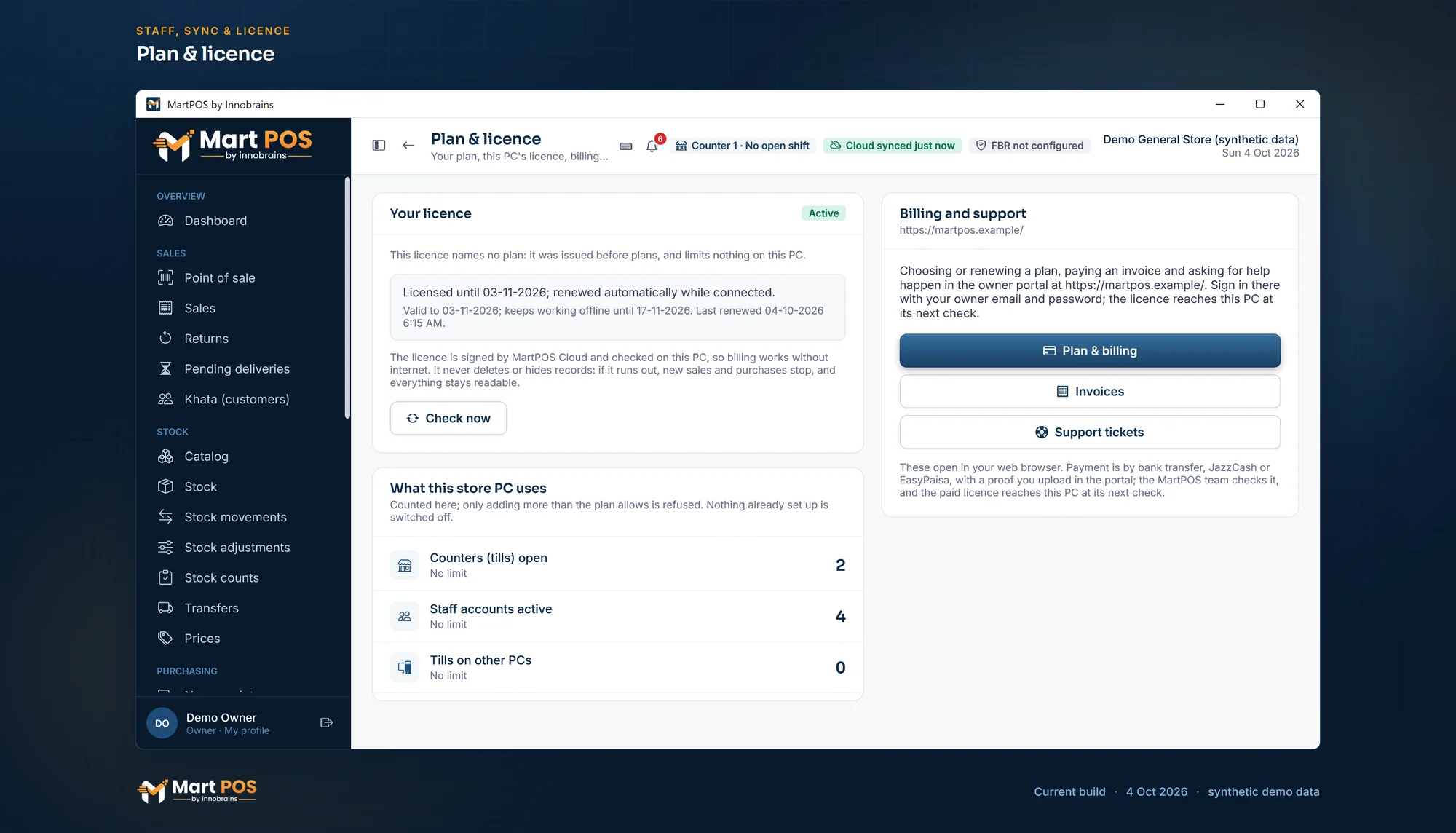
Plan & licence. The licence this store PC holds, checked on the PC itself, and what the store uses; plans are chosen and paid for in the owner portal. Screenshot of the current build (4 Oct 2026), synthetic demo data.
What this store PC uses
This card counts what the plan limits on this PC:
| Line | What it counts |
|---|---|
| Counters (tills) open | Counters that are open under Staff & counters |
| Staff accounts active | Staff who can sign in |
| Tills on other PCs | Tills paired over the shop network |
Each line shows, for example, 2 of 3 with 1 more allowed, At the plan's limit: adding more is refused, or No limit. Only adding more than the plan allows is refused; nothing already set up is switched off. When the plan does not include tills on other PCs, the line says so, and tills already paired keep working.
Billing and support
Paying and asking for help happen in the owner portal of MartPOS Cloud, where you sign in with your owner email and password. The buttons open it in your web browser:
- Plan & billing: choose or renew a plan and edition, buy add-ons (an extra branch, counter or staff account, where they are on sale) or the cloud add-on of an Offline licence, and pay by bank transfer, JazzCash or EasyPaisa with a payment proof you upload. The MartPOS team checks it, and the paid licence reaches this PC at its next check. See Add-ons.
- Invoices: your invoices and their payment proofs.
- Support tickets: ask the MartPOS team for help and follow their answers.
The links go to the cloud this store PC is paired with; before pairing, to martpos.pk. Nothing about payment is kept on the store PC. See The owner portal and the pricing page.
Downloads & updates
Updates for the store PC shows the version of the MartPOS app on this PC and of the store server, and whether a newer release is on offer. Updates are downloaded, checked and installed under Settings › System & updates; the button goes there. An update is checked against MartPOS's signature and its file's SHA-256 before it is used, the store database is backed up first, and it is installed when an owner or manager chooses Install now on the store PC, or by itself at a quiet moment at night if the store is set to install updates automatically. See Automatic updates at night.
The MartPOS installer: Open the download page opens the download page in your browser, for a new store PC, a replacement, or an extra till. Once installed, extra tills take new versions from the store PC (see Updating tills from the store PC). The installer is not code-signed yet, so Windows may say Unknown publisher: compare the file's SHA-256 with the one on the download page first. See Installing MartPOS.
Common questions
Why can my manager not see Plan & licence?
The plan, billing and support belong to the owner. Managers still see the licence's state in one line on Sync & FBR, and the bell tells them when it needs attention.
I paid. When does the store PC know?
At its next licence check, about once an hour while it is online, or at once with Check now after the MartPOS team has approved the payment.
The Invoices button opens a sign-in page. Is that right?
Yes. The portal asks for your owner email and password (and your second step, if you set one), then shows your invoices.
Our cloud add-on ended. Can we still sell?
Yes. The add-on only switches syncing on and off: when it ends, Sync & FBR shows Cloud add-on ended · not syncing and billing, returns, purchases, reports, exports and backups carry on. What you record meanwhile waits on the PC and is sent once the renewed add-on reaches it.
Where did the licence card on Sync & FBR go?
It moved here. Sync & FBR keeps a one-line summary with a Plan & licence button for the owner.
Related guides
Last updated 04 October 2026. Still stuck? Contact us.