Not everything on a bill comes off a shelf. A shop may charge Rs 50 for home delivery, Rs 10 for a carry bag, or a fee for stitching a garment bought elsewhere. In MartPOS these are services and charges: items that are billed and refunded like any other, but have no stock and no cost. This guide shows how to add one, how it behaves at the till, and where MartPOS leaves it out.
What a service or charge is
A service or charge is an item in Catalog of the kind Service or charge (no stock). On screen: "Billed and refunded like any item, such as home delivery, a carry bag or stitching; never bought, counted or kept in stock, so it never shows as out of stock."
- It is billed like any item: scan it, search it, or pick it, and change the quantity.
- It is refunded on a return against the bill, like any line.
- It has no stock, so it is never out of stock and never low.
- It has no cost, so the whole of what it brings in, after discount and before tax, is gross profit.
How to add one
- Open Catalog (under Stock) and choose New item.
- At the top of the form, choose Service or charge (no stock). The form's title becomes New service or charge, and the fields that only goods need disappear: sold loose, the reorder level, packs and expiry dates.
- Type the Item name, for example Home delivery or Carry bag, and a Variant / size if you have more than one, such as Within 2 km or Large.
- Under Units, prices and barcodes, type the Retail price. A new service is billed one at a time, as EA (Each). "The price of one. A service or charge has no packs; add a barcode only if one is printed for it."
- Set the Tax rate (%) if your tax adviser gives it one. MartPOS suggests none.
- Choose Save item.
MartPOS gives it its own code starting with NS (non-stock), for example NS-MAIN-000001, where goods start with IT. Search finds a service by its name, other names and code, like any item.
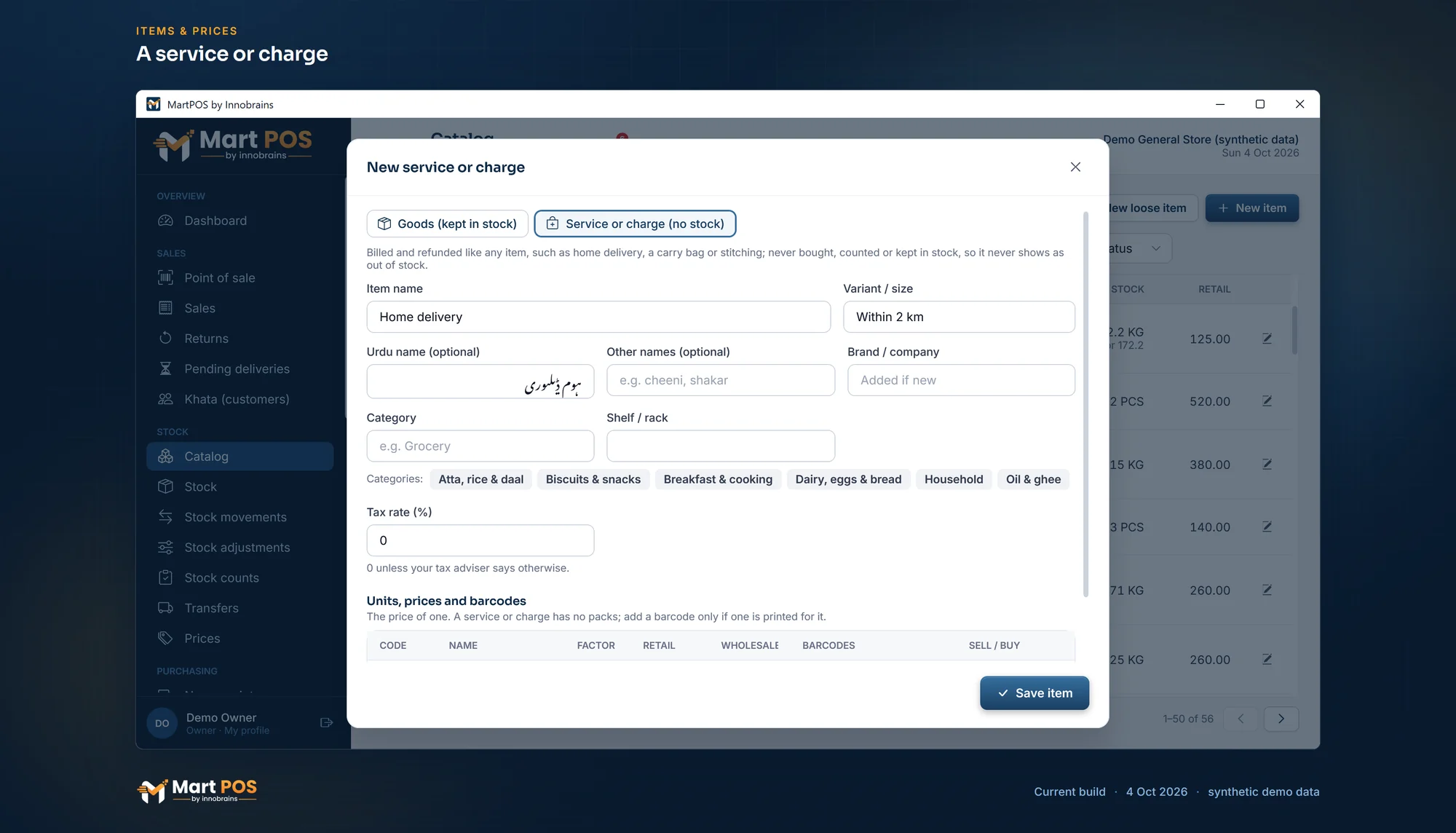
A service or charge. Home delivery or a carry bag is billed and refunded like any item, but never bought, counted or kept in stock, so it is never out of stock. Screenshot of the current build (4 Oct 2026), synthetic demo data.
At the till
Add the charge to the bill like any item: type deliv and press Enter, for example. It shows on the bill, the receipt and the A4 invoice with its price and tax. A discount on it works like a discount on any line. A cashier can add it as many times as the customer needs.
A customer's order that is held for later cannot carry a charge: "'Home delivery' is a service or charge: add it on the bill when the order is delivered." Add it to the bill when the goods are handed over. See Orders and pending deliveries.
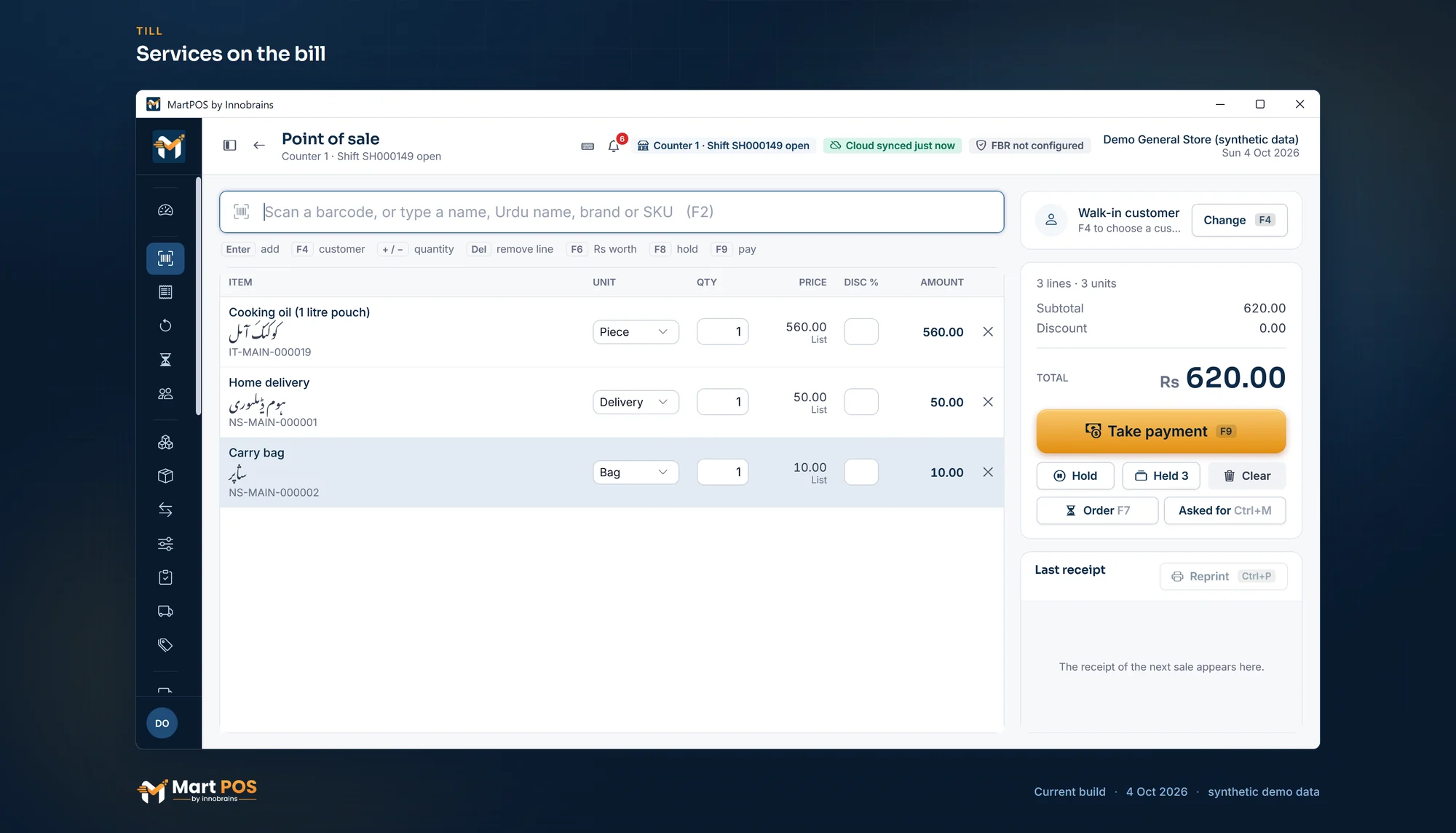
Services on the bill. A delivery charge and a carry bag go on the bill like any item, each with its own code starting NS; they are never bought, counted or kept in stock. Screenshot of the current build (4 Oct 2026), synthetic demo data.
Returns
A return against the bill can include the charge, and refunds it the right way, like any line. No stock comes back, because none went out. A return without a bill works the same way. See Returns, reprints and A4 invoices.
Where MartPOS leaves it out
A service is never bought, counted or moved, so every stock document refuses it with a message such as "'Carry bag' is a non-stock item (a service or charge): it is billed only, never bought.":
- purchases and purchase orders;
- stock adjustments, moves between the shop floor and the godown, and transfers to other branches;
- returns to suppliers.
Stock counts, the Stock list and the low-stock report leave services out, so they never clutter a count or show as missing.
In the reports and the books
A service's sales count in the daily report, best sellers, by tender, by cashier and profit and loss, like any sale. Its cost is always nil, so the whole net is gross profit. It has no stock value. The tax on it, if any, goes to sales tax payable like the tax on goods.
Changing an item's kind
An item that already has stock movements (bought, sold, counted or adjusted as goods) cannot become a service or charge: "This item already has stock movements, so it cannot become a service or charge (or the other way round). Add a new item instead." Mark the old item Discontinued and add a new one of the right kind.
Importing services
In a CSV import, the Item type column says goods or service (charge is read as service too); empty means goods. A service row cannot have opening stock, packs, Sold loose or Track expiry; each is shown as an error on its row. See Importing items, customers and suppliers from CSV.
Common questions
Should a carry bag be a service or goods?
If you want to know how many bags are left and reorder them, add the bag as goods and buy it on a purchase. If you only want to charge for it, a charge is simpler: it never needs a count.
Can I charge delivery on a khata bill?
Yes. The charge is part of the bill, so it goes on the customer's khata with the rest when the bill is paid on account.
Does a service need a barcode?
No. Most are found by typing their name. If you print a barcode for one, for example on a card at the counter, add it under Barcodes and it scans like any item.
Why does my service not appear in the stock count?
Services have no stock, so there is nothing to count. They are left out of counts on purpose.
Related guides
Last updated 05 October 2026. Still stuck? Contact us.