MartPOS works fully without the cloud. Pairing the store PC with MartPOS Cloud adds the owner portal: each branch's daily sales from anywhere, the licence, item and price edits, shop settings, transfers between branches and support. This guide covers pairing and how to read the sync status on the store PC.
What you need
- An owner account on MartPOS Cloud, approved by the MartPOS team. See Your MartPOS Cloud account and two-step sign-in. Turn on two-step sign-in first.
- The owner's sign-in on the store PC.
- Internet on the store PC while pairing.
Step 1: Create a pairing code in the portal
- Sign in to the owner portal and open Pairing codes (under Store PCs).
- Choose Create a pairing code.
- The code is shown once, for example K7P2Q-9XM4D: "Works once, until 3:45 PM, 27 Sep 2026 (Pakistan time)." Use Copy, or write it down. Only a fingerprint of it is kept.
A code works for 30 minutes and pairs one store PC. Recent codes shows the last 20 with their state: Waiting, Used by a store PC, or Expired. A business still waiting for approval cannot create codes.
Step 2: Pair on the store PC
- On the store PC, sign in as the owner and open Sync & FBR (under Administration).
- Under Pair with MartPOS Cloud, type the Cloud address, https://martpos.pk, and the Pairing code.
- Choose Pair this store. "Store paired with MartPOS Cloud. Sending waiting records now."
Pairing also fetches the store's licence. The branch appears in the portal under Branches and on the dashboard after its first sync, usually within a minute.
The first store PC you pair fixes which business the cloud account belongs to. A store set up offline as a separate business cannot join an account that already has another business. A second shop of the same business joins as a branch: see Joining a new branch to your business.
What is sent, and when
Sales, returns, purchases, payments, stock changes, item details and shop settings are queued on the store PC as they happen and sent in the background: every 15 seconds while the cloud answers, and less often (up to every 5 minutes) while it does not. Each record is sent in order and counted once, even after a long outage. Billing never waits for the cloud.
After each send, the store PC also collects what the owner changed in the portal: item and price edits, shop settings and transfers from other branches.
Reading the sync status
The bar at the top of every screen:
| Shows | Meaning |
|---|---|
| Cloud not connected | The store is not paired. Everything works on the store PC. |
| Cloud synced 2 min ago | The last round succeeded within the last few minutes. |
| Cloud last synced 26 Sep, 6:40 PM | Paired, but no successful round for more than 5 minutes: usually no internet. |
| Cloud paired, not synced yet | Just paired; the first round has not finished. |
| Cloud sync problem | The last round failed; the reason is on Sync & FBR. It is retried by itself. |
| Sync paused | Someone paused sync on Sync & FBR. Nothing is sent or fetched until it is resumed. |
| · 12 waiting | Records on the store PC not yet in the cloud. |
On Sync & FBR, the Cloud sync card shows the Cloud address, the last successful sync, how many records are Waiting to sync and how many Need attention, with what each state means: "The store keeps working and nothing is lost."
- Sync now sends at once instead of waiting: "Sent 45 record(s) to MartPOS Cloud." or "Everything is already in the cloud."
- Pair again takes a new code, for example after the cloud account was changed.
- Pause sync and Unpair… are explained below.
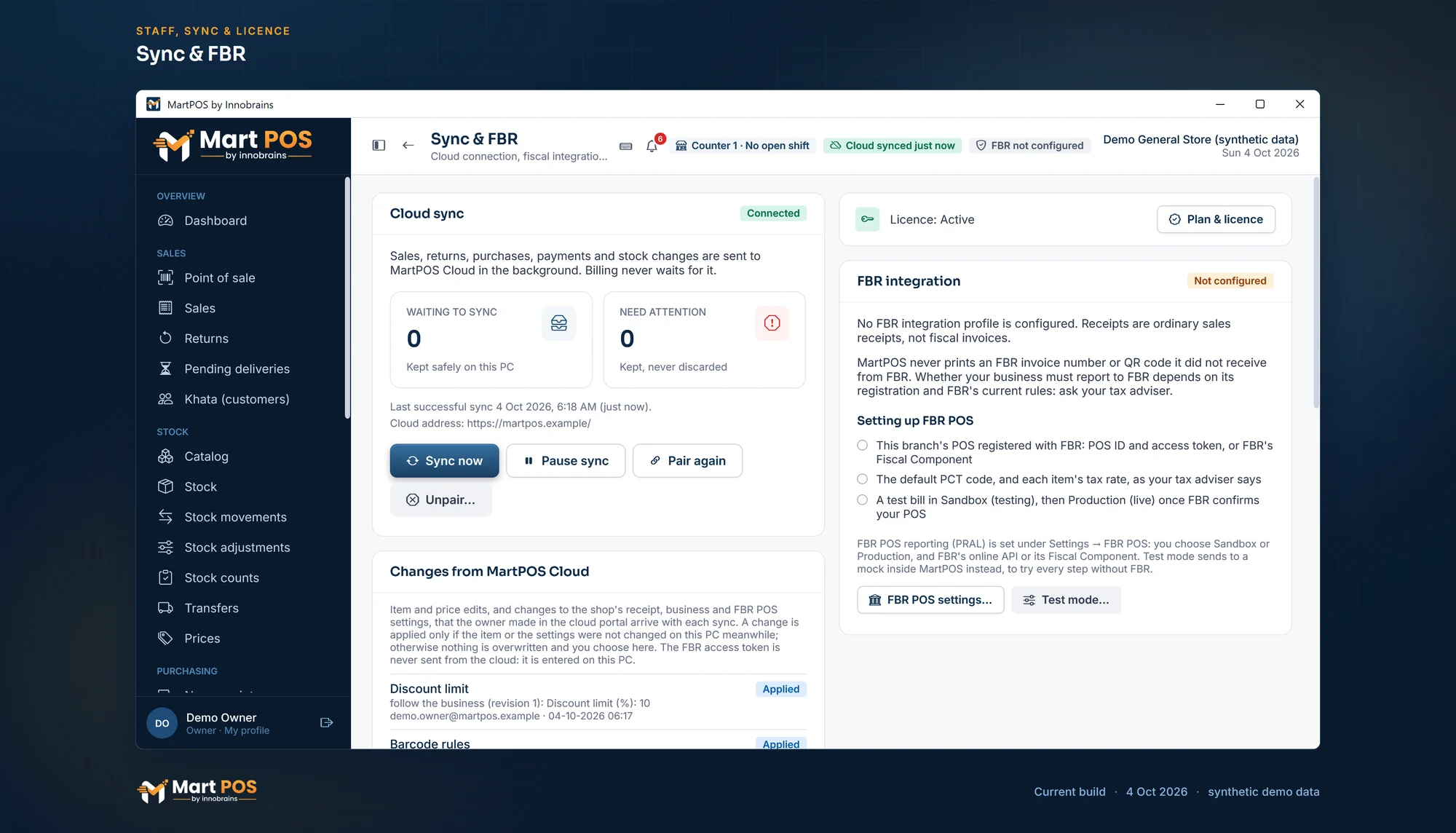
Sync & FBR. Sales, returns and stock changes go to MartPOS Cloud in the background and billing never waits; sync can be paused or the PC unpaired here, and settings the owner shares arrive with each sync. FBR POS is shown not configured. Screenshot of the current build (4 Oct 2026), synthetic demo data.
Pausing sync
On a metered or slow connection, an owner or a manager can choose Pause sync on Sync & FBR. "Sync paused: nothing goes to MartPOS Cloud until you resume it. Billing goes on; records wait on the store PC."
While sync is paused:
- billing, returns, purchases, the day book and backups carry on as always, and records wait on the store PC in order;
- nothing is sent to the cloud or fetched from it (the portal's figures stop at the last sync, and portal changes wait in the cloud);
- the licence is still checked;
- every PC shows Sync paused in the bar, and a Sync paused banner on every page but the till; Sync & FBR says who paused it and when.
Choose Resume sync on the same card: what waited is sent at once, each record exactly once. Pausing and resuming are recorded in the audit log and in Settings › Settings history.
Unpairing the store PC
Unpairing stops the store PC sending sales, stock and khata to the cloud and fetching the owner's changes from the portal. Everything stays on the PC: bills, stock, khata, settings and backups.
- On the store PC, sign in as the owner and open Sync & FBR.
- If records are waiting (or sync is paused), resume sync and choose Sync now until Waiting to sync shows 0. MartPOS refuses to unpair while records are waiting, because they would never reach the cloud.
- Choose Unpair…, type UNPAIR to confirm, and choose Unpair this PC. "Unpaired: MartPOS Cloud no longer takes this PC's records, and its portal shows it as unpaired. Everything stays on this PC. Pair again with a new code to carry on."
The portal's Devices page then shows the PC as Unpaired on the store PC, with the date. If the cloud could not be reached at that moment, the PC unpairs itself anyway and never uses that pairing again; revoke it in Devices to tidy the list.
The licence is renewed only while the store PC is paired: pair it again before the licence it holds runs out. Pairing again with a new code carries on where it stopped: nothing is sent twice and no number is used twice.
Records the cloud refused
A record the cloud refuses (which should not happen in normal use) is listed under Refused by the cloud, with its reason and sequence number: "These records are kept on this PC with the reason. The rest of the store's records keep syncing. Quote the sequence number to support." Refused records are never deleted and never sent again by themselves; open a support ticket with the number. When support says the cause is fixed (usually after a MartPOS Cloud update), an owner or a manager chooses Send them again: the records go exactly as they were, and one the cloud still refuses comes back to the list with its reason.
The owner portal's view
The portal shows each branch's figures as last reported, always with the time. A branch that has not reported for 15 minutes is marked STALE: its shop may be selling right now without the internet. The store PC is the record; the cloud shows what it received, and when. See The owner portal.
Common questions
Does the shop stop billing if the internet goes down?
No. Everything waits safely on the store PC and goes up when the internet is back.
Can I pair the tills on other PCs too?
No need. Only the store PC pairs with the cloud; the tills work through it.
Can I stop the store PC syncing for a while?
Yes: Pause sync on Sync & FBR (owners and managers), and Resume sync later. Nothing is lost while it is paused. To stop for good, the owner unpairs the store PC (above).
I changed the store PC. Do I pair again?
A replaced or restored store PC must be handed over and paired again with a new code, so the old PC can never keep sending. See Backups and restoring a store PC.
Is my data safe in the cloud?
Each store PC has its own key, kept encrypted on that PC; the cloud keeps only a fingerprint of it. The cloud takes the business and branch from that key, never from what a request says, and limits every page and query to your own business. The connection to https://martpos.pk is encrypted.
Related guides
Last updated 04 October 2026. Still stuck? Contact us.