Customers often pay before they take the goods. A restaurant hands over Rs 20,000 at the start of the month and collects its groceries week by week. A family pays Rs 50,000 towards a wedding order of rice, sugar, cooking oil and spices that they pick up over the coming days. Someone pays ahead in Ramazan for ration bags to give away. That money is not a sale yet. MartPOS keeps it as an advance: money held for the customer, owed to them until it is used on a bill or paid back. This guide covers taking an advance, using it at the till, refunding it and keeping track of every advance held.
How to take an advance
- Open Khata (customers) and find the customer by name, code, phone or CNIC, or add them with New. A phone number makes them easy to find when they come back. For a restaurant, office or hotel, choose the institution type; tick Charge wholesale prices if they buy at wholesale rates.
- Choose Take advance ("Money paid now for goods collected later; held until used on a bill or refunded").
- Type the Amount (Rs) and choose how it was paid: cash (through this counter's drawer), bank transfer or cheque, card, EasyPaisa or JazzCash. Add a reference, such as the cheque number or the wallet's transaction ID, or a note if useful.
- Choose Record advance.
MartPOS shows, for example, "MAIN-DP000003: advance of Rs 20,000.00 from Al-Noor Restaurant (demo). Advance held: Rs 20,000.00." The customer's panel now shows Advance held next to what they owe, and the statement's Advance tab gets a line.
Cash taken as an advance goes into the drawer and is counted at the shift close; bank, card and wallet advances do not touch the drawer. Taking an advance needs an open shift on the counter only when it is paid in cash.
How to use an advance on a bill
- At the till, press F4 and choose the customer.
- Put the items on the bill as usual, and press F9.
- Click From advance. It fills in the advance or what is due, whichever is smaller.
- If the bill is larger than the advance, put the rest on cash, a wallet or khata.
- Choose Complete sale.
With a Rs 20,000 advance and a Rs 6,850 bill for the week's atta, daal, oil and eggs, the bill is paid from the advance and Rs 13,150 stays held. No cash moves: the drawer already counted the Rs 20,000 on the day it was paid, so it is not counted twice.
From advance is greyed out when no customer is chosen, or when the customer holds no advance.
Advances and orders
An advance often goes together with an order. The family pays towards the wedding order, and the items are put on an order for them with F7: what is on the shelf is held for them, and what the distributor has not delivered yet is awaited. When they collect, Hand over on Pending deliveries makes the bill, which can be paid From advance. The same works for a Ramazan ration order collected in several trips. See Orders and pending deliveries.
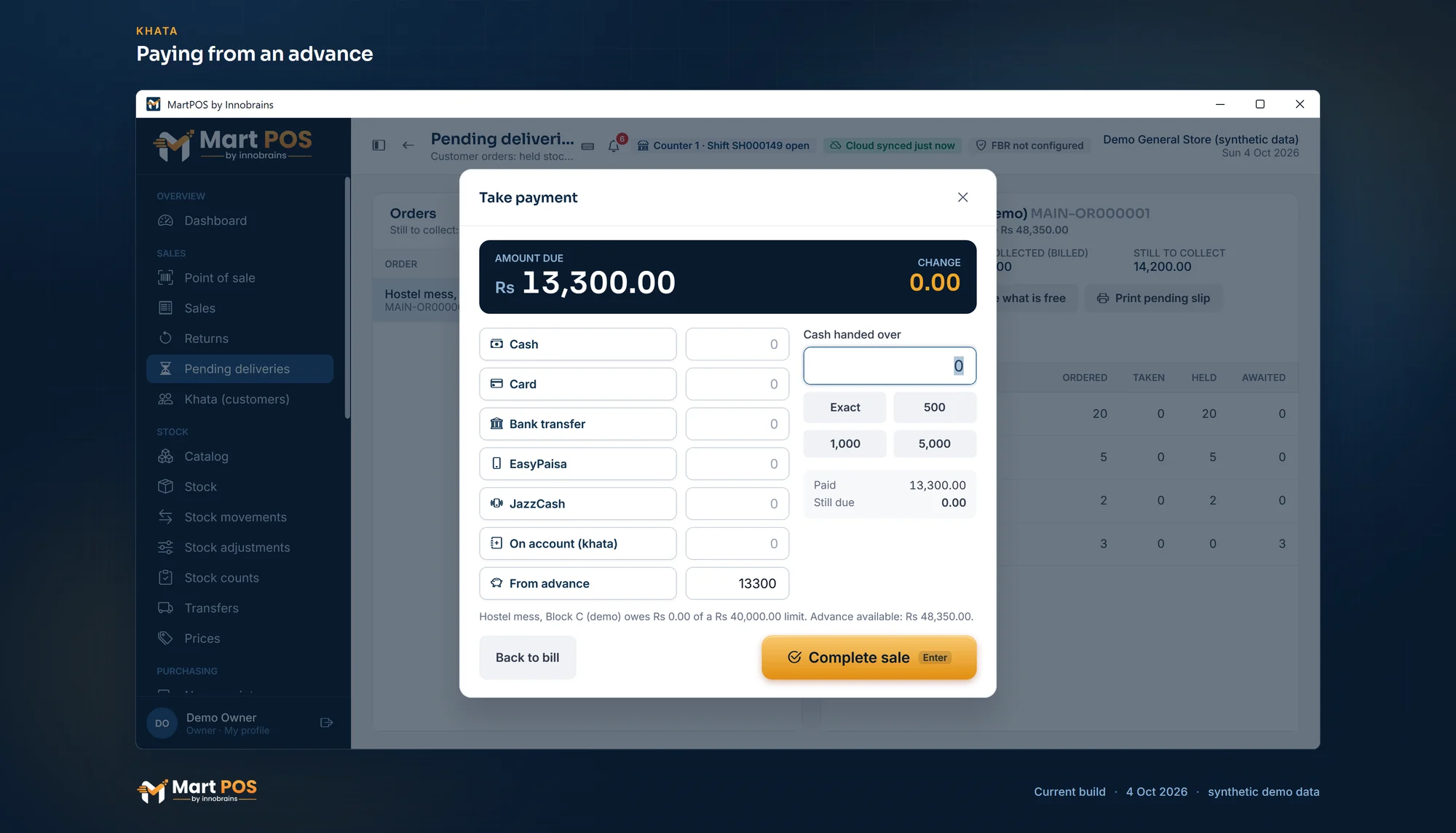
Paying from an advance. From advance pays a bill from what the customer paid ahead, here the hand-over of an order; no cash moves, because the drawer counted the advance on the day it was paid. Screenshot of the current build (4 Oct 2026), synthetic demo data.
How to refund an advance
- In Khata (customers), choose the customer.
- Choose Refund advance. The amount starts as everything they hold; lower it to pay back part.
- Choose how it is paid back, and Refund.
Refunding needs the advance-refund permission, which owners, managers and accountants have. Cashiers can take advances but not refund them, and do not see the button. A cash refund comes out of the counter's drawer and is counted at the shift close.
A return of goods paid from an advance can also go back onto the advance: choose Advance under Refund by in the return. See Returns, reprints and A4 invoices.
Keeping track of advances
- Khata (customers) shows Advances held for everyone at the top, and the list can be narrowed to customers who have an advance.
- The customer's statement shows each advance received, used and refunded on its Advance tab, apart from what they owe.
- Reports › Daily lists Advances held for customers: each customer with their phone and what was Received, Used, Refunded and is still Held. "Money taken in advance and not yet used on a bill or refunded. It is owed to the customer, not income."
- The shift close shows "Cash advances taken less refunded" as its own line, so the drawer count makes sense.
- MartPOS Cloud (when the store PC is paired): the owner portal's Khata › Advances tab shows each branch's customers with an advance held, read-only, and the customer's Ledger there lists every movement of it, apart from what they owe.
Rules worth knowing
- An advance is not income. It is money the shop owes the customer until goods are billed. The profit and loss report does not count it as sales.
- An advance is not khata. A customer can hold an advance and owe money at the same time; the two are shown apart. A khata payment cannot be larger than what the customer owes: MartPOS suggests recording the rest as an advance.
- Advances belong to one customer and one branch.
- Opening advances are not imported or entered as opening balances: for advances held before MartPOS, take them as new advances on the first day.
Common questions
The customer paid by JazzCash. Can I take that as an advance?
Yes. Choose JazzCash under how it was paid, and add the transaction ID as the reference.
Can an advance be used at another branch?
No. Advances, like khata, are kept by the branch that took them.
The wedding is over and Rs 3,000 is left. How do I give it back?
Use Refund advance. It pays back what is held, in cash or another way, and the advance goes to zero.
Why did the drawer not change when a bill was paid from the advance?
Because the cash came in when the advance was taken. Paying from the advance only moves money the shop already holds for the customer.
Does cancelling an order refund the advance?
No. Cancelling what is left of an order frees the held items but leaves the advance as it is. Refund it separately if the customer wants the money back.
Related guides
Last updated 05 October 2026. Still stuck? Contact us.