Sync problems never stop the shop: billing, returns, purchases and khata keep working on the store PC, and records wait safely there until the cloud answers. This guide explains what each sync message means and what to check.
First: where to look
- On the store PC: the bar at the top of every screen (Cloud synced …, Cloud last synced …, Cloud sync problem, · 12 waiting) and the Cloud sync card on Sync & FBR, which shows the last successful sync and the reason for the last failure.
- In the portal: each branch's last report on the dashboard, and STALE when it has not reported for 15 minutes.
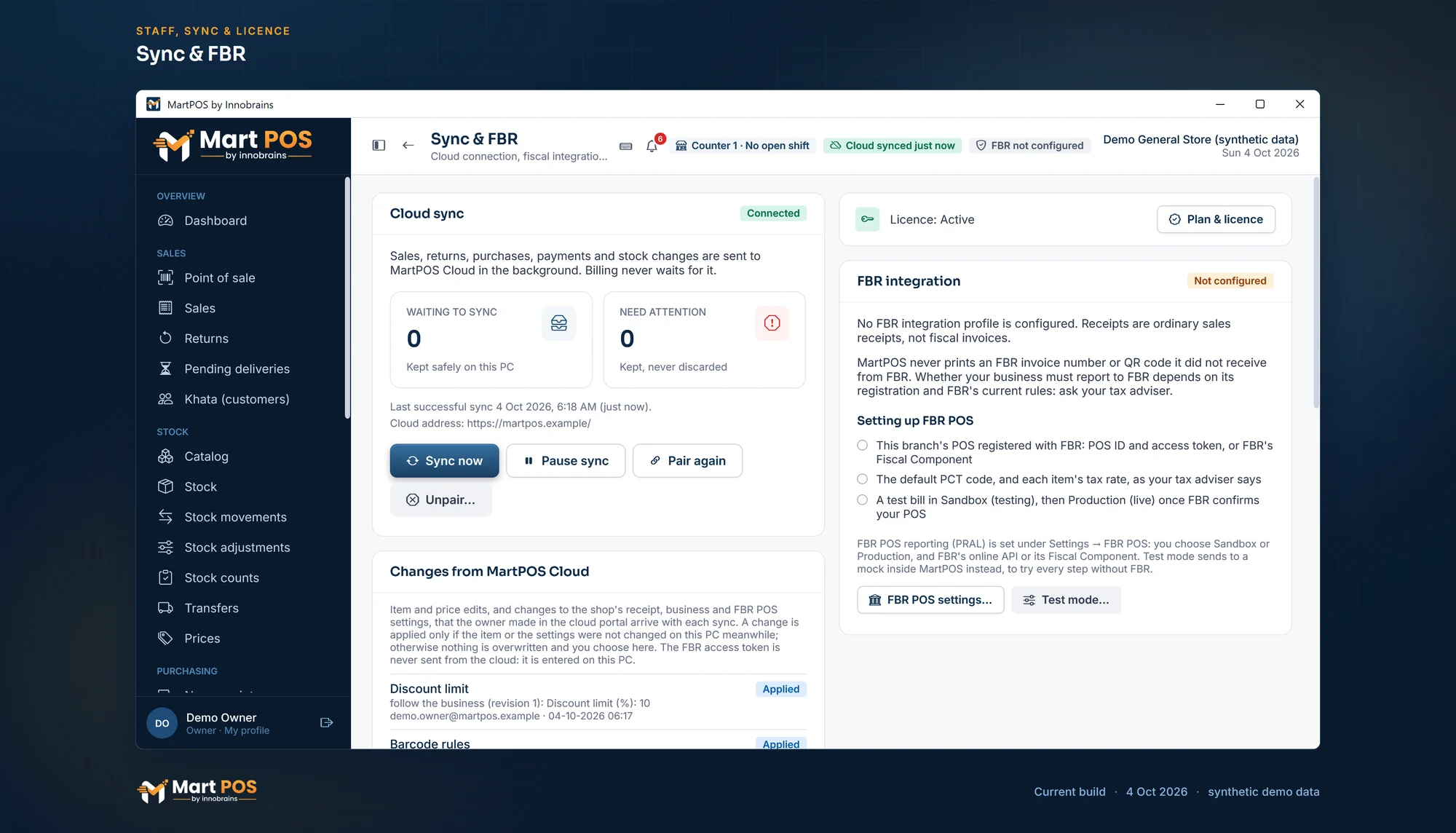
Sync & FBR. Sales, returns and stock changes go to MartPOS Cloud in the background and billing never waits; sync can be paused or the PC unpaired here, and settings the owner shares arrive with each sync. FBR POS is shown not configured. Screenshot of the current build (4 Oct 2026), synthetic demo data.
"Cloud last synced …" and records waiting
The store PC could not reach the cloud for more than 5 minutes. "The store keeps working. Records wait on this PC and are sent as soon as the cloud answers again."
- Check the internet on the store PC: open any website in a browser.
- Choose Sync now on Sync & FBR. "Sent 45 record(s) to MartPOS Cloud." means it worked.
- If the internet is fine but sync still fails, look at the reason on the Cloud sync card and see below.
The store PC retries by itself every 15 seconds, and less often (up to every 5 minutes) while the cloud does not answer. Nothing needs doing when the internet comes back.
"Sync paused"
Someone paused sync on Sync & FBR (the card says who, and when), for example while the shop was on a metered connection. Nothing is sent or fetched, and records wait safely on the store PC. An owner or a manager chooses Resume sync on that card; what waited is sent at once. Sync now is greyed out while sync is paused.
The portal says STALE
The branch's store PC has not reported for 15 minutes. If sync was paused on the store PC, the branch stays STALE until it is resumed. The shop may be billing normally without the internet. The figures catch up at the next sync; STALE never means records are lost. If it lasts, check the store PC as above, and that it is switched on and MartPOS is running on it.
"Cloud sync problem"
"The store keeps working and nothing is lost. The last attempt did not complete; it is retried automatically." The reason on Sync & FBR says why. Common reasons:
| Reason | What it means | What to do |
|---|---|---|
| No connection, timeout | No internet, or the cloud is busy | Wait, or check the internet. It retries by itself. |
| "This store PC is not paired, or its pairing was revoked." | The PC was revoked in the portal (Devices), or pairing was lost | Create a new pairing code and use Pair again |
| "This store PC is not the current authority for the branch." | The branch was handed over to a replacement PC; this is the old one | Stop using this PC for billing. See Backups and restoring a store PC |
Pairing is refused
| Message | Meaning |
|---|---|
| "This pairing code is wrong, expired or already used. Create a new one in MartPOS Cloud." | Codes work once, for 30 minutes. Make a new one. |
| "This business is already connected to another MartPOS Cloud account. Pair it with a code from that account." | Use the account the business was first paired with. |
| "This store PC belongs to a different business than the cloud account. Branches set up offline cannot join another business yet." | The PC was set up as a separate business. See Joining a new branch to your business. |
| "This branch is already paired with another cloud account." | The branch belongs to another account. |
| "Branch code … is already used by another branch of this business." | Each branch needs its own code. |
The cloud address must start with https://. A business waiting for approval cannot create pairing codes yet.
Records the cloud refused
A record the cloud refuses (which should not happen in normal use) is listed under Refused by the cloud, with the reason and a sequence number. "These records are kept on this PC with the reason. The rest of the store's records keep syncing." They are never deleted and never sent again automatically, because a refusal is not something waiting will fix. Open a support ticket in the portal and quote the sequence number. When support says the cause is fixed (usually after a MartPOS Cloud update), an owner or a manager chooses Send them again under the list: the records go exactly as they were, and one still refused comes back with its reason.
"Unpaired" in the portal, or the store PC will not unpair
Unpaired on the store PC in the portal's Devices means the owner unpaired that PC on Sync & FBR. Its data stays on the PC and in the portal; pairing it again with a new code carries on where it stopped. See Pairing with MartPOS Cloud and sync status.
The store PC refuses to unpair while records are still waiting ("… still waiting to go to MartPOS Cloud, and would not reach it after unpairing."): resume sync if it is paused, choose Sync now, and unpair once Waiting to sync shows 0.
The portal is missing records the store PC has: send everything again
If the portal's figures for a branch are short (for example after MartPOS Cloud had to put its database back from an older copy, or the branch was paired with a cloud that never had its history), the owner can send the store PC's whole history once more:
- On the store PC, sign in as the owner and open Sync & FBR.
- Under Send everything again, choose Send everything again and confirm.
Billing goes on meanwhile. The records go in small batches between the normal sync rounds (the normal sync keeps going), and if the store PC restarts it carries on where it stopped. The card shows how far it is: sent of total, how many MartPOS Cloud did not have, how many it already had. Stop ends it after the batch on its way.
MartPOS Cloud keeps only the records it did not have; records it already has are ignored, so nothing is counted twice. When everything is sent, it rebuilds the branch's figures from all the records it now holds; the portal's Branches page says the figures are being rebuilt, then Sent again. If nothing was missing, nothing changes. Items, prices and shop settings are sent again fresh as well.
It is refused while sync is paused, on a store PC that is not paired, and for a plan without the cloud add-on. A branch transfer's own record lost by the cloud does not come back this way (its stock movements do).
Changes from the portal are not arriving
Item edits, settings changes and transfers reach the store PC only when it syncs. Check that it is syncing (above). A change that arrived but could not be applied is either a conflict under Changes from MartPOS Cloud on Sync & FBR, waiting for someone to choose, or listed in the portal as Refused by the store PC with its reason.
The licence and the cloud
The store PC renews its licence from the cloud while it syncs, at most once an hour. If it cannot reach the cloud for a long time, the licence runs into its grace period and the bar shows Licence: reconnect soon. See Your MartPOS licence.
Common questions
Will a long internet outage lose sales in the cloud?
No. Every record waits on the store PC, in order, and is sent once the internet is back, each exactly once.
Why do two PCs show as paired for one branch in Devices?
Revoke the one no longer used, for example an old store PC after a replacement. Only the current store PC should be paired.
Does sending everything again double the sales in the portal?
No. MartPOS Cloud recognises every record it already has and ignores it; only lost records are added, and the figures are rebuilt from the records themselves.
Can I see which records are waiting?
Sync & FBR shows how many are waiting and lists any that need attention. The records themselves are the shop's normal bills and payments.
Related guides
Last updated 04 October 2026. Still stuck? Contact us.