Money leaves the shop for more than stock: rent, wages, the electricity bill, a rickshaw for a delivery, tea for the staff. And cash goes from the drawer to the bank. Recording both in MartPOS keeps the drawer count right at the shift close and puts the expenses in the profit and loss report.
How to record an expense
- Open Expenses (under Money) and choose New expense, or on Day book choose Expense ("Rent, wages, electricity, tea…").
- Choose What for:
- Rent
- Salaries and wages
- Electricity, gas and internet
- Transport and delivery
- Repairs and maintenance
- Bank charges
- Online payment gateway fees (what a payment gateway keeps from a settlement; usually booked for you by Gateway settlements, see below)
- Other expenses (tea, cleaning and the like)
- any category the shop has added, such as Packing material (see Expense categories of your own below)
- Type the Amount (Rs).
- Choose Paid with: Cash (from this counter's drawer), Bank transfer / cheque, Card, EasyPaisa or JazzCash.
- Optionally fill in Paid to (LESCO, landlord), the Bill or cheque no. and Notes.
- Choose Record expense. "MAIN-EX000007: Electricity, gas and internet Rs 8,450.00 recorded."
"A supplier's bill for goods is a purchase, not an expense. Cash paid here is counted at the shift close." Cash expenses need an open shift on this counter and show at the close as "− Expenses paid in cash".
Save draft keeps the expense on the store server to finish later, even before the amount is known, for example when the electricity bill is due but has not come. Nothing is posted. It is listed on Expenses › Drafts with who saved it and when; Open it, fill in the amount and choose Record expense, and the draft is gone. See Drafts and same-day voids.
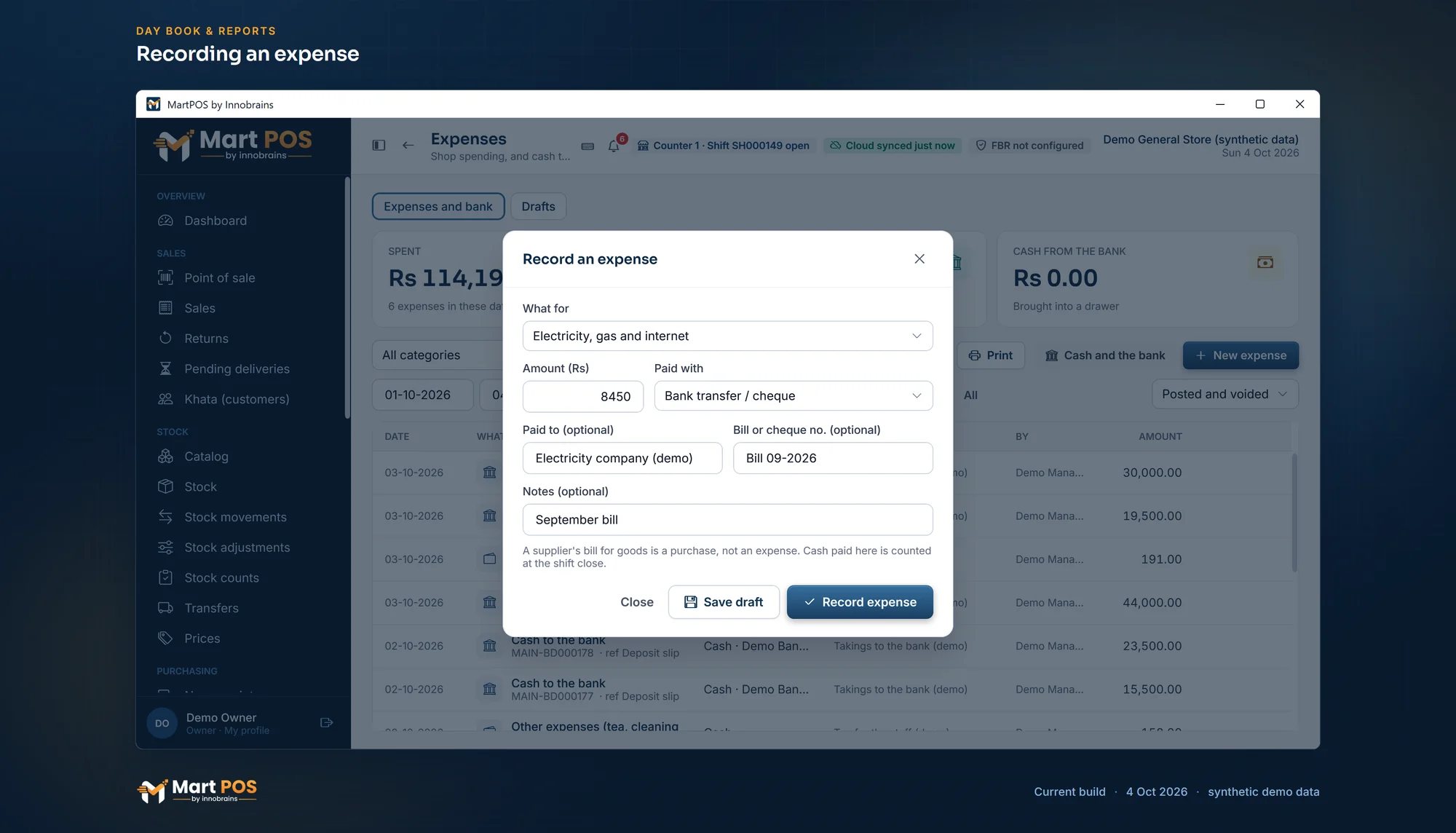
Recording an expense. Rent, wages, electricity or tea: what it was for, the amount, how it was paid and to whom; cash paid from the drawer is counted at the shift close. Screenshot of the current build (4 Oct 2026), synthetic demo data.
Expense categories of your own
An owner or manager adds categories under Settings › Cash & shifts, in the Expense categories card.
- Choose Add category, type a Name such as Packing material or Staff meals, and choose Save category.
- The expense form offers it from then on, after the built-in ones.
Each category you add gets its own ledger account (6000-01, 6000-02 and so on, under operating expenses), so Profit and loss lists it by name and the trial balance shows it on its own line. Change renames a category of your own or switches any category off:
- The eight built-in categories keep their names.
- A category that is switched off is no longer offered for new expenses. Expenses already recorded in it keep it, and lists and reports still show its name.
- Other expenses always stays on, so there is always somewhere to record an expense.
- A category is never deleted. Renaming one renames it everywhere, for past expenses too.
How to move cash between the drawer and the bank
- On Expenses or Day book, choose Cash and the bank (Cash and bank on the Day book).
- Choose Drawer to bank (a deposit), Bank to drawer (bringing change or cash back from the bank) or Between accounts (from one of the shop's bank or wallet accounts to another, with no drawer).
- Type the amount and, optionally, the Deposit slip or cheque no. and notes.
- Choose Record. "MAIN-BD000004: Rs 50,000.00 taken from the drawer to the bank."
When moving cash needs a manager
The owner can ask for a manager's approval for large movements: Settings › Cash & shifts › Moving cash needs a manager's approval from an amount, with the amount in From Rs. It is off until the owner sets it.
With an amount set, for example Rs 50,000, a deposit, a withdrawal or a transfer between accounts of that amount or more is recorded by an owner or manager as usual. Anyone else who may move cash, such as an accountant, sees "This shop asks for a manager's approval from Rs 50,000: a manager will be asked for their PIN before it is recorded." A manager then types their PIN for that one movement, and the list shows who approved it. Expenses are not affected.
"The drawer is this counter's: the cash is counted at its shift close." The close shows the net as "− Cash to the bank (net)".
A move between the drawer and the bank is not an expense and not income: it only moves money between two of the shop's own accounts.
Where they show
- Expenses (under Money): every expense and bank move, newest first, with its number, what it was for, who it was paid to, how it was paid, the reference, the notes and who recorded it. The cards show what was Spent, Cash to the bank and Cash from the bank for the dates chosen. Narrow the list by category, by Expenses only or Cash and the bank only, and by dates (From and To, or Today, This month, Last month, Year, All). CSV, PDF and Print give the list as it is filtered.
- Day book: each expense and bank move as a journal entry on its day.
- Reports › Profit and loss: expenses by account under Expenses and losses.
- The shift close: cash expenses and cash to the bank, in the expected-cash lines.
- MartPOS Cloud (when the store PC is paired): the owner portal's Expenses page shows each branch's expenses read-only, with totals by category, a voided expense marked and left out of the totals, and cash to and from the bank on its own tab; Reports there takes the expenses off the gross profit. What for, the payee, the note and who recorded it come from store PCs updated on or after 29 September 2026.
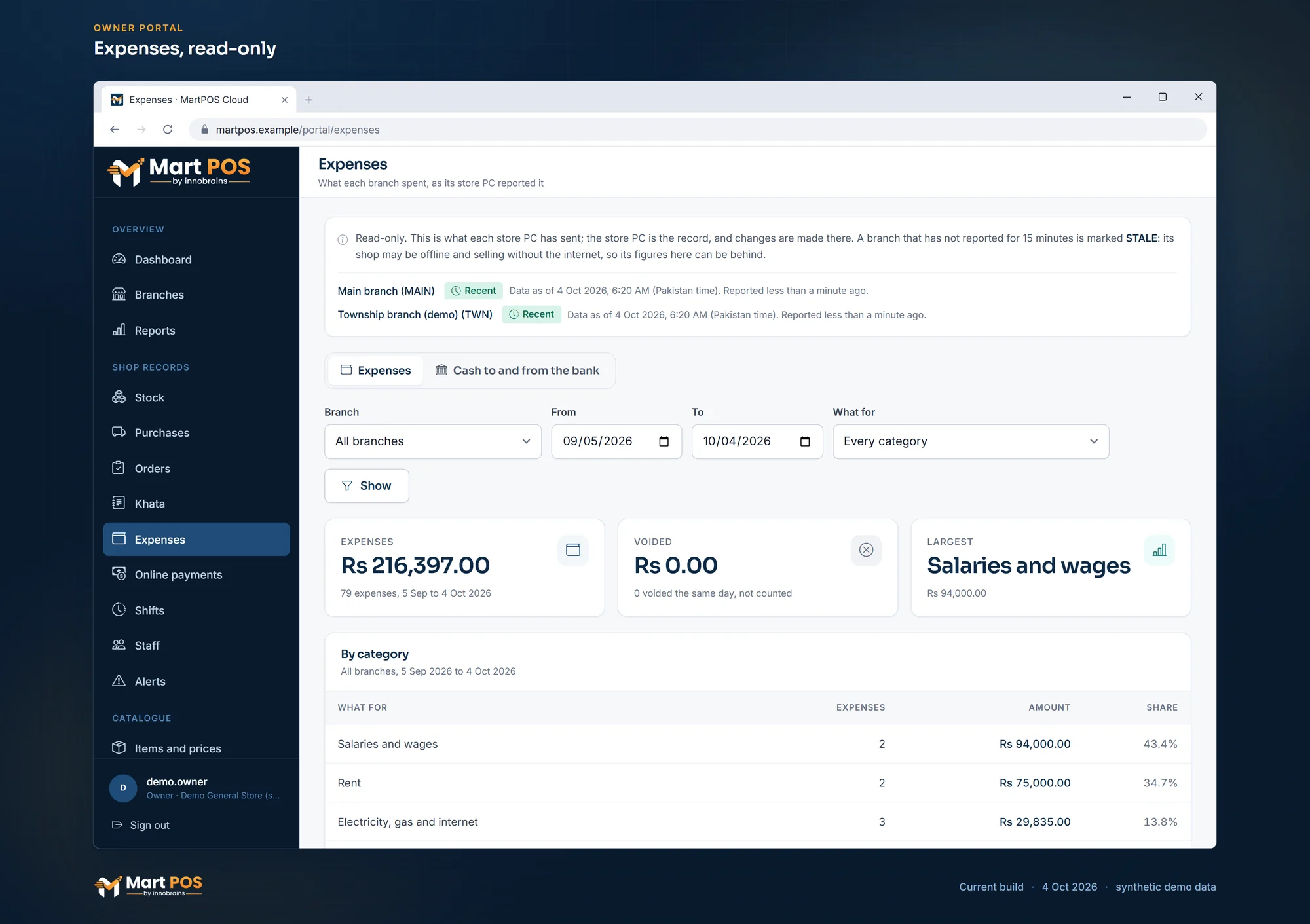
Expenses, read-only. Each branch's expenses by category, such as salaries, rent and electricity, as its store PC reported them. Screenshot of the current build (4 Oct 2026), synthetic demo data.
Who can do this
Recording expenses and moving cash to and from the bank needs the expenses permission: owners, managers and accountants. Cashiers cannot. The Expenses page needs the accounting permission (owners, managers, accountants and auditors). Adding or changing expense categories, and setting the amount from which moving cash needs a manager, are settings: owners and managers.
Rules worth knowing
- Expenses are never edited or deleted. On the day it was recorded, an owner or manager can choose Void on its row, with a reason: the money comes back (cash into its shift's drawer while that shift is open, otherwise this counter's) and it leaves the expenses and the profit. It stays on the list marked Voided, and the list can show Voided ones only. After that day, a wrong expense is corrected by another entry; ask your accountant which. Cash to or from the bank is not voided: record the opposite movement.
- Dated today. Expenses are dated on the business day they are recorded, so closing the books for past days never blocks them. See The day book, trial balance and closing the books.
- Gateway fees are booked by the settlement. When a way of paying goes through an online payment gateway, the gateway pays the shop later, less its fee. Recording that payout under Money › Gateway settlements books the fee and the tax on it in Online payment gateway fees, so you do not record it again as an expense. See Online payment gateways and settlements.
- Bank and wallet accounts. MartPOS starts with one account of each kind: Bank, Card settlements receivable, EasyPaisa wallet and JazzCash wallet. An owner or manager adds more under Settings › Bank & wallet accounts, each with its own ledger account and book, and can enter what was in an account when the shop started using it. See Opening balances and opening stock.
Common questions
The owner took cash home. Is that an expense?
No. It is money taken out of the business, not a shop expense. MartPOS has no separate drawings entry: ask your accountant how to record it, and use Drawer to bank only if the cash really went to the bank.
We pay the helper's wages weekly in cash. Which category?
Salaries and wages, paid with cash from the drawer, during an open shift.
Can I record an expense for last month?
No. Every entry in MartPOS is dated on the business day it is recorded; expenses cannot be back-dated. Record each expense on the day it is paid.
Can I rename "Other expenses" or delete a category I no longer use?
No. The built-in categories keep their names, and no category is deleted, because past expenses are recorded in them. Switch a category off so it is no longer offered; Other expenses is the one that cannot be switched off.
Can I attach a photo of the bill?
No. Type the bill number in Bill or cheque no. and keep the paper bill.
Related guides
Last updated 05 October 2026. Still stuck? Contact us.