Each person can set a short PIN of 4 to 6 digits. With it they sign in quickly at a till of the shop, and a manager uses theirs to approve something a cashier may not do alone, right at the counter, without anyone signing out. Roles do not change: a PIN never gives anyone more than their role allows, and an approval covers one bill, return or copy only.
Setting your PIN
- Sign in with your password and choose your name at the bottom of the menu (My profile).
- Choose PIN for tills.
- Type the New PIN (4 to 6 digits) twice and your Your password, then choose Set PIN (or Change PIN).
The PIN may not be the same digit repeated or a straight run such as 1234, 3456 or 9876: "Choose a PIN that is harder to guess than 1234 or 1111." The owner can ask for 5 or 6 digits, or switch the obvious-PIN check off, under Settings › Sign-in & passwords; a PIN already set keeps working. Only a scrambled form of the PIN is kept on the store PC, like the password, and the change is recorded in the audit log. If the owner chose Reusing an old PIN under Settings › Sign-in & passwords, a new PIN may not be your current one or one of your last few: "You have used this PIN recently." Remove PIN switches PIN sign-in and approvals off for you until you set a new one. When the owner resets someone's password under Staff & counters, that person's PIN is removed too; they set a new one after signing in.
Signing in with a PIN
On a till where it is allowed, the sign-in screen offers Sign in with PIN under the password. Choose it, choose your name from the list, type your PIN and choose Sign in. Use my password instead goes back.
Only registered tills of this store offer it:
- A till on another PC that the owner paired with the store PC is a registered till, and PIN sign-in is on there from the start. See Tills on other PCs.
- The store PC itself does not offer PINs until the owner allows it, for a shop where the store PC is also a counter.
- Any other PC cannot reach the store server at all, so it never offers PINs.
The owner turns PIN sign-in on or off for each PC under Staff & counters › Sign-in with a PIN: This store PC and each paired till, with Allow PIN sign-in or Turn off. A session opened with a PIN works only on the PC it was opened on, exactly like one opened with the password, and it signs itself out after the same time without use. The owner's rules under Settings › PCs & sign-in (what the PC is for, which roles sign in there, and the PCs one person is allowed or blocked on) apply to a PIN exactly as to a password: the name list shows only the people who may sign in on that PC. Someone whose password has expired, or was reset by the owner, signs in with the password once to choose a new one.
Wrong PINs and lockout
"Wrong PIN. 4 tries left." Five wrong PINs in a row lock that person's PIN for 5 minutes; the next lockout in a row lasts 10 minutes, then 20, and so on up to a day (the owner can change the tries and the first lock's minutes under Settings › Sign-in & passwords), so guessing a PIN takes far too long to be worth trying. A right PIN resets the count. While a PIN is locked the sign-in list says PIN locked for now under the name. The password always still works, and lockouts are recorded in the audit log.
Manager approval by PIN
Some things at the till need a permission a cashier does not have. Instead of the cashier signing out, a manager approves that one thing with their PIN:
| What the cashier is doing | What the manager approves |
|---|---|
| A discount above the till's 10% limit, or a changed price | This bill's discount |
| A line that would sell below its average cost | Selling below cost on this bill (the reason is still asked for) |
| Switching a bill between retail and wholesale prices, for a cashier the owner has not allowed to | This bill at those prices |
| A return against a bill | This return |
| A return without a bill | This return. See Returns without a bill |
| Printing a receipt again, for a role without the reprint permission | This one copy |
| A bill on khata over the customer's credit limit, or while they have an old unpaid bill, where the shop asks for an approval | This bill on khata. See Udhaar khata: customers, credit limits and recoveries |
| A bank deposit, a withdrawal or a transfer between accounts of the shop's amount or more, by someone who is not an owner or manager | This one movement. See Expenses and cash to the bank |
At the till: when the store server refuses the bill, the till shows This bill needs a manager's approval for … above the lines with Manager approval. Returns: a cashier's Return items, New return and Return without a bill end with the approval window before anything is saved.
In the Manager approval window the manager chooses their name under Who approves (only people whose role allows it and who have a PIN are listed), types Their PIN and chooses Approve. The window shows what is being approved, for example This bill of 2 lines for a walk-in customer (Cooking oil 5 litre tin: 20% off).
What an approval covers, and what it does not:
- Exactly what was shown. Change a quantity or a discount on the bill and it must be approved again: "The bill changed after the manager approved it."
- Once. The bill, return or copy that uses it uses it up.
- A few minutes. An approval not used within 10 minutes runs out.
- Not the session. The cashier stays signed in as themselves and can do nothing more than before on the next bill.
- Both names are kept. The bill or return records who took it and who approved it; its page says Approved by … with their PIN for …, a return receipt prints Approved by …, and the audit log records both people.
Nobody can approve their own request, a person whose role does not allow it is refused ("… may not approve this."), and a wrong PIN counts towards that manager's lockout.
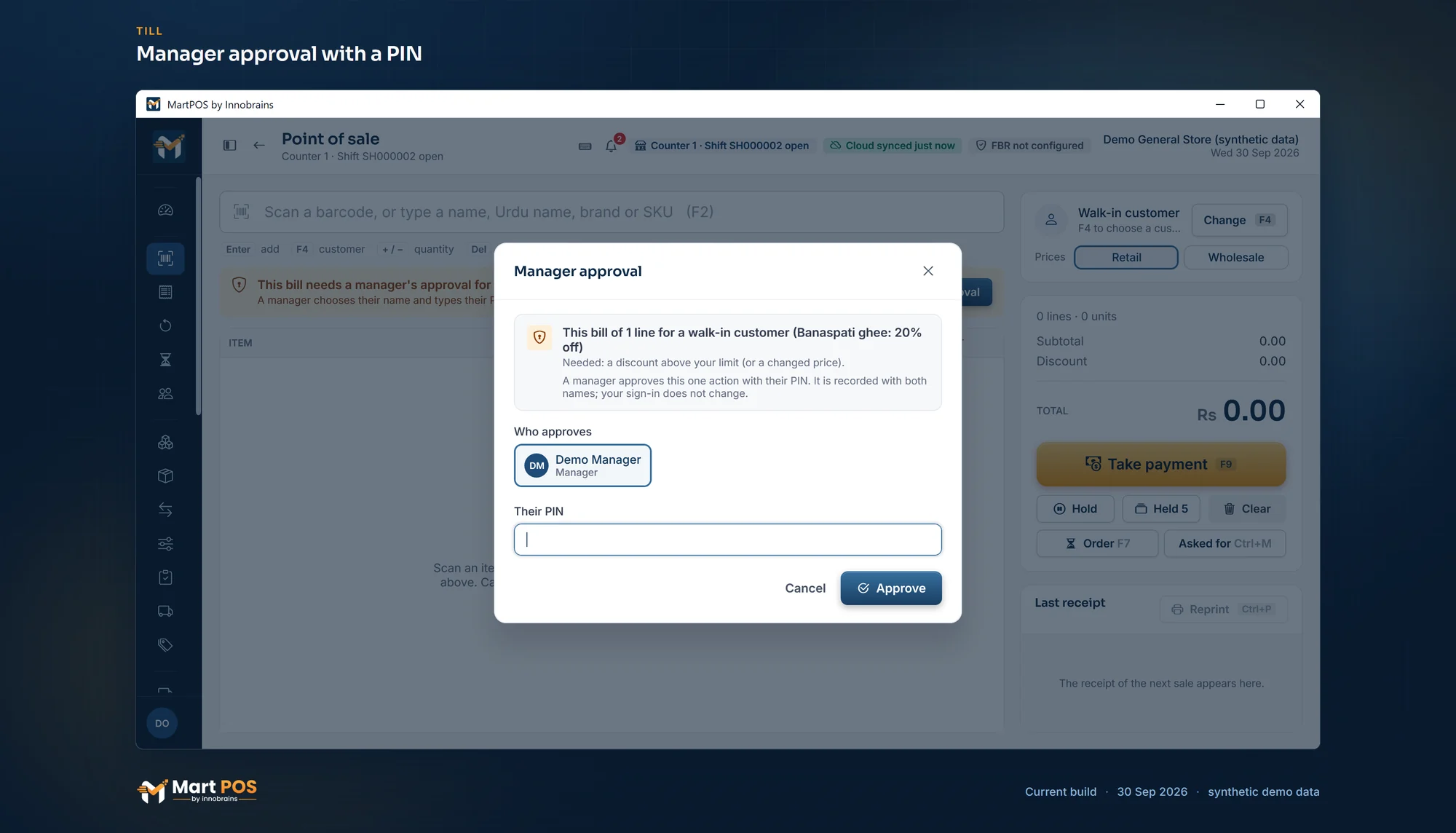
Manager approval with a PIN. A discount above the cashier's limit waits for a manager, who approves it at the same till with their PIN; both names are recorded. Screenshot of the current build (30 Sep 2026), synthetic demo data.
Common questions
Can a cashier give a 20% discount now?
Only with a manager's approval for that bill. The cashier's own limit is unchanged, and the next bill needs its own approval.
Why is Sign in with PIN missing on this PC?
Either this PC is the store PC and the owner has not allowed PINs there, the owner turned PIN sign-in off for this till, or nobody has set a PIN yet. The owner checks under Staff & counters › Sign-in with a PIN.
I forgot my PIN. What do I do?
Sign in with your password and set a new PIN under My profile › PIN for tills. The owner cannot see anyone's PIN.
Can the owner approve too?
Yes, once the owner has set a PIN. Anyone whose role holds the permission can approve.
Related guides
Last updated 04 October 2026. Still stuck? Contact us.