Wholesale and retail prices in one shop, without mistakes at the counter
Many kiryana and general stores sell thok and parchoon from the same shelves. How to give every unit a retail and a wholesale price, decide who pays which, keep the switch out of the wrong hands, and see what wholesale really sells, with the way MartPOS does it.
A neighbourhood shop rarely sells at one price. The family down the street pays retail, parchoon. The smaller shop two streets away buys by the carton at your wholesale rate, thok. A hotel has its own agreed rate for a tin of cooking oil. When those prices live in the cashier's head or on a paper rate card, three things go wrong: a busy cashier charges retail to a trade buyer and loses the customer, a friendly one gives wholesale to a friend and loses the margin, and at the end of the month nobody can tell how much went out at which price. This guide sets out a simple way to run both from one stock, and how MartPOS does each part.
Decide who pays which price
Write the rule down before you set anything up. A common one:
| Buyer | Pays |
|---|---|
| Walk-in customers | Retail |
| Shopkeepers who buy to resell | Wholesale |
| Hotels, restaurants and canteens you supply | Their own price list |
| One buyer with an agreement on a few items | Their agreed prices on those items |
Everything below is a way of making the counter follow that rule without the cashier having to remember it.
Give every unit two prices
In MartPOS each unit of an item has a Retail price and a Wholesale price: the piece, the kilo, the packet, the carton, the bag. A carton usually has its own wholesale price, lower per piece than single pieces. If a carton has no price of its own, the till uses the piece's wholesale price times the pieces in the carton. Prices are dated: a change applies from the day it is saved, and bills already made keep what they charged.
Leave the wholesale price empty on items you never sell at wholesale. On a wholesale bill such an item is sold at its retail price, and its line says No wholesale price: retail, so the cashier is never surprised and nothing is sold below what you intended. See units, packs, prices and barcodes.
Choose how the shop sells
The owner or a manager sets this under Settings › Sales › Retail and wholesale:
| Choice | What the till does |
|---|---|
| Retail | Bills start at retail. Customers set to wholesale prices get them; there is no switch. |
| Retail and wholesale | The same, and a Retail | Wholesale switch under the customer on every bill. |
| Wholesale shop | Every bill starts at wholesale, walk-in bills too; the switch gives retail when a customer asks. |
Two more settings fit a shop that sells both ways. A counter can start every bill at wholesale, for example the counter at the side where trade buyers are served, while the front counter bills at retail; that counter's till shows the switch even in a retail shop. And a wholesale bill needs a named customer makes the till ask for the customer before taking payment on a wholesale bill, so every trade sale has a name on it.
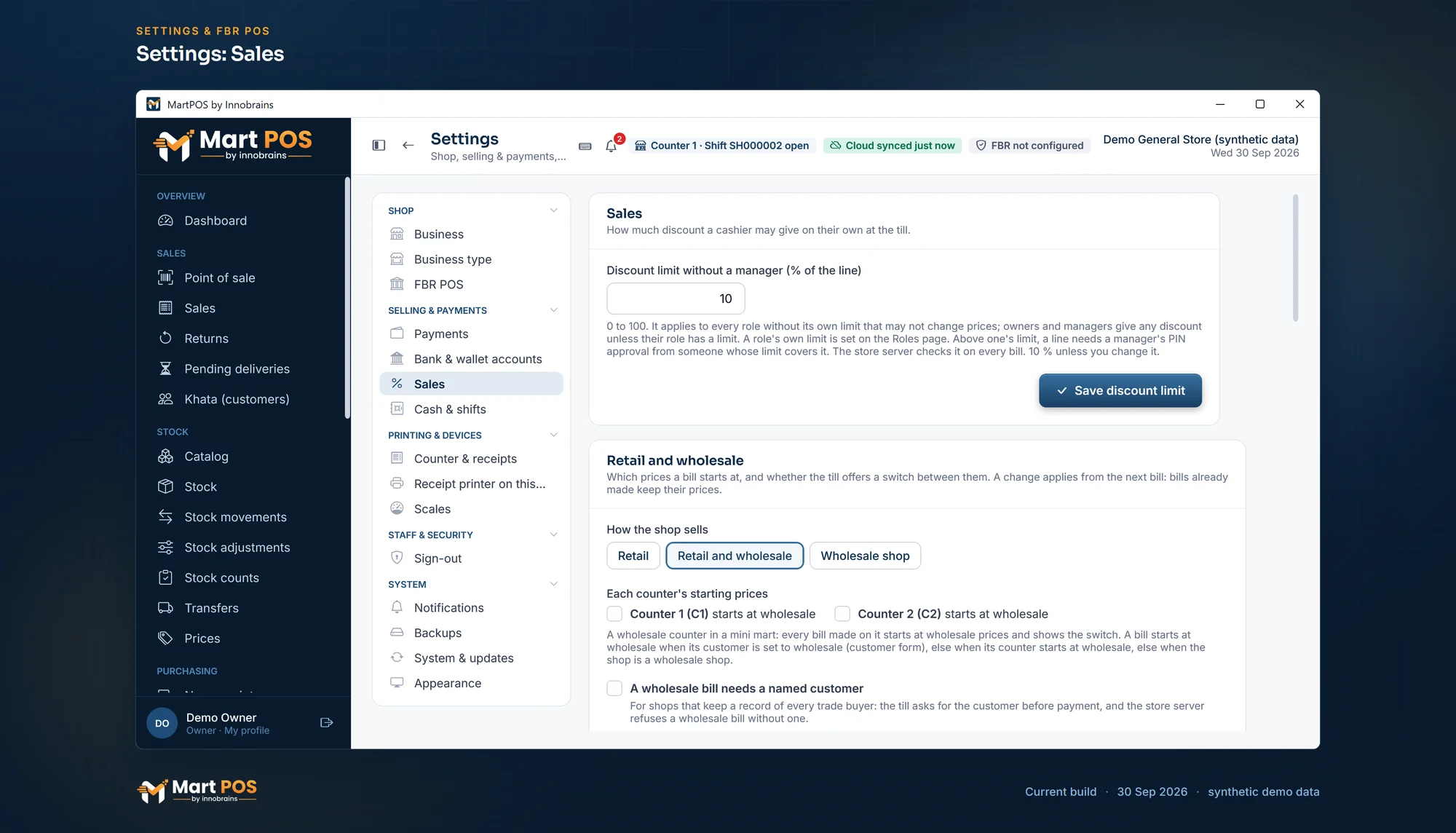
Settings: Sales. The discount a cashier may give without a manager, and whether the shop sells retail, wholesale or both, counter by counter. Screenshot of the current build (30 Sep 2026), synthetic demo data.
Where a bill starts
A bill starts at wholesale when its customer is set to Charge wholesale prices; otherwise when its counter starts at wholesale; otherwise in a wholesale shop. In every other case it starts at retail. A customer's price list or agreed price comes before the wholesale price, and a quantity break or a promotion can only lower a price, never raise it. Every line shows where its price came from: List, Wholesale, Price list, Contract, Qty price or Promotion. See billing at the till.
Keep the switch in the right hands
Switching a bill away from the prices it started at is a permission of its own. Owners and managers always have it. A cashier has it only when the owner ticks it on the Cashier role on the Roles page; otherwise the till says the bill needs a manager's approval, and a manager approves that one bill with their PIN. The store PC checks the permission on every bill, whatever the screen shows, and changing a single line's price by hand still needs the price-override permission. See staff, roles and counters.
Price lists and agreed prices
For a group of buyers on the same terms, make a named, dated price list, such as Hotel rates 2026-27, with its own price per item or a discount off a brand or a category, and put those customers on it. For one buyer's agreement on a few items, add contract prices on that customer. Both come before the wholesale price, and both need the pricing permission to change. See price lists, quantity breaks and promotions.
Trade buyers on khata
Shopkeepers who buy from you usually buy on credit. Give each one a credit limit and they can take goods on khata up to it; their statement shows every bill and payment, and the ageing report shows who is paying late. Advances they pay ahead are kept apart from what they owe. See udhaar khata for customers.
See what wholesale really sells
On the Sales page, choose Wholesale prices for a period: the list shows only the bills made at wholesale, and its cards add up that period's wholesale sales. Retail prices does the same for retail. The receipt, the A4 invoice and the bill's page of a wholesale bill say Prices: Wholesale, and a return refunds what the bill charged. Because both kinds of sale post to the same day book at the same average cost, the profit and loss shows what the whole shop earned. See returns, reprints and A4 invoices.
A few things worth knowing
- One price level per bill. A bill is at retail or at wholesale as a whole. One line at a different price needs someone allowed to change prices.
- A counter POS, not a distribution system. There is no order-booker or salesman app, no delivery routes and no mobile app.
- Price lists stay in each branch. Price lists and agreed prices are kept by each store PC; the owner portal can change an item's retail and wholesale prices for one branch or all.
Common questions
Can one shop sell at both wholesale and retail prices?
Yes. Give each unit a retail and a wholesale price, choose Retail and wholesale in Settings › Sales, and the till shows a Retail | Wholesale switch on every bill. Stock stays one figure whichever price is charged.
Can a cashier give wholesale prices to anyone?
Only if the owner allows cashiers to switch. Otherwise a manager approves each switched bill with a PIN, and every bill records who made it.
What if I forget to set a wholesale price?
The item is sold at retail on a wholesale bill, and its line says No wholesale price: retail.
Can a trade buyer have lower prices on only a few items?
Yes: add contract prices for those items on that customer. They come before the wholesale price and any price list.
How do I know how much I sold at wholesale this month?
On the Sales page, choose Wholesale prices and this month's dates. The cards total that month's wholesale sales.
For the whole picture, see retail and wholesale billing and the udhaar khata page.
Founder & CEO, Innobrains Technologies
Arshad Ali is the founder and CEO of Innobrains Technologies, the company that is building MartPOS: point-of-sale, stock and khata software for kiryana stores, general stores and mini marts in Pakistan.
Run your shop on MartPOS
Barcode billing, loose goods and packs, khata and advances, on the shop's own PC without internet. We set it up on your shop PC with you.
Related guides
Keeping a kiryana store's accounts (hisaab) day by day
A kiryana store's hisaab comes down to six questions: what was sold, whether the drawer is right, who owes you, whom you owe, what the shop spent and what it earned. A daily routine that answers them, and how MartPOS keeps each figure as the counter works.
30 Sep 2026 · 8 minUdhaar khata for customers, without losing track of who owes what
Khata keeps a neighbourhood shop's regulars coming back, and quietly eats its cash if nobody watches it. How to set credit limits, sell on khata, take payments, read a statement and chase what is overdue, with the way MartPOS keeps each account.
29 Sep 2026 · 5 minUrdu on your shop's receipts: the words, the item names and what to check first
Many customers read Urdu more easily than English, and the names they ask for are Urdu names. What a receipt can show in Urdu, how a thermal printer prints Nastaliq, how to choose between Urdu, English or both, and what to test before relying on it.
04 Oct 2026 · 6 min