Urdu on your shop's receipts: the words, the item names and what to check first
Many customers read Urdu more easily than English, and the names they ask for are Urdu names. What a receipt can show in Urdu, how a thermal printer prints Nastaliq, how to choose between Urdu, English or both, and what to test before relying on it.
In most kiryana and general stores the shopkeeper says "cheeni", "daal" and "atta", and many customers read the bill more easily in Urdu than in English. A receipt that shows the item names the way the customer knows them, and the total and the change in words they can read, saves questions at the counter and arguments later about a khata bill. This guide explains what an Urdu receipt can show, how a thermal receipt printer prints Urdu, how to choose between Urdu, English and both, and what to test before you rely on it.
What a receipt can show in Urdu
A receipt has two kinds of text, and they can be set separately:
- The receipt's own words: Bill, Date, Cashier, Total, Cash, Change and the like. These can be in English, in Urdu, or in both, each word printed as Bill / بل نمبر.
- The item names: each line can print the item's English name, its Urdu name, or both names.
Amounts, bill numbers, dates and the shop's own name print as they are. A receipt with only Urdu words is laid out right to left; a receipt with both keeps each line readable either way. An item that has no Urdu name yet prints its English name, so a half-finished item list never leaves a blank line.
Which to choose depends on your customers. Both suits a mixed neighbourhood and is the safest start. Urdu item names with English words suit a shop whose regulars know the items by their Urdu names. Urdu for everything suits a counter where few customers read English.
How a thermal printer prints Urdu
Most counter receipt printers use ESC/POS, a set of printer commands with built-in letters, and those letters do not include Urdu. So a receipt with any Urdu on it is sent to the printer as a picture, drawn line by line in a proper Nastaliq font. Three things follow:
- It looks like written Urdu, joined letters and all, because it is drawn, not typed.
- It prints a little slower and comes out longer, because Urdu lines are taller than English ones.
- Paper width matters more. On 58 mm paper a long item name in both languages wraps sooner; on 80 mm both names fit more often on one line.
A receipt printer's Windows driver can print the same picture. Old 76 mm dot-matrix printers are better used through their Windows driver for Urdu.
Getting the item names right
The receipt can only print an Urdu name that the item has. Type it once on each item, with the spelling your customers expect, and add the other names people ask for (cheeni, shakar) so the cashier finds the item whichever word they type. When moving from a register, the item list can carry Urdu names in the import file. Two habits help:
- One spelling per item. "چینی" on one sugar and a different spelling on another confuses customers and the search.
- Short names. The receipt line is narrow. "دال مسور" reads better than a long description; keep the size or the pack in the variant.
A bill keeps the names it was made with, so bills from before you typed an Urdu name reprint in English. That is deliberate: a reprint shows what the customer was given.
Setting it up in MartPOS
In MartPOS the receipt's language is a shop setting, used by every till: Settings › Counter & receipts, the card Language, size and logo.
- Under The receipt's words, choose English, Urdu or English and Urdu.
- Under Item lines print, choose the English name, the Urdu name, or both names.
- Choose Normal or Large text. Large prints taller lines with the same number of characters, so the receipt is longer but easier to read.
- If you like, add the shop's logo (PNG or JPG). A dark mark on a white background prints best on thermal paper.
- Watch the Preview beside the form: it is laid out by the same code that lays out the real receipt.
Then, on the PC with the receipt printer, open Settings › Printers on this PC and print the Urdu test. The step-by-step help is in receipt and printer settings. The A4 invoice and customers' statements can also be in Urdu, or in both, under Settings › Business; they keep a left-to-right page layout.
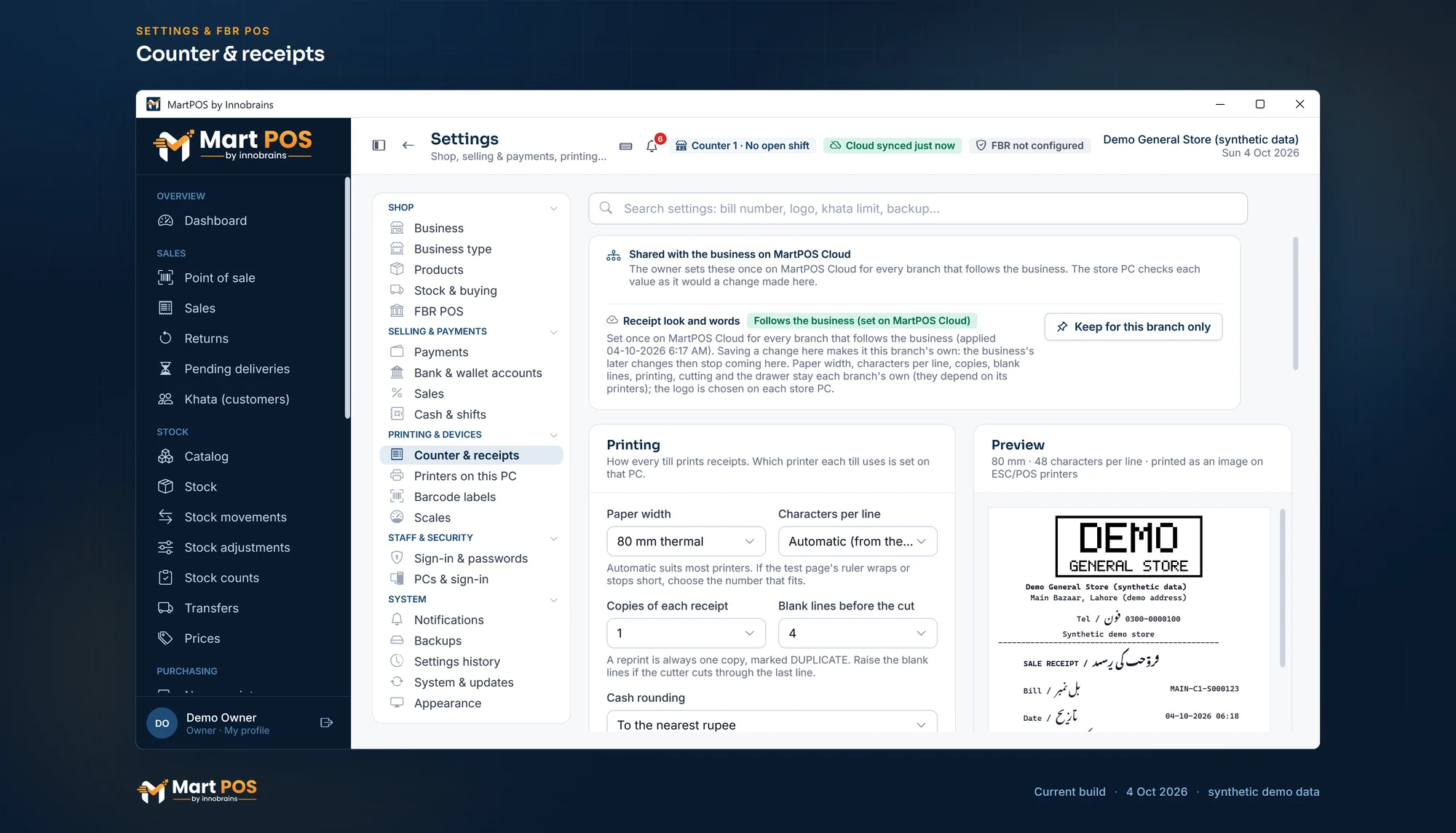
Counter & receipts. The receipt's logo, its words in English, Urdu or both, what it shows and cash rounding, with a preview of an 80 mm receipt; here the words follow the business. Screenshot of the current build (4 Oct 2026), synthetic demo data.
What to check first
- Print the Urdu test and one real receipt, and have someone who reads Urdu well read them. Check that the letters join, that nothing is cut at the right edge, and that the total and the change are clear.
- Check the speed before the busiest hour. A picture prints slower than text. Print a long bill and see whether the wait suits your counter.
- Read the fixed words as your customers will: Bill, Total, Cash and Change. If a word reads wrong to you, tell us.
- Set the paper width to the roll you use, 80 mm thermal or 58 mm thermal, and print a test page again after changing it, because Urdu names wrap differently on each.
The general store POS page explains how the till, receipts and payments fit together.
Common questions
Will the whole receipt be in Urdu?
Only if you choose Urdu for both the words and the item names. Amounts, bill numbers, dates and FBR's own lines stay as they are, and FBR's lines stay in English.
Are the screens in Urdu too?
No. The screens are in English. Items can show their Urdu names on screen, and receipts, the A4 invoice and statements can print in Urdu.
My printer prints Urdu as boxes or question marks. Why?
That happens when Urdu is sent to a printer as text. MartPOS sends Urdu as a picture to ESC/POS printers, so print the Urdu test from Printers on this PC and check the printing mode chosen there.
Which paper width is better for Urdu?
80 mm fits both names on one line more often. 58 mm works, with more wrapped lines.
Does the Urdu receipt cost more paper?
A little. Urdu lines are taller, so a receipt with Urdu is longer than the same receipt in English.
Founder & CEO, Innobrains Technologies
Arshad Ali is the founder and CEO of Innobrains Technologies, the company that is building MartPOS: point-of-sale, stock and khata software for kiryana stores, general stores and mini marts in Pakistan.
Run your shop on MartPOS
Barcode billing, loose goods and packs, khata and advances, on the shop's own PC without internet. We set it up on your shop PC with you.
Related guides
Register se computer par: dukaan ka hisaab POS software mein kaise layein
Kiryana ya general store ka hisaab barson se register, khata copy aur Excel mein chal raha ho to software par aana mushkil lagta hai. Saat qadam mein poora tareeqa, Roman Urdu mein, aur har qadam par MartPOS ki screen ka naam.
30 Sep 2026 · 6 minMoving your item list into MartPOS from Excel
Bring in items with their packs, Urdu names and opening stock, customers with what they owe and suppliers with what you owe them, from a CSV file, with every row checked before anything is saved.
29 Sep 2026 · 6 minSwitching a general store from a register or Excel to a POS, step by step
A practical plan for moving a kiryana or general store from a register or an Excel sheet onto POS software: when to switch, cleaning the item list, one closing date, the import, the checks before the first bill, the first day and the first week.
29 Sep 2026 · 6 min