Landed cost for kiryana purchases: freight and loading in the price of a bag
A bag of sugar does not cost what the mandi bill says. The truck, the loaders and the toll are part of its cost, and if they are not counted, every kilo looks more profitable than it is. What landed cost is, two ways to share it, and how MartPOS adds it to a purchase.
A bag of sugar from the mandi does not cost what the bill says. The truck that brought it, the loaders who carried it in and sometimes a toll on the way are all part of what the shop paid to get that bag onto its shelf. That full figure is the landed cost: the supplier's price and everything else it took to bring the goods to the shop. When the extra charges are left out, every kilo looks a little more profitable than it really is, and over a month the difference can be the shop's rent.
This guide explains landed cost for kiryana purchases in plain terms, shows two fair ways to share a freight bill over a delivery, and shows how MartPOS adds the charges to a purchase so the cost of each item, the stock value and the profit come out right.
What goes into landed cost
Count every amount the shop had to pay because of this delivery:
- Freight: the truck, pickup or loader rickshaw from the market or the distributor's godown.
- Loading and unloading: the labourers who lifted the bags and cartons.
- Other charges: a toll, a market fee charged per delivery, a small charge for packing.
Leave out what the shop pays anyway, whatever it buys: the rent, the staff's salaries, the electricity. Those are expenses of running the shop, not part of any one bag's cost. A rickshaw that goes to fetch goods once a week for many bills is better entered as a transport expense than spread over one purchase.
A worked example
Suppose a kiryana shop receives this from one supplier in one truck:
| Line | Bought | Supplier's price |
|---|---|---|
| Sugar | 10 bags of 50 kg | Rs 74,000 |
| Cooking oil | 5 cartons of 12 pouches | Rs 30,000 |
| Goods | Rs 104,000 |
The supplier adds Rs 1,200 freight to the bill, and the shop pays the loaders Rs 300 in cash. The charges are Rs 1,500, so the landed cost of the delivery is Rs 105,500.
Without the charges, sugar costs Rs 148.00 a kg and a pouch of oil Rs 500.00. With them, the cost is a little higher, and how much higher depends on how the Rs 1,500 is shared.
Two ways to share the charges
By value. Each line takes a share in proportion to what the supplier charged for it. Sugar is Rs 74,000 of Rs 104,000, so it takes about 71% of the charges: Rs 1,067.31. Oil takes the rest, Rs 432.69.
| Line | Goods | Share by value | Landed cost | Per unit |
|---|---|---|---|---|
| Sugar, 500 kg | Rs 74,000.00 | Rs 1,067.31 | Rs 75,067.31 | Rs 150.13 a kg |
| Oil, 60 pouches | Rs 30,000.00 | Rs 432.69 | Rs 30,432.69 | Rs 507.21 a pouch |
By quantity. Every unit received, in the unit it was bought in, takes an equal share. Here that is 10 bags and 5 cartons, 15 units, so each bag or carton takes Rs 100. Sugar takes Rs 1,000 (Rs 150.00 a kg) and oil Rs 500 (about Rs 508.33 a pouch). Free goods count as units too, so a free carton still carries its share of the truck.
Which is fairer? By value suits a mixed delivery, where expensive goods and cheap goods arrive together. By quantity suits a truck of similar bags or cartons, where the transporter really charges per bag. Pick one as the shop's usual way and stay with it, so this month's costs compare with last month's.
Why it matters for a kiryana shop
A kiryana shop works on thin margins. If sugar sells at Rs 160 a kg, the margin over the mandi price is Rs 12 a kg; over the landed cost it is about Rs 10. Two rupees a kilo is a sixth of the margin. Leave freight out, and the daily report shows a profit the drawer never sees, and the shop may price a bag for a shopkeeper customer at a rate that loses money after the truck is paid.
Landed cost also keeps the stock value honest: what the shelf and the godown hold is valued at what the goods really cost, so profit and loss, stock value and the books agree. This is part of keeping a kiryana store's accounts straight.
How MartPOS adds the charges
On New receipt (under Purchasing), enter the supplier's bill as usual: each item in the unit you bought it (a bag, a carton, a dozen), with the supplier's price. Then choose Charges beside the box where you add items:
- For each charge, choose what it was (Freight, Loading and unloading or Other charge), its amount, and a note if you like, such as Truck from the mandi.
- Choose On the supplier's bill when the supplier charged it on their bill: you owe it to them with the bill, and the receipt total includes it. Choose Paid now when you paid someone else, and how: cash from the counter's drawer (a shift must be open), bank transfer, card, EasyPaisa or JazzCash.
- Choose By value or By quantity. The dialog shows each line's share before you confirm. The shop's usual way is set in Settings › Stock & buying.
- Choose Use these charges, check the total, and post the receipt.
Each line then goes into stock at its price with its share added, so the item's average cost carries the charges, and the bill's page on Purchases lists the charges and who was paid. Cash paid to the loaders comes out of that counter's drawer and shows at the shift close. The step-by-step help is in receiving stock.
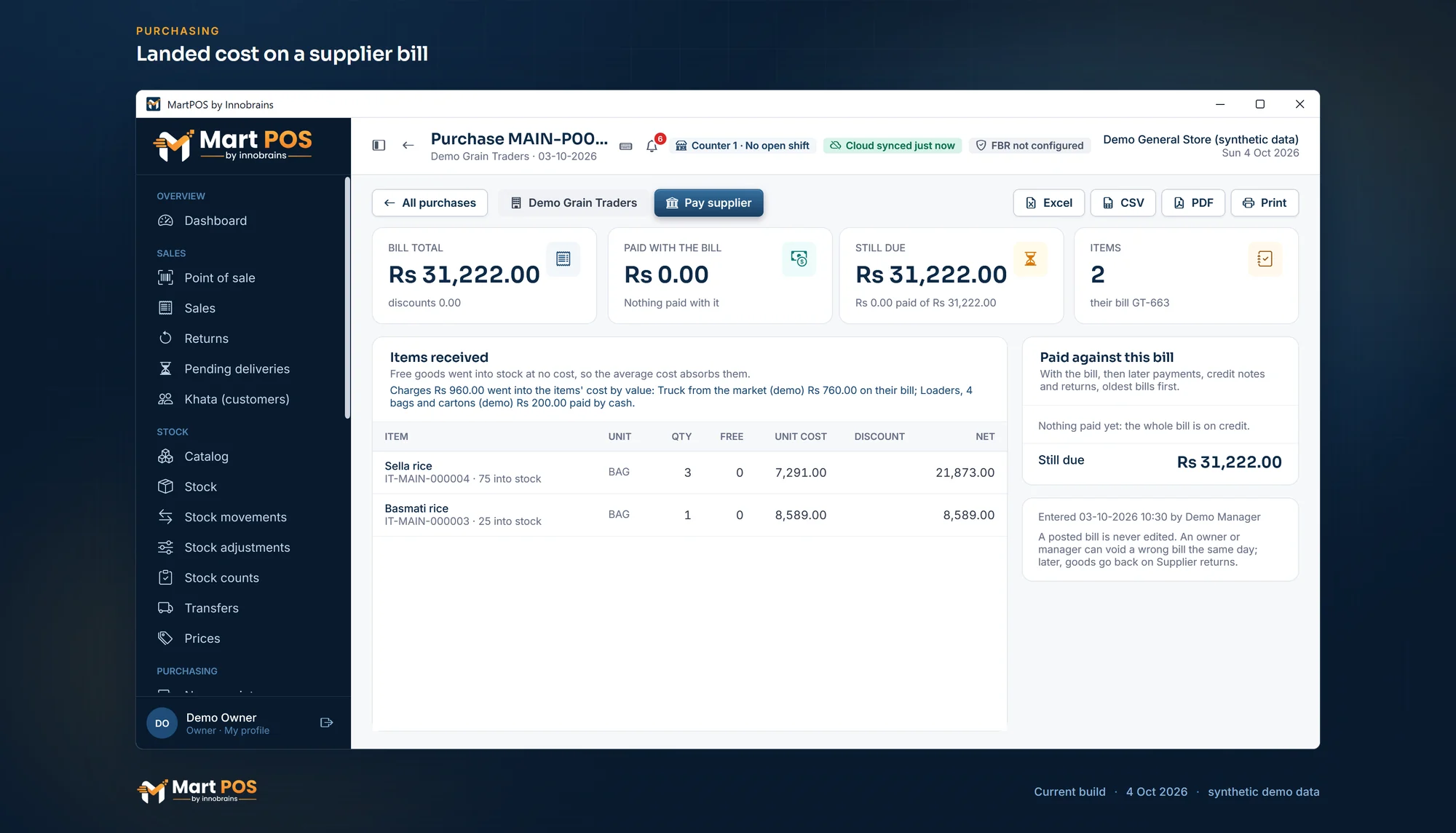
Landed cost on a supplier bill. Freight on the supplier's bill and loaders paid from the drawer, shared into the items' cost by value, so profit counts what the goods really cost. Screenshot of the current build (4 Oct 2026), synthetic demo data.
What to watch for
- Enter the charges with the purchase when you can. A transporter's bill that arrives a week later can still be added to the posted purchase as a later charge (since 4 October 2026): the part for the goods still in stock goes into their cost, and the part for the goods already sold goes to cost of goods sold, because those left at the old cost. Recorded as a plain expense instead, it does not change the cost.
- One truck, two suppliers. If one truck brought goods from two suppliers, split the freight yourself and enter each part with its own purchase.
- Do not count a charge twice. If the supplier's price already includes delivery, there is nothing to add.
- Work out your first delivery on paper. Share its charges by hand, as in the example above, and compare your figures with the shares the dialog shows before you confirm: it is the quickest way to see how the way you chose spreads the charges.
Common questions
Is freight an expense or part of the cost?
Freight paid to bring a particular delivery is part of that delivery's cost. Freight or rickshaw fares that are not tied to one purchase are an expense of running the shop.
Should I share the charges by value or by quantity?
By value for a mixed delivery, by quantity for a truck of similar bags or cartons. Either is fair if you use it every time.
Does landed cost change the price I sell at?
No. MartPOS never changes a selling price by itself. It changes the cost, so the profit on each sale is true, and you decide whether the price needs to move. The kiryana store software page explains how prices, packs and khata work together.
Can I add the loaders' money later?
Yes. Open the purchase on Purchases and add a later charge under Later charges: on the supplier's bill or paid now, shared by value or by quantity. The part for goods still in stock goes into their cost; the part for goods already sold goes to cost of goods sold. An owner or manager can void it the same day while the stock it went into has not gone out since.
Does the owner portal show the charges?
Yes. A branch's supplier bill in the owner portal shows each line's share of the charges in its cost, read-only, as the store PC sent it. Stock and costs are changed only on the store PC. See the stock and inventory software page for how stock is kept.
Founder & CEO, Innobrains Technologies
Arshad Ali is the founder and CEO of Innobrains Technologies, the company that is building MartPOS: point-of-sale, stock and khata software for kiryana stores, general stores and mini marts in Pakistan.
Run your shop on MartPOS
Barcode billing, loose goods and packs, khata and advances, on the shop's own PC without internet. We set it up on your shop PC with you.
Related guides
Barcodes for loose items and the goods you pack yourself
Loose daal, rice and spices come without a maker's barcode, and so do the 1 kg packets you fill yourself. Two ways to make them scan at the till in MartPOS, which to use when, and why you should never make up an EAN-13 number.
30 Sep 2026 · 5 minSelling atta, rice, daal and sugar by weight or by rupees
Half a kilo of daal, a pao of haldi, Rs 100 of sugar, a whole bag of atta. How a cashier bills loose goods by weight or by the rupee in MartPOS, why Rs 50 of sugar can come to Rs 50.08, and what the till checks on every line.
30 Sep 2026 · 6 minExpiry dates in a grocery store, without writing a date on every pack
Packed milk, yoghurt, bread and biscuits go off; soap and matches do not. How a grocery or general store can keep track of dates only where they matter, find what to move before it expires, and deal with what has, with the way MartPOS does it and its limits.
30 Sep 2026 · 6 min