Udhaar Book, DigiKhata or a POS with khata: which does a kiryana store need?
Khata apps such as Udhaar Book and DigiKhata keep udhaar on your phone; a POS with khata writes it from the bill itself and checks each customer's limit at the counter. What each does, where the apps are ahead, and how to choose, from the vendors' own websites on 7 October 2026.
A kiryana store that sells on udhaar can keep it in two kinds of software. A khata app, such as Udhaar Book or DigiKhata, is a digital khata register on your phone: you type in what each customer took and what they paid. A POS with khata is the billing software at the counter, and its khata is fed by the bills themselves: when a bill goes on a customer's account, their balance changes with it, item by item.
This guide compares Udhaar Book, DigiKhata and a POS with khata for a kiryana or general store in Pakistan. Everything about the two apps comes from their own websites and app store listings, checked on 7 October 2026, with links. Where they do not say something, we write "not stated" rather than guess.
We make MartPOS, which is a POS with khata, so read our part with that in mind. The khata apps are ahead on several things, and we say which.
The difference in one line each
- A khata app records udhaar. Someone has to remember to write each entry, often after the customer has left, and type the amount in again.
- A POS with khata records the sale. The udhaar entry is part of the bill: the unpaid part goes on the customer's account with the bill's number, date and items.
Nearly every other difference follows from that one.
What Udhaar Book offers
Udhaar Book is a phone app, on Google Play and Apple's App Store, with a web version. On its website it says:
- it is "100% free";
- you can "Record transactions online & offline", and "Record unlimited transactions on your phone without internet", and it syncs your data automatically;
- you can "Set collection date & send auto reminder to your debtors", and "Send unlimited free reminder SMS";
- you can send payment links and PDF reports, and receive payments into its wallet from a bank, Easypaisa or JazzCash;
- its menu also has a Cash Book, Staff Book, Invoice Book, a Stock Book with "units, barcodes, and expiry dates", and a Sale POS where a sale can be paid in cash or put on udhaar.
The app has a new name. Its Google Play listing, updated on 1 October 2026, calls it "Rupin (formerly Udhaar Book)", and describes WhatsApp and SMS payment reminders and a POS for the counter that prints receipts. Credit limits for customers are not stated.
What DigiKhata offers
DigiKhata is on Google Play, Apple's App Store and the web, and has a Windows app for Windows 10 and 11 and for Windows 7 and 8. Its website lists:
- a Party Ledger for "customers, suppliers, and bank balances in one place";
- a Stock Book, Cash Book, Bill Book, Expense Book and Staff Book;
- automatic backup: "Your data backs itself up the moment you're back online";
- SMS and WhatsApp reminders "with customizable templates and automated collection runs";
- staff access rights (view only, edit or delete) and a PIN or fingerprint lock;
- card payments on the phone by NFC tap, and DigiQR for payments by QR code.
Its price is not stated on its website. Its Google Play listing, linked from its website and updated on 2 September 2026, promises "Unlimited 100% Free SMS reminders" and shows that the app has in-app purchases. Credit limits for customers are not stated.
Where the khata apps are ahead
- Price. Udhaar Book says it is free. A POS costs money: MartPOS's Desktop Shop is Rs 29,900, once.
- Your phone, anywhere. You can record a payment at the customer's door, at the mandi or at home. MartPOS takes khata payments only in the shop, at a MartPOS till.
- Reminders that cost nothing. Both apps say their SMS reminders are free. MartPOS sends SMS reminders through the shop's own SendPK account, so each text uses the shop's own SendPK credit.
- Collecting money. Payment links, wallets and QR codes. MartPOS records payments by cash, bank transfer, card, EasyPaisa or JazzCash, but it does not send payment links or hold money for you.
- Nothing to set up. A khata app needs no PC, receipt printer or scanner. A shop with one counter, a handful of udhaar customers and no interest in stock records may need nothing more.
Where a POS with khata is ahead
- No entry is forgotten. In a busy hour, an udhaar sale written down later is an udhaar sale that may never be written down. At a till with khata, an udhaar bill cannot be finished without choosing the customer, so the entry exists before the goods leave the counter.
- The amount is the bill's amount. The items were scanned or weighed, priced and discounted on the bill, so nobody types a total twice. The customer's statement shows each bill, and the bill shows what was in it.
- Limits checked at the counter. In MartPOS, a customer with no credit limit pays cash. A bill that would take a customer over their limit is refused, or, if the owner chooses, the cashier is warned and confirms, or a manager types their PIN. The bill records who let it through. The same rule can apply when a customer's oldest unpaid bill is older than the days you give.
- Khata, stock and cash agree. A bill on khata is a sale on the day it is made, and its goods leave stock at once. When the customer pays, cash goes into the drawer of the counter that took it and is counted at the shift close. A khata app beside separate billing keeps two records, and two records drift apart.
- Staff. Every bill and every payment records who made it.
How a POS with khata works in MartPOS
MartPOS is a POS with khata for kiryana stores, general stores and mini marts. It runs on the shop's Windows PC and keeps working without internet. For udhaar:
- Each customer has an account with a credit limit, optional days to pay and, if you like, a customer group such as Shopkeepers or Hotels whose terms apply to everyone in it.
- At the till, the cashier presses F4 to choose the customer and, on F9, puts the unpaid part of the bill On account (khata). The rest can be paid in cash, card, bank transfer, EasyPaisa or JazzCash on the same bill.
- A payment settles the oldest bills first, or the bills the customer says they are paying for, if you switch that on. Each payment gets a number.
- The statement shows every bill and payment with a running balance for any dates. Save it as a PDF to send on WhatsApp or email, or print it on A4 or the receipt printer.
- The ageing report shows who owes what, and for how long.
Money a customer pays ahead is kept as an advance, apart from what they owe. Late payment charges are optional and never posted by themselves. Old balances from a register or an app come in once from a CSV file as opening balances. With a Cloud plan, the owner sees each branch's khata in the owner portal, read-only and as the store PC last sent it; the portal also opens in a phone's browser. The full guide is udhaar khata: customers, credit limits and recoveries, and udhaar khata for customers covers the habits that keep it healthy.
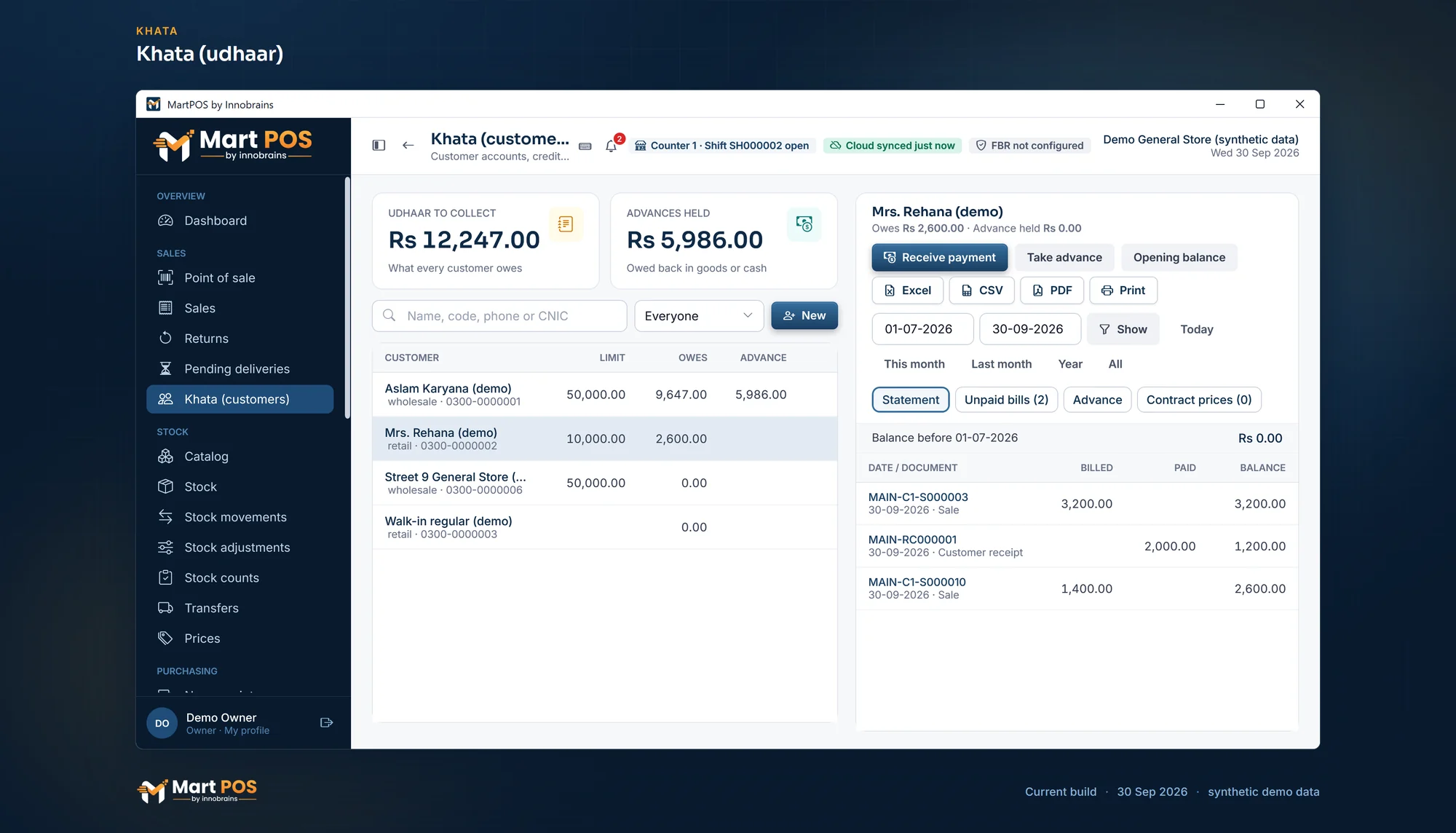
Khata (udhaar). What each customer owes on khata, their credit limit and advance, and a statement of bills and payments for any dates. Screenshot of MartPOS (30 Sep 2026) with sample shop data.
Side by side
| Udhaar Book (now Rupin) | DigiKhata | MartPOS | |
|---|---|---|---|
| What it is | Phone app and web version | Phone app, web and a Windows app | Billing, stock and khata on the shop's Windows PC, with tills on the shop network |
| Price | "100% free" | Not stated; in-app purchases on Google Play | Desktop Shop Rs 29,900 once; Cloud Shop Rs 1,990 a month |
| Who writes the khata entry | You, by hand | You, by hand | The bill, when it goes on account |
| Without internet | "Record transactions online & offline" | Backs up "the moment you're back online" | The store PC bills and keeps khata with no internet |
| Credit limits | Not stated | Not stated | Per customer or group, checked on every bill |
| Reminders | Free SMS, as it states | Free SMS and WhatsApp, as it states | SMS through the shop's own SendPK account |
| Collecting money | Payment links and wallet | Payment links, DigiQR and card by NFC | Records cash, bank, card and wallet payments |
| Stock and billing | Stock Book and Sale POS | Stock Book and Bill Book | A full till: barcodes, loose goods by weight or by rupees, packs, receipts |
Can you use a khata app and a POS together?
You can, but decide which one is the record. If the till keeps the sales and an app keeps the udhaar, every udhaar bill has to be entered twice, and the two will disagree within a month. If you move to a POS with khata, bring each customer's balance in once, dated with your closing day, and stop writing in the app from that day. A customer who asks "how much do I owe?" should get one answer.
How to choose
- Count the udhaar. A few regular customers who settle monthly is one thing; thirty udhaar bills a day, written by three people, is another.
- Who sells on udhaar? If only you do, a phone app in your pocket may be enough. If cashiers do, you want limits checked at the counter and each bill to say who made it.
- Do you need a till anyway? If you already want barcodes, loose goods, stock and daily cash closing, the till does udhaar as part of the bill, and a separate khata app adds work.
- Where are you when money comes in? Payments taken at the customer's door suit a phone app. Payments taken at the counter suit the till.
- Add up a year. Udhaar Book says it is free; DigiKhata's price is not stated. MartPOS is Desktop Shop at Rs 29,900 once, or Rs 15,000 now and Rs 14,900 after 30 days, or Cloud Shop at Rs 1,990 a month or Rs 19,900 a year, with your SendPK texts on top if you send reminders. See pricing.
- Try it with the internet off. Put a bill on khata, take a payment and print a statement with the cable out.
MartPOS has a 14-day trial, counted from when your first store PC is set up. What it keeps for customers and suppliers is on the khata software page.
Udhaar Book, Rupin and DigiKhata details are as published on udhaar.pk, digikhata.pk and their Google Play listings on 7 October 2026. "Not stated" means we did not find it there. MartPOS prices are those on our pricing page. All product names are trademarks of their owners.
Common questions
Is Udhaar Book free?
Its website says the app is "100% free". Its Google Play listing now calls it Rupin (formerly Udhaar Book). DigiKhata's price is not stated on its website, and its Google Play listing shows in-app purchases.
Do Udhaar Book and DigiKhata work without internet?
Udhaar Book says you can record transactions on your phone without internet, and that it syncs your data automatically. DigiKhata says your data backs itself up the moment you are back online. Neither says how its POS features behave without internet: that is not stated.
What is a POS with khata?
Billing software whose khata is fed by its own bills. When a bill, or part of it, goes on a customer's account, their balance, statement and the shop's sales and stock all change together. In MartPOS the credit limit is checked on the bill before it is saved.
Can MartPOS remind customers what they owe?
Yes, by SMS through the shop's own SendPK account, to one customer or to everyone overdue by the days you choose. It never sends one to a customer marked No SMS reminders, or more than once a day. Statements can also be saved as a PDF and sent on WhatsApp by hand.
Can I move my khata from an app to MartPOS?
Yes, as opening balances. Note each customer's balance on your closing day from the app's own report, put them in a CSV file with their names, phone numbers and credit limits, and import them once. Each statement in MartPOS then starts from the right figure.
Which is better for a kiryana store?
For a small shop with a few udhaar customers and no till, a free khata app on the phone is hard to beat. For a shop where cashiers bill at a counter and udhaar is a real share of sales, a POS with khata keeps the udhaar, the stock and the cash in one record and stops a bill that breaks your limits. Read what offline POS software really means before you choose one.
Founder & CEO, Innobrains Technologies
Arshad Ali is the founder and CEO of Innobrains Technologies, the company that makes MartPOS: point-of-sale, stock and khata software for kiryana stores, general stores and mini marts in Pakistan.
Run your shop on MartPOS
Barcode billing, loose goods and packs, khata and advances, on the shop's own PC without internet. We set it up on your shop PC with you.
Related guides
Best kiryana store software in Pakistan (2026): 10 options compared
Which kiryana store software in Pakistan bills without internet, sells loose goods, keeps udhaar khata and costs least over three years? We checked 10 products on their own websites on 7 October 2026: what each does, what it costs in PKR, and who each one suits.
07 Oct 2026 · 15 minFBR POS integration for small retailers: options and costs
Who has to report sales to FBR from the counter, what FBR POS integration involves, the ways to do it (software with it built in, a paid add-on, PRAL) and every cost to ask about, from the Re 1 service charge to the printer, with vendors' published prices checked on 7 October 2026. General information, not tax advice.
07 Oct 2026 · 11 minMartPOS vs HysabOne: which is better for a kiryana or general store in 2026?
HysabOne is cloud accounting and inventory software with a point-of-sale plan, Urdu screens and phone apps. MartPOS is point-of-sale, stock and khata software for kiryana and general stores that runs on the shop's own Windows PC and is paid once on Desktop. Here is how they compare in PKR and at the counter.
07 Oct 2026 · 11 min