Offline POS software in Pakistan: which ones keep billing without internet
Many POS programs sold in Pakistan now say they work offline, and the word covers very different things. What "offline" really means, how to test it before you pay, load-shedding and UPS, backups and sync, and what seven products say on their own websites, checked on 7 October 2026.
Many POS programs sold in Pakistan now say they work offline. For a kiryana store, a general store or a mini mart, that promise matters more than almost any feature: the PTCL line drops, the router loses power during load-shedding, and the queue at the counter does not wait. But "offline" covers very different things, from a program that never needs the internet to bill, to a website that keeps a few bills in the browser until the line comes back.
This guide explains what offline POS software in Pakistan really means, how to test it before you pay, what load-shedding, backups and syncing change, and what seven products say about it on their own websites. We checked every product on 7 October 2026 and link to each page. Where a website does not say something, we write "not stated".
We make MartPOS, one of the seven, so read our part with that in mind.
What "offline" really means
There are three kinds of POS behind the same word:
- A program on the shop's PC, with its own database. Bills, returns, stock and khata are written on a computer in your shop. The internet is used for other things: sending copies to the cloud, the owner's phone, updates and the licence. When the line drops, the counter carries on as if nothing happened.
- A cloud POS with an offline mode. The records live on the vendor's servers. When the internet drops, the counter keeps some bills on the device and sends them when it returns. Ask what does not work in that mode: adding a new item, a customer's khata balance, a second counter, reports, closing the day.
- A cloud POS with no offline mode. No internet, no bill.
Offline is also not the same as power-proof. Whatever kind you choose, the PC that holds the records, the printer and the router or network switch that joins the counters all need power.
Offline POS software in Pakistan: what seven products say
| Software | How it bills without internet, in its own words | Counters on the shop network | Published price (PKR) |
|---|---|---|---|
| MartPOS | A Windows program on the store PC owns the database; no internet needed to bill | Yes, tills on other PCs | Desktop Shop Rs 29,900 once; Cloud Shop Rs 1,990 a month |
| Mint POS | Saved "to your local PostgreSQL database on your PC" | Yes, "over your shop LAN" | Rs 2,499 a month billed annually, or Rs 3,499 monthly |
| Posify | "Core billing works 100% offline"; Windows or Linux | Up to 10 counters | Rs 2,500 a month |
| CloudPOS | Cloud based; offline point of sale is an add-on | Not stated | Rs 25,000 a year, Rs 10,000 setup, offline add-on Rs 5,000 per system |
| Moneypex Retail POS | "Offline & Online Billing"; a desktop-only offline POS on request | Not stated | Rs 1,500 a month |
| Oscar | "Cloud-Based With Offline POS Capability" | Not stated | Not published |
| HysabOne POS | The POS plan lists "Offline mode" | Not stated | From Rs 6,563 a month |
The details and sources are below.
MartPOS
- How it works offline: the shop's main PC runs the MartPOS store server, which owns that branch's database: stock, bills, khata and the day book. The till on the same PC and tills on other PCs in the shop all work through it. Selling, returns, purchases, khata payments, closing a shift and printing need no internet.
- What stops: if the shop network is down, a till on another PC cannot bill (the till on the store PC can). If the store PC is off, the shop stops billing: no second PC quietly takes over, because two PCs selling the same stock separately could both sell the last packet.
- Price: Desktop Shop is Rs 29,900 once, for life, for one branch, two counters and five staff logins, not counting the owner. Desktop Business is Rs 39,900 once, for four counters. Cloud Shop is Rs 1,990 a month or Rs 19,900 a year, with the owner portal and backups kept on MartPOS Cloud. See pricing.
- Gaps: Windows only, and no app for billing on a phone. The owner sees the shop from home only with a Cloud plan.
Mint POS
Mint POS installs a Windows terminal and writes every sale "to your local PostgreSQL database on your PC". Counters "connect to a single local PostgreSQL server over your shop LAN", and sales go to the cloud "the moment connectivity returns". It says billing continues during load-shedding "as long as your PC and printer have power (UPS or generator)". Its pricing: Solo, one PC, Rs 2,499 a month billed annually or Rs 3,499 monthly; Zanjeer Rs 6,999 a branch a month billed yearly or Rs 8,999 monthly, with unlimited counters per branch and a phone app. It has a 7-day trial and no setup fee on standard plans.
Posify
Posify downloads for Windows or Linux and says "Core billing works 100% offline". In its Offline Mode nothing is sent to its cloud at all; in Hybrid Mode sales are backed up to its cloud whenever the internet is available. One master computer holds the data for up to 10 counters on the shop network. Solo is Rs 2,500 a month for one computer, Business Rs 4,000 a month for up to 3 computers and Warehouse Rs 8,000 a month for up to 10 counters, with a 3-day trial.
CloudPOS
CloudPOS calls itself "a cloud-based point of sale system". When the connection drops it "continues billing" and stores transactions on your device, syncing when the line returns. On its grocery pricing, the "Offline Point of Sale" is an add-on at PKR 5,000 per system, and the Enterprise plan includes "Free Offline Installation". Basic is PKR 25,000 a year with a one-year minimum and a PKR 10,000 setup fee.
Moneypex Retail POS
Moneypex lists "Offline & Online Billing" on its Standard plan at PKR 1,500 a month, and says it can "Process sales smoothly even without an internet connection". A separate "Offline POS", described as a "Desktop-only solution", is priced on request. Extra terminals, shops and users are add-ons.
Oscar
Oscar's grocery page says "Cloud-Based With Offline POS Capability" and "Automatic data sync when internet returns". Whether it installs a database on the shop's PC is not stated, and its price is not published.
HysabOne
HysabOne describes itself on its home page as "Online cloud-based accounting software with inventory management, POS & ERP features". On its pricing page the HysabOne POS plan, "From PKR6,563/mo", lists "Offline mode", and yearly billing saves 12.5%. How the offline mode works is not stated.
How to test offline billing before you buy
A demo on the vendor's laptop with good internet proves little. Whichever offline POS software in Pakistan you shortlist, ask to run these tests on your own counter, during a trial:
- Pull the internet cable, or switch off the router's internet. Make a bill, a return and an udhaar bill, take a khata payment, print a receipt and close the shift.
- Bill on the second counter with the internet still off. If it stops, the "offline" mode belongs to one device, not the shop.
- Switch off the router itself for a minute. Find out which counters keep billing and which stop.
- Switch off the main PC in the middle of a bill, as a power cut would. Start it again: is the bill still there, and was anything saved twice?
- Leave it offline overnight. Ask in writing how long it may run without the internet before the licence stops it.
- Plug the internet back in and compare the day's total in the cloud with the counter's own report. They should be equal, with nothing missing and nothing counted twice.
Load-shedding: power matters more than internet
The PC that holds the records, the receipt printer and, with more than one counter, the router or switch should be on a UPS. A counter laptop on battery cannot reach the main PC through a switch with no power. In MartPOS, a bill in progress is kept if the power goes, and comes back when MartPOS starts again; a sale retried after an unclear answer cannot be posted twice. See when a till cannot reach the store PC.
Backups: the risk moves into your shop
With a program on the shop's PC, your records are in your shop, and so is the risk: a dead hard disk, a theft or a virus. Ask every vendor what is backed up, when, where to, and how a restore works on a new PC.
MartPOS's store PC takes an encrypted backup at the time you choose, after each shift closes and before each database upgrade, reads it back to check it, and can keep a second copy in another folder such as a USB drive. With a Cloud plan, or Cloud Backup Only at Rs 499 a month per branch on a Desktop licence, each backup is also copied to MartPOS Cloud, still encrypted, to restore on any PC. See backups and restoring a store PC.
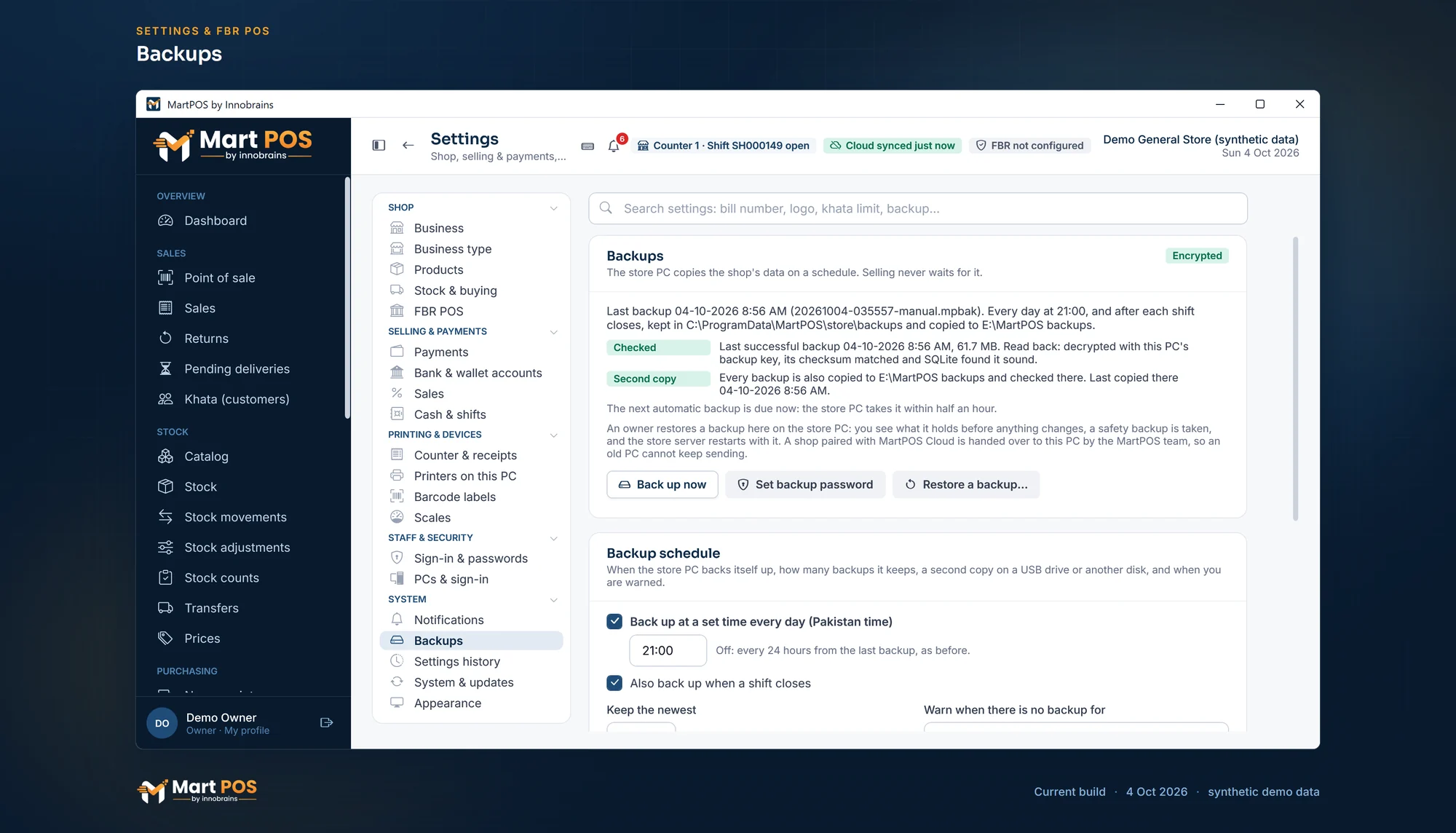
Backups. The last backup, read back and checked, its second copy on another disk, and when the next one is due; new backups are encrypted with the shop's backup password. Screenshot of MartPOS (4 Oct 2026) with sample shop data.
Syncing later: what the owner sees
Offline billing means the cloud is always a little behind the counter. A good system says how far behind. MartPOS saves each sale together with a numbered message for the cloud, in one step, and sends what is waiting every 15 seconds, or when someone presses Sync now. A message sent twice counts once. In the owner portal, a branch that has not reported for 15 minutes is marked STALE, never shown as live, because it may be selling right now without the internet. More on the offline and cloud page.
The licence: does it need the internet?
Some offline software checks its licence online, so ask how long it keeps billing without a check. A MartPOS Desktop licence, bought once, never expires: the store PC keeps selling even if it is never online again. On a Cloud plan the store PC holds a signed licence it checks itself, renewed whenever it syncs; by default it lasts 30 days, with 14 days' grace after. See your MartPOS licence.
What about FBR when the internet is down?
FBR's own rules expect it: invoices made while the internet or power is down are marked as issued in offline mode and uploaded within 24 hours of the connection coming back (rule 150XC of the Sales Tax Rules, in FBR's POS booklet). MartPOS's optional FBR POS integration prints such a bill as an offline invoice and sends it to FBR by itself, oldest first, once FBR can be reached. Our guide to FBR POS integration costs covers the rest.
Every product's details and prices are as published on its own website on 7 October 2026, as linked above. "Not stated" means we did not find it there. All product names are trademarks of their owners.
Common questions
Which POS software works without internet in Pakistan?
Several programs install on the shop's PC and bill with no internet: on their own websites, MartPOS, Mint POS and Posify describe a database on the shop's PC with counters on the shop network. CloudPOS sells offline billing as an add-on, and Moneypex, Oscar and HysabOne mention an offline mode without saying how it runs.
Does offline POS software still need the internet?
Only for what happens outside the shop: copies to the cloud, the owner's view from home, updates and, in some products, the licence. Billing itself should never wait for it.
Can two counters bill offline?
Yes, when both work through one PC in the shop over the shop network. In MartPOS, Desktop Shop includes two counters and Desktop Business four; extra tills join the store PC with a one-time code. See adding a till on a second PC.
Is my data safe if the PC breaks?
Only if a backup is somewhere else. Keep a second copy on a USB drive or let the software copy each backup to the cloud, and practise a restore once before you need it.
How much is offline POS software in Pakistan?
On the websites we checked, subscriptions run from Rs 1,500 a month (Moneypex) to Rs 8,999 a month per branch (Mint POS Zanjeer, paid monthly), sometimes with setup fees and paid offline add-ons. Of the seven, only MartPOS publishes a one-time price: Desktop Shop is Rs 29,900 once, or Rs 15,000 now and Rs 14,900 after 30 days, and MartPOS has a 14-day trial from when the first store PC is set up.
Founder & CEO, Innobrains Technologies
Arshad Ali is the founder and CEO of Innobrains Technologies, the company that makes MartPOS: point-of-sale, stock and khata software for kiryana stores, general stores and mini marts in Pakistan.
Run your shop on MartPOS
Barcode billing, loose goods and packs, khata and advances, on the shop's own PC without internet. We set it up on your shop PC with you.
Related guides
MartPOS vs HysabOne: which is better for a kiryana or general store in 2026?
HysabOne is cloud accounting and inventory software with a point-of-sale plan, Urdu screens and phone apps. MartPOS is point-of-sale, stock and khata software for kiryana and general stores that runs on the shop's own Windows PC and is paid once on Desktop. Here is how they compare in PKR and at the counter.
07 Oct 2026 · 11 minFBR POS integration for small retailers: options and costs
Who has to report sales to FBR from the counter, what FBR POS integration involves, the ways to do it (software with it built in, a paid add-on, PRAL) and every cost to ask about, from the Re 1 service charge to the printer, with vendors' published prices checked on 7 October 2026. General information, not tax advice.
07 Oct 2026 · 11 minBest kiryana store software in Pakistan (2026): 10 options compared
Which kiryana store software in Pakistan bills without internet, sells loose goods, keeps udhaar khata and costs least over three years? We checked 10 products on their own websites on 7 October 2026: what each does, what it costs in PKR, and who each one suits.
07 Oct 2026 · 15 min