Expiry dates in a grocery store, without writing a date on every pack
Packed milk, yoghurt, bread and biscuits go off; soap and matches do not. How a grocery or general store can keep track of dates only where they matter, find what to move before it expires, and deal with what has, with the way MartPOS does it and its limits.
Every grocery loses money to dates. A crate of packed milk pushed to the back of the fridge, a tray of yoghurt that nobody noticed, biscuits found three months past their date during Eid cleaning. The loss is rarely one big item: it is many small ones that nobody saw in time. Tracking every date on every pack is not realistic for a busy store, and it is not needed. This guide sets out a routine that tracks dates only where they matter, and shows how MartPOS supports it, including what it does not do.
Track dates only on what goes off
Divide the shop into three groups:
| Group | Examples | Track the date? |
|---|---|---|
| Goes off in days | Packed milk, yoghurt, bread, eggs in trays | Yes |
| Goes off in months | Biscuits, snacks, cooking oil, packed spices | Yes, for the lines that move slowly |
| Does not go off | Soap, matches, detergent, steel and plastic goods | No |
In MartPOS, expiry dates are off unless you turn them on for an item. Open the item in Catalog and tick Track expiry dates, or set the Track expiry column to yes for many items at once in a CSV import. Items you do not tick never ask for a date, so the counter and the receiving desk only see the question where it matters.
Enter the date when the goods arrive
The best moment to record a date is when the delivery is checked, not later on the shelf. On New receipt, each line of an item that tracks expiry has an EXPIRY box: type the date printed on the goods, day first, such as 31-12-2026.
- The date is required for those items. A delivery without it is refused, which stops the habit of "I will add it later".
- Expired goods are not received. A date before today is refused, and the goods should go back with the delivery man.
- Two dates in one delivery. Since 4 October 2026 a line can be split into lots, each with its own date (and the maker's batch number, if the pack shows one) and how many carry it.
Look at what is close to its date, every week
Reports › Near expiry lists, for the items that track dates, each stock lot (a delivery's date and batch) that expires within 7, 30, 60 or 90 days, or has already expired, with the days left and how much of it is in stock. The Dashboard and the notifications bell count what has passed its date and what expires within 30 days, and open the report. A weekly routine works well:
- Monday morning: open Near expiry for 7 days. Bring those packs to the front of the shelf or the fridge.
- Monday, for 30 days: decide on each slow line. Put it on a dated promotion, or return it to the supplier while their return window is still open.
- Every day, on the dashboard: if anything has expired, take it off the shelf the same day.
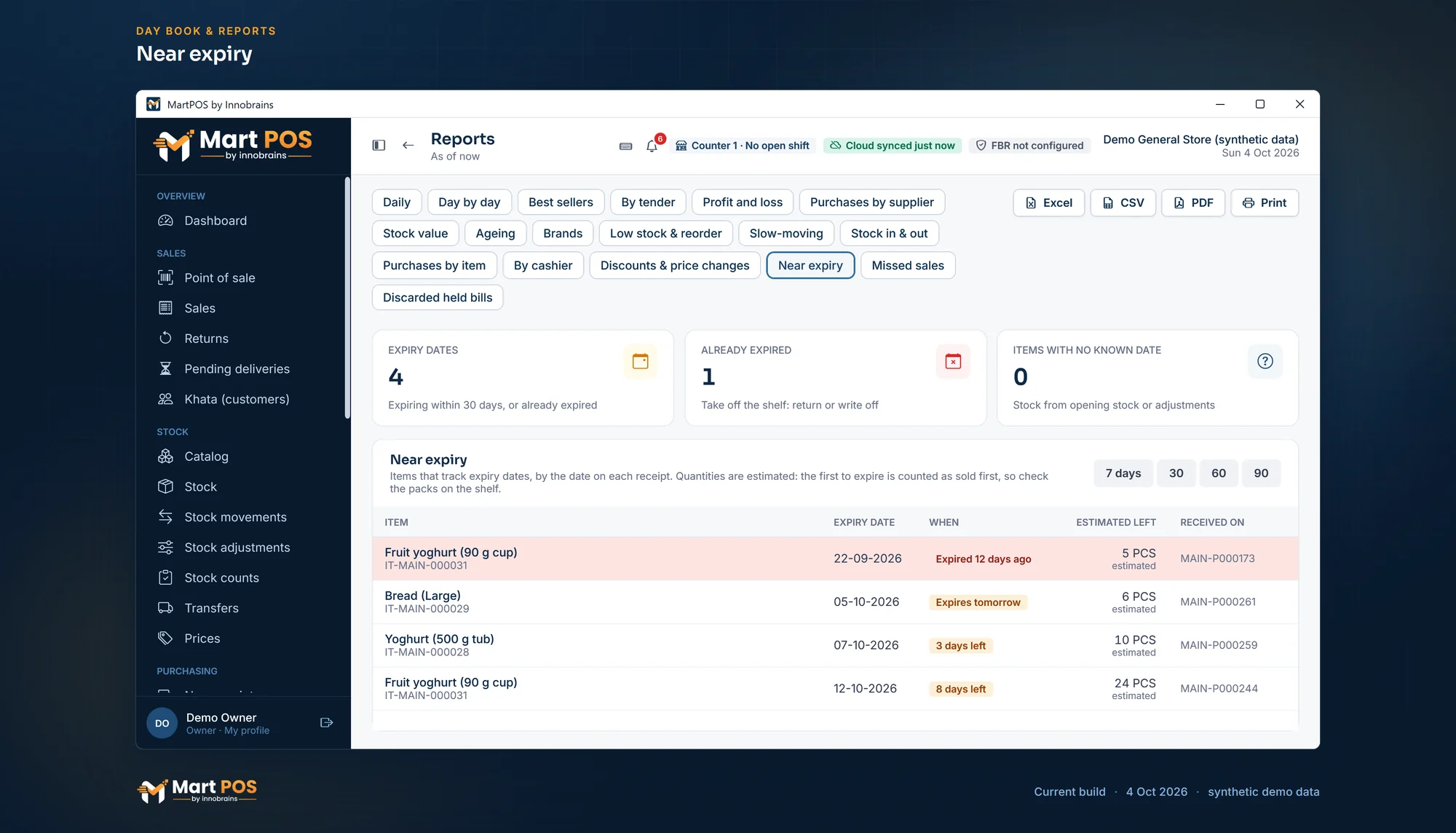
Near expiry. Dated goods by the date on each delivery, with the quantity estimated to be left (the first to expire counted as sold first). Screenshot of the current build (4 Oct 2026), synthetic demo data.
How the lots follow the shelf
Since 4 October 2026, MartPOS keeps the stock of a dated item in lots, one per date and batch, and every sale takes the earliest date first. The till still does not ask which pack the customer took: if the staff put new crates in front of old ones, the old packs may still be there when the lots say they sold. A weekly count of the dated shelf, lot by lot, puts the lots right. Stock with no known date, such as opening stock entered without one or stock from before you turned dates on, is listed separately so you can count it once and give it its dates.
What to do with goods near or past their date
- Near the date: move it to the front, sell it on a clearance promotion the owner approves, or return it to the supplier as a claim that their credit note settles.
- Past the date: take it off the shelf and write it off with a stock adjustment and a reason such as expired, or send it back if the supplier accepts it. The loss then shows in the profit and loss, where you can see it, rather than hiding in the stock figure.
As it comes, the till sells an item whose date has passed like any other. The owner can make it warn the cashier, ask for a manager's PIN, or refuse the sale while expired stock remains (Settings › Products › Expiry). Keeping expired goods off the shelf stays a shop routine.
What MartPOS does not do with dates
- Pack-level tracking is not possible: the till does not ask which pack was sold, so the lots assume the earliest date went first. Count by lot to correct them.
- Opening stock imported from a CSV file has no date; opening stock entered on Stock adjustments can carry one.
Common questions
Do I have to enter a date for every item?
No. Only for the items you tick Track expiry dates on. Everything else is received and sold without a date.
What if a delivery has two different dates?
Split the line into lots on the receipt, each date with how many packs carry it, so the report and the till know both.
Can the till refuse to sell an expired pack?
It can refuse the sale of an item while it has stock past its date, if the owner chooses that, or warn the cashier, or ask for a manager. It cannot tell which pack the customer picked, so the cashier checks the pack in hand.
Does MartPOS keep batch numbers?
Yes, since 4 October 2026: each delivery line can carry the maker's batch number with its date, and each date and batch is its own stock lot.
Can I see near-expiry stock from home?
The owner portal shows the store PC's alerts, including stock near or past its date, as the store PC last sent them. The full report is on the store PC.
More in expiry dates and the near-expiry report and supplier returns and credit notes. For everything MartPOS does for a grocery counter, see grocery store POS, or retail stock and barcodes for stock as a whole.
Founder & CEO, Innobrains Technologies
Arshad Ali is the founder and CEO of Innobrains Technologies, the company that is building MartPOS: point-of-sale, stock and khata software for kiryana stores, general stores and mini marts in Pakistan.
Run your shop on MartPOS
Barcode billing, loose goods and packs, khata and advances, on the shop's own PC without internet. We set it up on your shop PC with you.
Related guides
Landed cost for kiryana purchases: freight and loading in the price of a bag
A bag of sugar does not cost what the mandi bill says. The truck, the loaders and the toll are part of its cost, and if they are not counted, every kilo looks more profitable than it is. What landed cost is, two ways to share it, and how MartPOS adds it to a purchase.
04 Oct 2026 · 7 minSelling atta, rice, daal and sugar by weight or by rupees
Half a kilo of daal, a pao of haldi, Rs 100 of sugar, a whole bag of atta. How a cashier bills loose goods by weight or by the rupee in MartPOS, why Rs 50 of sugar can come to Rs 50.08, and what the till checks on every line.
30 Sep 2026 · 6 minBarcodes for loose items and the goods you pack yourself
Loose daal, rice and spices come without a maker's barcode, and so do the 1 kg packets you fill yourself. Two ways to make them scan at the till in MartPOS, which to use when, and why you should never make up an EAN-13 number.
30 Sep 2026 · 5 min