Switching a general store from a register or Excel to a POS, step by step
A practical plan for moving a kiryana or general store from a register or an Excel sheet onto POS software: when to switch, cleaning the item list, one closing date, the import, the checks before the first bill, the first day and the first week.
Most kiryana and general stores that move to POS software have run for years on a register, a khata copy, an Excel sheet, or all three. The software is rarely the hard part of the move. The hard part is starting with an item list, stock figures and khata balances everyone trusts, so that the first month's reports mean something. This plan is the order we recommend, with the MartPOS screens for each step. The same plan in Roman Urdu is register se POS software par.
Step 1: Pick the right week
Do not switch in the busiest weeks. The last ten days of Ramazan, the days before Eid and the first days of the month, when salaried customers settle their khata, are the worst times to learn anything new. A quiet week, when the counter can spare an hour each afternoon, is best. Give yourself about a week before the chosen day for the item list and the count.
Step 2: Clean the item list
Whatever you import is what you will bill from, so clean it first, in Excel:
- One row per item as it is sold. The 1 kg and 500 g pouches of the same brand are two items, each with its own price and stock. Write the size in the variant column.
- Loose goods marked. Sugar, rice, daal, flour and loose oil are sold in parts of a kilogram or litre. Mark them as sold loose, with the price per kilogram. How that works with bags is in selling loose and packed goods.
- Packs written down. For every item also sold as a carton, bag or dozen, write how many units the pack holds for that item, its own price and its barcode.
- Barcodes checked. A 13, 12 or 8-digit barcode with a wrong check digit is refused by MartPOS rather than saved. Fixing them now is quicker than at the counter; barcode check digits explained shows how to spot one.
- Urdu names and other names added where they help: the name on the shelf label, and the words customers really ask for.
- Duplicates removed. Two rows for the same item split its stock in two.
- Suppliers and distributors named the same way every time, so their bills and payments land on one account.
Step 3: Set up the store PC and the staff
MartPOS goes on the shop's main PC, the one that stays on while the shop is open. While there is no public installer, we install it with you. Then:
- Set the backup password and check that the first daily backup is taken.
- Add every person with their own sign-in and role, and a counter for each till. Shared passwords make the records useless when something needs explaining.
- Set up the receipt and print a test page from Settings › Printers on this PC, so the first customer's bill is not the first one you see on paper.
Step 4: One closing date, one count
Choose the evening before the first day as the closing date. On that evening, count the stock on the shelf and in the godown, and take each customer's and each supplier's balance from the khata copy or the sheet. Every opening figure is dated with that one day, which is what makes the first month's reports agree with the books.
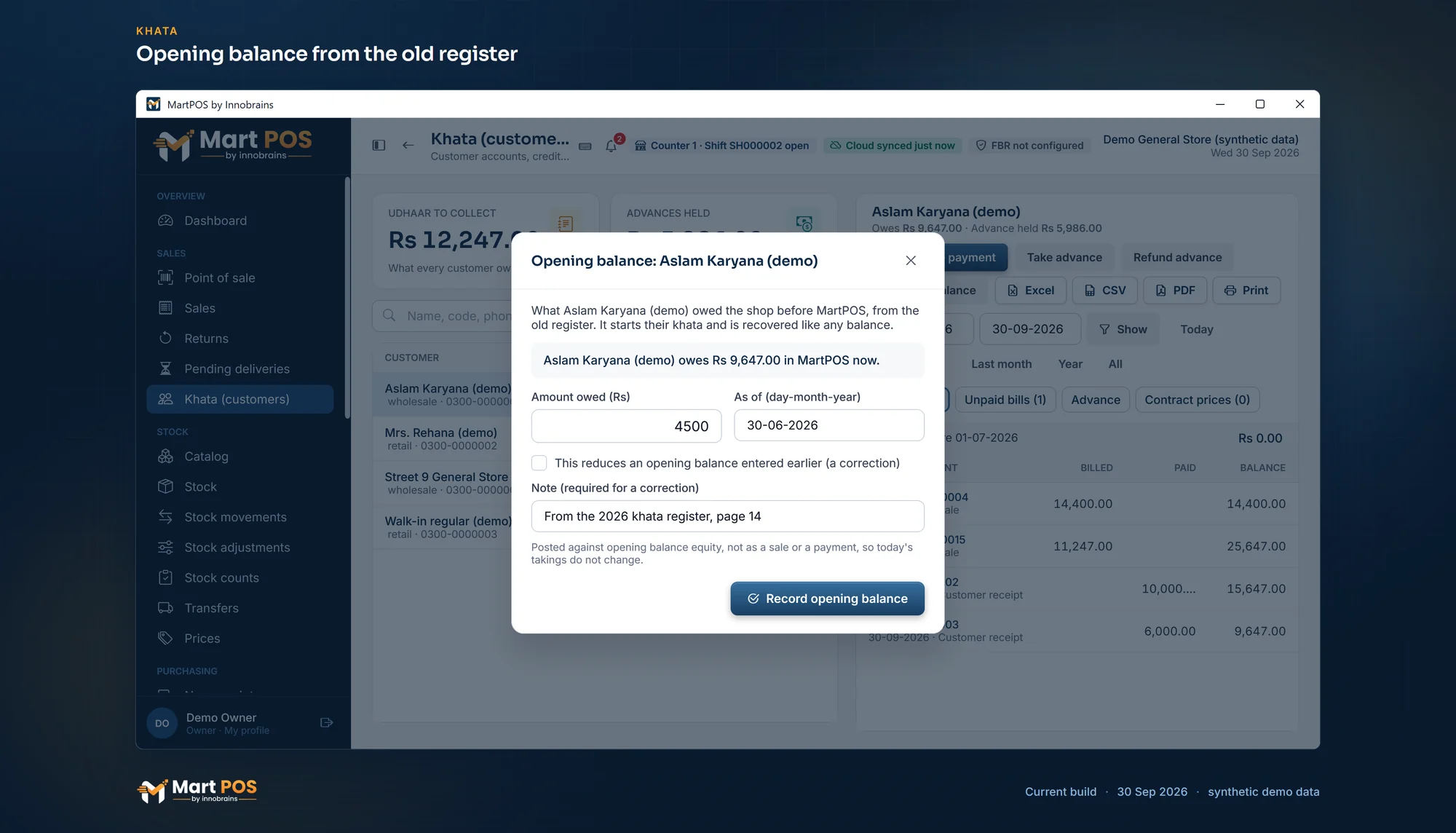
Opening balance from the old register. What a customer owed before MartPOS, entered once with its date and a note; today's takings do not change. Screenshot of the current build (30 Sep 2026), synthetic demo data.
Step 5: Import, then check
Import items with their opening stock first, then customers with what they owe, then suppliers with what you owe them. MartPOS checks every row before it saves anything and tells you which rows to fix (moving your item list from Excel).
Before the first bill, check three figures against the old records:
- Total stock value on the stock report.
- Total owed by customers on the khata list.
- Total owed to suppliers.
If one is off, find the row now. A wrong opening figure can be corrected later, with a note saying why, but it is simpler to fix it before any sale touches it.
Step 6: The first day
Open the shift with the float in the drawer, bill as usual, and close with a blind count, where the cashier counts the drawer without seeing the expected figure first. Keep the register beside the till for the first day if it makes the staff more confident, but write nothing in it that is not also in MartPOS.
Step 7: The first week
- Read the daily report each evening: sales, cash, khata and advances.
- Count one shelf or one category a day while the shop stays open, and post only the real differences (counting stock while the shop is open).
- Check that the backup ran, and keep one copy off the PC.
- Note every question the staff ask. Most are answered in the help centre.
If you would like help planning the move for your own shop, tell us about it.
Common questions
Can we keep the register running alongside for a while?
For a day or two, as a comfort. Longer than that, two sets of records start to disagree and nobody knows which one is right. Decide on the day MartPOS becomes the only record, and keep the register only for looking up the past.
What if the stock count is wrong after the import?
Correct it with a stock adjustment that gives a reason, or with a count of that shelf. MartPOS never lets anyone type over a stock figure; every change is a movement with a person and a time.
Do customers' old unpaid bills need to be entered one by one?
No. Bring in each customer's total balance as of the closing date. Their statement starts from that opening balance, and new bills and payments follow it. More in running khata for customers.
How long does the switch take?
Most of the work is the clean item list and the count, which depend on the size of the shop. The import itself takes minutes once the file is clean.
Founder & CEO, Innobrains Technologies
Arshad Ali is the founder and CEO of Innobrains Technologies, the company that is building MartPOS: point-of-sale, stock and khata software for kiryana stores, general stores and mini marts in Pakistan.
Run your shop on MartPOS
Barcode billing, loose goods and packs, khata and advances, on the shop's own PC without internet. We set it up on your shop PC with you.
Related guides
Urdu on your shop's receipts: the words, the item names and what to check first
Many customers read Urdu more easily than English, and the names they ask for are Urdu names. What a receipt can show in Urdu, how a thermal printer prints Nastaliq, how to choose between Urdu, English or both, and what to test before relying on it.
04 Oct 2026 · 6 minRegister se computer par: dukaan ka hisaab POS software mein kaise layein
Kiryana ya general store ka hisaab barson se register, khata copy aur Excel mein chal raha ho to software par aana mushkil lagta hai. Saat qadam mein poora tareeqa, Roman Urdu mein, aur har qadam par MartPOS ki screen ka naam.
30 Sep 2026 · 6 minMoving your item list into MartPOS from Excel
Bring in items with their packs, Urdu names and opening stock, customers with what they owe and suppliers with what you owe them, from a CSV file, with every row checked before anything is saved.
29 Sep 2026 · 6 min