Selling loose and packed goods from one stock figure
Sugar by the kilo and by the 50 kg bag, oil by the bottle and by the carton, eggs by the dozen and by the tray. How to set up units and packs so that every sale, whatever the size, comes out of one stock figure that stays right.
A kiryana shop sells the same goods in many sizes. A customer asks for two and a half kilos of sugar, a hotel takes a 50 kg bag, and the shopkeeper next door wants a carton of cooking oil at your wholesale rate. If the software keeps a separate stock figure for each size, the figures drift apart within a week, and nobody knows how much sugar is really left. This guide explains how MartPOS keeps one figure per item, whatever size it is sold in, and how it sells loose goods by weight or by amount.
One item, one base unit
Every item in MartPOS has a base unit: the unit its stock is kept in. For packed goods it is usually the piece: one packet of biscuits, one bottle of oil, one bar of soap. For goods sold by weight or measure it is the kilogram or the litre. Stock is always kept in the base unit, and nothing else.
Loose goods: parts of a unit
Mark an item as sold loose and its stock may have parts of the unit, to three decimal places: 0.625 kg, 1.5 litres, 12.250 kg. That is what you want for sugar, rice, daal, flour, loose tea and loose oil. An item that is not sold loose is counted in whole units only, so nobody can sell half a packet of biscuits by mistake.
On the bill, the quantity of a loose item is in its unit and may have a part, for example 2.5 kg of sugar at the price per kilogram. The line total is worked out from that price, and the stock goes down by exactly 2.5 kg. The cashier weighs the goods and types the weight in the line's quantity, or taps one of the till's quick-weight buttons for 100 g, 250 g, 500 g or 1 kg.
Packs: bags, cartons, dozens and trays
A pack is another way of selling the same item, with the number of base units it holds for that item:
| Item | Base unit | Packs |
|---|---|---|
| Sugar | kg, sold loose | Bag of 50 kg |
| Cooking oil 1 litre bottle | piece | Carton of 12 |
| Biscuits, family pack | piece | Carton of 24 |
| Eggs | piece | Dozen (12), tray (30) |
| Soap bar | piece | Box of 6, carton of 72 |
Each pack has its own price and its own barcode. The price need not be the unit price times the size: a carton is often cheaper per piece, and MartPOS keeps whatever you set. Scan the carton barcode and a carton goes on the bill; scan the bottle and a bottle does.
Behind the scenes, a pack is only a way of counting base units. Sell one bag of sugar and 50 kg leave stock; sell 3.5 kg loose from what is left and 3.5 kg more leave. You never "open" a bag in the software, and the stock never shows bags and kilos as two separate piles.
Why this matters for the owner
- Stock value stays right. Everything is valued at the weighted-average cost of the base unit, so a kilo sold loose and a kilo sold in a bag cost the same.
- Reorder levels mean something. A reorder level of 100 kg on sugar shows the item as low at 100 kg, whether the last sales were bags or kilos.
- Counts are simple. Count the sugar in kilograms, bags included, and post only the real difference (counting stock while the shop is open).
- Purchases fit. Receive 20 bags from the distributor and 1,000 kg are added.
Setting it up
In the item form, choose the base unit, tick Sold loose for weighed goods, and add each pack with its name, its size in base units, its price and its barcode. When you import your list from Excel, the same fields are columns: unit, sold loose, pack name, units per pack, pack retail price and pack barcode (moving your item list from Excel).
A few habits help:
- Name the size in the item, not only the pack. "Oil 1 litre bottle" and "Oil 5 litre tin" are two items with their own stock, because the distributor bills them separately.
- Give every pack its barcode if the carton has one. Scanning is faster than choosing a unit.
- Add the names customers ask for. An item can carry its Urdu name and other names such as cheeni and shakar, so the cashier finds it by any of them.
- Tick Track expiry dates on items that go off, such as packed milk and yoghurt. Every delivery of them then asks for the date on the goods (expiry dates in a grocery store).
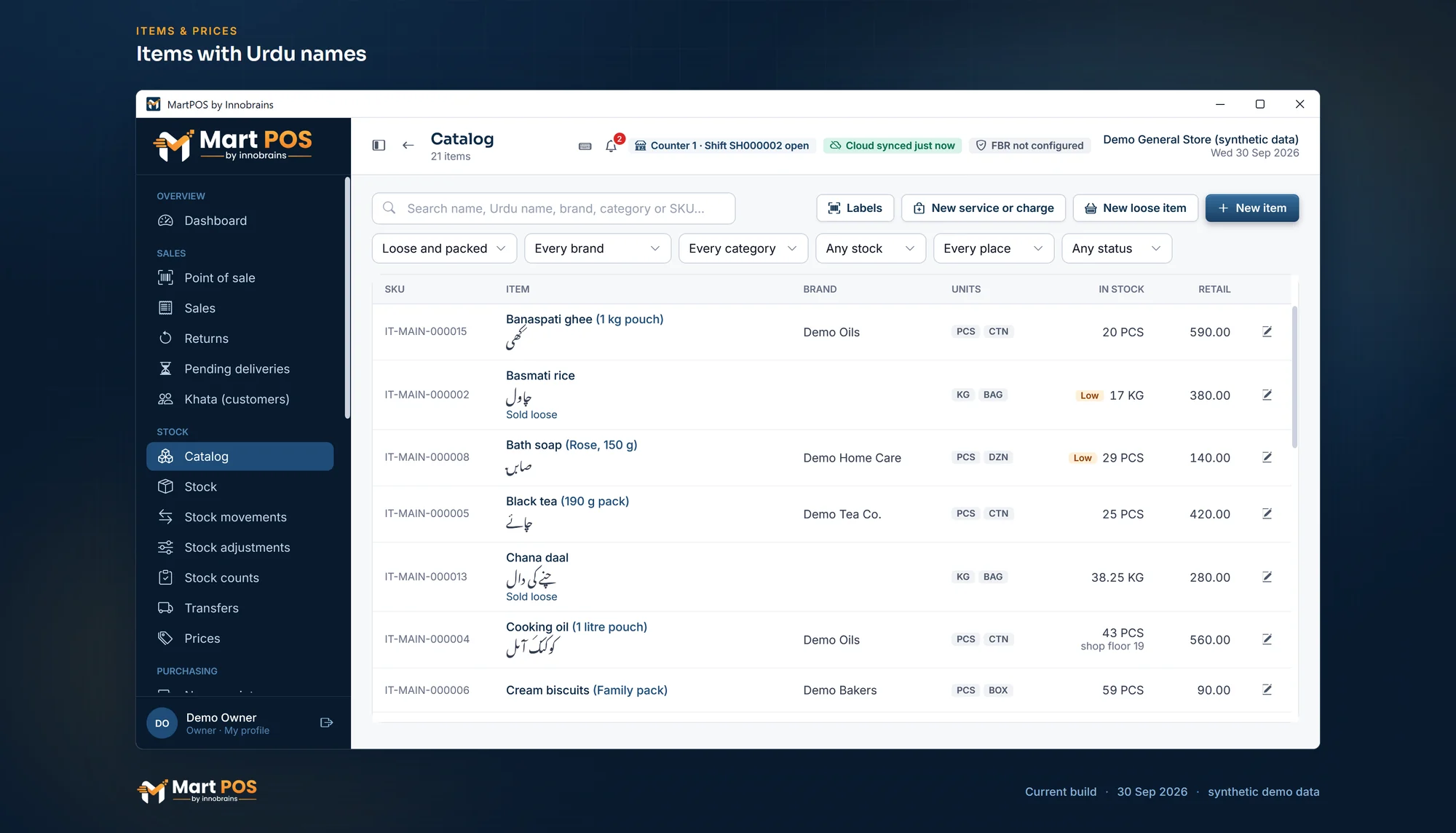
Items with Urdu names. Loose and packed items with their Urdu names, brands, units (piece, carton, kg, bag) and stock, with low stock marked. Screenshot of the current build (30 Sep 2026), synthetic demo data.
Selling by amount: "Rs 100 of sugar"
Many customers ask for money's worth, not weight: "Rs 100 of sugar", "Rs 50 of haldi". In MartPOS the cashier puts the loose item on the bill, presses F6 (Rs worth) and types the amount. The store PC works out the weight at that line's price, to the gram, and the line shows it. At Rs 160 a kilo, Rs 50 buys 0.3125 kg, which is 0.313 kg to the gram, so the line reads 0.313 kg for Rs 50 → Rs 50.08. The cashier weighs out 0.313 kg, and the bill, the stock and the cash all agree to the gram.
Common questions
Do I have to open a bag in the software before selling loose from it?
No. Stock is kept in kilograms, so a bag sold and kilos sold loose both come out of the same figure. There is nothing to open.
Can a carton have a lower price per piece than a single piece?
Yes. Each pack has its own price, set separately; it need not be the unit price times the size.
Can I sell half a packet of biscuits by mistake?
No. Only items marked as sold loose take parts of a unit. Every other item is counted in whole units.
Does this work for a wholesale customer too?
Yes. Each unit and pack has a retail and a wholesale price, and a customer can be set to wholesale prices or given a price list. More on the khata and credit page.
How the cashier bills them, by weight or by rupees, is in selling atta, rice, daal and sugar by weight or by rupees. For the whole picture of MartPOS in a kiryana shop, see kiryana store software.
Founder & CEO, Innobrains Technologies
Arshad Ali is the founder and CEO of Innobrains Technologies, the company that is building MartPOS: point-of-sale, stock and khata software for kiryana stores, general stores and mini marts in Pakistan.
Run your shop on MartPOS
Barcode billing, loose goods and packs, khata and advances, on the shop's own PC without internet. We set it up on your shop PC with you.
Related guides
Landed cost for kiryana purchases: freight and loading in the price of a bag
A bag of sugar does not cost what the mandi bill says. The truck, the loaders and the toll are part of its cost, and if they are not counted, every kilo looks more profitable than it is. What landed cost is, two ways to share it, and how MartPOS adds it to a purchase.
04 Oct 2026 · 7 minSelling atta, rice, daal and sugar by weight or by rupees
Half a kilo of daal, a pao of haldi, Rs 100 of sugar, a whole bag of atta. How a cashier bills loose goods by weight or by the rupee in MartPOS, why Rs 50 of sugar can come to Rs 50.08, and what the till checks on every line.
30 Sep 2026 · 6 minBarcodes for loose items and the goods you pack yourself
Loose daal, rice and spices come without a maker's barcode, and so do the 1 kg packets you fill yourself. Two ways to make them scan at the till in MartPOS, which to use when, and why you should never make up an EAN-13 number.
30 Sep 2026 · 5 min