Counting stock in a general store without closing the shutter
A general store rarely gets a day off to count. How to count a shelf, a category or the godown while the till keeps selling, weigh loose goods, and post only the real differences, with a routine that keeps the count small enough to finish.
Every shop owner knows the feeling: the software says 40 packets of a biscuit are on the shelf, the shelf says 31. A few went to a customer on khata and were never billed, a carton was damaged in the rain, a cashier sold the family pack at the price of the small one. None of it is visible until someone counts. The trouble is that a kiryana or general store rarely gets a day with the shutter down, and a count done while selling usually goes wrong, because the stock changes under the counter's hands. This guide explains how MartPOS counts while the shop stays open, and a routine that keeps counting from becoming a once-a-year ordeal.
The idea: a snapshot per line
When you save a counted line, MartPOS records what its records showed for that item at that moment. The difference is what you counted minus that snapshot. If a packet is sold ten minutes later, the current stock figure beside the line changes, but the difference does not, so the sale is not taken for a loss. That is what lets the till keep selling while the count goes on, for an hour or over several days.
Make small count sheets
A count sheet can cover a shelf or rack, a category, a single item or the whole shop, in one place: the shop floor or a godown. Small sheets are the secret. A sheet for "Rack R5" or "Soap and detergents" is finished in twenty minutes; a sheet for the whole shop is still open a week later.
- Open Stock counts and choose New count sheet.
- Give it a name, and type a shelf, a category or an item to count only what matches. Leave it empty to count everything.
- Choose the place: the shop floor, where the till sells from, or the godown.
The sheet lists every matching item in shelf order. It helps to fill in the shelf or rack on every item when you set up your list, so that counting by shelf is easy later.
Count in the base unit
Every item keeps its stock in its base unit, so that is what you count:
- Packed goods in pieces. Five cartons of 24 are 120. Open cartons are counted piece by piece.
- Loose goods by weight. An open sack of sugar weighed at 12.35 kg is typed as 12.35. Full bags are counted in kilograms too: three bags of 50 kg are 150.
- Sizes apart. The 500 ml and the 1 litre bottle of the same oil are different items, and so are two flavours of the same biscuit. Count each on its own line.
- Leave a line empty if you did not count it; it is not changed. Type 0 for an item that is not there at all.
Save as you go. If two people type on the same sheet at once, the second save is refused and asks them to reload, so nobody's figures are lost.
If paper is easier, print the sheet with an empty column for the counted figures, count with a pen, and type the figures in afterwards.
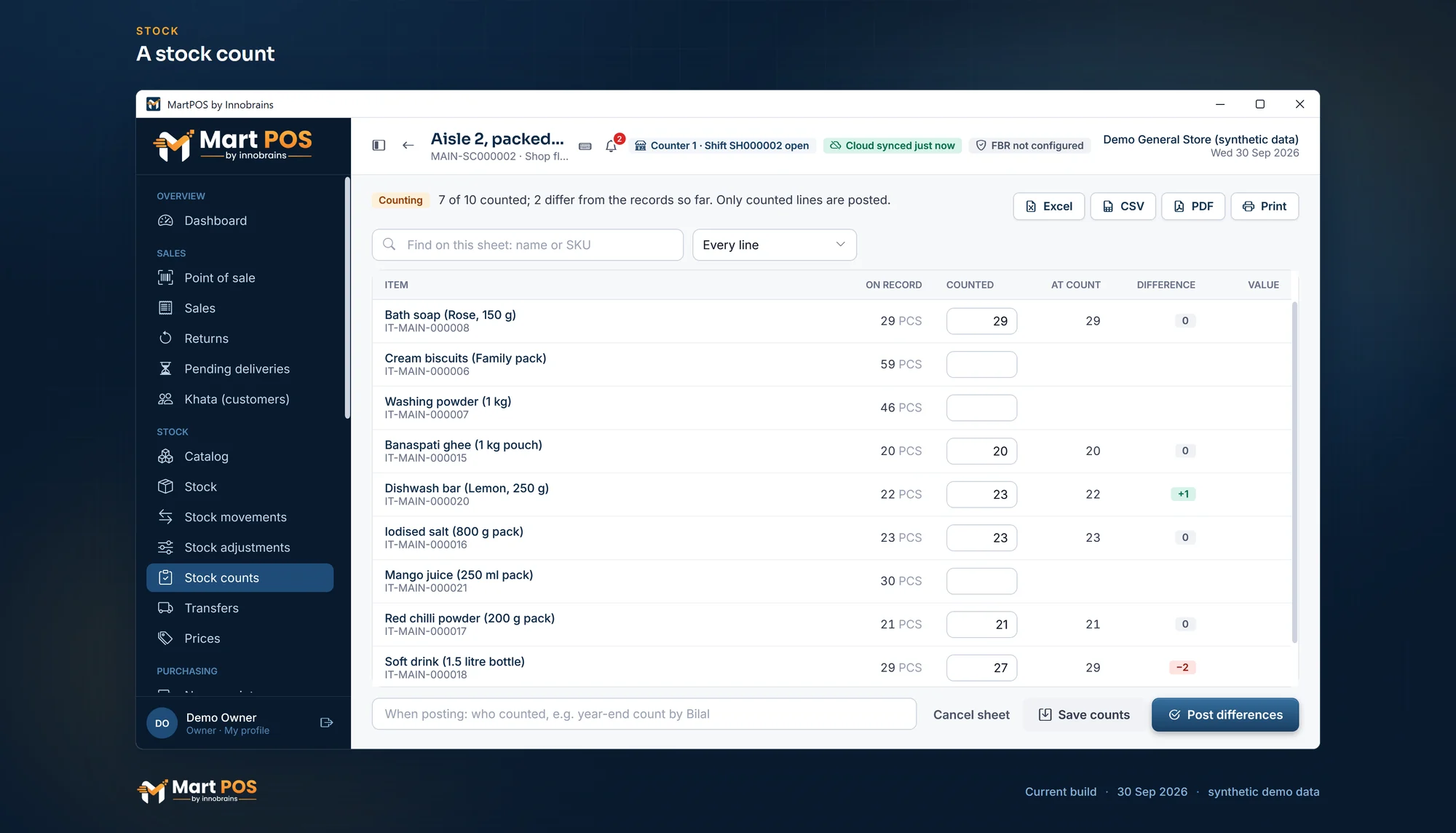
A stock count. A count sheet for one aisle while the shop stays open: each counted line keeps the quantity on record at that moment, and only real differences are posted. Screenshot of the current build (30 Sep 2026), synthetic demo data.
Post only the differences
Check the lines that differ and recount anything that looks wrong, such as a whole carton missing. Then write who counted and post. MartPOS adds or takes out only the real differences, at the average cost, and records them in a stock adjustments account so they show in profit and loss. Lines you did not count are left alone, and stock never goes below zero.
Nothing about a count is silent. Every movement it made carries the sheet's number and who posted it, so a difference found in March can still be explained in June.
A routine that works
- Count one shelf or one category a day, at a quiet hour. In a month, the whole shop has been counted without anyone losing a Sunday.
- Count fast movers more often. Sugar, cooking oil, tea and cigarettes (where you sell them) deserve a weekly count.
- Count the godown separately from the shop floor, on its own sheet.
- Look at the pattern, not only the number. The same item short every week points to a price or unit set up wrong, or to something walking out of the door.
- Write off damage on the day it happens with a stock adjustment and a reason, instead of waiting for the count to find it.
Common questions
Do I have to close the shop to count?
No. Each counted line keeps its own snapshot, so sales made after it was counted never look like losses.
Can I count the godown?
Yes. Choose the godown as the place when you make the sheet. The sheet shows the godown's stock, and posting changes only the godown's stock.
How do I count loose sugar?
Weigh it and type the weight in kilograms, with decimals: 12.35. Count full bags in kilograms as well.
I typed a wrong figure and saved. Can I change it?
Yes, until the sheet is posted: type the right figure and save again.
Who can post a count?
Owners, managers and warehouse staff, who have the stock-adjustment permission. Anyone who can see stock can read the sheets.
For more on how stock is kept, see retail inventory software and the help centre.
Founder & CEO, Innobrains Technologies
Arshad Ali is the founder and CEO of Innobrains Technologies, the company that is building MartPOS: point-of-sale, stock and khata software for kiryana stores, general stores and mini marts in Pakistan.
Run your shop on MartPOS
Barcode billing, loose goods and packs, khata and advances, on the shop's own PC without internet. We set it up on your shop PC with you.
Related guides
Landed cost for kiryana purchases: freight and loading in the price of a bag
A bag of sugar does not cost what the mandi bill says. The truck, the loaders and the toll are part of its cost, and if they are not counted, every kilo looks more profitable than it is. What landed cost is, two ways to share it, and how MartPOS adds it to a purchase.
04 Oct 2026 · 7 minSelling atta, rice, daal and sugar by weight or by rupees
Half a kilo of daal, a pao of haldi, Rs 100 of sugar, a whole bag of atta. How a cashier bills loose goods by weight or by the rupee in MartPOS, why Rs 50 of sugar can come to Rs 50.08, and what the till checks on every line.
30 Sep 2026 · 6 minBarcodes for loose items and the goods you pack yourself
Loose daal, rice and spices come without a maker's barcode, and so do the 1 kg packets you fill yourself. Two ways to make them scan at the till in MartPOS, which to use when, and why you should never make up an EAN-13 number.
30 Sep 2026 · 5 min