Barcodes for loose items and the goods you pack yourself
Loose daal, rice and spices come without a maker's barcode, and so do the 1 kg packets you fill yourself. Two ways to make them scan at the till in MartPOS, which to use when, and why you should never make up an EAN-13 number.
Packed goods arrive with the maker's barcode printed on them, and scanning them is quick. Loose goods do not: the sack of chana daal, the tin of loose tea, the spices sold by the pao. Nor do the 1 kg packets of sugar you fill yourself on a slow afternoon. If the cashier has to search for each of these by name, the queue slows down just when the shop is busiest. There are two ways to make loose and self-packed goods scan in MartPOS. This guide explains each, when to use it, and one mistake to avoid.
First, one rule: never make up an EAN-13
A 13-digit barcode is not just a number. Its last digit is a check digit worked out from the others, and the first digits belong to a registered company. If you invent a 13-digit number for your own packets, it may be refused because its check digit is wrong, or worse, it may be a real product's barcode that a distributor delivers next month. MartPOS checks every 13, 12 and 8-digit code as EAN-13, UPC-A or EAN-8 and refuses a wrong check digit, and it never invents a barcode for you. For your own goods, use a code that is clearly yours, as below. The arithmetic is in barcode check digits explained.
Way 1: a label for the loose item itself
Every item in MartPOS has its own code, its SKU, such as IT-MAIN-000123, and the SKU is added to the item as a barcode automatically. MartPOS can print it as a Code 128 label, which the till already scans.
- In Catalog, choose Labels, add the loose item, and tick Show the price if you want its price per kg on the label.
- Choose the layout, an A4 sheet of 24 labels or a 50 × 30 mm roll, make the PDF and print it at 100%.
- Stick the label on the sack, the bin or a card kept at the counter.
Scanning it puts 1 kg of the item on the bill. The cashier then types the weight, or presses F6 and types the rupees for "Rs 100 of daal". This suits goods weighed in front of the customer. A card at the counter with a label for each loose item, in the order of the shelves, is often quicker than searching. See selling loose goods by weight or by rupees.
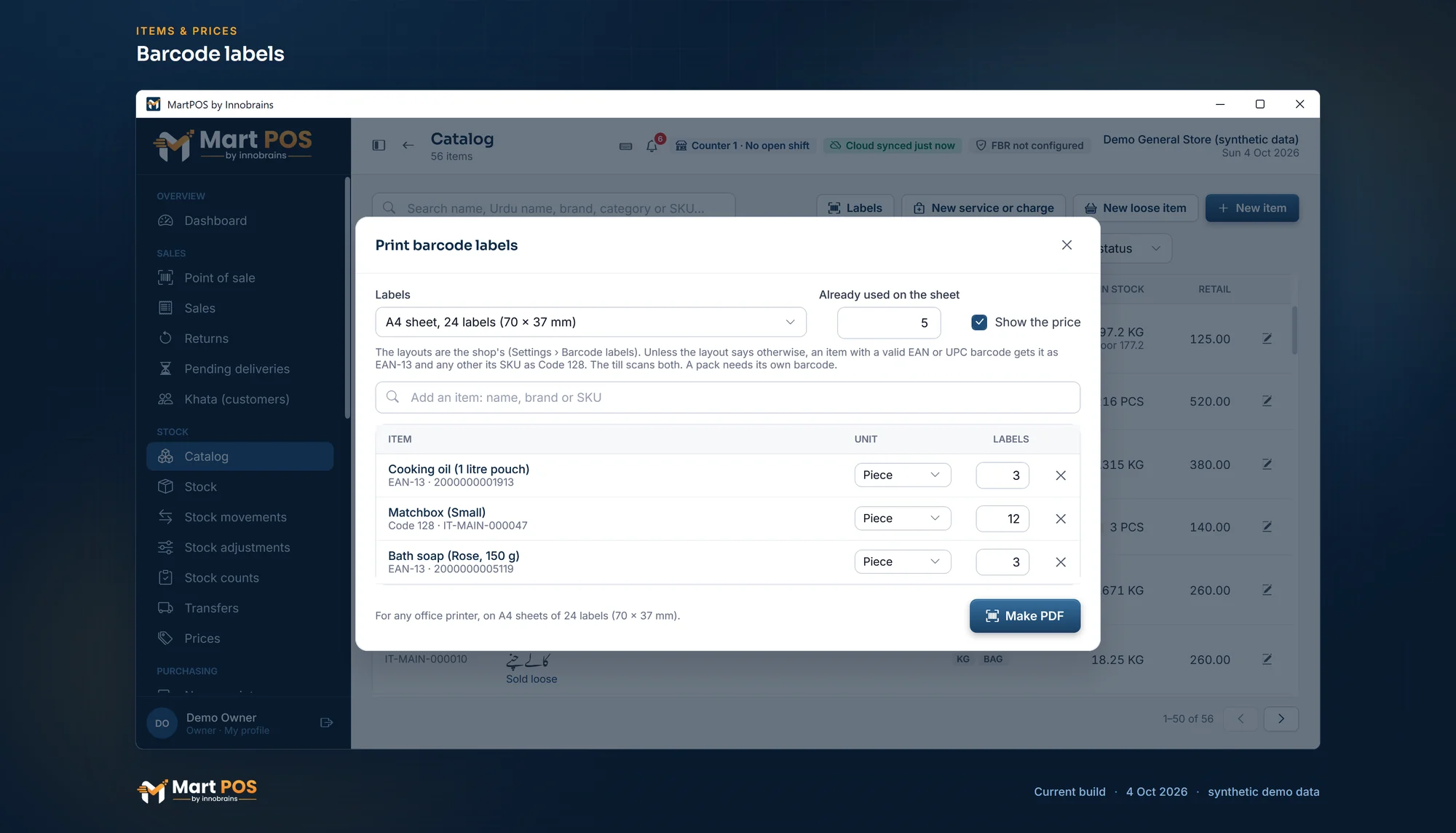
Barcode labels. Labels for an A4 sheet of 24 with used positions skipped; an item with no barcode of its own gets its SKU as a Code 128 barcode. Screenshot of the current build (4 Oct 2026), synthetic demo data.
Way 2: your own packets, with their own code
Goods you pack in fixed sizes, 1 kg of sugar or 500 g of daal, sell faster if the packet itself scans at its own price. There are two ways to set them up, and the difference is the stock.
| A pack of the loose item | An item of its own | |
|---|---|---|
| Set-up | Add a unit to the loose item, such as 1 kg packet with factor 1 or 5 kg bag with factor 5, with its own price and barcode | Make a new item, such as Sugar 1 kg (shop packed), sold by the piece |
| Stock | One figure in kg: selling a packet takes 1 kg from the same stock as loose sales | Its own stock, counted in packets |
| Suits | Packing from the same sack you sell loose from | Goods that differ from the loose stock, or that you buy already packed |
Either way, the packet needs a code of its own before it can be labelled, because the loose item's SKU would ring up 1 kg of the loose item, not the packet. Type a code in the unit's or the item's Barcodes, one that is clearly yours, such as SUG1KG. A code that is not 13, 12 or 8 digits is kept as your own label and printed as Code 128. If a pack has no code, MartPOS says so when you try to label it, rather than inventing one. See units, packs, prices and barcodes.
Printing labels well
- Print one test label and scan it at the till before printing a hundred.
- Print the PDF at actual size (100%), not "fit to page", so the bars keep their width.
- On a part-used A4 sheet, type how many labels are Already used on the sheet, and printing starts after them, so a half sheet is not wasted.
- Stick the label on a flat part of the pack, not over a fold or a seam.
- A label printed with a price keeps that price, while the till always charges today's. When a price changes, MartPOS lists the labels printed with the old one, and Add all to print puts them back on the list at today's price.
MartPOS prints labels on the PC's own label printer, or makes a PDF for A4 label sheets and label printer rolls that prints on any printer. See printing barcode labels.
Common questions
Can I print my own EAN-13 barcodes for loose goods?
No. MartPOS never invents a barcode, and a made-up 13-digit number can clash with a real product. Use the item's own code, or a code of your own with letters in it, printed as Code 128.
Should a 1 kg packet be a pack or its own item?
A pack of the loose item if you fill it from the same sack, so stock stays one figure in kg. Its own item if the packed goods are different, or bought already packed.
What does scanning a loose item's label put on the bill?
One kilogram, or one of the item's base unit. The cashier types the real weight, or sells by rupees with F6.
For stock and barcodes as a whole, see retail stock and barcodes, or what MartPOS does for a grocery store.
Founder & CEO, Innobrains Technologies
Arshad Ali is the founder and CEO of Innobrains Technologies, the company that is building MartPOS: point-of-sale, stock and khata software for kiryana stores, general stores and mini marts in Pakistan.
Run your shop on MartPOS
Barcode billing, loose goods and packs, khata and advances, on the shop's own PC without internet. We set it up on your shop PC with you.
Related guides
Landed cost for kiryana purchases: freight and loading in the price of a bag
A bag of sugar does not cost what the mandi bill says. The truck, the loaders and the toll are part of its cost, and if they are not counted, every kilo looks more profitable than it is. What landed cost is, two ways to share it, and how MartPOS adds it to a purchase.
04 Oct 2026 · 7 minSelling atta, rice, daal and sugar by weight or by rupees
Half a kilo of daal, a pao of haldi, Rs 100 of sugar, a whole bag of atta. How a cashier bills loose goods by weight or by the rupee in MartPOS, why Rs 50 of sugar can come to Rs 50.08, and what the till checks on every line.
30 Sep 2026 · 6 minExpiry dates in a grocery store, without writing a date on every pack
Packed milk, yoghurt, bread and biscuits go off; soap and matches do not. How a grocery or general store can keep track of dates only where they matter, find what to move before it expires, and deal with what has, with the way MartPOS does it and its limits.
30 Sep 2026 · 6 min