
Skip to content
14-day free trial · no card required

Kiryana and general store POS for Pakistan.

Billing software for kiryana, grocery and general stores: barcode billing, loose atta and daal by the kilo, packs and cartons, retail and wholesale prices, udhaar khata, stock and a day book that balances, on the shop's own Windows PC. It keeps billing when the internet doesn't, and the owner sees every branch online and in the MartPOS Owner app on Android, always with the time each branch last reported.

The till

Scan or search by name, brand or Urdu name; take cash, card, EasyPaisa or JazzCash, or put it on khata.

Piece · Packet · Carton Hold bill Khata From advance

Loose goods

Sugar, rice and daal kept in kg with parts, sold by weight or by amount: "Rs 100 of sugar", worked out to the gram. A 50 kg bag is a pack with its own price and barcode.

F6 · Rs worth, and quick weights of 100 g to 1 kg

0

Internet needed to bill

0.625 kg

Loose stock in parts

3

Barcode kinds checked

See the screens

The current build, screen by screen

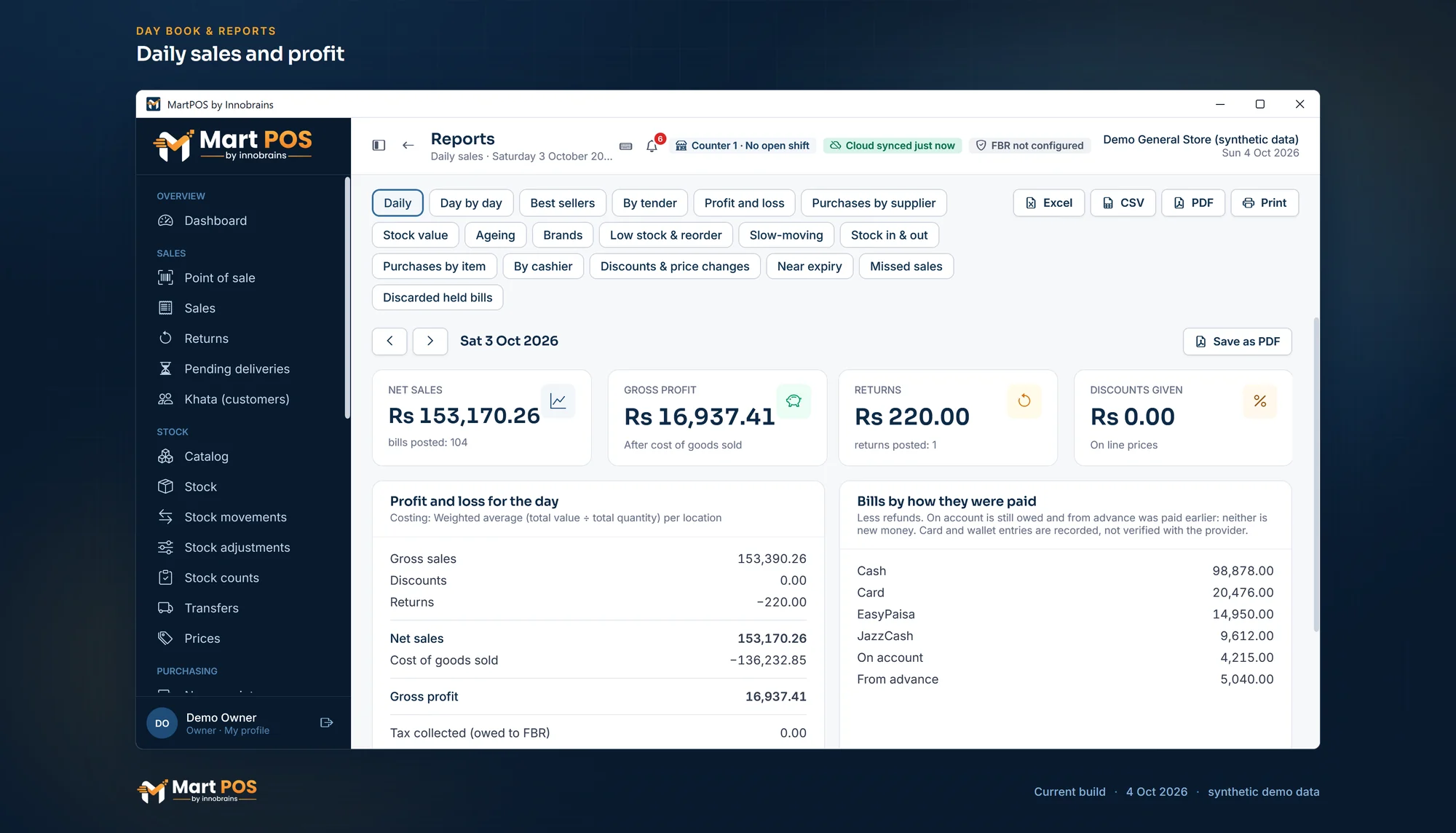
Real screenshots of the Windows app and the owner portal, with sample shop data; each says the day it was taken.

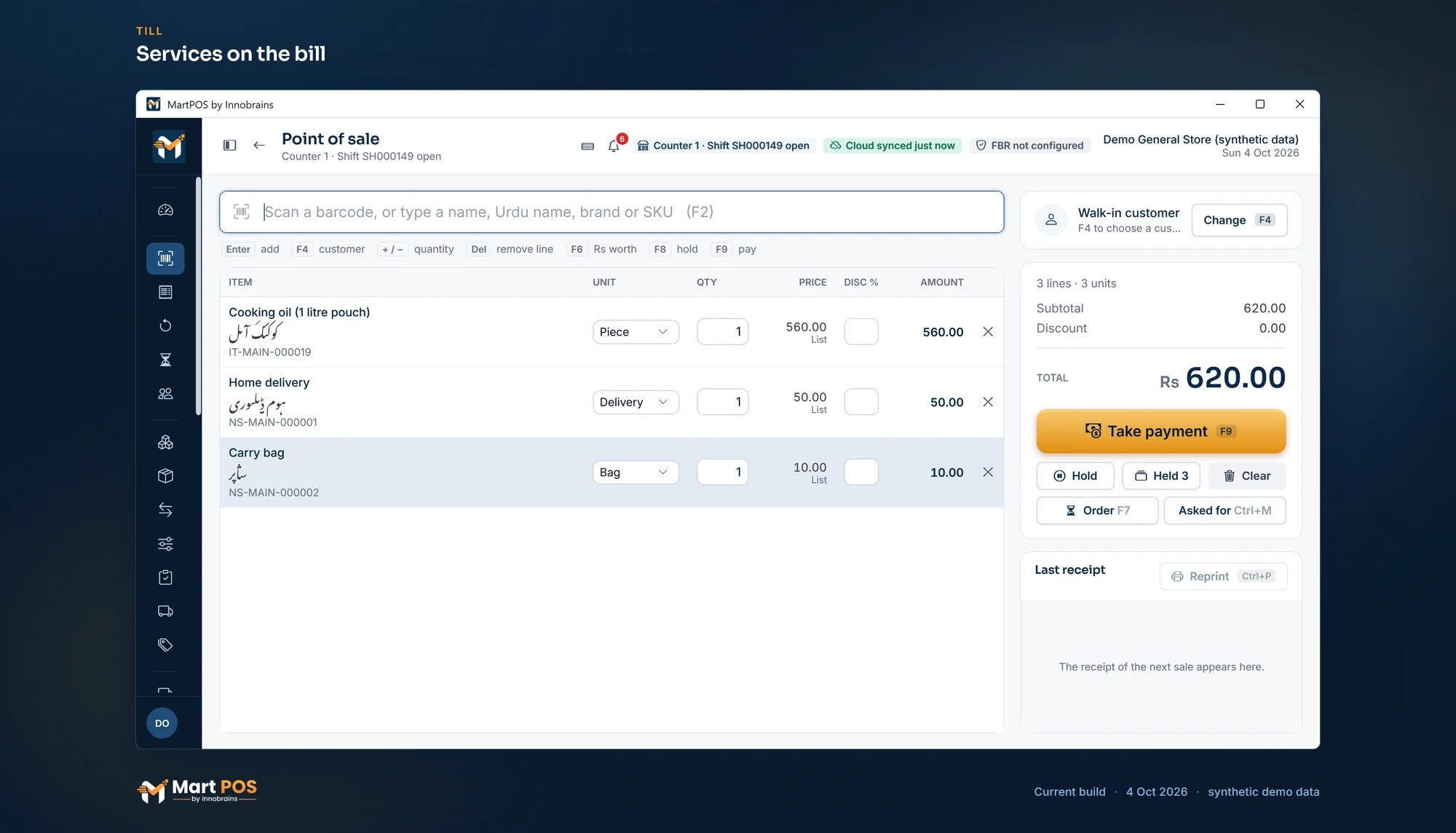
The till with a pouch of cooking oil, home delivery and a carry bag, each with its Urdu name and its code, total Rs 620.00
Open the full-size screenshot
Services on the bill. A delivery charge and a carry bag go on the bill like any item, each with its own code starting NS; they are never bought, counted or kept in stock. Screenshot of MartPOS (4 Oct 2026) with sample shop data.

See more screens

Try it

Check a barcode the way MartPOS does

Type or paste the digits under a barcode: an EAN-13 (13 digits), a UPC-A (12) or an EAN-8 (8). MartPOS verifies the check digit every time an item is saved or imported, and refuses a wrong one rather than guessing.

Try:

Sample numbers chosen for this example, not taken from real products: an EAN-13, a UPC-A and an EAN-8 with correct check digits, then the first one with its last digit mistyped. Checked in your browser: nothing you type is sent anywhere.

Offline and cloud

Billing without internet on the shop's PC; the cloud is the owner's window

One product in two places. The store PC bills with or without internet; MartPOS Cloud shows the owner what each branch reported, and when.

The store PC

Each shop's main PC runs the store server and owns that branch's records.

  • Keeps billing, returns and purchases going with no internet
  • Other PCs in the shop can bill as extra tills over the shop network
  • Encrypted backups on a schedule you choose, with a second copy
  • Changes go up in order, each once, when the internet is back; sync can be paused

MartPOS Cloud

For the owner, in any browser and in the Owner app for Android, with two-step sign-in.

  • Each branch's daily sales, with the time it last reported
  • STALE after 15 minutes without a report, never called "live"
  • Pair and revoke store PCs with one-time codes
  • Add items, change prices and share settings with every branch that follows

What works without internet, what the shop network does, and what the owner sees online: Offline and cloud, explained

Why MartPOS

Built around how a kiryana or general store actually sells

A basic billing program does not know that sugar is sold by the kilo and by the 50 kg bag, that a customer's advance is not a sale, or that one carton holds 24 packets while another holds 12. MartPOS does.

Keyboard-first till

Scan or search by name, brand, item code, Urdu name or another name customers ask for. Split a bill across cash, card, bank, EasyPaisa and JazzCash, or put it on khata.

Loose and packed goods

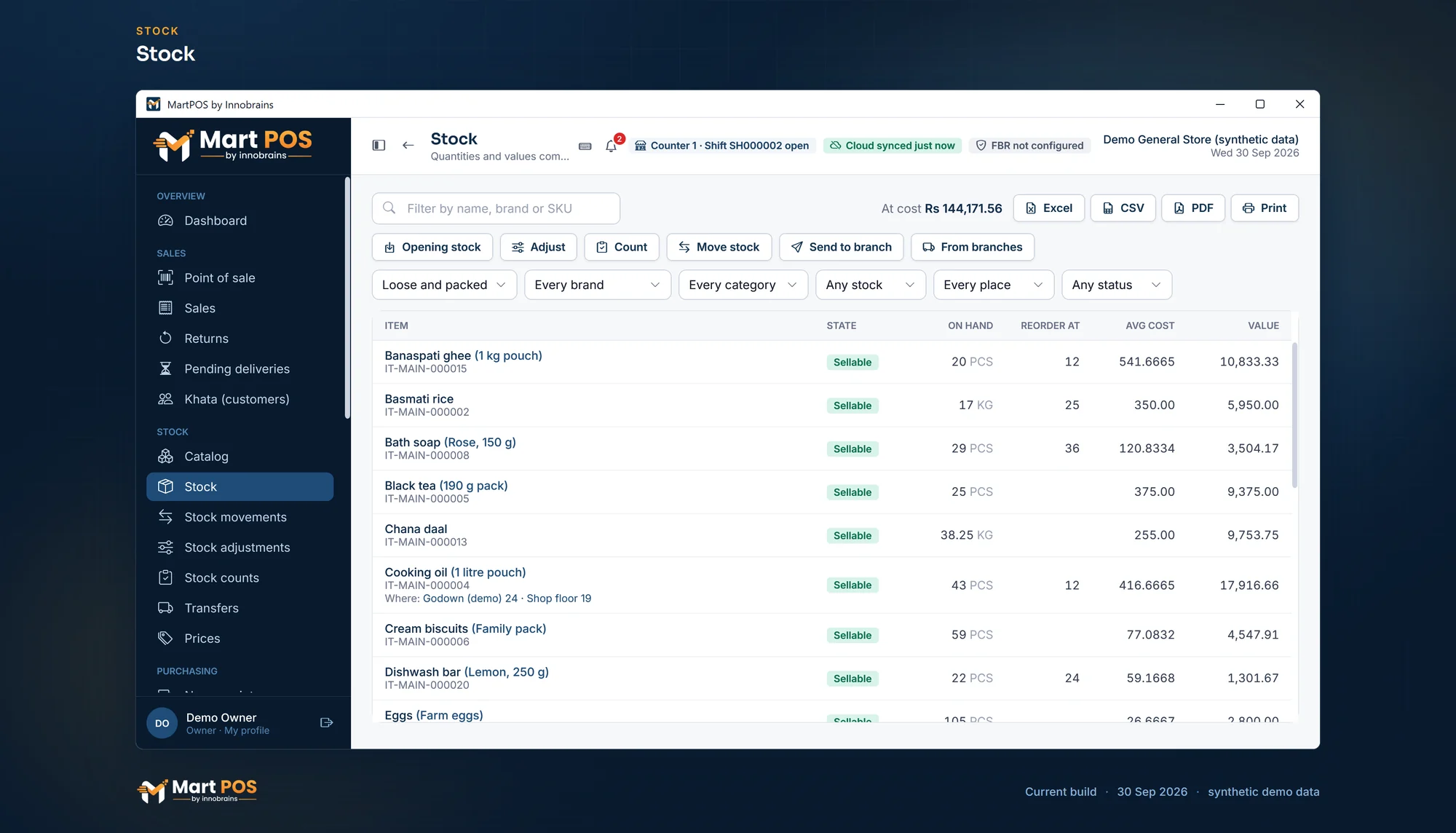
Sugar and daal keep their stock in kg with parts (0.625 kg) and sell by weight or by amount ("Rs 100 of sugar"); a 50 kg bag or a carton is a pack with its own price and barcode.

Barcodes checked, never invented

EAN-13, UPC-A and EAN-8 check digits are verified when an item is saved or imported. A mistyped barcode is refused.

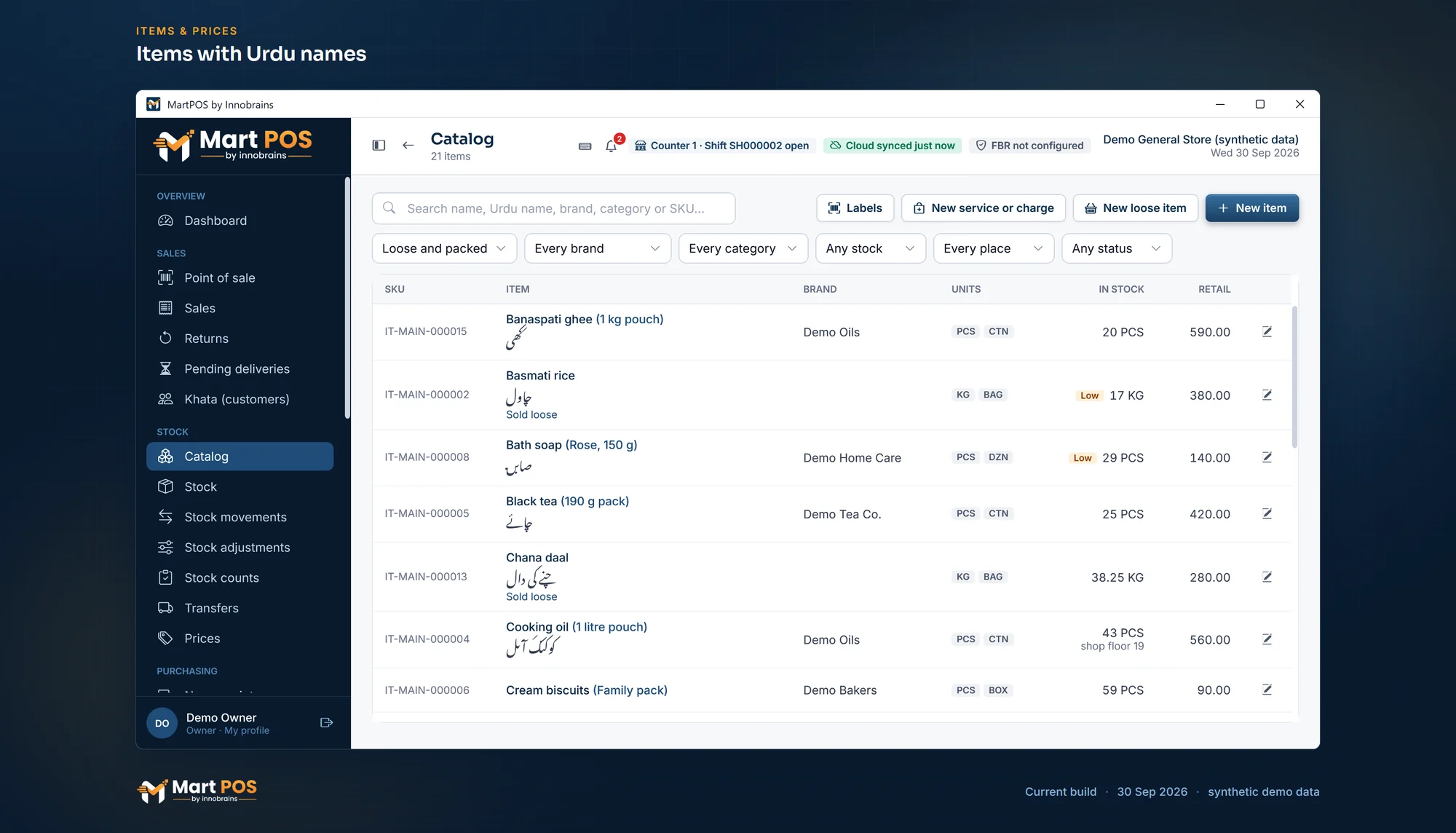
Urdu names in search

Each item can carry its Urdu name and the other names customers ask for (cheeni, shakar); search finds every one of them.

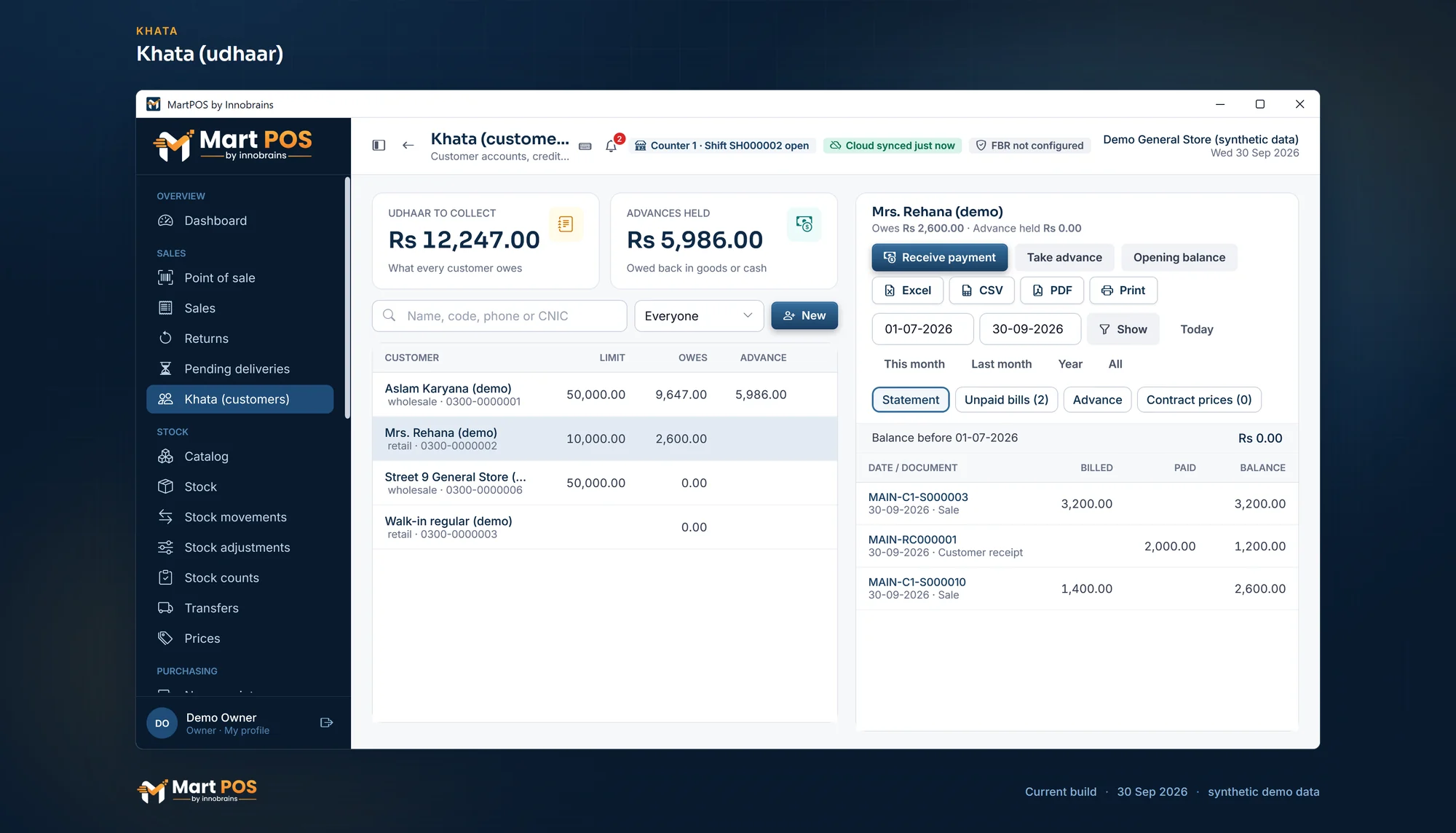
Khata and advances

Credit limits, statements and recoveries for every customer. An advance is held for the customer, not counted as a sale.

A day book that balances

Every sale, return, purchase and payment posts a balanced double entry. Till shifts close blind, with the difference recorded.

Get started

How a shop starts, in three steps

Download the Windows installer, set up the store PC, and start billing. We help if you ask.

Start the free trial

Create your account in a minute and choose Desktop or Cloud. Tell us what you sell and how many counters and branches you have.

Install on the store PC

Run the installer from the Download page on your main PC, then import your items, customers and suppliers from CSV, every row checked first.

Start billing

Add extra tills on the shop network if you need them, and pair the store with MartPOS Cloud to see each branch's daily sales.

The owner portal

Your branches, from anywhere, and how fresh each figure is

You cannot stand behind every counter. MartPOS Cloud shows what each branch reported, and never pretends a branch that went quiet is up to date.

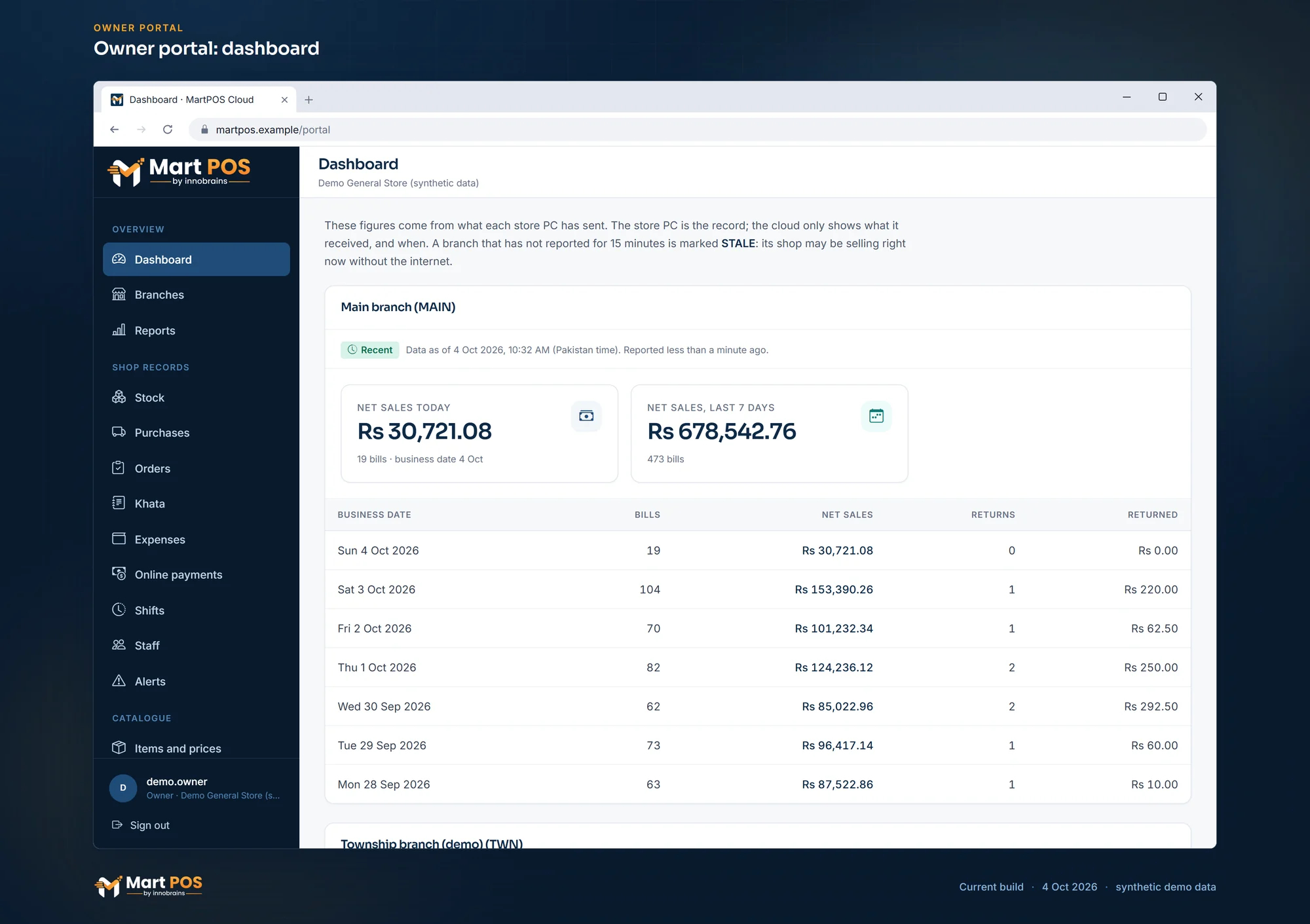
  • Daily sales per branch Today's and the last 7 days' net sales, bills and returns, in rupees, as each branch reported them.
  • "Data as of", always Every figure carries the time of its branch's last report. After 15 minutes without one, the branch is marked STALE.
  • Store PCs under your control Pair a PC with a one-time code; revoke one and its cloud access stops at once.
  • Items and prices, sent to the shops Add items, or change an item's name, packs, barcodes or prices; each branch applies it at its next sync, unless the shop changed it meanwhile.
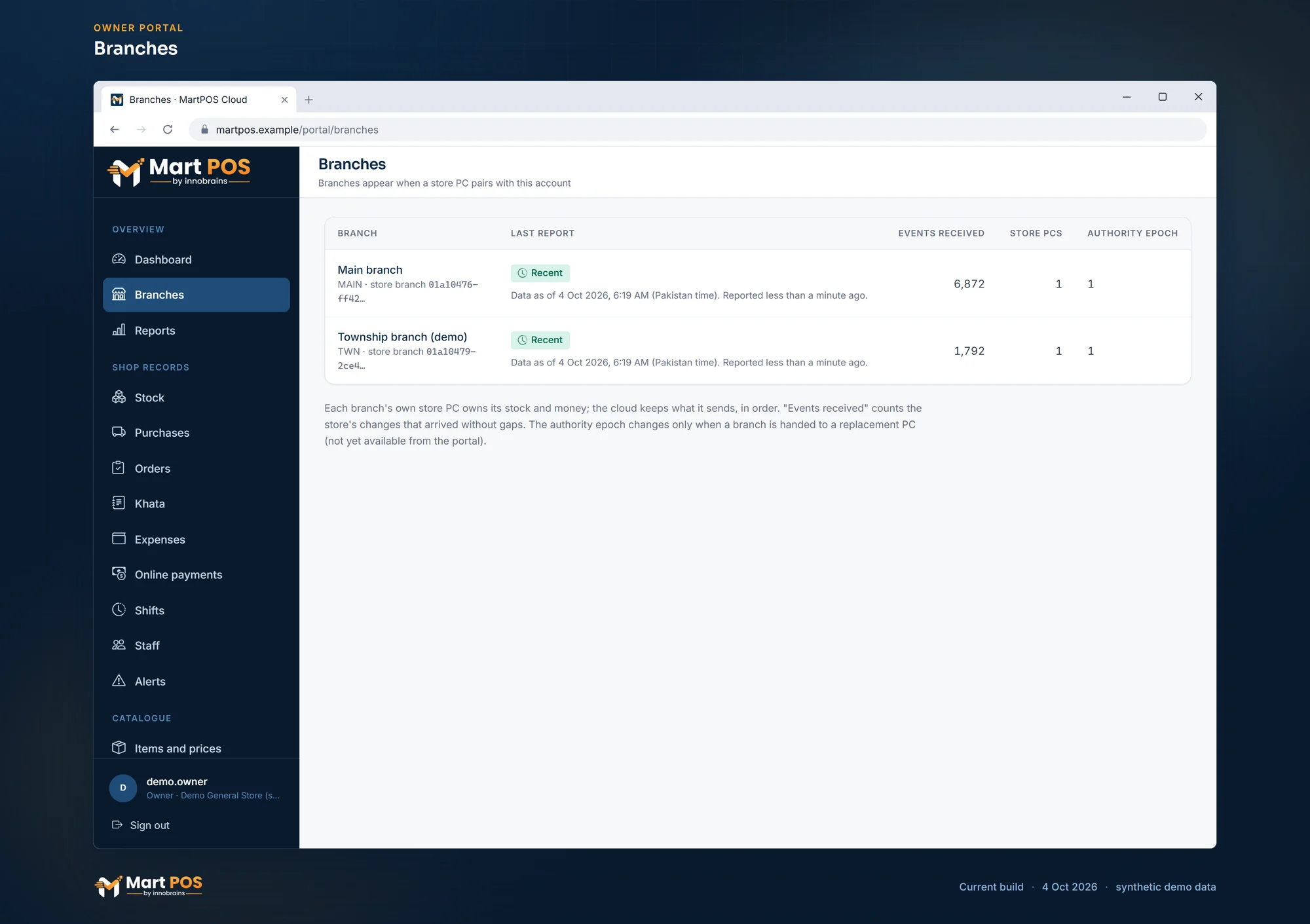
The owner portal's Branches page: Main branch with 6,872 changes received and Township branch (demo) with 1,792, both reported less than a minute ago Open the full-size screenshot
Branches. Each branch with its last report, the changes received from its store PC and how many store PCs it has. Screenshot of MartPOS (4 Oct 2026) with sample shop data.

Also in the portal

  • Stock, purchases, orders, khata and advances, expenses, shifts, staff and alerts for each branch, read-only, as its store PC last sent them.
  • Managers you invite by email, for every branch or only the branches you choose.
  • It works in a laptop's or a phone's browser, with two-step sign-in, and on Android in the MartPOS Owner app.
MartPOS Owner app · Android

Your shop, on your phone

Away from the counter, keep an eye on every branch: today's sales and profit, every bill, stock, khata, cash and what needs you, on your Android phone. Each figure carries the time its branch last reported.

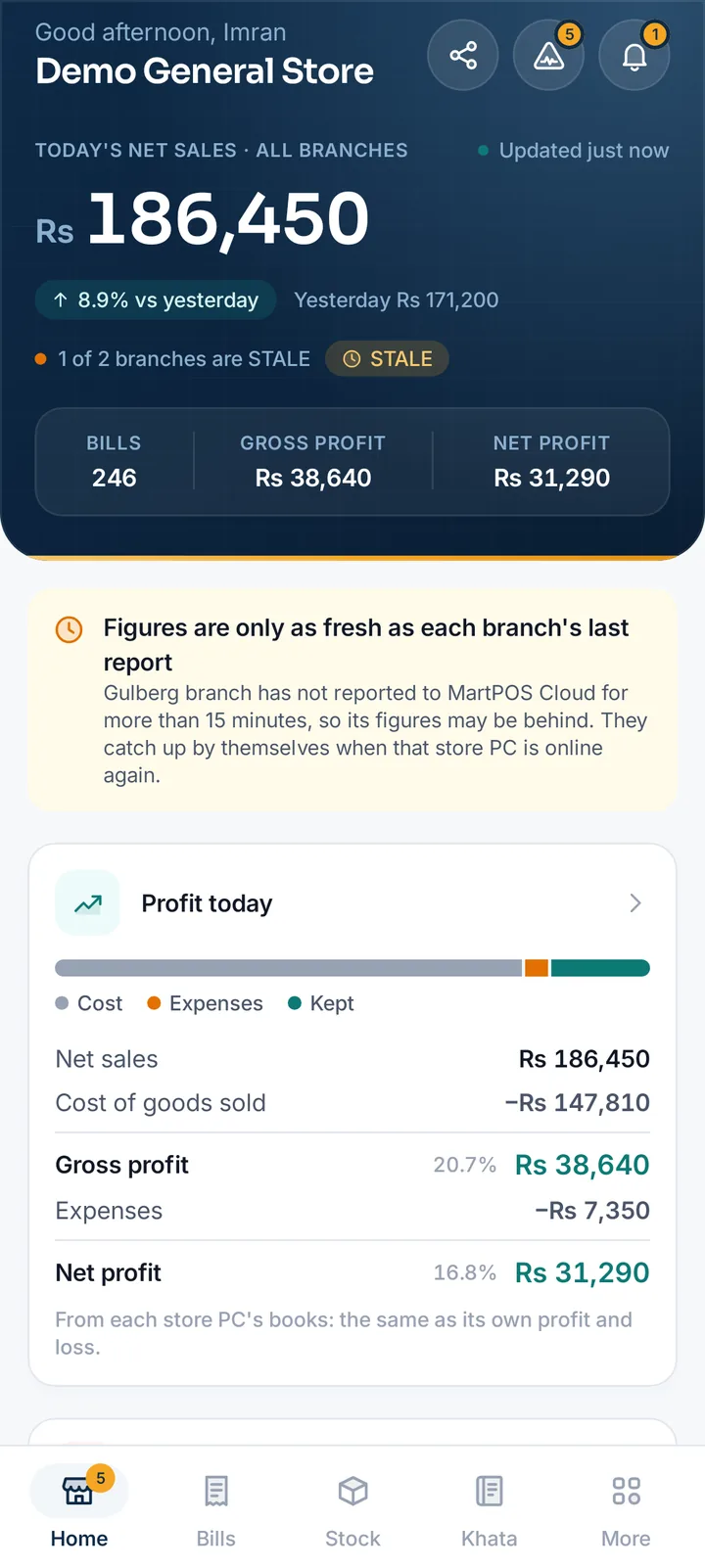
  • Today against yesterday Net sales, bills, gross and net profit in every branch, the last 30 days and your best sellers.
  • Profit from the books From net sales to net profit, the same as each store PC's profit and loss, with the branches side by side.
  • Every bill, any day Bills and returns with how each was paid, voids with the reason, and one bill line by line.
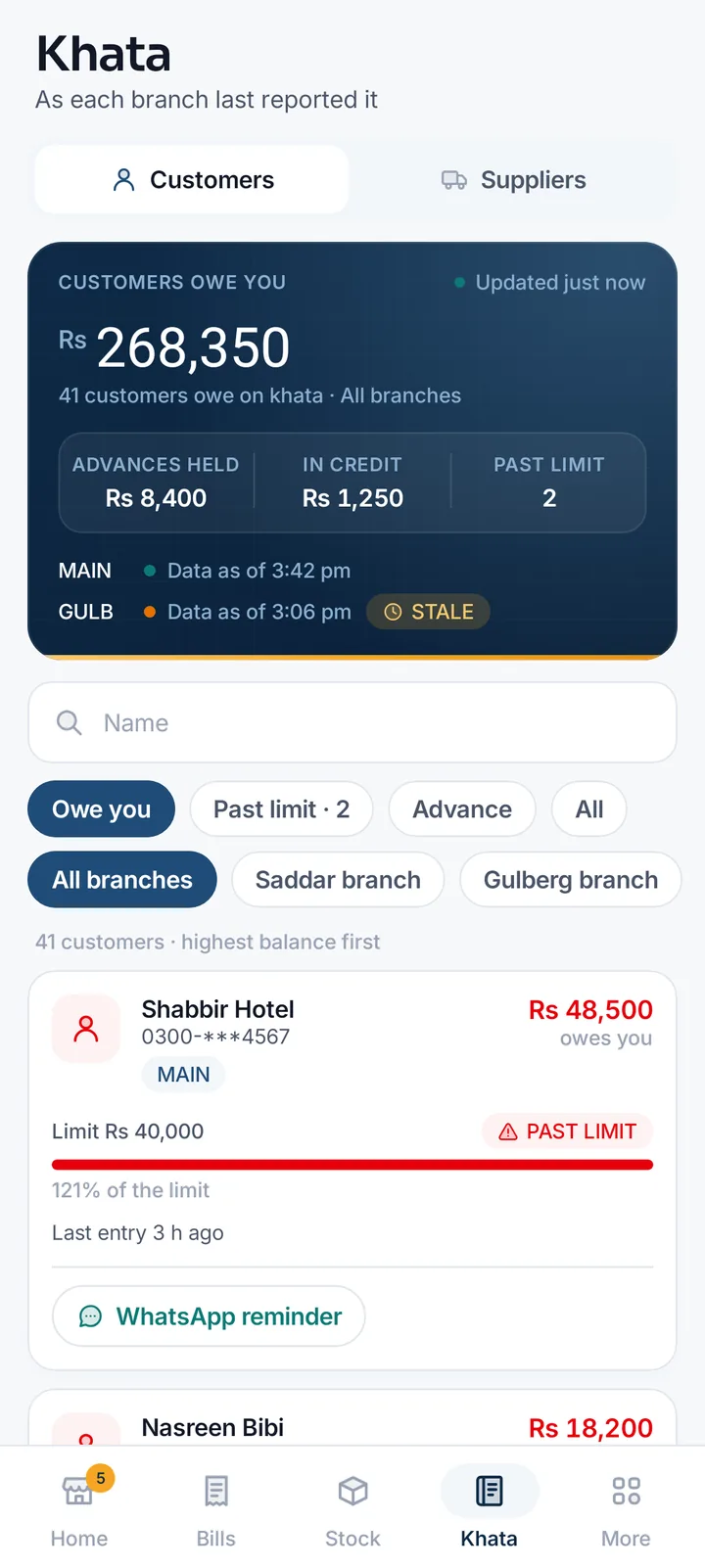
  • Stock and khata Each item at each branch and place, who owes you and who is past the limit, with a WhatsApp reminder.
  • Shifts, cash and FBR Who opened and closed each shift, cash expected and counted, and invoices not with FBR yet.
  • Alerts on your phone Low stock, near expiry, a branch gone quiet, a shift short: told once, when you switch notifications on.

Read-only. Included with every Cloud plan, including its free trial, and with a Desktop licence that has a Cloud plan on top. Android 7.0 and later · version 1.0.0 on the Owner app page.

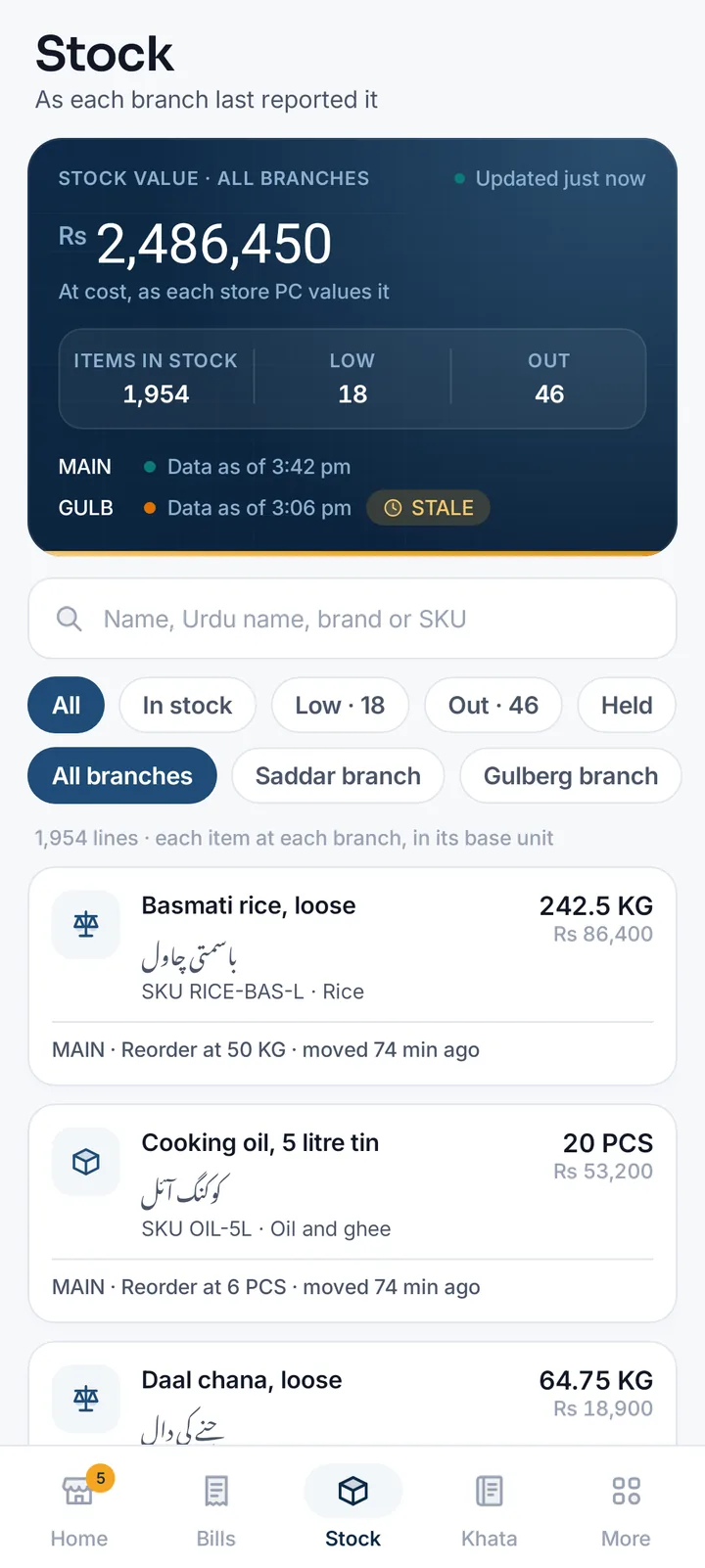
MartPOS Owner stock screen: stock value Rs 2,486,450 across branches, 1,954 items in stock, 18 low and 46 out, with loose rice and daal in KG and their Urdu names
MartPOS Owner home screen: today's net sales of Rs 186,450 across all branches, 8.9% up on yesterday, 246 bills, gross profit Rs 38,640, net profit Rs 31,290, a STALE note for one of two branches, and Profit today step by step
MartPOS Owner khata screen: customers owe Rs 268,350, advances held Rs 8,400, two past their limit, and a customer at 121% of the limit with a WhatsApp reminder button
Stock, Home and Khata in MartPOS Owner. Screenshot of MartPOS Owner with sample shop data.
FBR POS integration

FBR POS integration, built into MartPOS

Every bill reported to FBR's POS system right after it is saved, with FBR's invoice number and QR code on the receipt, and the queue keeps moving.

It is optional and off until the shop switches it on. Registering with FBR is done by you or your tax adviser.

Reported as you bill

Every sale goes to FBR right after it is saved, through FBR's online API or FBR's Fiscal Component on the store PC. Returns go as credit notes.

FBR number and QR on receipts

Receipts print the FBR invoice number, its QR code, your NTN, STRN and FBR POS ID.

Internet down? Keep billing

Bills print as offline invoices and are sent to FBR automatically once it can be reached.

Off until you need it

No fee, no FBR lines and no FBR fields until you switch it on in Settings.

Safe by design

Your shop's records, kept straight without anyone remembering to

Bills, stock and khata are your business. These rules are built into MartPOS, not left to habit.

One PC owns the records

Only the store server writes to the shop's database. Tills ask it, so two counters can never both sell the last packet.

Backups on your schedule

An encrypted backup at the time you choose, after each shift closes and before each database upgrade, read back to check it, with a second copy to another folder such as a USB drive. An owner can restore one on screen, on the same PC or a replacement.

A sign-in for every person

Owners, managers, cashiers, accountants and warehouse staff each sign in with their own name, and every posting records who made it. The owner sets the password and PIN rules and which roles may sign in on which PC.

Nothing quietly changed

Posted bills and stock movements are never edited. A correction is a new document with its reason.

Closed books stay closed

The owner can close the books through a date; nothing can be posted into it, and reopening needs a reason.

Two-step sign-in for the cloud

Owners can require a code from an authenticator app, with one-time recovery codes. Every business's cloud data is kept to its own account.

Who it is for

From one counter to a mini mart with branches

The same MartPOS for a neighbourhood kiryana or grocery shop, a busy general store, a shop that sells wholesale too, and a mini mart with several tills.

A kiryana shop

One counter on one PC and no internet worries: loose goods and packs, khata and advances, and a day book that balances.

Learn more about MartPOS for a kiryana shop

A general store

Barcode billing with packs and cartons, every way to pay, returns against the bill and stock you can count while open.

Learn more about MartPOS for a general store

A grocery store

Packed goods by barcode and atta, rice and daal by the kg from one stock, expiry dates on packed milk and bread, and low-stock alerts.

Learn more about MartPOS for a grocery store

A mini mart with branches

Extra tills on the shop network, staff roles and shifts, promotions, transfers between branches and every branch's sales online.

Learn more about MartPOS for a mini mart with branches

A shop that sells wholesale too

Retail and wholesale prices from one stock, a Retail | Wholesale switch at the till, wholesale customers and counters, and khata for trade buyers.

Learn more about MartPOS for a shop that sells wholesale too

A shop that runs on udhaar

Udhaar khata with credit limits, statements and recoveries, advances kept apart, and ageing that shows who owes what and for how long.

Learn more about MartPOS for a shop that runs on udhaar

MartPOS Desktop is a lifetime licence, paid once. See plans and prices

From the blog

Guides for running a kiryana or general store

All guides
Choosing POS software

Udhaar Book, DigiKhata or a POS with khata: which does a kiryana store need?

Khata apps such as Udhaar Book and DigiKhata keep udhaar on your phone; a POS with khata writes it from the bill itself and checks each customer's limit at the counter. What each does, where the apps are ahead, and how to choose, from the vendors' own websites on 7 October 2026.

11 min read

Choosing POS software

Offline POS software in Pakistan: which ones keep billing without internet

Many POS programs sold in Pakistan now say they work offline, and the word covers very different things. What "offline" really means, how to test it before you pay, load-shedding and UPS, backups and sync, and what seven products say on their own websites, checked on 7 October 2026.

11 min read

Choosing POS software

MartPOS vs Oscar POS: which is better for a kiryana or general store in 2026?

Oscar is a cloud POS for retail, restaurants and many other businesses, with payments, an online store and loyalty, but no published price. MartPOS is built only for kiryana stores, general stores and mini marts, publishes its PKR prices and runs on the shop's own Windows PC. Here is how they compare for a grocery counter.

11 min read

FAQ

Frequently asked questions

Yes. The shop's main PC runs the MartPOS store server and keeps the records, so billing, returns, purchases, khata payments and closing a shift all work with no internet. Changes go to MartPOS Cloud, in order and each once, when the internet is back.

The Windows installer is on the Download page, and we help you set it up: the store PC, your item list and your staff's first day at the till.

Yes. An item sold loose keeps its stock in kg or litres with parts, such as 0.625 kg, and a bag or carton can be a pack of it with its own price and barcode. The cashier types the weight, or sells by amount: for "Rs 100 of sugar" press F6 and type 100, and the store PC works out the weight to the gram.

Yes. A code of 13, 12 or 8 digits is checked as an EAN-13, UPC-A or EAN-8 barcode when an item is saved or imported, and a wrong check digit is refused. Other codes are kept as your own labels. MartPOS never makes up a barcode.

Yes. Each unit of an item has a retail and a wholesale price, from one stock figure. Customers set to wholesale are charged it, and in Settings › Sales you can show a Retail | Wholesale switch on every bill, start one counter at wholesale, or run the whole shop at wholesale. Owners and managers may switch a bill's prices; a cashier only when the owner allows it.

Yes. Each item can have an Urdu name, shown beside the English name and found by search, and other names customers ask for. The screens themselves are in English.

Yes, and it is optional. Once you switch it on in Settings, every sale and return is reported to FBR right after the bill is saved, through FBR's online API or FBR's Fiscal Component, and the receipt carries the FBR invoice number and QR code. Until then nothing is sent and no FBR fields appear.

Yes, on a Cloud plan: the owner portal in any browser and the MartPOS Owner app for Android show each branch's sales with the time it last reported. A branch that has not reported for 15 minutes is marked STALE, because it may be billing offline.

Yes: MartPOS Owner for Android. It shows today's sales in every branch against yesterday, profit, bills, stock, khata, shifts and cash, FBR and alerts, each figure with the time its branch last reported. It is read-only, and it comes with every Cloud plan, including its free trial, and with a Desktop licence that has a Cloud plan on top. Download it from the Owner app page.

MartPOS Desktop is a lifetime licence, paid once, from Rs 29,900, or in instalments; MartPOS Cloud plans are paid monthly or yearly, from Rs 1,990 a month. Every price is on the pricing page, in PKR, paid by bank transfer, JazzCash or EasyPaisa.

The till and store server are built and tested on 64-bit Windows 11, and have also been tested on a till with 64-bit Windows 10 22H2. The owner portal works in any modern browser.

14-day free trial

Want to try MartPOS in your shop?

Start a 14-day free trial, no card required, and download the Windows installer. We help you set it up.