
MartPOS Owner
for Android · by Innobrains
Your shop, on your phone
You cannot stand behind every counter. MartPOS Owner shows each branch's day the way an owner thinks about it, from today's sales and profit to stock, khata and cash, and always says how fresh each figure is.
- Read-only
- Data as of, on every figure
- Android 7.0 and later
- Included with Cloud plans

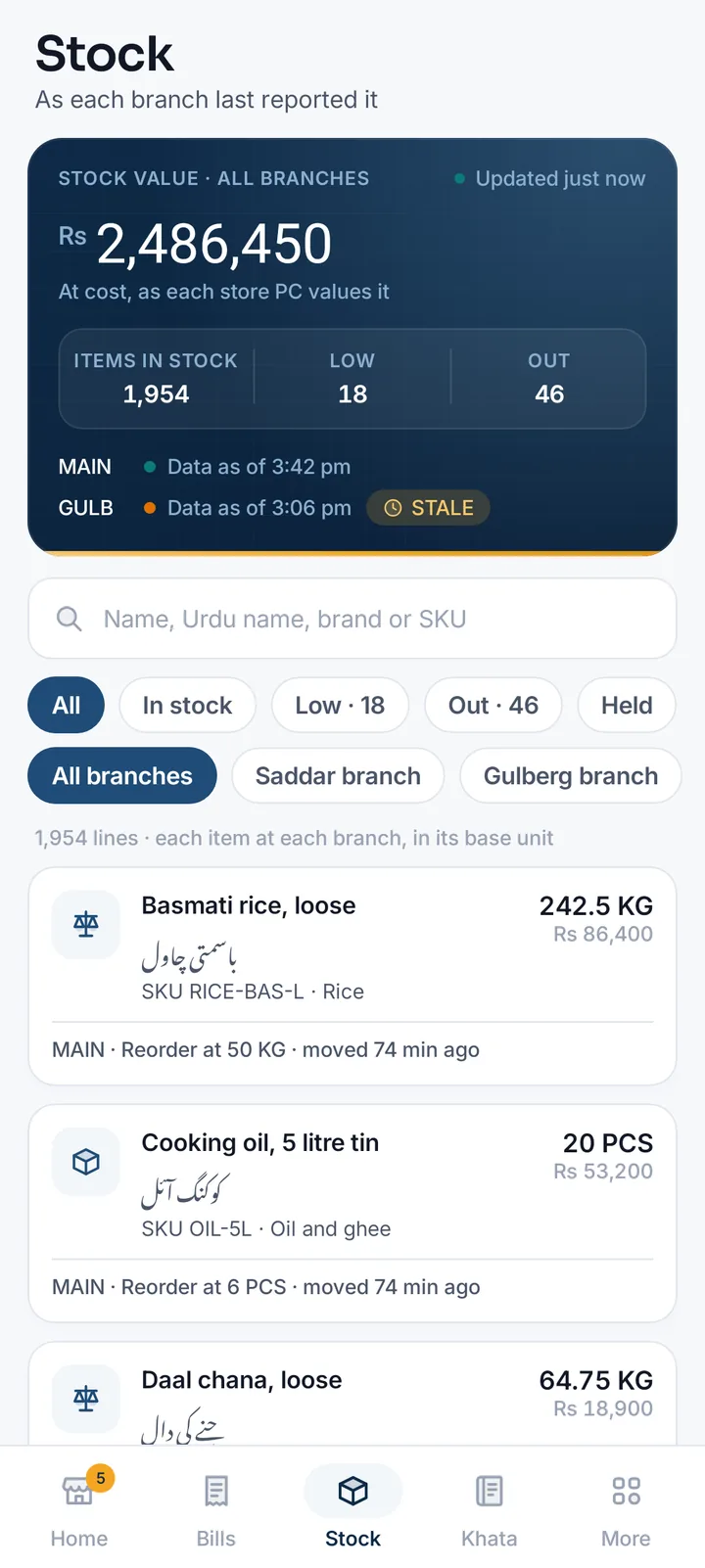
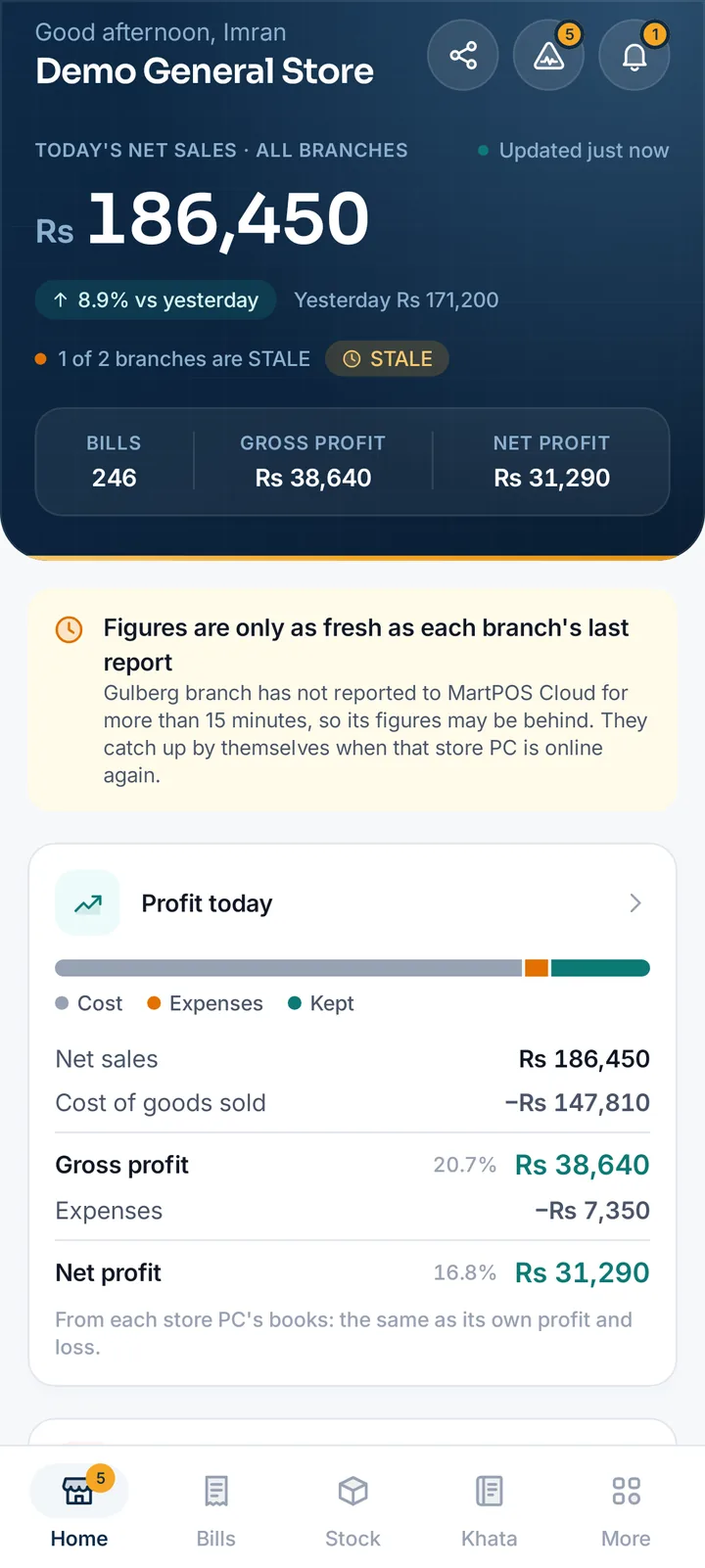
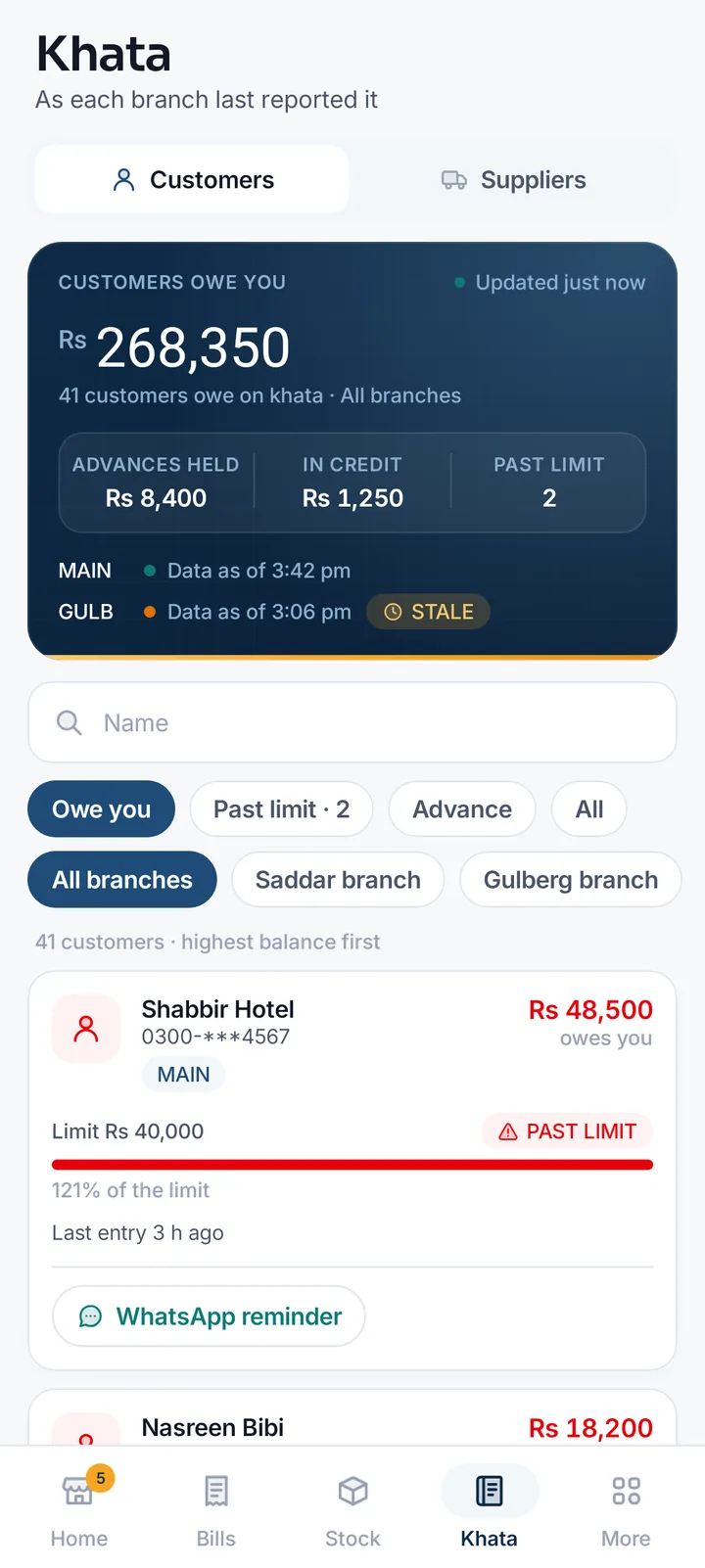
Your shop's day, in the order you think about it
Every screen reads what each branch's store PC has reported to MartPOS Cloud, with the time it reported.
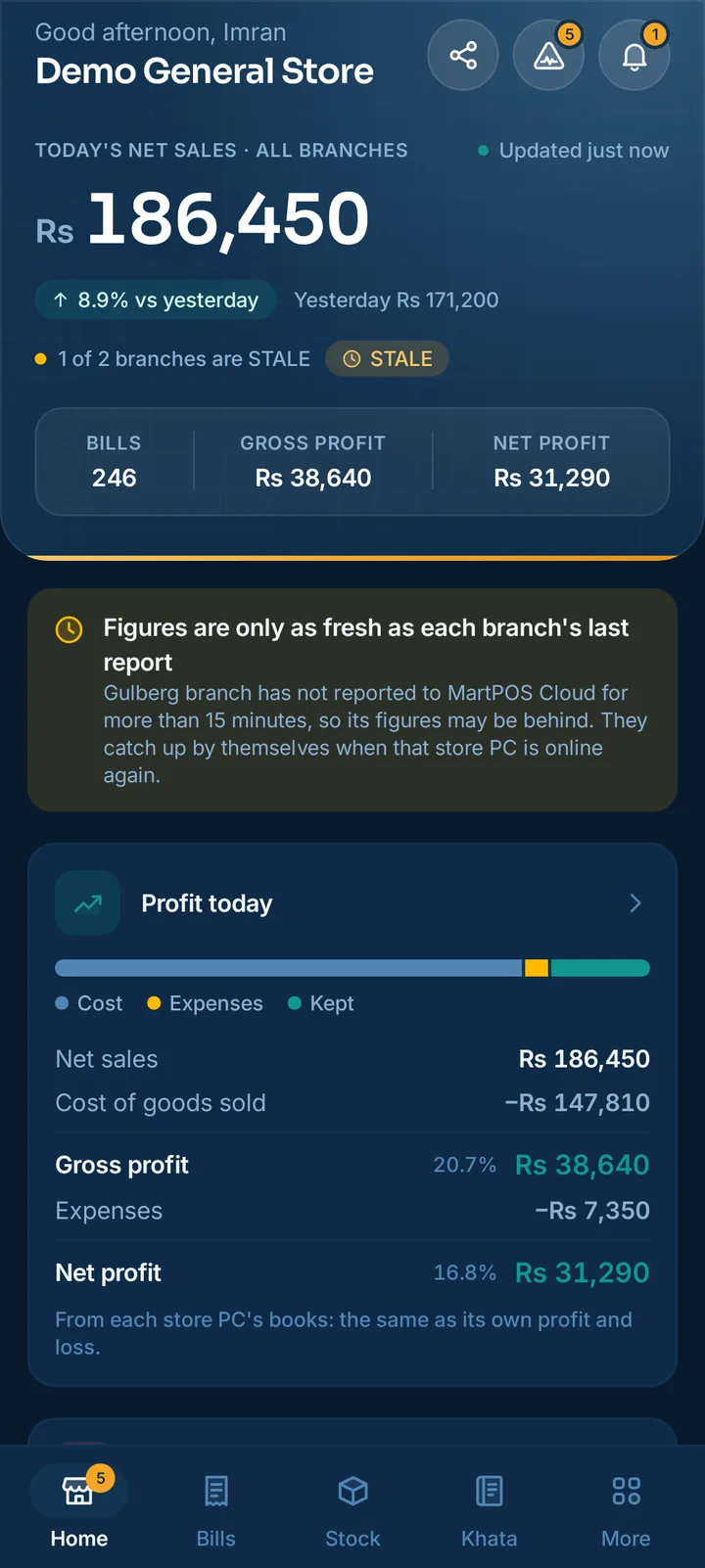
Today against yesterday
Net sales, bills, gross and net profit in every branch, the change on yesterday, and how customers paid, with khata kept apart as no new money.
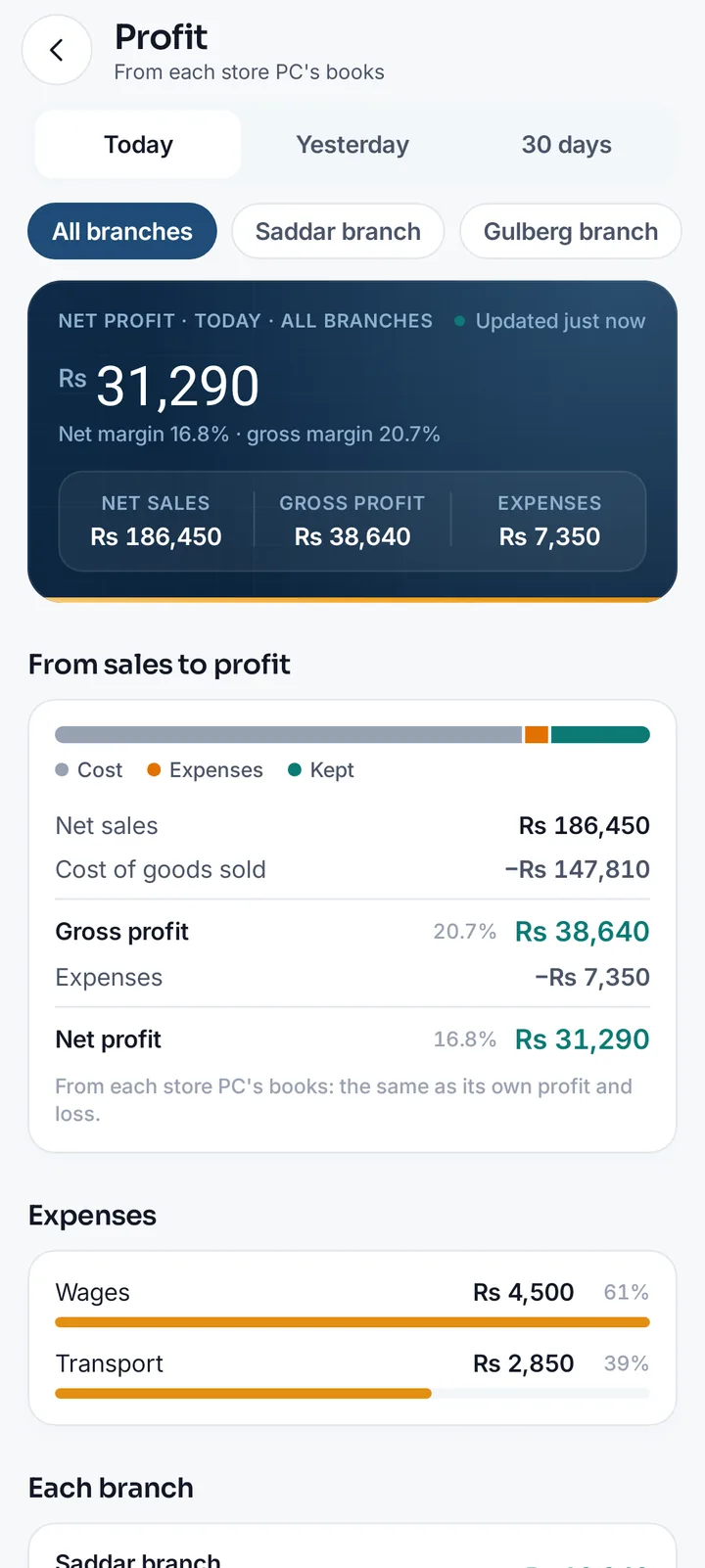
Profit from the books
Net sales, cost of goods, gross profit, other income, expenses and net profit with margins, for today, yesterday or 30 days, per branch and per day.
Branches side by side
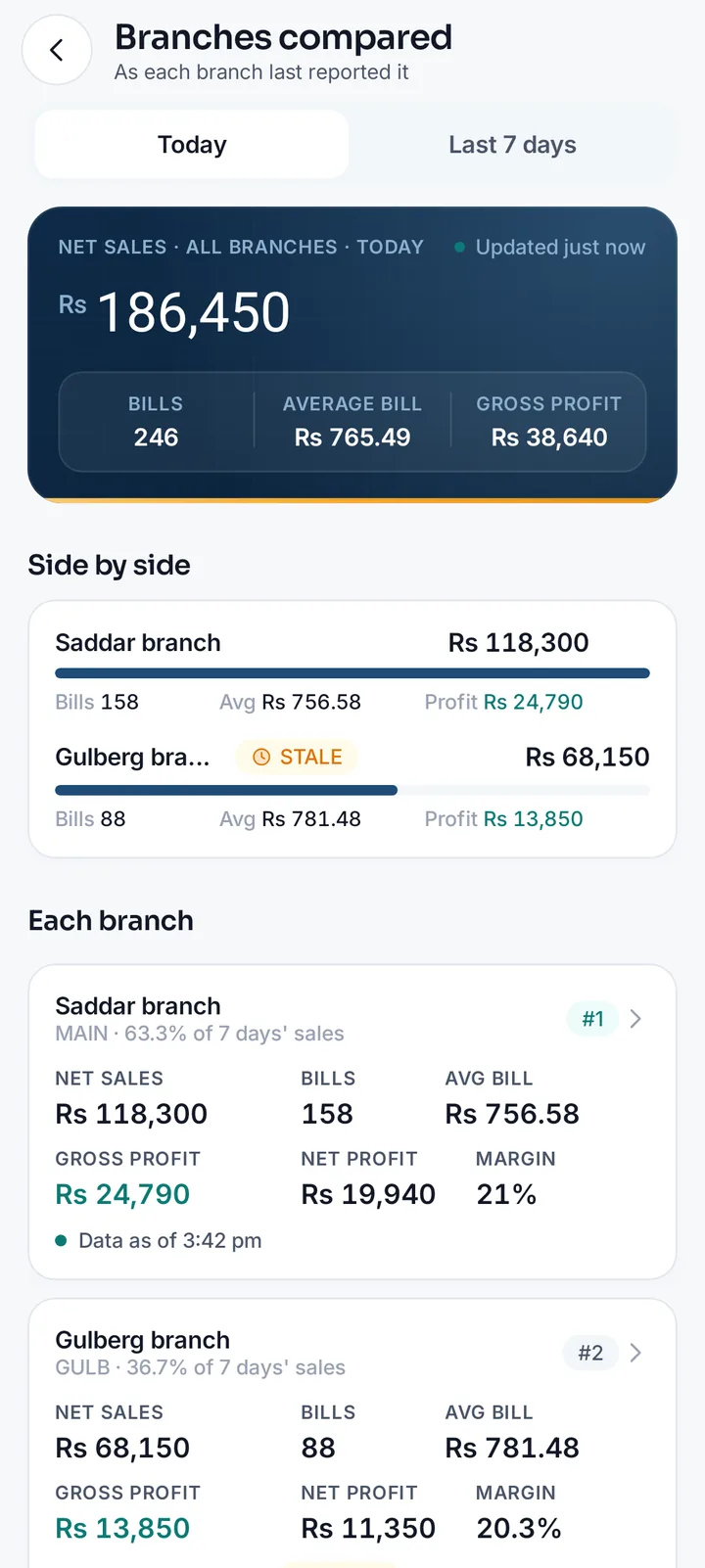
Today or the last 7 days: net sales, bills, average bill, gross and net profit, each branch's share and rank.
The last 30 days
A chart of the month day by day, this month so far, and your best sellers over 7 or 30 days with their Urdu names.
Every bill of any day
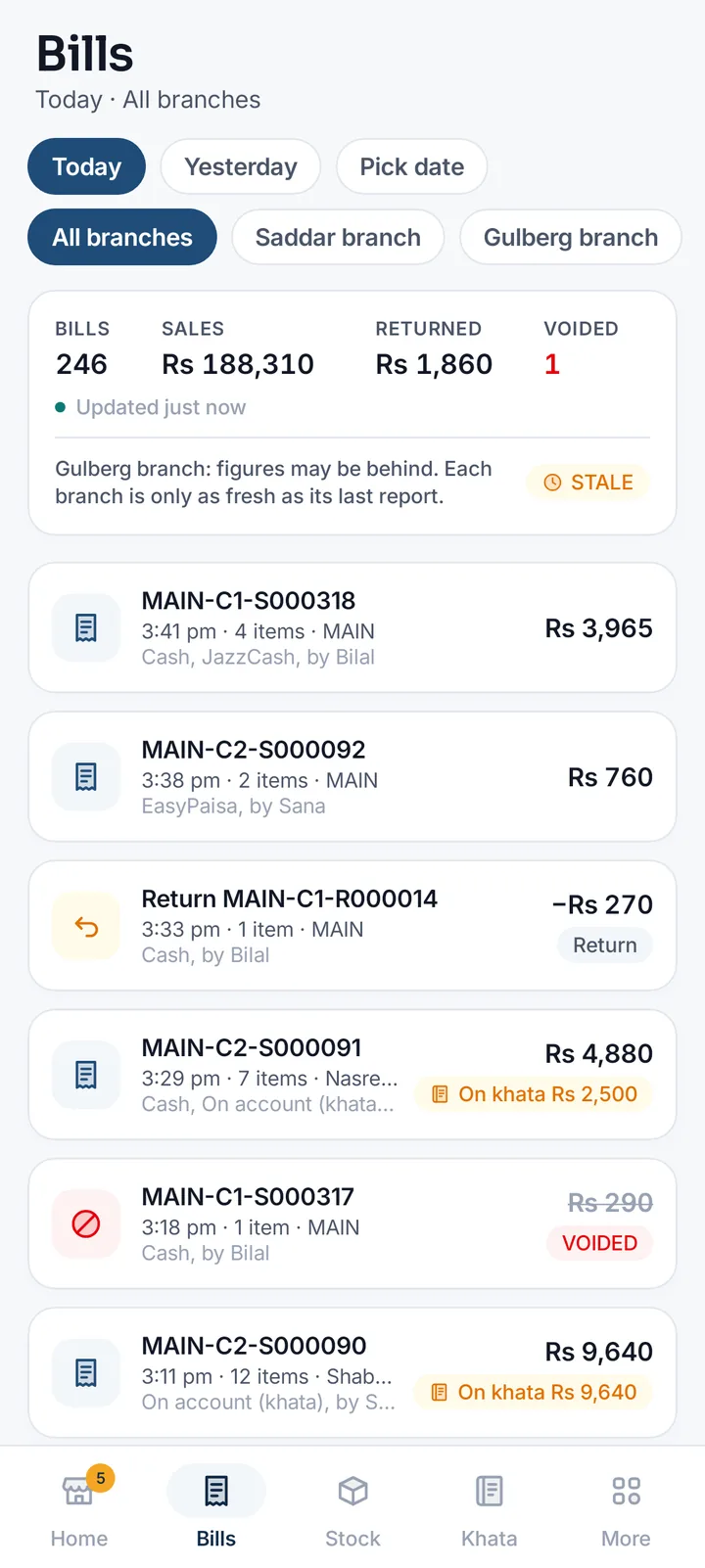
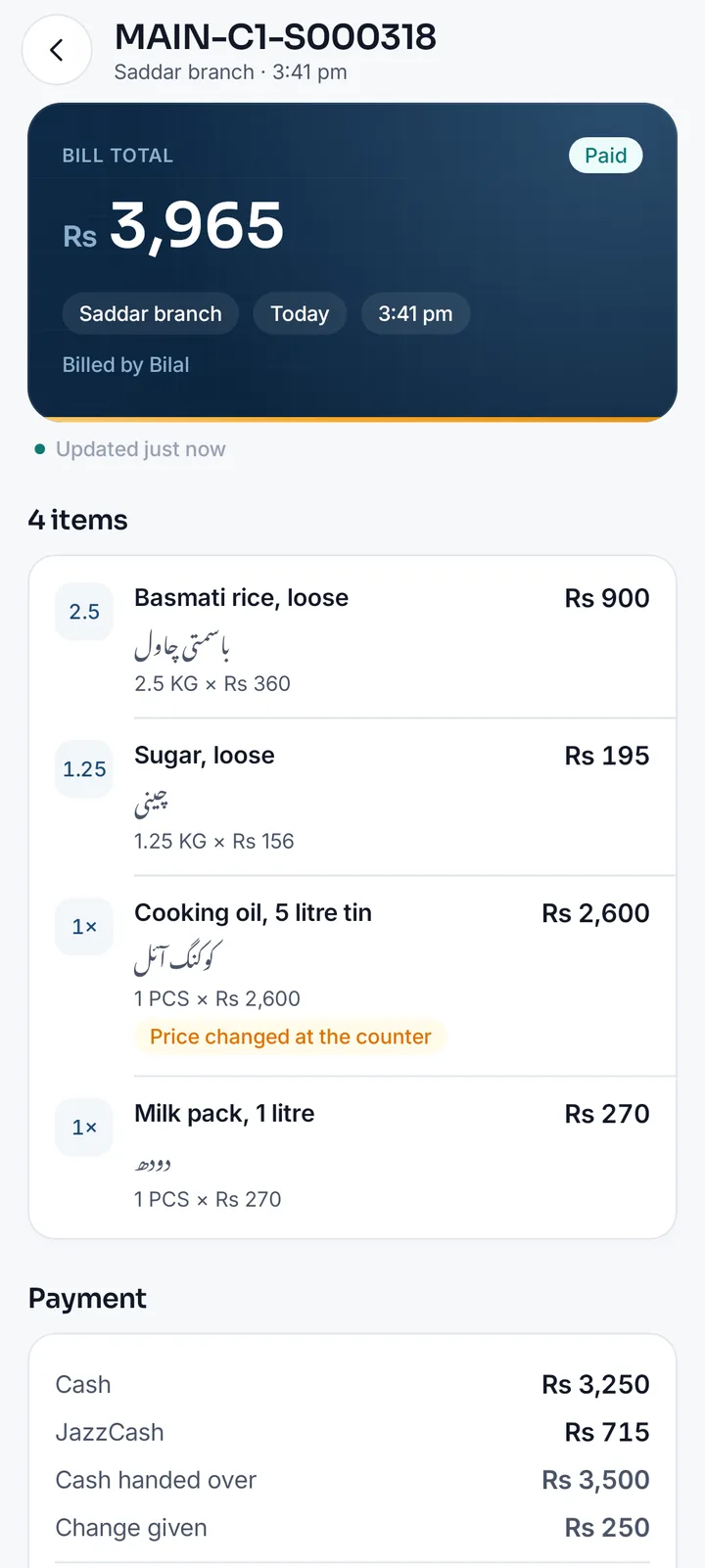
Pick a day and a branch: bills and returns with how each was paid, who billed it, what went on khata and which were voided, and why. One bill opens line by line with its profit.
Stock per item, branch and place
Stock value, low and out of stock, each item in its own unit (loose goods in KG to three decimals) at each branch, godown and shop floor, with its prices, packs and barcodes.
Khata, customers and suppliers
Who owes you, advances held, customers past their credit limit and what you owe suppliers, with a WhatsApp reminder in English or Roman Urdu that you send yourself.
Purchases and expenses
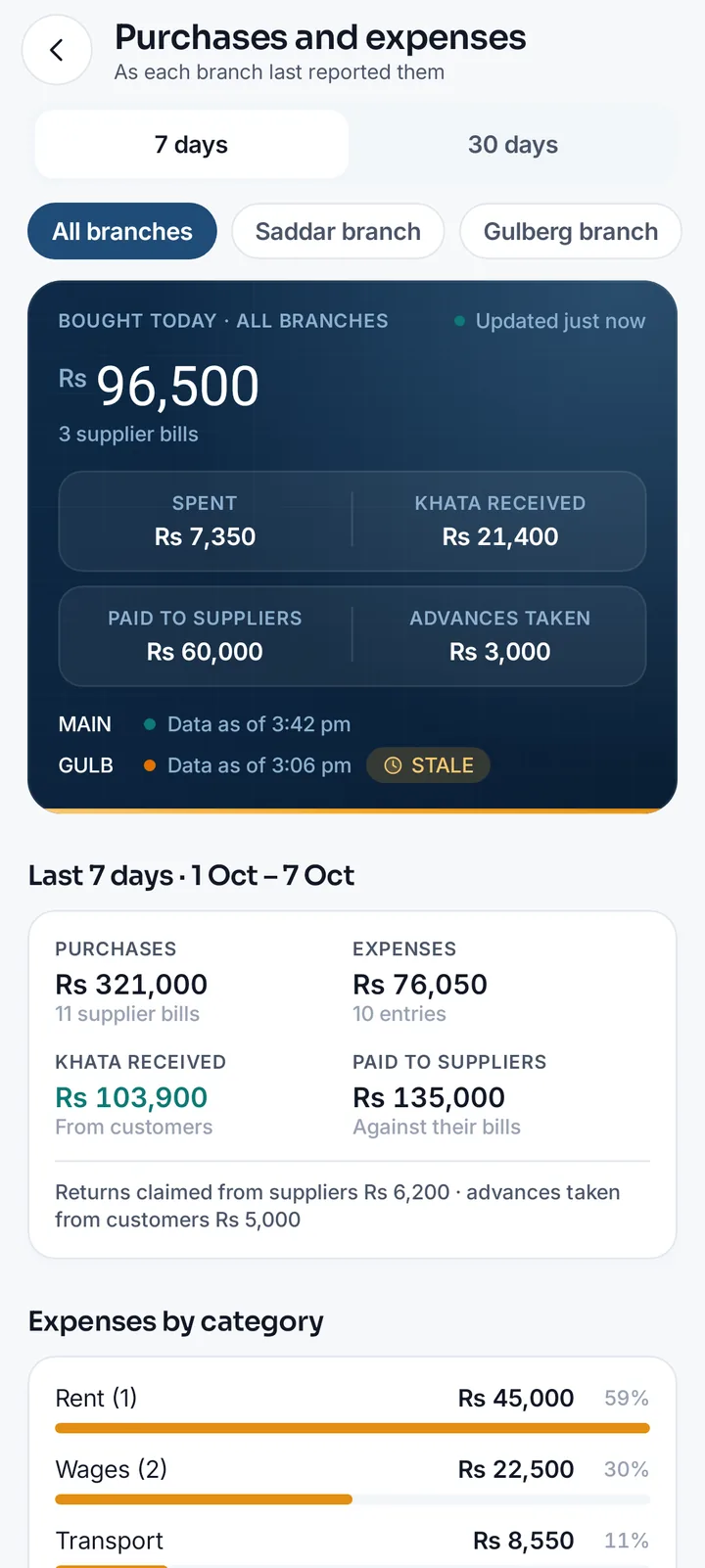
Bought, spent, khata received, suppliers paid and advances taken, today and over 7 or 30 days, with expenses by category.
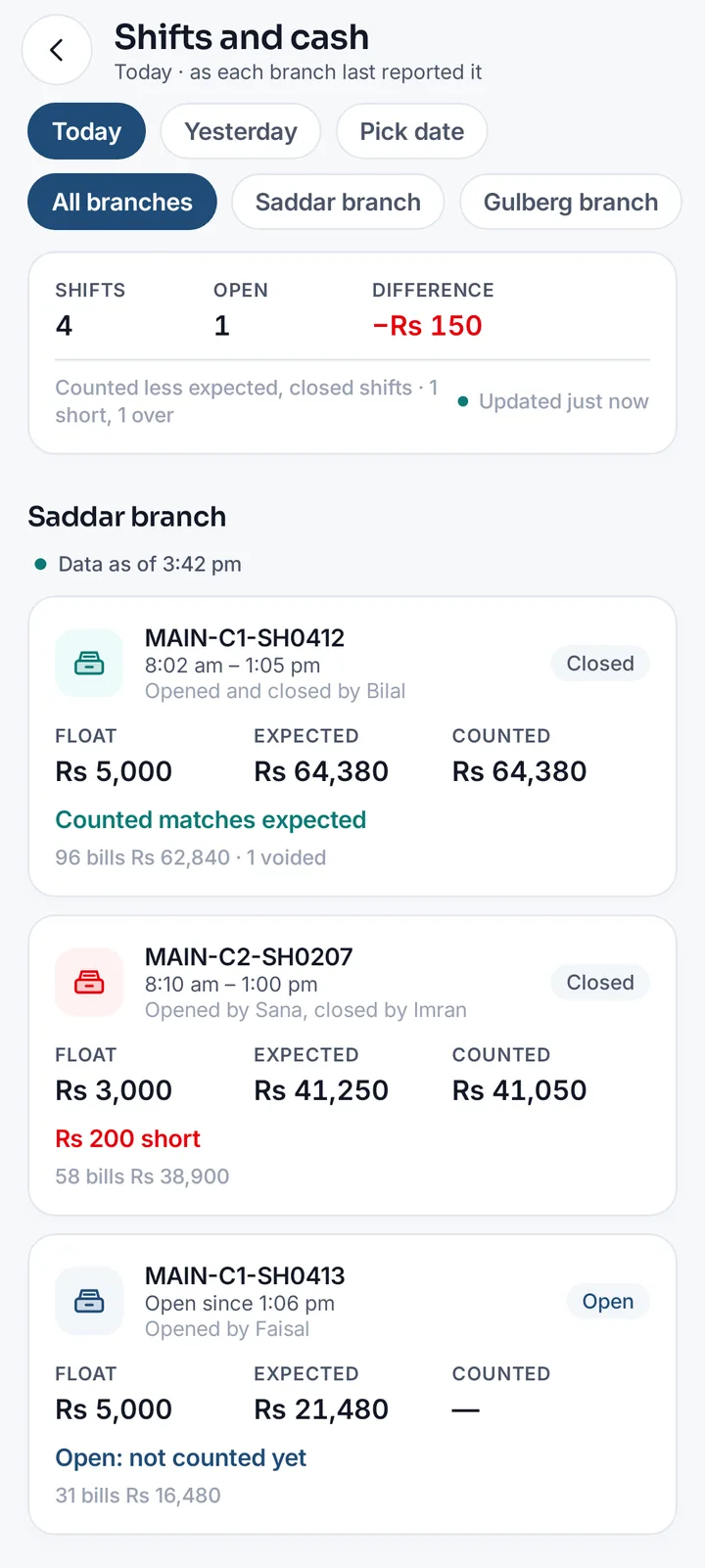
Shifts and cash
Each shift of the day: who opened and closed it, the float, the cash expected and counted, and any shortage in rupees.
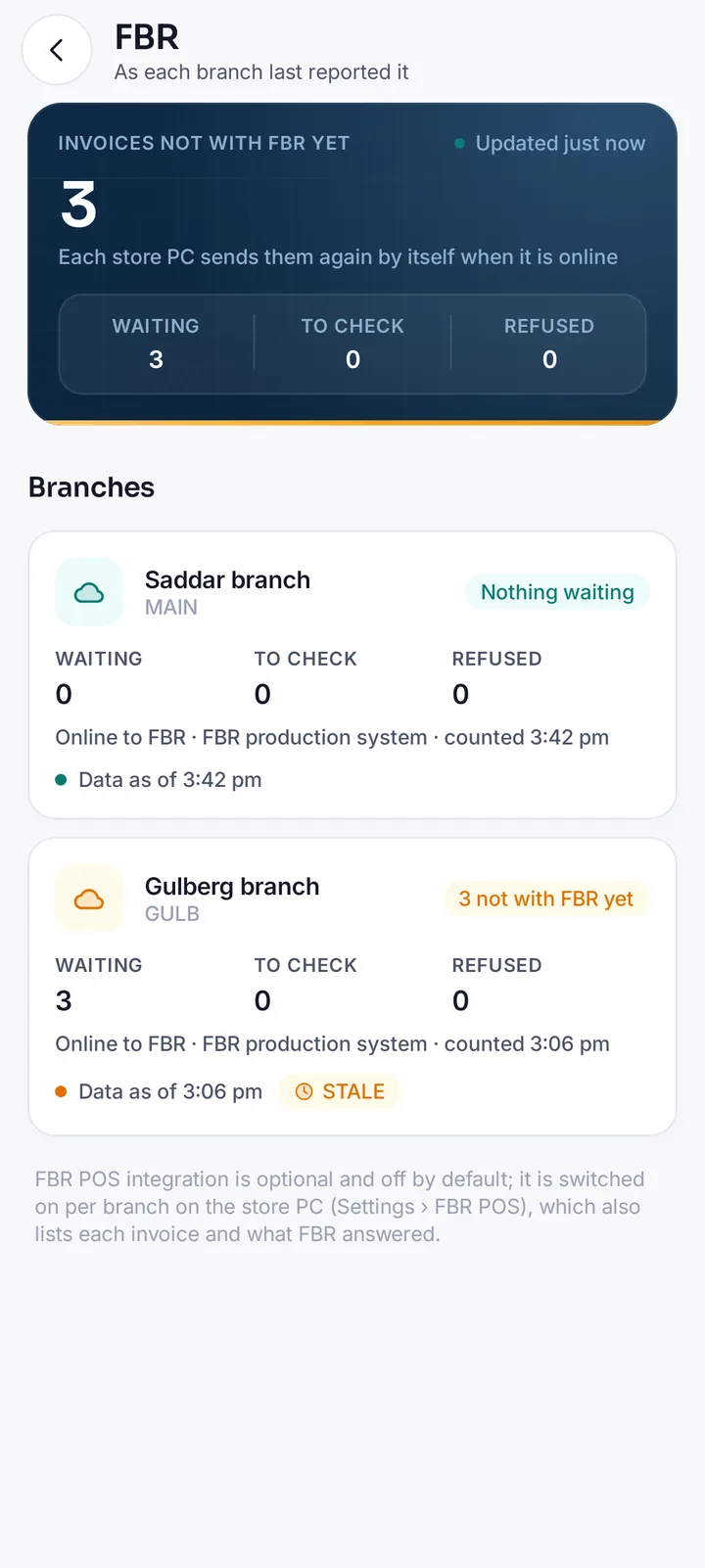
FBR
Each branch's invoices not with FBR yet (waiting, to check or refused) and whether FBR POS integration is on there.
Plan and licence
Your plan, edition and licence, paid until or lifetime, your Cloud plan and MartPOS Care, limits and the next payment, with Plan & billing a tap away.
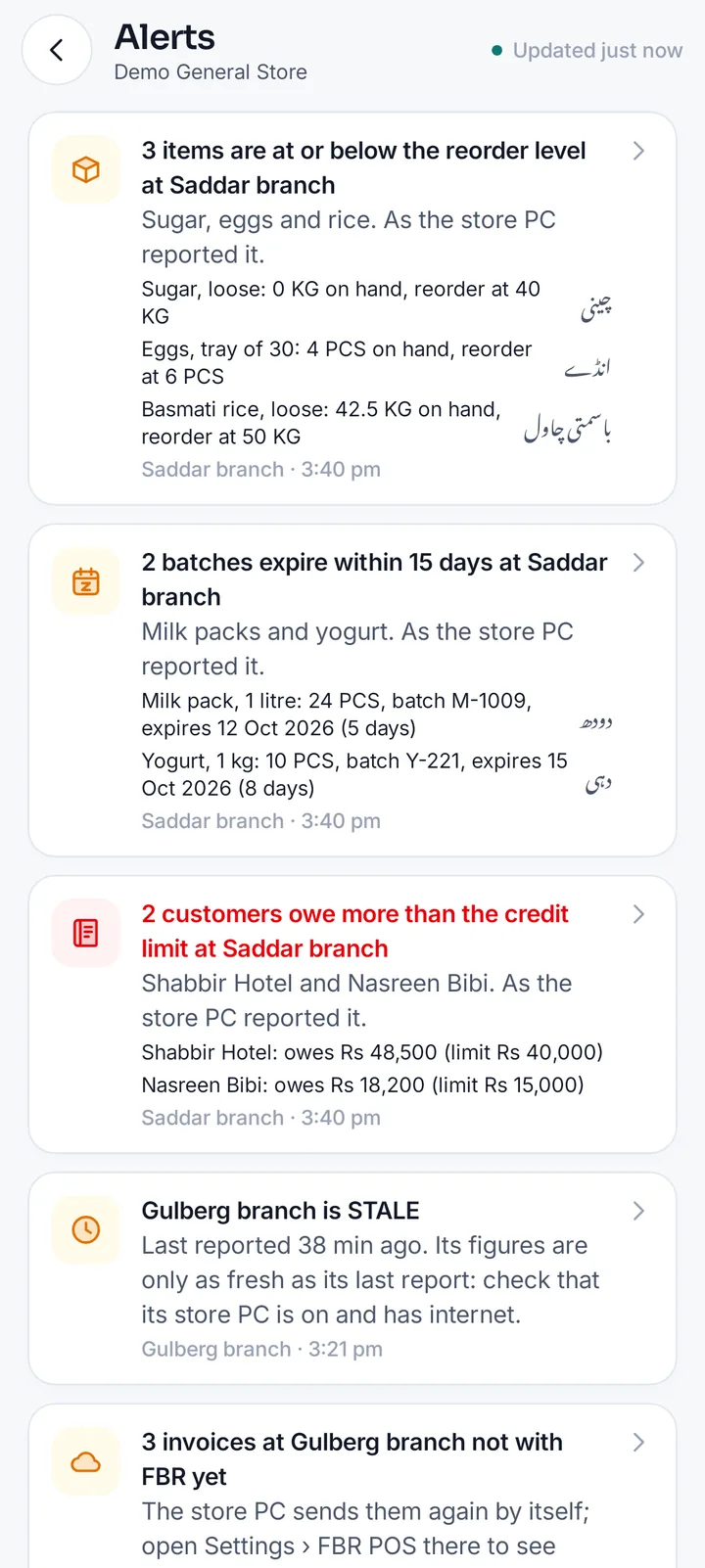
Alerts and notifications
What needs you now, each opening its screen, and notifications on your phone when something new comes up. Also transfers between branches, staff and store PCs.
The screens an owner opens every day
The app's own screens, drawn from its code with a sample shop's figures.
Quick to open, easy to share, safe to carry
Home-screen widget
Today's net sales and profit across your branches on the home screen, with the time of the oldest branch's report.
Figures kept on the phone
Every screen's last figures stay on the phone with the time they were saved, for a weak line or none.
A day report to share
The day's figures and each branch's as a clean picture, with the same words as text, for WhatsApp or any app.
Light or dark
A light and a dark theme, or as the phone is set, in MartPOS's own colours.
App lock
Fingerprint, face or the phone's PIN after five minutes away. Bills and khata are kept out of screenshots.
Urdu item names
Item names in Urdu beside the English, in the Noto Nastaliq Urdu face, on stock, bills, best sellers and alerts.
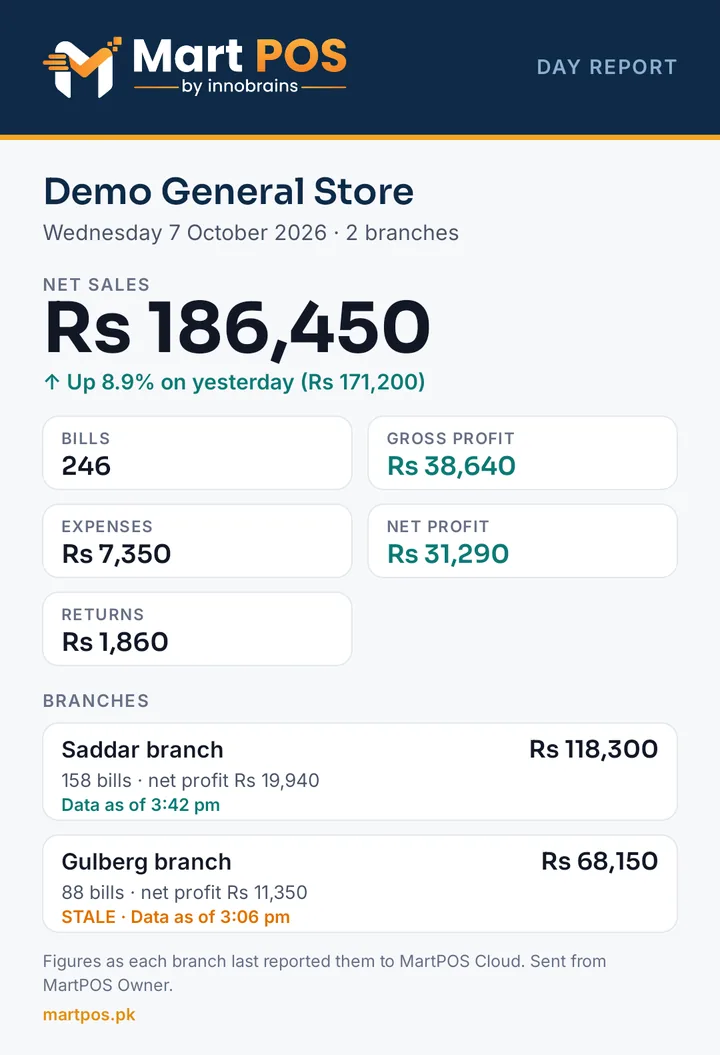
“Data as of”, on every figure
Each branch's store PC is the record. It sends what is new to MartPOS Cloud about every 15 seconds while it has internet, and keeps billing when it has none.
- Every branch shows its last report The time each branch last reported sits next to its figures, and the phone says when it saved them too.
- STALE after 15 minutes A branch that has not reported for 15 minutes is marked STALE, so a quiet internet line is never mistaken for a quiet day.
- The same as the store PC Profit comes from each store PC's own books, and sales from the bills and returns it sent; the cloud never recalculates a bill.
- Read-only Nothing in the app bills, voids or changes a price, stock or a balance. That stays on the store PC.
Included with MartPOS Cloud
The app has no price of its own: it comes with the plans whose store PCs send their records to MartPOS Cloud.
A Cloud plan
Every MartPOS Cloud plan (Cloud Shop, Cloud Business and Cloud Chain), including its free trial. Each branch's store PC syncs, and the app shows every branch.
Desktop with a Cloud plan
A Desktop licence with a Cloud plan on top works the same way, for as long as the Cloud plan runs.
Your team
Managers, accountants and auditors you invite in the portal sign in with their own accounts and see what their role and branches allow.
Desktop on its own
The shop's records stay on its PC, so the app shows your plan, your store PCs and notices; add a Cloud plan and the figures follow.
What each plan includes: Pricing · Step by step: the Owner app help guide
MartPOS Owner for Android
Android 7.0 and later
- Version
- 1.0.0
- Size
- 4.3 MB
- Published
- 7 Oct 2026
MartPOS-Owner-1.0.0.apk · SHA-256: 912659388536d84eec08986368a45072dbcbf2c7280a98d29a92d25dc077ca5f
Install in four steps
- 1
Download on your phone
Open this page on your Android phone and tap Download for Android. The file is MartPOS-Owner-1.0.0.apk.
- 2
Open the file
Tap the download when it finishes, from the browser or the notification.
- 3
Allow installs from your browser
If Android says your browser may not install apps, tap Settings and turn on Allow from this source (on Android 7, Unknown sources under Settings › Security), then go back and tap Install. You do this once.
- 4
Sign in
Open MartPOS Owner and sign in with your owner portal email and password, and your 6-digit code if two-step sign-in is on. Turn on the app lock and notifications under More › Settings.
A newer version installs over the old one in the same way, and you stay signed in.
Frequently asked questions
Yes: MartPOS Owner, for Android 7.0 and later. It shows today's sales in every branch against yesterday, profit from each store PC's books, the branches side by side, the last 30 days, the bills of any day, best sellers, stock per item, branch and place, khata, purchases and expenses, shifts and cash, FBR, your plan and what needs your attention, each figure with the time its branch last reported. Download it from this page.
Every MartPOS Cloud plan (Cloud Shop, Cloud Business and Cloud Chain), including its free trial, and every Desktop licence with a Cloud plan on top, at no extra cost. The app shows what your store PCs send to MartPOS Cloud. A Desktop licence without a Cloud plan keeps the shop's records on its own PC, so there the app shows your plan, your store PCs and notices from the MartPOS team; add a Cloud plan and the figures follow.
As fresh as each branch's last report, and the app always says when that was ("Data as of 3:42 pm"). A store PC sends what is new to MartPOS Cloud about every 15 seconds while it has internet, and keeps billing when it has none. A branch that has not reported for 15 minutes is marked STALE, so a quiet internet line is never mistaken for a quiet day.
No. The app is read-only: nothing in it bills, voids a bill, or changes a price, stock or a balance. Those stay on the store PC, where each person signs in with their own name and role.
Yes. Net sales, cost of goods sold, gross profit, expenses and net profit come from each store PC's own books for each business day, so they equal its profit and loss. A day from an older store PC that did not send its books is worked out from its sales and expenses and marked as estimated.
With the email and password of your owner portal at martpos.pk, and the 6-digit code from your authenticator app (or a recovery code) when two-step sign-in is on. Managers, accountants and auditors you invited sign in with their own accounts and see what their role and branches allow.
Yes, once you switch notifications on in the app (More › Settings). About every 30 minutes the phone checks MartPOS Cloud and tells you, once each, about low stock, batches near their date, customers past their credit limit, a branch gone quiet, invoices not with FBR yet, a shift closed short, a large void or refund, your plan and notices from the MartPOS team. Each kind can be switched off.
It keeps the last figures of every screen on the phone and shows them with the time they were saved, beside each branch's own time, so you can still look at the day on a weak line. New figures come when the phone is back online.
Sign it out in the owner portal: Security, then Phones signed in to the Owner app. Its access ends at once. A phone not used for 30 days is signed out by itself, and removing a member signs out all of their phones. With the app lock on, the app opens only with your fingerprint, face or the phone's PIN.
On your Android phone (Android 7.0 or later), download the APK from this page and open it. Android asks once to allow installs from your browser: allow it, go back and tap Install. A newer version installs over the old one, and you stay signed in.
Want every branch on your phone?
Start a 14-day free trial, no card required, and download the Windows installer. We help you set it up.